


In the realm of modern municipal governance, the efficiency of building permit processing is directly tied to the clarity of underlying data structures. A robust platform must seamlessly integrate applicant information, property details, zoning regulations, and inspection schedules into a cohesive system. When data is siloed or poorly modeled, bottlenecks occur, compliance checks fail, and public trust erodes. This is where Entity Relationship Diagrams (ERDs) become indispensable, serving as the architectural blueprint that ensures every stakeholder—from the zoning officer to the field inspector—operates on a unified data model.

Visualizing these complex relationships through code offers a level of precision and maintainability that traditional drag-and-drop tools often struggle to match. By using PlantUML within VPasCode, architects and government developers can define their data schema in a text-based format that is version-ready, easily shareable, and instantly renderable. This tutorial demonstrates how to construct a professional-grade ERD for a Municipal Building Permit Zoning Compliance and Inspection Scheduling Platform, guiding you through the logical flow from applicants to final inspection outcomes.
Understanding the Model: Purpose, Scope & Problem Framing
Diagram Abstraction & Representation
The Entity Relationship Diagram (ERD) is the foundational tool for defining the static structure of a database. In this specific context, the diagram abstracts the real-world entities involved in the building permit lifecycle into logical data tables. It maps the cardinality of relationships, such as how one applicant can submit multiple permit applications, or how a single property can have a history of multiple permits over time. The ERD clarifies the “who, what, and where” of the data, ensuring referential integrity between the zoning rules and the properties they govern.
Target Domain Scope & Scenario
This model focuses exclusively on the core operational data required for a municipal platform. It covers the full spectrum of the permit lifecycle: from the initial Applicant registration and Property identification, through the submission of a PermitApplication, to the critical ComplianceReview against ZoningDistrict rules, and finally the execution of Inspections by licensed Inspectors. The scope intentionally excludes financial payment processing or architectural drawing storage to keep the data model focused on workflow and compliance logic.
Key Takeaways & Educational Insights
By constructing this diagram, readers will gain a deep understanding of how to model one-to-many and one-to-one relationships in a government context. You will learn how to structure entities to support audit trails (like ComplianceReview and InspectionResult) and how to link regulatory rules (ZoningRule) to specific geographic assets (Property). The resulting diagram serves as a living document that can be used to generate database schemas, API contracts, or system documentation.
Complete Diagram & Full Source Code
Before diving into the step-by-step construction, here is the complete, rendered result of the Municipal Building Permit ERD. This visual representation shows the entities, their attributes, and the relationships connecting them, all styled with the aws-orange theme for a professional, modern aesthetic.
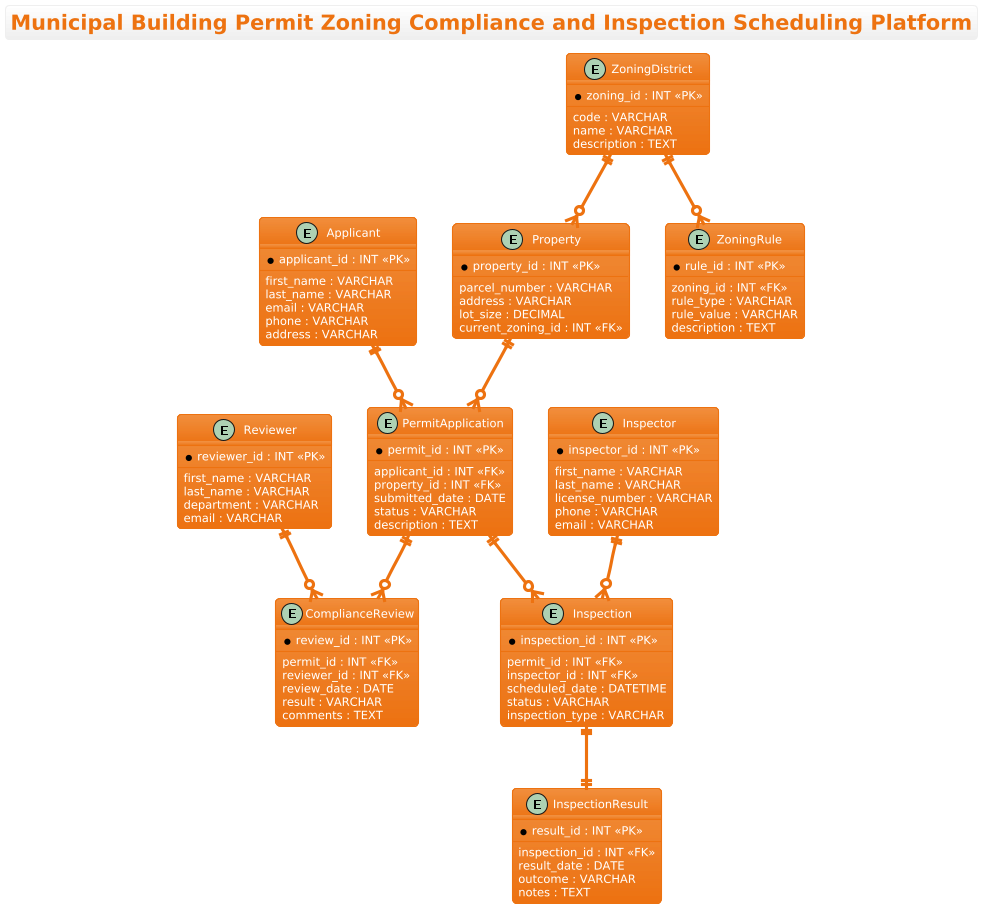
The following code block contains the complete PlantUML source code. You can copy this directly into the VPasCode editor to see the live rendering and make real-time adjustments.
@startuml
!theme aws-orange
title Municipal Building Permit Zoning Compliance and Inspection Scheduling Platform

/'
This ERD models the core data structures for a municipal platform that manages building permit applications,
verifies zoning compliance, and schedules inspections. It captures applicants, properties, permit applications,
zoning districts and rules, compliance reviews, inspectors, inspections, and outcomes. The diagram helps
stakeholders understand how permit data, zoning checks, and inspection workflows are connected.
'/

entity "Applicant" as applicant {
  * applicant_id : INT <<PK>>
  --
  first_name : VARCHAR
  last_name : VARCHAR
  email : VARCHAR
  phone : VARCHAR
  address : VARCHAR
}

entity "Property" as property {
  * property_id : INT <<PK>>
  --
  parcel_number : VARCHAR
  address : VARCHAR
  lot_size : DECIMAL
  current_zoning_id : INT <<FK>>
}

entity "ZoningDistrict" as zoning_district {
  * zoning_id : INT <<PK>>
  --
  code : VARCHAR
  name : VARCHAR
  description : TEXT
}

entity "ZoningRule" as zoning_rule {
  * rule_id : INT <<PK>>
  --
  zoning_id : INT <<FK>>
  rule_type : VARCHAR
  rule_value : VARCHAR
  description : TEXT
}

entity "PermitApplication" as permit_application {
  * permit_id : INT <<PK>>
  --
  applicant_id : INT <<FK>>
  property_id : INT <<FK>>
  submitted_date : DATE
  status : VARCHAR
  description : TEXT
}

entity "ComplianceReview" as compliance_review {
  * review_id : INT <<PK>>
  --
  permit_id : INT <<FK>>
  reviewer_id : INT <<FK>>
  review_date : DATE
  result : VARCHAR
  comments : TEXT
}

entity "Reviewer" as reviewer {
  * reviewer_id : INT <<PK>>
  --
  first_name : VARCHAR
  last_name : VARCHAR
  department : VARCHAR
  email : VARCHAR
}

entity "Inspection" as inspection {
  * inspection_id : INT <<PK>>
  --
  permit_id : INT <<FK>>
  inspector_id : INT <<FK>>
  scheduled_date : DATETIME
  status : VARCHAR
  inspection_type : VARCHAR
}

entity "Inspector" as inspector {
  * inspector_id : INT <<PK>>
  --
  first_name : VARCHAR
  last_name : VARCHAR
  license_number : VARCHAR
  phone : VARCHAR
  email : VARCHAR
}

entity "InspectionResult" as inspection_result {
  * result_id : INT <<PK>>
  --
  inspection_id : INT <<FK>>
  result_date : DATE
  outcome : VARCHAR
  notes : TEXT
}

applicant ||--o{ permit_application
property ||--o{ permit_application
zoning_district ||--o{ property
zoning_district ||--o{ zoning_rule
permit_application ||--o{ compliance_review
reviewer ||--o{ compliance_review
permit_application ||--o{ inspection
inspector ||--o{ inspection
inspection ||--|| inspection_result

@endumlStep-by-Step Architectural Walkthrough
Building a complex ERD requires a methodical approach. We will deconstruct the diagram into four logical phases: canvas setup, entity declaration, relationship mapping, and visual polish.
Phase 1: Canvas Configuration & Layout Directives
The first step in any PlantUML ERD is setting the stage. We begin by defining the diagram type and applying a theme that matches the desired visual identity. In this case, we are using the aws-orange theme to give the diagram a warm, professional look suitable for government dashboards.
Additionally, we include a comment block to document the diagram’s purpose. This is a best practice for maintaining documentation clarity.
@startuml
!theme aws-orange
title Municipal Building Permit Zoning Compliance and Inspection Scheduling Platform

/'
This ERD models the core data structures...
'/
The @startuml directive initializes the diagram engine, while !theme aws-orange applies the styling. The title command sets the header text displayed at the top of the diagram.
Phase 2: Declaring Core Entities, Actors, and Boundaries
Next, we define the core entities. In PlantUML, the entity keyword is used to create a box representing a database table. Each entity is given a display name and a unique alias (lowercase) for referencing relationships later.
Inside the entity block, we define attributes. The * symbol before an attribute name denotes a Primary Key (PK), while < denotes a Foreign Key. The -- separator visually divides keys from other attributes.
entity "Applicant" as applicant {
  * applicant_id : INT <>
  --
  first_name : VARCHAR
  last_name : VARCHAR
  email : VARCHAR
  phone : VARCHAR
  address : VARCHAR
}
We repeat this pattern for all core entities: Property, ZoningDistrict, PermitApplication, and Inspection. Note how Property includes a current_zoning_id marked as a Foreign Key, establishing a link to the ZoningDistrict entity.
Phase 3: Mapping Data Flows & Key Interactions
Once the entities are defined, the most critical part of an ERD is defining the relationships. PlantUML uses specific arrow syntax to denote cardinality (one-to-one, one-to-many, etc.).
For example, an Applicant can submit zero or many PermitApplications. This is represented by the ||--o{ syntax (double line for “one”, circle for “zero or many”, arrow for “many”).
applicant ||--o{ permit_application
property ||--o{ permit_application
zoning_district ||--o{ property
We continue mapping these relationships to reflect the business logic: a PermitApplication triggers a ComplianceReview by a Reviewer, and leads to an Inspection performed by an Inspector. The final relationship between Inspection and InspectionResult uses ||--|| to indicate a strict one-to-one relationship, as one inspection record corresponds to exactly one result record.
Phase 4: Grouping, Annotations & Visual Polish
In this final phase, we ensure the diagram is readable and self-documenting. The comment block added in Phase 1 serves as the primary annotation. In PlantUML ERDs, grouping is often handled implicitly by the proximity of entities, but the use of aliases (e.g., as applicant) allows for cleaner relationship lines that don’t clutter the visual space with full entity names.
The aws-orange theme automatically handles color palettes, font sizes, and border styles, ensuring the diagram looks polished without requiring manual skinparam adjustments for every element.
Syntax & Keyword Deep Dive
To master PlantUML ERDs, it is essential to understand the specific syntax elements used in this diagram. Here is a breakdown of the key keywords and conventions:
entity: Defines a new entity (table) in the diagram. Syntax:entity "Display Name" as alias { ... }.*: Indicates the Primary Key attribute within an entity block. It is rendered with a key icon in the diagram.<: A stereotype used to mark a Foreign Key attribute. It visually distinguishes keys that reference other tables.> --: A separator line used inside an entity block to visually separate key attributes from standard attributes.||--o{: Relationship syntax representing a One-to-Many relationship. The double line||means “one”, the circleomeans “zero or many”, and the arrow{points to the “many” side.||--||: Relationship syntax representing a strict One-to-One relationship./' ... '/: The syntax for multi-line comments in PlantUML. This is crucial for adding context to the diagram without affecting the rendering.!theme: A directive to apply a pre-defined color theme (e.g.,aws-orange,default,dark) to the entire diagram.
Best Practices & Pitfalls to Avoid
When building ERDs for complex systems like municipal platforms, adhering to best practices ensures the diagram remains a useful asset rather than a source of confusion.
- Consistent Naming Conventions: Always use a unique alias (e.g.,
as applicant) for each entity. This prevents ambiguity when drawing relationships and keeps the relationship lines short and readable. - Separate Keys from Attributes: Use the
--separator to visually group primary keys at the top of the entity box. This makes it immediately obvious which fields are unique identifiers. - Document Relationships: While the diagram shows the structure, the comment block (or external documentation) should explain why a relationship exists. For example, explaining that
current_zoning_idis a foreign key helps developers understand the data integrity rules. - Manage Complexity: If the diagram becomes too crowded, consider splitting it into multiple diagrams (e.g., one for “Permit Management” and one for “Inspection Scheduling”) and linking them. However, for a system of this size, a single cohesive ERD is often the best approach.
Try It Yourself with VPasCode
Ready to visualize your own data models? VPasCode provides a free, browser-based environment where you can write PlantUML code and see your Municipal Building Permit ERD render instantly. No installation, no configuration—just type, preview, and refine.
Start Building Professional ERDs Faster with VPasCode
Instantly render complex data models, test relationship syntax, and export clean diagrams online with our free PlantUML editor.