


以下是使用 VPasCode 中的 D2 创建的常见软件图表的即用示例。您可以将这些代码片段直接复制到 VPasCode 实时编辑器中,立即生成清晰的可视化图表。
注意: 您可以使用以下方式设置布局方向:
direction: right 或 direction: down 在您的 D2 代码块顶部。1. 系统架构图
一个包含嵌套服务器和存储组件的多层云Web架构。
direction: right

User: {
  shape: person
}

Web Application: {
  CDN: {
    shape: cloud
  }

  Load Balancer

  App Servers: {
    Server 1
    Server 2
  }

  Data Tier: {
    PostgreSQL Database: {
      shape: cylinder
    }
    Redis Cache: {
      shape: cylinder
    }
  }
}

User -> Web Application.CDN: 请求页面
Web Application.CDN -> Web Application.Load Balancer: 路由流量
Web Application.Load Balancer -> Web Application.App Servers.Server 1
Web Application.Load Balancer -> Web Application.App Servers.Server 2

Web Application.App Servers.Server 1 -> Web Application.Data Tier.Redis Cache: 检查缓存
Web Application.App Servers.Server 1 -> Web Application.Data Tier.PostgreSQL Database: 查询数据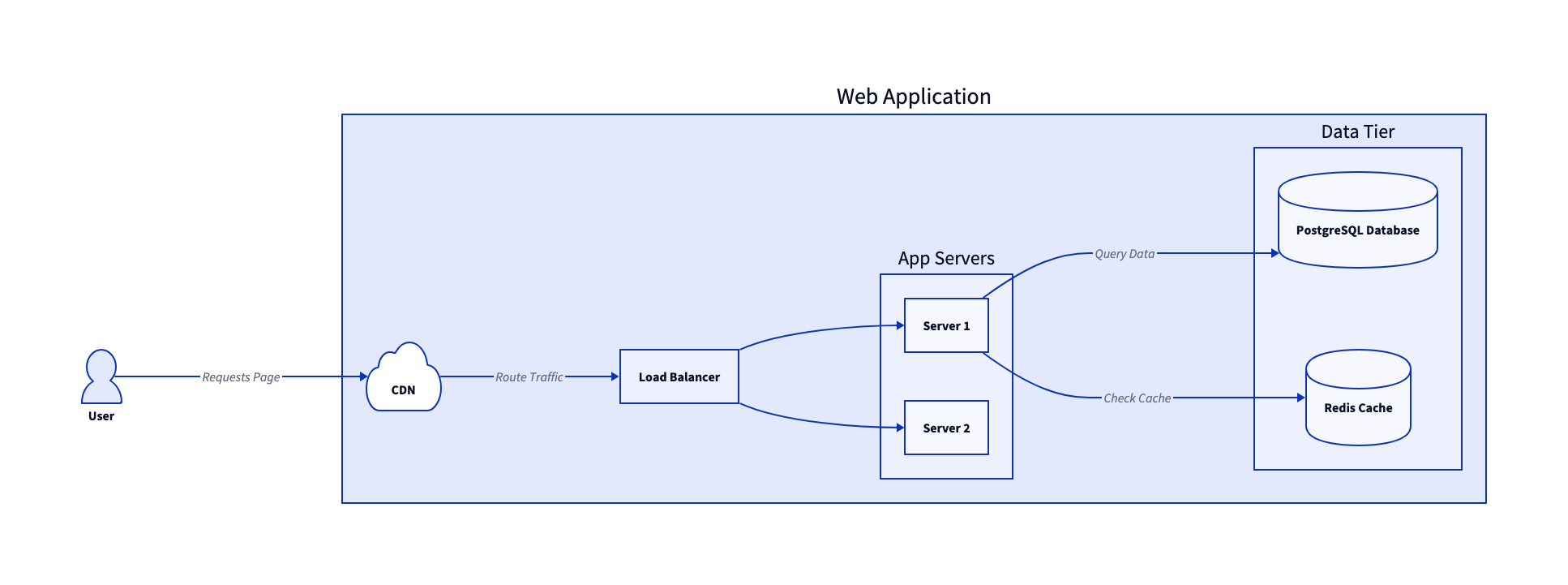
2. 数据库模式(SQL 表图)
D2 内置支持使用 sql_table 形状,以清晰地渲染 SQL 表和实体关系。
users: {
  shape: sql_table
  id: int {constraint: primary_key}
  username: varchar
  email: varchar
  created_at: timestamp
}

orders: {
  shape: sql_table
  id: int {constraint: primary_key}
  user_id: int {constraint: foreign_key}
  total_amount: decimal
  status: varchar
}

order_items: {
  shape: sql_table
  id: int {constraint: primary_key}
  order_id: int {constraint: foreign_key}
  product_name: varchar
  quantity: int
}

users.id -> orders.user_id: 1对多
orders.id -> order_items.order_id: 1对多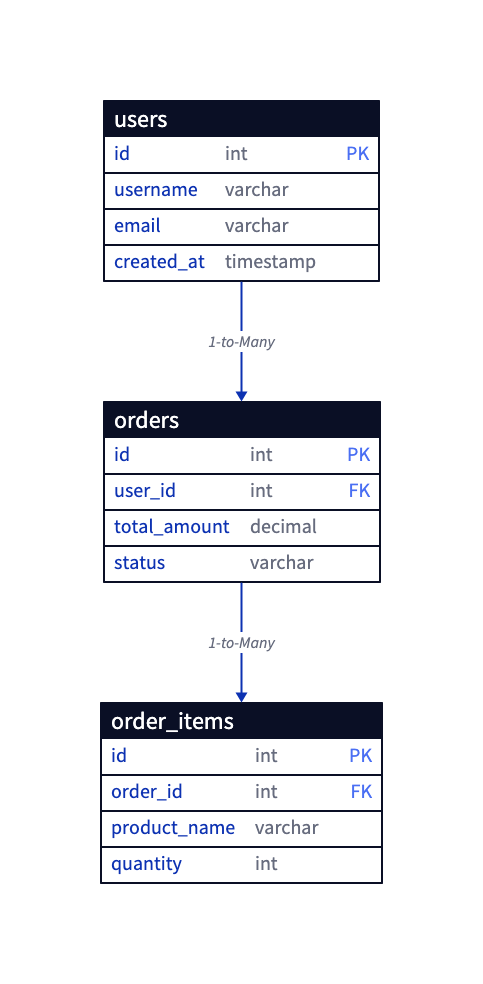
3. 自动化部署流水线(CI/CD)
绘制从代码提交到生产环境发布的软件部署步骤。
direction: right

Developer -> GitHub: 1. 推送代码

GitHub Pipelines: {
  构建步骤 -> 测试步骤 -> Docker 镜像
}

GitHub -> GitHub Pipelines: 2. 触发操作
GitHub Pipelines.Docker Image -> Docker 注册表: 3. 存储构建

Docker 注册表 -> 生产服务器: 4. 部署容器