


在绘制相互连接的网络、结构层次或复杂实体关系时,图表示(或网络图)是理想的视觉框架。通过将项目显示为节点,连接显示为有向或无向链接,图表示使用户能够探索集群、依赖树和关系流而标准的表格图表无法传达——例如微服务架构、社交网络互动或知识图谱。
图表示的原理
在 Apache ECharts 中,图表示使用type: 'graph'。与直接将数值映射到横纵坐标不同,图表示采用显式的节点(或data)和links(或边。ECharts 随后使用固定坐标定位、环形布局或动态力导向物理引擎来排列这些节点。
1. 基础设置
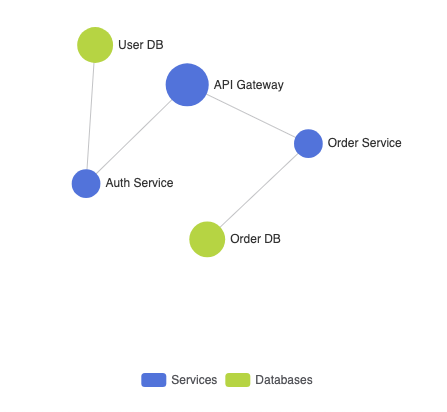
要使用力导向物理方法构建基本网络图,请在data中声明您的节点,在links中映射连接,并设置layout: 'force':
ECharts
在 VPasCode 中编辑 ECharts
ECharts
Edit ECharts in VPasCode
option = {
    tooltip: {},
    legend: {
        data: ['服务', '数据库']
    },
    series: [
        {
            name: '系统网络',
            type: 'graph',
            layout: 'force',
            roam: true, // 允许缩放和拖动
            label: {
                show: true,
                position: 'right'
            },
            force: {
                repulsion: 100,
                edgeLength: 80
            },
            data: [
                { id: '0', name: 'API 网关', symbolSize: 30, category: 0 },
                { id: '1', name: '认证服务', symbolSize: 20, category: 0 },
                { id: '2', name: '订单服务', symbolSize: 20, category: 0 },
                { id: '3', name: '用户数据库', symbolSize: 25, category: 1 },
                { id: '4', name: '订单数据库', symbolSize: 25, category: 1 }
            ],
            links: [
                { source: '0', target: '1' },
                { source: '0', target: '2' },
                { source: '1', target: '3' },
                { source: '2', target: '4' }
            ],
            categories: [
                { name: '服务' },
                { name: '数据库' }
            ]
        }
    ]
};
高级结构技术
图图表支持其他布局引擎,例如环形排列或有向箭头,以清晰展示数据依赖关系。
1. 带有有向链接箭头的环形布局
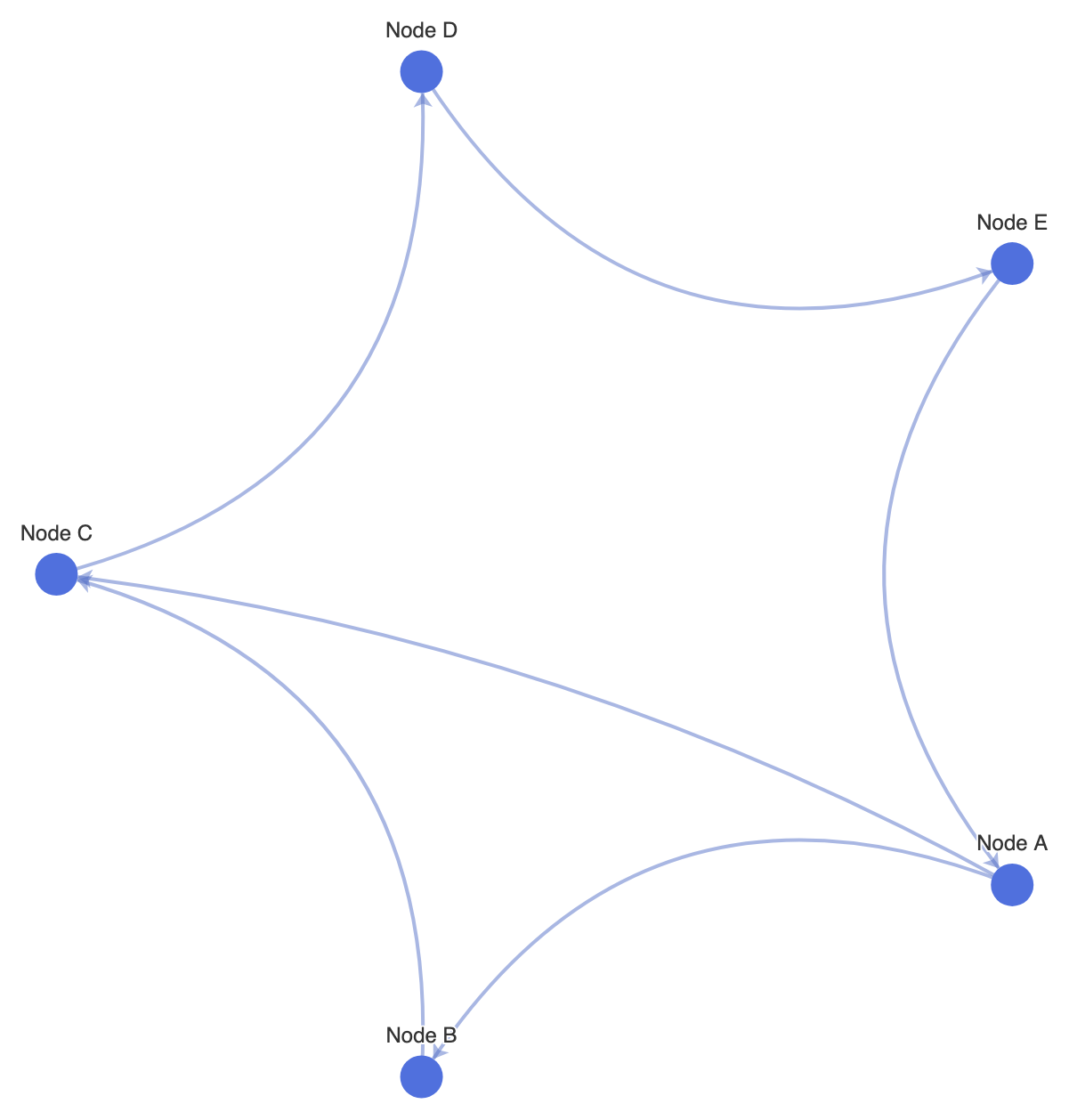
设置 layout: 'circular'以将节点组织成整洁的环形结构,并启用边箭头以显示组件之间的方向关系:
ECharts
在 VPasCode 中编辑 ECharts
ECharts
Edit ECharts in VPasCode
option = {
    tooltip: {},
    series: [
        {
            type: 'graph',
            layout: 'circular',
            roam: true,
            label: {
                show: true,
                position: 'outside'
            },
            edgeSymbol: ['none', 'arrow'], // 在链接端点绘制箭头
            edgeSymbolSize: [0, 8],
            data: [
                { id: 'A', name: '节点 A', symbolSize: 24 },
                { id: 'B', name: '节点 B', symbolSize: 24 },
                { id: 'C', name: '节点 C', symbolSize: 24 },
                { id: 'D', name: '节点 D', symbolSize: 24 },
                { id: 'E', name: '节点 E', symbolSize: 24 }
            ],
            links: [
                { source: 'A', target: 'B' },
                { source: 'B', target: 'C' },
                { source: 'C', target: 'D' },
                { source: 'D', target: 'E' },
                { source: 'E', target: 'A' },
                { source: 'A', target: 'C' }
            ],
            lineStyle: {
                color: '#5470c6',
                width: 2,
                curveness: 0.2 // 曲线连接线以避免重叠
            }
        }
    ]
};
精细调整布局与节点样式
调整边的弯曲度、节点边框阴影和交互选项,可确保在交互式网页上密集的网络簇依然清晰可读。
1. 自定义节点类别颜色与力导向物理
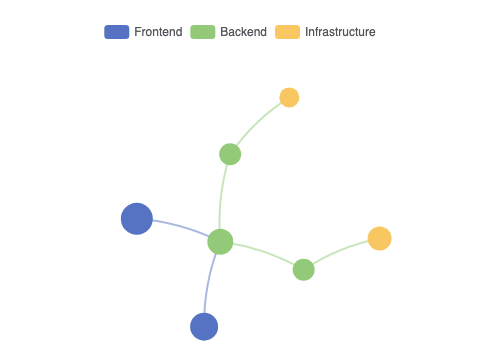
调整排斥力值和线条样式,以创建结构清晰、视觉上分离的簇:
ECharts
在 VPasCode 中编辑 ECharts
ECharts
Edit ECharts in VPasCode
option = {
    legend: {
        top: '5%',
        left: 'center'
    },
    series: [
        {
            type: 'graph',
            layout: 'force',
            roam: true,
            draggable: true,
            force: {
                repulsion: 250,
                gravity: 0.1,
                edgeLength: [50, 100]
            },
            categories: [
                { name: '前端', itemStyle: { color: '#5470c6' } },
                { name: '后端', itemStyle: { color: '#91cc75' } },
                { name: '基础设施', itemStyle: { color: '#fac858' } }
            ],
            data: [
                { name: 'Web 应用', category: 0, symbolSize: 32 },
                { name: '移动应用', category: 0, symbolSize: 28 },
                { name: 'API 网关', category: 1, symbolSize: 26 },
                { name: '微服务 A', category: 1, symbolSize: 22 },
                { name: '微服务 B', category: 1, symbolSize: 22 },
                { name: 'Redis 缓存', category: 2, symbolSize: 20 },
                { name: 'PostgreSQL', category: 2, symbolSize: 24 }
            ],
            links: [
                { source: 'Web 应用', target: 'API 网关' },
                { source: '移动应用', target: 'API 网关' },
                { source: 'API 网关', target: '微服务 A' },
                { source: 'API 网关', target: '微服务 B' },
                { source: '微服务 A', target: 'Redis 缓存' },
                { source: '微服务 B', target: 'PostgreSQL' }
            ],
            lineStyle: {
                color: 'source', // 根据源节点颜色设置边的颜色
                width: 2,
                curveness: 0.1
            }
        }
    ]
};
战略最佳实践
- 启用
roam: true以实现导航:交互式网络会迅速扩展。启用缩放和拖拽导航,可让用户专注于特定簇,而不会感到拥挤。 - 应用
curveness到边:设置轻微的弯曲度(例如,lineStyle.curveness: 0.1到0.2) 防止两个相同节点之间的双向链接重叠成一条线。 - 平衡力物理排斥: 调整
force.repulsion仔细调整。值过低会导致节点重叠成密集的簇,而值过高则会将节点完全推离可见画布。