


In the rapidly evolving landscape of Health Information Technology (HIT), precision is not just a preference—it is a regulatory and safety imperative. Electronic Health Record (EHR) systems form the backbone of modern patient care, managing sensitive data ranging from demographic details to complex clinical encounters. However, the complexity of these systems often leads to fragmented documentation and ambiguous data structures that can hinder interoperability.

Visual modeling serves as the bridge between abstract business requirements and concrete software architecture. By using a class diagram to map out the domain entities—such as Patients, Providers, and Clinical Observations—architects can ensure data integrity before a single line of production code is written. This tutorial demonstrates how to leverage PlantUML within VPasCode, a free, browser-based diagram-as-code tool, to create a living, versioned documentation artifact that evolves alongside your healthcare software.
Understanding the Model: Purpose, Scope & Problem Framing
Diagram Abstraction & Representation
A class diagram is the primary tool for modeling the static structure of a system. In the context of an EHR, this diagram defines the “nouns” of the domain: what data exists, how it is grouped, and how it relates to other data. Unlike sequence diagrams that focus on runtime interactions, this class diagram focuses on the schema—the blueprint of the database and object-oriented structure.
Key abstractions include:
- Entities: Tangible objects like
PatientorProviderthat store core identity data. - Aggregates: Complex objects like
Encounterthat group related clinical data together. - Inheritance: Hierarchies that allow shared attributes, such as the
ClinicalItembase class for all medical observations.
Target Domain Scope & Scenario
This model focuses on the core clinical domain of an EHR system. It intentionally excludes billing, scheduling, or external interface layers to maintain clarity on the patient data model. The scope covers the longitudinal record, ensuring that a patient’s history (allergies, problems, medications) is consistently linked to specific clinical encounters.
Key Takeaways & Educational Insights
By constructing this model, you will gain insights into:
- How to normalize clinical data using inheritance (Generalization).
- How to distinguish between ownership (Composition) and grouping (Aggregation).
- How to document cardinality (e.g., one patient has many encounters) for database design.
Complete Diagram & Full Source Code
Below is the finished blueprint of the Electronic Health Record System. This diagram encapsulates the relationships between patients, providers, and the clinical data they generate.
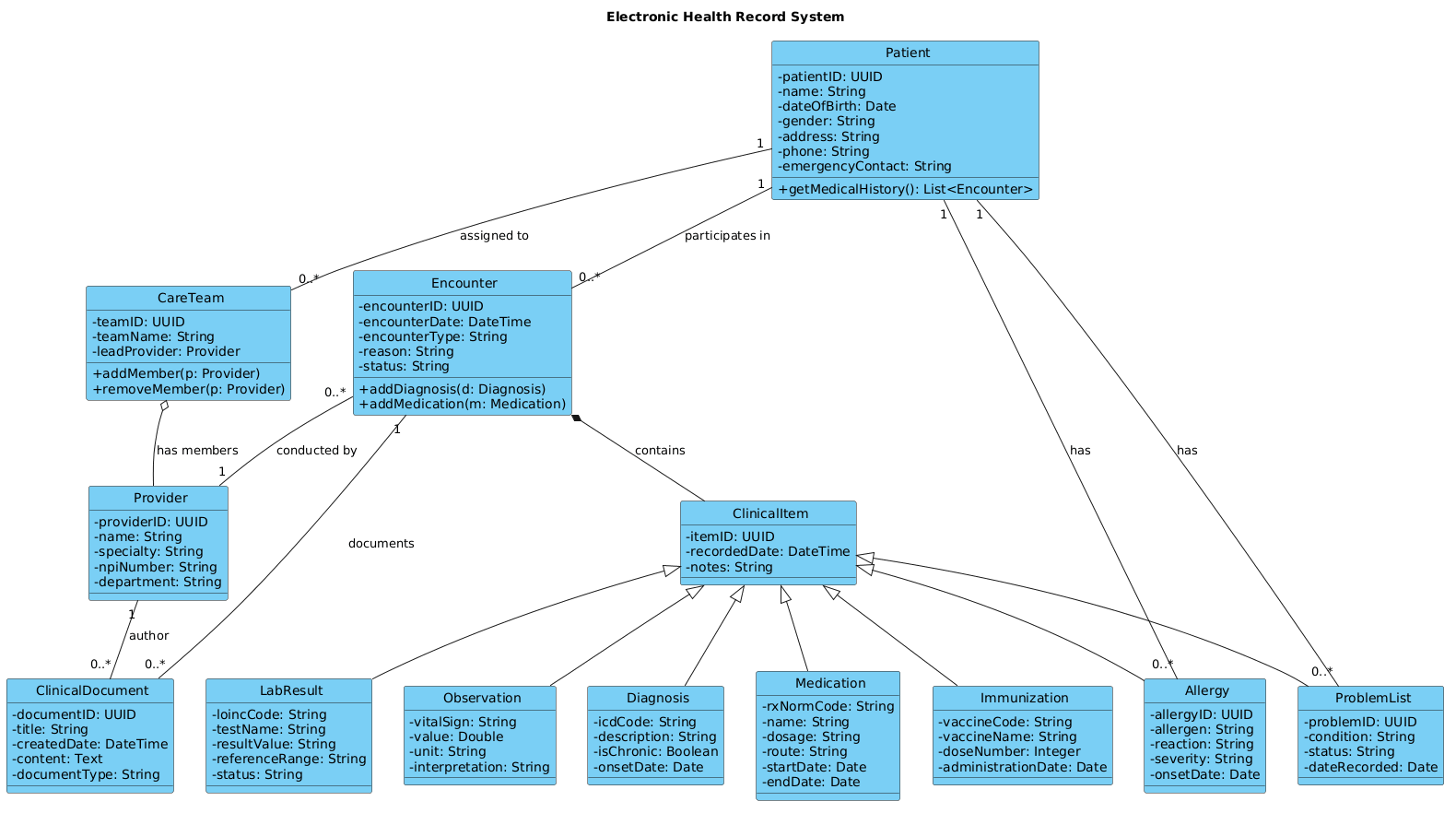
The following code block represents the complete source code for this diagram. You can copy this directly into the VPasCode editor to render it instantly.
@startuml
!include https://static.visual-paradigm.com/web/resources/plantuml-stdlib/themes/vp.puml

title Electronic Health Record System

/'
This class diagram models the core domain of an Electronic Health Record (EHR) system.
The system manages patient demographics, clinical encounters, medical observations,
diagnoses, medications, immunizations, and laboratory results. It also tracks
healthcare providers, care teams, and clinical workflows. The model supports
longitudinal patient records, clinical decision support, and interoperability
with external systems.
'/

class Patient {
  - patientID: UUID
  - name: String
  - dateOfBirth: Date
  - gender: String
  - address: String
  - phone: String
  - emergencyContact: String
  + getMedicalHistory(): List<Encounter>
}

class Encounter {
  - encounterID: UUID
  - encounterDate: DateTime
  - encounterType: String
  - reason: String
  - status: String
  + addDiagnosis(d: Diagnosis)
  + addMedication(m: Medication)
}

class ClinicalItem {
  - itemID: UUID
  - recordedDate: DateTime
  - notes: String
}

class Observation {
  - vitalSign: String
  - value: Double
  - unit: String
  - interpretation: String
}

class Diagnosis {
  - icdCode: String
  - description: String
  - isChronic: Boolean
  - onsetDate: Date
}

class Medication {
  - rxNormCode: String
  - name: String
  - dosage: String
  - route: String
  - startDate: Date
  - endDate: Date
}

class Immunization {
  - vaccineCode: String
  - vaccineName: String
  - doseNumber: Integer
  - administrationDate: Date
}

class LabResult {
  - loincCode: String
  - testName: String
  - resultValue: String
  - referenceRange: String
  - status: String
}

class Provider {
  - providerID: UUID
  - name: String
  - specialty: String
  - npiNumber: String
  - department: String
}

class CareTeam {
  - teamID: UUID
  - teamName: String
  - leadProvider: Provider
  + addMember(p: Provider)
  + removeMember(p: Provider)
}

class ClinicalDocument {
  - documentID: UUID
  - title: String
  - createdDate: DateTime
  - content: Text
  - documentType: String
}

class Allergy {
  - allergyID: UUID
  - allergen: String
  - reaction: String
  - severity: String
  - onsetDate: Date
}

class ProblemList {
  - problemID: UUID
  - condition: String
  - status: String
  - dateRecorded: Date
}

' Generalization (inheritance)
ClinicalItem <|-- Observation
ClinicalItem <|-- Diagnosis
ClinicalItem <|-- Medication
ClinicalItem <|-- Immunization
ClinicalItem <|-- LabResult
ClinicalItem <|-- Allergy
ClinicalItem <|-- ProblemList

' Composition (encounter owns clinical items)
Encounter *-- ClinicalItem : contains

' Aggregation (care team groups providers)
CareTeam o-- Provider : has members

' Association (patient has encounters)
Patient "1" -- "0..*" Encounter : participates in

' Association (provider responsible for encounter)
Encounter "0..*" -- "1" Provider : conducted by

' Association (patient has allergies)
Patient "1" -- "0..*" Allergy : has

' Association (patient has problem list)
Patient "1" -- "0..*" ProblemList : has

' Association (clinical document belongs to encounter)
Encounter "1" -- "0..*" ClinicalDocument : documents

' Association (care team assigned to patient)
Patient "1" -- "0..*" CareTeam : assigned to

' Association (provider documents)
Provider "1" -- "0..*" ClinicalDocument : author
@endumlStep-by-Step Architectural Walkthrough
Building a robust class diagram requires a phased approach. We will construct this EHR model in four logical stages, ensuring each relationship is semantically correct before moving to the next.
Phase 1: Canvas Configuration & Layout Directives
Before defining classes, we set the stage. We include the Visual Paradigm theme to ensure the diagram looks professional and consistent with enterprise standards. We also define the title and a comment block to provide context for future readers.
Start with the include directive and metadata:
!include https://static.visual-paradigm.com/web/resources/plantuml-stdlib/themes/vp.puml

title Electronic Health Record System

'/
This class diagram models the core domain of an Electronic Health Record (EHR) system...
'/
Phase 2: Declaring Core Entities, Actors, and Boundaries
The foundation of any EHR is the Patient and the Provider. These are the primary actors in the system. Define their attributes (private fields) and methods (public operations). In PlantUML, use - for private attributes and + for public methods.
class Patient {
  - patientID: UUID
  - name: String
  + getMedicalHistory(): List
}

class Provider {
  - providerID: UUID
  - name: String
  - specialty: String
}
Phase 3: Mapping Data Flows & Key Interactions
The Encounter class acts as the central hub for clinical data. It links the patient and provider to specific medical events. We define relationships to capture the “who, when, and what” of the visit.
Define the associations:
Patient "1" -- "0..*" Encounter : participates in
Encounter "0..*" -- "1" Provider : conducted by
Phase 4: Grouping, Annotations & Visual Polish
To reduce redundancy, we introduce the ClinicalItem abstract class. This allows us to use Generalization (inheritance) for all medical records like Diagnosis, Medication, and LabResult. We also define Composition to show that an Encounter owns its clinical items (they cannot exist without the encounter).
ClinicalItem <|-- Diagnosis
Encounter *-- ClinicalItem : contains
Syntax & Keyword Deep Dive
Understanding the specific PlantUML syntax is crucial for mastering class diagrams. Here are the key keywords used in this EHR model:
class: Defines a new class structure with its name and members.<|--: Represents Generalization (inheritance). The arrow points to the parent class (e.g.,ClinicalItem).*--: Represents Composition. The filled diamond indicates strong ownership (e.g.,EncounterownsClinicalItem).o--: Represents Aggregation. The hollow diamond indicates a "has-a" relationship where the child can exist independently (e.g.,CareTeamhasProvider).--: Represents a standard Association. A line connecting two classes without specific ownership semantics."0..*": Specifies Cardinality. This notation indicates that one side can have zero or more instances on the other side./' ... '/: Defines a comment block that renders as a note in the diagram, useful for documentation.
Best Practices & Pitfalls to Avoid
When modeling complex healthcare systems, clarity is paramount. Follow these best practices to maintain a clean and scalable diagram:
- Use Abstract Base Classes: As seen with
ClinicalItem, grouping similar entities reduces visual clutter and enforces domain logic. - Be Precise with Cardinality: Avoid vague relationships. Explicitly state "1" vs "0..*" to prevent database design errors.
- Separate Concerns: Keep administrative data (billing) separate from clinical data (encounters) in your mental model, even if they are in the same diagram.
- Keep it Readable: Use meaningful attribute names (e.g.,
icdCodeinstead ofcode1) to ensure the diagram serves as documentation.
Start Building PlantUML Class Diagrams Faster with VPasCode
Test, preview, and customize this EHR class diagram online in VPasCode without installing any tools or configuring local environments.