


In modern healthcare facilities, dietary management is a critical operational pillar that directly impacts patient recovery, safety, and satisfaction. Unlike general food service, hospital nutrition requires strict adherence to medical prescriptions, allergy management, and nutritional compliance. A breakdown in this system can lead to adverse health events, making clear architectural documentation essential for developers and stakeholders alike. Visual modeling allows teams to define the boundaries of responsibility, data ownership, and interaction flows before a single line of production code is written.
PlantUML offers a powerful diagram-as-code approach for documenting these complex systems. By treating your architecture as code, you ensure that your diagrams remain synchronized with your evolving software requirements. In this masterclass, we will construct a comprehensive Hospital Dietary Management System class diagram. This model captures the lifecycle of a patient’s nutritional journey, from initial prescription by a dietitian to meal preparation in the kitchen and final feedback collection. Using VPasCode, you can prototype this architecture instantly in the browser without any local environment setup.

Understanding the Model: Purpose, Scope & Problem Framing
Diagram Abstraction & Representation
This class diagram serves as the structural backbone for the Hospital Dietary Management System. In the context of UML (Unified Modeling Language), a class diagram provides a static view of the system by defining its constituent classes, their attributes, and the relationships between them. Unlike sequence diagrams that focus on time-based interactions, a class diagram defines the data structures and object-oriented relationships that persist throughout the system’s lifecycle. It answers the question: “What are the core entities in this system, and how do they relate to one another?”
Target Domain Scope & Scenario
The scope of this model is strictly bounded to the dietary management domain within a hospital setting. It encompasses the interaction between clinical staff (Dietitians), operational staff (Kitchen Staff, Inventory Managers), and patients. It deliberately excludes unrelated hospital systems such as billing or general patient admission to maintain focus on the nutritional workflow. The diagram models the flow of information from a medical prescription (MealPlan) to physical execution (MealPreparationTask) and resource management (InventoryItem).
Key Takeaways & Educational Insights
By studying this model, you will gain insights into how to model complex healthcare workflows using object-oriented principles. You will learn how to distinguish between different types of relationships, such as Composition (strong ownership where a child cannot exist without a parent) versus Aggregation (weak ownership where parts can exist independently). This distinction is crucial for data integrity in healthcare systems, ensuring that critical records like MealPlans are never orphaned if a Dietitian leaves the system.
Complete Diagram & Full Source Code
Below is the finalized blueprint for the Hospital Dietary Management System. You can copy this code directly into the VPasCode editor to see the rendered diagram.
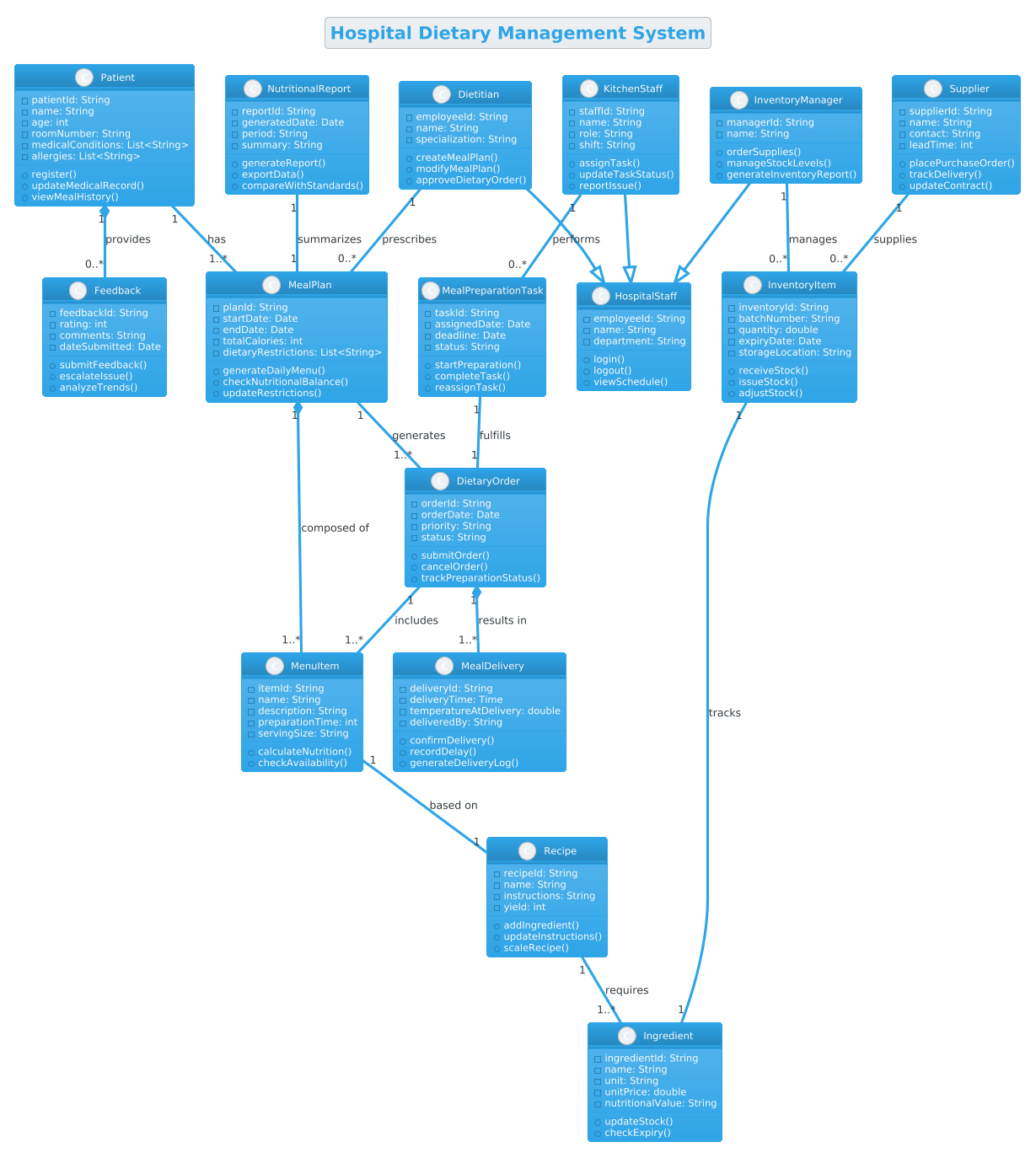
@startuml

!theme cerulean
title Hospital Dietary Management System

/'
This class diagram models the core entities and relationships in a Hospital Dietary Management System.
The system is designed to manage patient dietary plans, meal preparation, ingredient inventory, and staff assignments.
It captures the workflows from dietitian consultation and prescription, to kitchen order processing, meal delivery, and feedback collection.
Key domain concepts include patients with specific medical conditions and allergies, dietitians who create and adjust meal plans, kitchen staff who execute orders, and inventory managers who track ingredient usage and stock levels.
The diagram also includes administrative entities such as meal schedules, delivery records, and nutritional reports to support operational oversight and clinical compliance.
'/

class Patient {
  - patientId: String
  - name: String
  - age: int
  - roomNumber: String
  - medicalConditions: List<String>
  - allergies: List<String>
  + register()
  + updateMedicalRecord()
  + viewMealHistory()
}

class Dietitian {
  - employeeId: String
  - name: String
  - specialization: String
  + createMealPlan()
  + modifyMealPlan()
  + approveDietaryOrder()
}

class MealPlan {
  - planId: String
  - startDate: Date
  - endDate: Date
  - totalCalories: int
  - dietaryRestrictions: List<String>
  + generateDailyMenu()
  + checkNutritionalBalance()
  + updateRestrictions()
}

class DietaryOrder {
  - orderId: String
  - orderDate: Date
  - priority: String
  - status: String
  + submitOrder()
  + cancelOrder()
  + trackPreparationStatus()
}

class MenuItem {
  - itemId: String
  - name: String
  - description: String
  - preparationTime: int
  - servingSize: String
  + calculateNutrition()
  + checkAvailability()
}

class Recipe {
  - recipeId: String
  - name: String
  - instructions: String
  - yield: int
  + addIngredient()
  + updateInstructions()
  + scaleRecipe()
}

class Ingredient {
  - ingredientId: String
  - name: String
  - unit: String
  - unitPrice: double
  - nutritionalValue: String
  + updateStock()
  + checkExpiry()
}

class InventoryItem {
  - inventoryId: String
  - batchNumber: String
  - quantity: double
  - expiryDate: Date
  - storageLocation: String
  + receiveStock()
  + issueStock()
  + adjustStock()
}

class KitchenStaff {
  - staffId: String
  - name: String
  - role: String
  - shift: String
  + assignTask()
  + updateTaskStatus()
  + reportIssue()
}

class MealPreparationTask {
  - taskId: String
  - assignedDate: Date
  - deadline: Date
  - status: String
  + startPreparation()
  + completeTask()
  + reassignTask()
}

class MealDelivery {
  - deliveryId: String
  - deliveryTime: Time
  - temperatureAtDelivery: double
  - deliveredBy: String
  + confirmDelivery()
  + recordDelay()
  + generateDeliveryLog()
}

class Feedback {
  - feedbackId: String
  - rating: int
  - comments: String
  - dateSubmitted: Date
  + submitFeedback()
  + escalateIssue()
  + analyzeTrends()
}

class InventoryManager {
  - managerId: String
  - name: String
  + orderSupplies()
  + manageStockLevels()
  + generateInventoryReport()
}

class Supplier {
  - supplierId: String
  - name: String
  - contact: String
  - leadTime: int
  + placePurchaseOrder()
  + trackDelivery()
  + updateContract()
}

class NutritionalReport {
  - reportId: String
  - generatedDate: Date
  - period: String
  - summary: String
  + generateReport()
  + exportData()
  + compareWithStandards()
}

' Generalization (Inheritance)
Dietitian --|> HospitalStaff
KitchenStaff --|> HospitalStaff
InventoryManager --|> HospitalStaff

' Association
Patient "1" -- "1..*" MealPlan : has
Dietitian "1" -- "0..*" MealPlan : prescribes
MealPlan "1" -- "1..*" DietaryOrder : generates
DietaryOrder "1" -- "1..*" MenuItem : includes
MenuItem "1" -- "1" Recipe : based on
Recipe "1" -- "1..*" Ingredient : requires

' Aggregation (whole-part)
KitchenStaff "1" -- "0..*" MealPreparationTask : performs
MealPreparationTask "1" -- "1" DietaryOrder : fulfills

' Composition (strong whole-part)
MealPlan "1" *-- "1..*" MenuItem : composed of
DietaryOrder "1" *-- "1..*" MealDelivery : results in
Patient "1" *-- "0..*" Feedback : provides

' Association with Inventory
InventoryItem "1" -- "1" Ingredient : tracks
InventoryManager "1" -- "0..*" InventoryItem : manages
Supplier "1" -- "0..*" InventoryItem : supplies

' Association with Reports
NutritionalReport "1" -- "1" MealPlan : summarizes

class HospitalStaff {
  - employeeId: String
  - name: String
  - department: String
  + login()
  + logout()
  + viewSchedule()
}

@endumlStep-by-Step Architectural Walkthrough
Building a professional class diagram requires a systematic approach. We will break down the construction of this Hospital Dietary Management System into four logical phases, ensuring that each component is defined before establishing its relationships.
Phase 1: Canvas Configuration & Layout Directives
Before defining any classes, we must set the stage for the diagram. This involves selecting a visual theme and adding metadata that describes the diagram’s intent. In PlantUML, the !theme directive allows us to apply a consistent color palette and style, while the title directive provides a clear identifier for the model.
We also include a comment block using /' to document the context. This is vital for living documentation, ensuring that future developers understand the scope without needing to read the code immediately.
!theme cerulean
title Hospital Dietary Management System

/'
This class diagram models the core entities and relationships in a Hospital Dietary Management System.
... (comment content)
'/
Phase 2: Declaring Core Entities, Actors, and Boundaries
The next phase involves defining the primary classes. We start with the most critical actors: the Patient and the Dietitian. These classes contain attributes relevant to their domain, such as medicalConditions for patients and specialization for dietitians.
We then define the core data entities like MealPlan and DietaryOrder. Notice how we use the class keyword followed by the class name and a block definition for attributes and methods. This structure enforces encapsulation, a core principle of object-oriented design.
class Patient {
  - patientId: String
  - name: String
  + register()
}

class Dietitian {
  - employeeId: String
  + createMealPlan()
}
Phase 3: Mapping Data Flows & Key Interactions
With entities defined, we now map the relationships between them. This is where the diagram gains its architectural meaning. We use association lines to show how entities connect. For example, a Patient “has” one or many MealPlans.
We define cardinality using notation like "1" (one) and "1..*" (one to many). This clarifies the business rules: a patient cannot exist without a meal plan in this specific workflow context, but a meal plan can contain many dietary orders.
Patient "1" -- "1..*" MealPlan : has
Dietitian "1" -- "0..*" MealPlan : prescribes
Phase 4: Grouping, Annotations & Visual Polish
The final phase refines the diagram by adding inheritance hierarchies and complex ownership structures. We introduce the HospitalStaff superclass to avoid redundancy among Dietitian, KitchenStaff, and InventoryManager. This is achieved using the --|> generalization arrow.
We also distinguish between Composition (strong ownership, denoted by a filled diamond *--) and Aggregation (weak ownership, denoted by a hollow diamond or standard line). For instance, a MealPlan is composed of MenuItems; if the plan is deleted, the specific menu items for that plan are no longer relevant in this context.
Dietitian --|> HospitalStaff
MealPlan "1" *-- "1..*" MenuItem : composed of
Syntax & Keyword Deep Dive
To fully leverage VPasCode and PlantUML, it is essential to understand the specific syntax used in this diagram. Here is a breakdown of the key keywords and arrow conventions:
class: Defines a new class with a specific name. It is followed by a block containing attributes (prefixed with-for private) and methods (prefixed with+for public).--|>: Represents Generalization (Inheritance). The arrow points from the subclass (e.g.,Dietitian) to the superclass (e.g.,HospitalStaff), indicating that the subclass inherits properties from the parent.--: Represents Association. A standard line indicating a relationship between two classes. Cardinality labels like"1"or"0..*"define the multiplicity of the relationship.*--: Represents Composition. A line with a filled diamond at the parent end. It signifies strong ownership; the child object cannot exist independently of the parent.--(Hollow Diamond): Represents Aggregation. A line with an empty diamond. It signifies weak ownership; the child object can exist independently of the parent./'and'/: Used to create multi-line comments. These are ignored by the renderer but are visible in the source code for documentation purposes.!theme: A directive that applies a predefined visual theme to the entire diagram, ensuring consistent styling.
Best Practices & Pitfalls to Avoid
When modeling complex systems like a Hospital Dietary Management System, adhering to best practices ensures your diagram remains maintainable and clear.
- Maintain Clear Boundaries: Avoid mixing unrelated domains. Keep clinical data (Patient, MedicalConditions) distinct from operational data (KitchenStaff, InventoryItem) unless there is a direct dependency.
- Use Meaningful Names: Avoid generic names like
Entity1. Use domain-specific terms likeMealPreparationTaskto make the diagram self-documenting. - Manage Cardinality Carefully: Ensure your cardinality labels (e.g.,
"1..*") accurately reflect the real-world business rules. Incorrect cardinality can lead to data integrity issues in the actual application. - Group Related Classes: Use packages or grouping syntax if the diagram becomes too large. For this tutorial, we kept it flat for clarity, but in production, grouping
Staffclasses together might improve readability.
Start Building Hospital Dietary Management System Diagrams Faster with VPasCode
Immediately test, preview, and customize this class diagram online in VPasCode without installing any tools or configuring local environments.