


In the realm of government technology and public sector finance, accuracy is not just a preference—it is a legal mandate. A Tax Processing Engine is the backbone of revenue collection, handling millions of individual and business filings with precision. These systems must navigate a labyrinth of federal and state regulations, varying filing statuses, and complex deduction logic. Without clear architectural documentation, the risk of compliance errors increases exponentially.
Visual modeling plays a critical role in this domain. By using PlantUML within VPasCode, software architects can create living documentation that evolves alongside the codebase. This approach ensures that developers, auditors, and stakeholders share a unified understanding of the system’s data structures and logic flows. The following tutorial demonstrates how to construct a robust class diagram for a Tax Processing Engine, highlighting the relationships between core entities like returns, taxpayers, and tax rules.
Understanding the Model: Purpose, Scope & Problem Framing
Diagram Abstraction & Representation
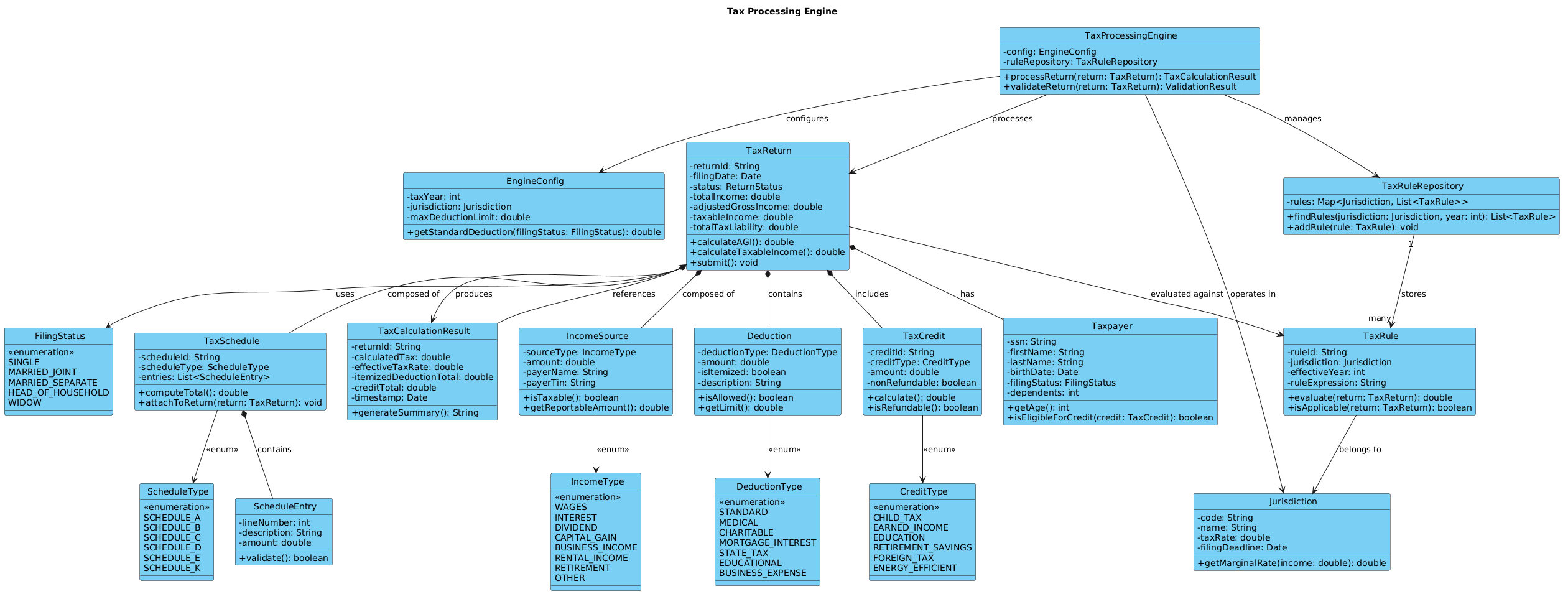
This class diagram models the static structure of the Tax Processing Engine. It focuses on the domain entities that represent real-world tax concepts rather than implementation details like database tables or API endpoints. Each class encapsulates specific responsibilities, such as TaxReturn managing the state of a filing, or TaxRule encapsulating the logic for applying jurisdictional tax laws.
Target Domain Scope & Scenario
The scope of this model covers the core calculation and validation logic required to process a tax return. It intentionally excludes external integration layers (like payment gateways or identity verification services) to focus on the internal domain model. The diagram illustrates how a TaxProcessingEngine orchestrates the interaction between a Taxpayer, their IncomeSource, and applicable TaxRules to produce a TaxCalculationResult.
Key Takeaways & Educational Insights
- Domain-Driven Design (DDD): Learn how to map complex business rules (deductions, credits) into software abstractions.
- Relationship Cardinality: Understand the difference between composition (
TaxReturnownsTaxSchedule) and aggregation. - Extensibility: See how enums and interfaces (via abstract classes) allow the system to grow without breaking existing logic.
Complete Diagram & Full Source Code
Before diving into the construction steps, here is the complete blueprint. You can copy this code directly into the VPasCode web editor to see the rendered result instantly.
@startuml
!include https://static.visual-paradigm.com/web/resources/plantuml-stdlib/themes/vp.puml

title Tax Processing Engine

/'
  This class diagram models the core domain of a Tax Processing Engine designed to compute
  federal and state tax liabilities for individual and business taxpayers. The system handles
  diverse income types, deductions, credits, filing statuses, and jurisdictional rules.
  The engine supports tax return preparation, audit trail generation, and integration with
  external tax authority systems. The diagram illustrates key abstractions such as TaxReturn,
  Taxpayer, IncomeSource, Deduction, TaxCredit, and TaxRule, along with their relationships.
  It also shows the composition of a return from schedules and worksheets, and the aggregation
  of tax rules by jurisdiction. The design enables extensibility for new tax forms and rules
  while maintaining separation of concerns between calculation logic and data entities.
'/

class TaxProcessingEngine {
  - config: EngineConfig
  - ruleRepository: TaxRuleRepository
  + processReturn(return: TaxReturn): TaxCalculationResult
  + validateReturn(return: TaxReturn): ValidationResult
}

class EngineConfig {
  - taxYear: int
  - jurisdiction: Jurisdiction
  - maxDeductionLimit: double
  + getStandardDeduction(filingStatus: FilingStatus): double
}

class TaxReturn {
  - returnId: String
  - filingDate: Date
  - status: ReturnStatus
  - totalIncome: double
  - adjustedGrossIncome: double
  - taxableIncome: double
  - totalTaxLiability: double
  + calculateAGI(): double
  + calculateTaxableIncome(): double
  + submit(): void
}

class Taxpayer {
  - ssn: String
  - firstName: String
  - lastName: String
  - birthDate: Date
  - filingStatus: FilingStatus
  - dependents: int
  + getAge(): int
  + isEligibleForCredit(credit: TaxCredit): boolean
}

class FilingStatus {
  <<enumeration>>
  SINGLE
  MARRIED_JOINT
  MARRIED_SEPARATE
  HEAD_OF_HOUSEHOLD
  WIDOW
}

class IncomeSource {
  - sourceType: IncomeType
  - amount: double
  - payerName: String
  - payerTin: String
  + isTaxable(): boolean
  + getReportableAmount(): double
}

class IncomeType {
  <<enumeration>>
  WAGES
  INTEREST
  DIVIDEND
  CAPITAL_GAIN
  BUSINESS_INCOME
  RENTAL_INCOME
  RETIREMENT
  OTHER
}

class Deduction {
  - deductionType: DeductionType
  - amount: double
  - isItemized: boolean
  - description: String
  + isAllowed(): boolean
  + getLimit(): double
}

class DeductionType {
  <<enumeration>>
  STANDARD
  MEDICAL
  CHARITABLE
  MORTGAGE_INTEREST
  STATE_TAX
  EDUCATIONAL
  BUSINESS_EXPENSE
}

class TaxCredit {
  - creditId: String
  - creditType: CreditType
  - amount: double
  - nonRefundable: boolean
  + calculate(): double
  + isRefundable(): boolean
}

class CreditType {
  <<enumeration>>
  CHILD_TAX
  EARNED_INCOME
  EDUCATION
  RETIREMENT_SAVINGS
  FOREIGN_TAX
  ENERGY_EFFICIENT
}

class TaxRule {
  - ruleId: String
  - jurisdiction: Jurisdiction
  - effectiveYear: int
  - ruleExpression: String
  + evaluate(return: TaxReturn): double
  + isApplicable(return: TaxReturn): boolean
}

class Jurisdiction {
  - code: String
  - name: String
  - taxRate: double
  - filingDeadline: Date
  + getMarginalRate(income: double): double
}

class TaxSchedule {
  - scheduleId: String
  - scheduleType: ScheduleType
  - entries: List<ScheduleEntry>
  + computeTotal(): double
  + attachToReturn(return: TaxReturn): void
}

class ScheduleType {
  <<enumeration>>
  SCHEDULE_A
  SCHEDULE_B
  SCHEDULE_C
  SCHEDULE_D
  SCHEDULE_E
  SCHEDULE_K
}

class ScheduleEntry {
  - lineNumber: int
  - description: String
  - amount: double
  + validate(): boolean
}

class TaxCalculationResult {
  - returnId: String
  - calculatedTax: double
  - effectiveTaxRate: double
  - itemizedDeductionTotal: double
  - creditTotal: double
  - timestamp: Date
  + generateSummary(): String
}

class TaxRuleRepository {
  - rules: Map<Jurisdiction, List<TaxRule>>
  + findRules(jurisdiction: Jurisdiction, year: int): List<TaxRule>
  + addRule(rule: TaxRule): void
}

' Relationships
TaxProcessingEngine --> EngineConfig : configures
TaxProcessingEngine --> TaxRuleRepository : manages
TaxProcessingEngine --> TaxReturn : processes
TaxReturn *-- Taxpayer : has
TaxReturn *-- IncomeSource : composed of
TaxReturn *-- Deduction : contains
TaxReturn *-- TaxCredit : includes
TaxReturn *-- TaxSchedule : composed of
TaxReturn --> TaxCalculationResult : produces
TaxReturn --> FilingStatus : uses
IncomeSource --> IncomeType : <<enum>>
Deduction --> DeductionType : <<enum>>
TaxCredit --> CreditType : <<enum>>
TaxSchedule *-- ScheduleEntry : contains
TaxSchedule --> ScheduleType : <<enum>>
TaxRule --> Jurisdiction : belongs to
TaxProcessingEngine --> Jurisdiction : operates in
TaxRuleRepository "1" --> "many" TaxRule : stores
TaxReturn --> TaxRule : evaluated against
TaxCalculationResult --> TaxReturn : references
@endumlStep-by-Step Architectural Walkthrough
Constructing a complex domain model requires a phased approach. We will build this diagram in four logical steps: setup, core entity declaration, data structures, and relationship mapping.
Phase 1: Canvas Configuration & Layout Directives
Every professional PlantUML diagram begins with setup directives that define the visual theme and metadata. In this government context, clarity and readability are paramount. We include the standard VP theme to ensure a consistent, clean look.
Start by defining the title and a comment block that explains the diagram’s purpose. This acts as living documentation for future developers.
!include https://static.visual-paradigm.com/web/resources/plantuml-stdlib/themes/vp.puml

title Tax Processing Engine

/'
  This class diagram models the core domain of a Tax Processing Engine designed to compute
  federal and state tax liabilities...
'/
Phase 2: Declaring Core Entities, Actors, and Boundaries
The heart of the system is the TaxProcessingEngine and the TaxReturn. These classes represent the primary entry points and data containers. We define their attributes (private data) and methods (public behavior) using standard UML notation.
class TaxProcessingEngine {
  - config: EngineConfig
  - ruleRepository: TaxRuleRepository
  + processReturn(return: TaxReturn): TaxCalculationResult
  + validateReturn(return: TaxReturn): ValidationResult
}
Notice the use of the - prefix for private attributes and + for public methods. This encapsulation is vital for maintaining data integrity within the tax calculation logic.
Phase 3: Mapping Data Flows & Key Interactions
Once the core classes are defined, we add the supporting data structures. This includes enumerations for FilingStatus and IncomeType, which restrict values to predefined sets, preventing invalid data entry.
class FilingStatus {
  <>
  SINGLE
  MARRIED_JOINT
  MARRIED_SEPARATE
  HEAD_OF_HOUSEHOLD
  WIDOW
}
We also model the TaxRule and Jurisdiction to handle the variability of tax laws across different regions. This separation allows the engine to swap rules dynamically based on the taxpayer’s location.
Phase 4: Grouping, Annotations & Visual Polish
The final phase involves defining relationships. We use composition (*--) to indicate strong ownership (e.g., a TaxReturn is composed of TaxSchedules). If the return is deleted, the schedules are deleted with it. We use aggregation (--) for weaker relationships, such as a TaxRule belonging to a Jurisdiction.
TaxReturn *-- TaxSchedule : composed of
TaxRule --> Jurisdiction : belongs to
Syntax & Keyword Deep Dive
To master this diagram, you must understand the specific PlantUML syntax used to define structure and behavior.
class: Defines a class structure. Followed by the class name and a block containing attributes and methods.+and-: Visibility modifiers.+is public,-is private.<<enumeration>>: A stereotype used to define a class as an enum, listing fixed values inside.*--: Composition relationship. Indicates strong ownership (e.g., parts cannot exist without the whole).-->: Association or dependency. A directional relationship where one class uses another.: label: Adds a label to a relationship line to explain the nature of the connection.
Best Practices & Pitfalls to Avoid
When modeling complex government systems, adhere to these principles to maintain clarity:
- Separation of Concerns: Keep calculation logic (
TaxProcessingEngine) separate from data storage (TaxRuleRepository). This makes testing easier. - Clear Naming Conventions: Use domain language. Instead of
Entity1, useIncomeSourceorTaxCredit. - Manage Complexity: If a diagram becomes too crowded, consider breaking it into multiple diagrams (e.g., one for Data Models, one for Processing Logic).
- Use Enums for Constraints: Always use
<<enumeration>>for statuses and types to prevent invalid states in your model.
Start Building Tax Processing Diagrams Faster with VPasCode
Test, preview, and customize your PlantUML class diagrams instantly in your browser without installing any tools.