


In the high-stakes environment of corporate banking, clarity is currency. A Letter of Credit (LC) is a critical financial instrument that guarantees payment to a seller, reducing risk for both the buyer and seller. However, the internal workflow required to issue an LC involves multiple departments, strict compliance checks, and conditional approvals. Miscommunication or unclear process flows can lead to significant financial exposure or regulatory breaches.

Visual modeling bridges the gap between technical requirements and business processes. By using a diagram-as-code approach with PlantUML in VPasCode, architects and banking operations teams can rapidly prototype, document, and validate these complex workflows. This method ensures that the logic remains versioned in text, easy to review, and instantly renderable without the overhead of drag-and-drop tools. This tutorial demonstrates how to construct a professional activity diagram for the Letter of Credit Issuance process, highlighting swimlanes, parallel processing, and decision logic.
Understanding the Model: Purpose, Scope & Problem Framing
Diagram Abstraction & Representation
An Activity Diagram is the ideal tool for modeling the dynamic behavior of a system. In the context of corporate banking, it visualizes the flow of control from one activity to another. Unlike static class diagrams, activity diagrams capture the temporal sequence of events. They are particularly effective for defining swimlanes, which partition the diagram by responsible actors (e.g., Customer, Relationship Manager, Credit Team). This visual separation ensures that every step of the LC issuance process is clearly assigned to a specific role, eliminating ambiguity regarding accountability.
Target Domain Scope & Scenario
This model focuses specifically on the Issuance Phase of a Letter of Credit within a Corporate Banking System. It intentionally excludes the downstream stages of LC amendment or maturity settlement to maintain focus on the initial risk assessment and approval workflow. The scope covers the interaction between the corporate client and the bank’s internal risk and operations teams, encompassing application submission, credit limit validation, compliance checks, and final document generation.
Key Takeaways & Educational Insights
By studying and building this model, you will gain insight into:
- Process Decomposition: How to break a monolithic banking process into manageable, sequential steps.
- Conditional Logic: Implementing
if/elsestructures to handle rejection scenarios and limit checks. - Parallel Processing: Using
forkblocks to model simultaneous compliance and collateral assessments. - State Management: Tracking the lifecycle of the application from “Submitted” to “Issued” via swimlane transitions.
Complete Diagram & Full Source Code
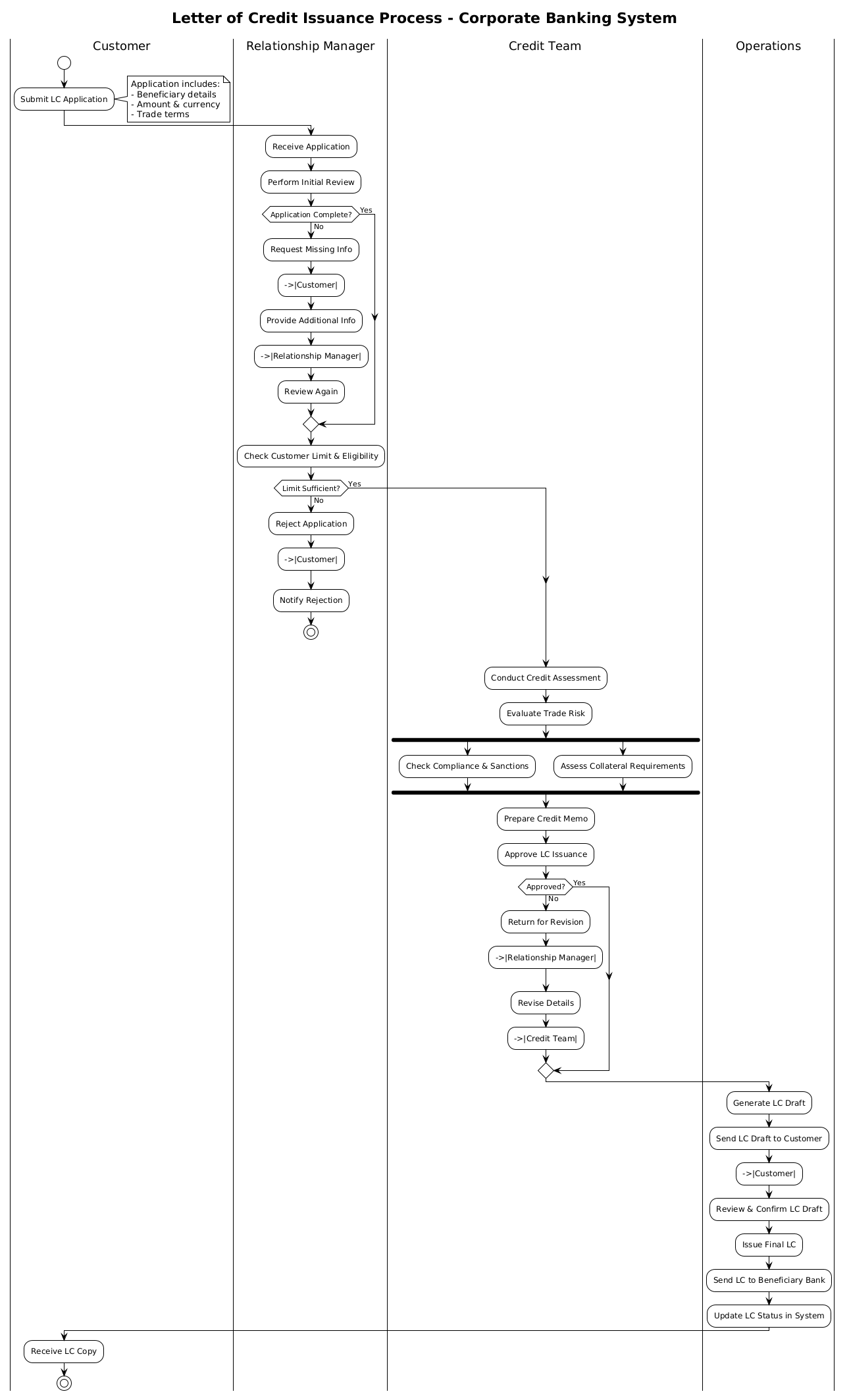
Below is the finished blueprint for the Letter of Credit Issuance process. You can copy this code directly into the VPasCode editor to see the live rendering.
@startuml
!theme plain
title Letter of Credit Issuance Process - Corporate Banking System

|Customer|
|Relationship Manager|
|Credit Team|
|Operations|

|Customer|
start
:Submit LC Application;
note right
  Application includes:
  - Beneficiary details
  - Amount & currency
  - Trade terms
end note

|Relationship Manager|
:Receive Application;
:Perform Initial Review;

if (Application Complete?) then (No)
  :Request Missing Info;
  -->|Customer|
  :Provide Additional Info;
  -->|Relationship Manager|
  :Review Again;
else (Yes)
endif

:Check Customer Limit & Eligibility;

if (Limit Sufficient?) then (No)
  :Reject Application;
  -->|Customer|
  :Notify Rejection;
  stop
else (Yes)
endif

|Credit Team|
:Conduct Credit Assessment;
:Evaluate Trade Risk;

fork
  :Check Compliance & Sanctions;
fork again
  :Assess Collateral Requirements;
end fork

:Prepare Credit Memo;
:Approve LC Issuance;

if (Approved?) then (No)
  :Return for Revision;
  -->|Relationship Manager|
  :Revise Details;
  -->|Credit Team|
else (Yes)
endif

|Operations|
:Generate LC Draft;
:Send LC Draft to Customer;
-->|Customer|
:Review & Confirm LC Draft;

|Operations|
:Issue Final LC;
:Send LC to Beneficiary Bank;
:Update LC Status in System;

|Customer|
:Receive LC Copy;

stop
@endumlStep-by-Step Architectural Walkthrough
Building a robust diagram requires a structured approach. We will construct this model in four logical phases, starting with the canvas setup and moving through the specific banking logic.
Phase 1: Canvas Configuration & Layout Directives
Before defining the process flow, we must establish the visual theme and the organizational structure. In VPasCode, we start with the @startuml directive to initialize the PlantUML parser. We apply the !theme plain directive to ensure a clean, professional look suitable for corporate documentation, avoiding overly decorative styles that might distract from the logic.
We then define the title to provide context for anyone viewing the diagram. The most critical structural element is the swimlane definition. We use the pipe syntax |Role| to declare the lanes. In banking diagrams, swimlanes are essential for audit trails.
!theme plain
title Letter of Credit Issuance Process - Corporate Banking System

|Customer|
|Relationship Manager|
|Credit Team|
|Operations|
Phase 2: Declaring Core Entities, Actors, and Boundaries
This phase focuses on the entry point of the process. The process begins with the Customer lane. We use the start node to mark the entry point of the activity diagram. The first action is submitting the application, which is enhanced with a note to detail the required data fields (Beneficiary, Amount, Trade terms).
Next, we transition to the Relationship Manager lane. This actor performs the initial intake and review. We use the pipe syntax to switch lanes, ensuring the visual flow follows the organizational hierarchy.
|Customer|
start
:Submit LC Application;
note right
  Application includes:
  - Beneficiary details
  - Amount & currency
  - Trade terms
end note

|Relationship Manager|
:Receive Application;
:Perform Initial Review;
Phase 3: Mapping Data Flows & Key Interactions
Here we introduce the decision logic and parallel processing. A banking process is rarely linear; it requires gates. We implement the if/else structure to validate application completeness and credit limits. If an application is incomplete, the flow loops back to the customer.
For the Credit Team phase, we utilize the fork block. In LC issuance, compliance checks and collateral assessments often happen simultaneously to save time. The fork and end fork directives allow us to split the flow into parallel branches that converge later.
if (Application Complete?) then (No)
  :Request Missing Info;
  -->|Customer|
  :Provide Additional Info;
  -->|Relationship Manager|
  :Review Again;
else (Yes)
endif

fork
  :Check Compliance & Sanctions;
fork again
  :Assess Collateral Requirements;
end fork
Phase 4: Grouping, Annotations & Visual Polish
The final phase involves the Operations team and the conclusion of the process. This includes generating the draft, obtaining customer confirmation, and issuing the final LC. We ensure the diagram ends with a stop node to signify a successful termination of the workflow. We also add a final transition back to the Customer lane to show the delivery of the final document.
|Operations|
:Issue Final LC;
:Send LC to Beneficiary Bank;
:Update LC Status in System;

|Customer|
:Receive LC Copy;

stop
Syntax & Keyword Deep Dive
To master PlantUML activity diagrams, understanding the specific keywords is crucial. Here is a breakdown of the syntax features used in this tutorial:
start/stop: Define the entry and exit points of the activity diagram. Every valid diagram should have a clear start and end state.|Lane|: Declares a swimlane. When you switch to a new lane, subsequent activities are drawn within that vertical partition, representing a change in responsibility.if (Condition) then (Path) else (Path) endif: Creates a decision diamond. Thethenandelselabels help clarify the outcome of the decision point visually.fork/fork again/end fork: Enables parallel execution.forkstarts a branch,fork againadds a parallel branch, andend forkmerges them back into a single flow.note right/left: Adds annotation text attached to a specific activity node. This is vital for documenting requirements or data constraints without cluttering the main flow.-->|Actor|: Creates a labeled arrow that explicitly shows the flow crossing between swimlanes, indicating handoffs between departments.
Best Practices & Pitfalls to Avoid
When modeling financial workflows, accuracy and readability are paramount. Follow these guidelines to maintain high-quality diagrams:
- Maintain Logical Swimmable Boundaries: Ensure that every step within a lane is logically performed by that actor. Avoid placing “System Processing” steps in a human lane unless the human is manually triggering it.
- Limit Nested Conditions: Deeply nested
if/elseblocks make diagrams hard to read. If a condition is complex, consider splitting it into sub-processes or using separate diagrams for specific risk scenarios. - Use Descriptive Labels: Avoid vague verbs like “Process” or “Handle.” Use specific actions like “Check Customer Limit” or “Generate LC Draft” to ensure the diagram serves as functional documentation.
- Validate Parallel Flows: Ensure that all
forkblocks have a correspondingend fork. Unmerged forks can lead to logical errors where the process appears to end prematurely or branch infinitely.
Start Building PlantUML Activity Diagrams Faster with VPasCode
Instantly render and customize your corporate banking workflows online in VPasCode without installing any tools or configuring local environments.