


Architectural Context: Modeling Financial Systems with Diagram-as-Code
In the fintech and banking sectors, the complexity of merchant onboarding, transaction processing, and settlement systems requires rigorous architectural documentation. A Merchant Account System is not merely a database schema; it is a dynamic ecosystem of business rules, compliance checks, and financial flows. When designing such systems, developers and architects often struggle to communicate the relationships between entities like Settlements, Transactions, and Compliance Monitoring using static documentation.

Visual modeling bridges this gap. By using PlantUML within the VPasCode editor, you can transform abstract requirements into living, executable documentation. This approach ensures that your class diagrams remain synchronized with your codebase, allowing you to prototype complex inheritance hierarchies and cardinality constraints instantly without the overhead of local tooling. This tutorial guides you through constructing a robust Merchant Account System class diagram, demonstrating how to model financial entities, their attributes, and their critical inter-relationships.
Understanding the Model: Purpose, Scope & Problem Framing
Diagram Abstraction & Representation
A Class Diagram is the backbone of object-oriented system design. It captures the static structure of a system by defining classes, their attributes, methods, and the relationships that bind them. In the context of a Merchant Account System, this diagram serves as a blueprint for the backend logic. It defines:
- Entities: Core objects like
MerchantAccount,Transaction, andSettlementthat hold data. - Behaviors: Methods such as
authorizeTransaction()orcalculateSettlement()that dictate system actions. - Relationships: How entities interact, such as a Merchant owning multiple Transactions or a Transaction being disputed via a Chargeback.
Target Domain Scope & Scenario
This model focuses specifically on the Payment Processing Lifecycle. It covers the journey from Merchant Onboarding (creating the account) to Transaction Authorization, Fraud Detection, and finally Settlement. It explicitly excludes user interface components or external network infrastructure, focusing purely on the core data model and business logic required for a payment gateway to function correctly.
Key Takeaways & Educational Insights
By building this diagram, you will gain a deeper understanding of:
- Inheritance Patterns: How to model different merchant types (Retail, E-Commerce, Mobile) under a common abstract base.
- Ownership Semantics: Distinguishing between Composition (strong ownership) and Aggregation (weak ownership).
- Cardinality: Defining one-to-one, one-to-many, and many-to-many relationships accurately.
Complete Diagram & Full Source Code
Below is the complete blueprint for the Merchant Account System. This diagram utilizes the sunlust theme for a professional financial aesthetic and includes 12 distinct classes with complex relationship mappings.
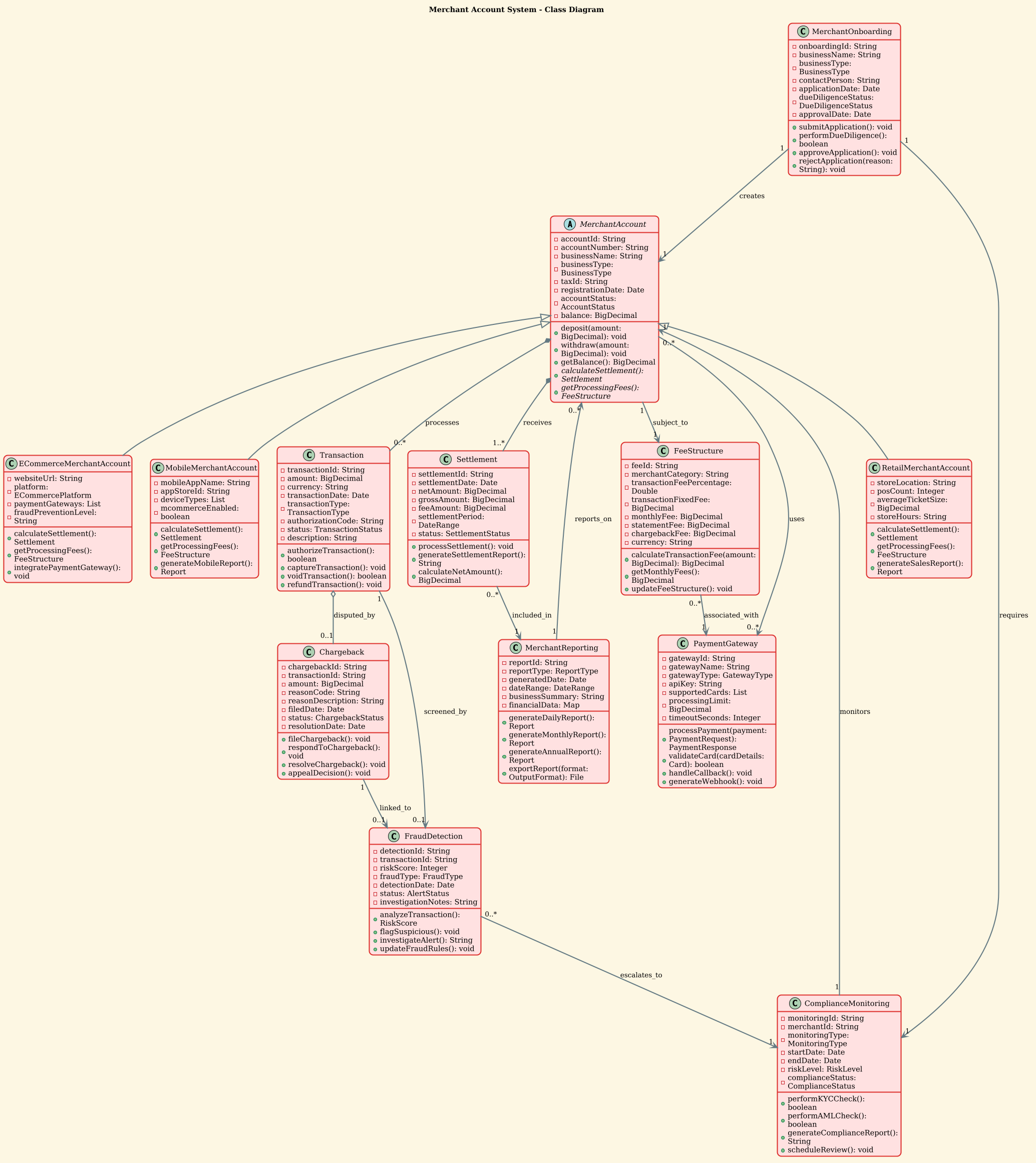
@startuml

!theme sunlust
title Merchant Account System - Class Diagram

' Abstract base class
abstract class MerchantAccount {
  - accountId: String
  - accountNumber: String
  - businessName: String
  - businessType: BusinessType
  - taxId: String
  - registrationDate: Date
  - accountStatus: AccountStatus
  - balance: BigDecimal
  + deposit(amount: BigDecimal): void
  + withdraw(amount: BigDecimal): void
  + getBalance(): BigDecimal
  + {abstract} calculateSettlement(): Settlement
  + {abstract} getProcessingFees(): FeeStructure
}

' Derived classes from MerchantAccount
class RetailMerchantAccount {
  - storeLocation: String
  - posCount: Integer
  - averageTicketSize: BigDecimal
  - storeHours: String
  + calculateSettlement(): Settlement
  + getProcessingFees(): FeeStructure
  + generateSalesReport(): Report
}

class ECommerceMerchantAccount {
  - websiteUrl: String
  - platform: ECommercePlatform
  - paymentGateways: List
  - fraudPreventionLevel: String
  + calculateSettlement(): Settlement
  + getProcessingFees(): FeeStructure
  + integratePaymentGateway(): void
}

class MobileMerchantAccount {
  - mobileAppName: String
  - appStoreId: String
  - deviceTypes: List
  - mcommerceEnabled: boolean
  + calculateSettlement(): Settlement
  + getProcessingFees(): FeeStructure
  + generateMobileReport(): Report
}

' Transaction class
class Transaction {
  - transactionId: String
  - amount: BigDecimal
  - currency: String
  - transactionDate: Date
  - transactionType: TransactionType
  - authorizationCode: String
  - status: TransactionStatus
  - description: String
  + authorizeTransaction(): boolean
  + captureTransaction(): void
  + voidTransaction(): boolean
  + refundTransaction(): void
}

' Settlement class
class Settlement {
  - settlementId: String
  - settlementDate: Date
  - netAmount: BigDecimal
  - grossAmount: BigDecimal
  - feeAmount: BigDecimal
  - settlementPeriod: DateRange
  - status: SettlementStatus
  + processSettlement(): void
  + generateSettlementReport(): String
  + calculateNetAmount(): BigDecimal
}

' FeeStructure class
class FeeStructure {
  - feeId: String
  - merchantCategory: String
  - transactionFeePercentage: Double
  - transactionFixedFee: BigDecimal
  - monthlyFee: BigDecimal
  - statementFee: BigDecimal
  - chargebackFee: BigDecimal
  - currency: String
  + calculateTransactionFee(amount: BigDecimal): BigDecimal
  + getMonthlyFees(): BigDecimal
  + updateFeeStructure(): void
}

' PaymentGateway class
class PaymentGateway {
  - gatewayId: String
  - gatewayName: String
  - gatewayType: GatewayType
  - apiKey: String
  - supportedCards: List
  - processingLimit: BigDecimal
  - timeoutSeconds: Integer
  + processPayment(payment: PaymentRequest): PaymentResponse
  + validateCard(cardDetails: Card): boolean
  + handleCallback(): void
  + generateWebhook(): void
}

' Chargeback class
class Chargeback {
  - chargebackId: String
  - transactionId: String
  - amount: BigDecimal
  - reasonCode: String
  - reasonDescription: String
  - filedDate: Date
  - status: ChargebackStatus
  - resolutionDate: Date
  + fileChargeback(): void
  + respondToChargeback(): void
  + resolveChargeback(): void
  + appealDecision(): void
}

' FraudDetection class
class FraudDetection {
  - detectionId: String
  - transactionId: String
  - riskScore: Integer
  - fraudType: FraudType
  - detectionDate: Date
  - status: AlertStatus
  - investigationNotes: String
  + analyzeTransaction(): RiskScore
  + flagSuspicious(): void
  + investigateAlert(): String
  + updateFraudRules(): void
}

' MerchantReporting class
class MerchantReporting {
  - reportId: String
  - reportType: ReportType
  - generatedDate: Date
  - dateRange: DateRange
  - businessSummary: String
  - financialData: Map
  + generateDailyReport(): Report
  + generateMonthlyReport(): Report
  + generateAnnualReport(): Report
  + exportReport(format: OutputFormat): File
}

' MerchantOnboarding class
class MerchantOnboarding {
  - onboardingId: String
  - businessName: String
  - businessType: BusinessType
  - contactPerson: String
  - applicationDate: Date
  - dueDiligenceStatus: DueDiligenceStatus
  - approvalDate: Date
  + submitApplication(): void
  + performDueDiligence(): boolean
  + approveApplication(): void
  + rejectApplication(reason: String): void
}

' ComplianceMonitoring class
class ComplianceMonitoring {
  - monitoringId: String
  - merchantId: String
  - monitoringType: MonitoringType
  - startDate: Date
  - endDate: Date
  - riskLevel: RiskLevel
  - complianceStatus: ComplianceStatus
  + performKYCCheck(): boolean
  + performAMLCheck(): boolean
  + generateComplianceReport(): String
  + scheduleReview(): void
}

' ============ Relationships ============

' Generalization (Inheritance)
MerchantAccount <|-- RetailMerchantAccount
MerchantAccount <|-- ECommerceMerchantAccount
MerchantAccount <|-- MobileMerchantAccount

' Composition (MerchantAccount - Transaction) - Strong ownership
MerchantAccount *-- "0..*" Transaction : processes

' Composition (MerchantAccount - Settlement) - Strong ownership
MerchantAccount *-- "1..*" Settlement : receives

' Association (MerchantAccount - FeeStructure) - One-to-One
MerchantAccount "1" --> "1" FeeStructure : subject_to

' Association (MerchantAccount - PaymentGateway) - Many-to-Many
MerchantAccount "0..*" --> "0..*" PaymentGateway : uses

' Aggregation (Transaction - Chargeback) - Weak ownership
Transaction o-- "0..1" Chargeback : disputed_by

' Association (Transaction - FraudDetection) - One-to-One
Transaction "1" --> "0..1" FraudDetection : screened_by

' Association (MerchantOnboarding - MerchantAccount) - One-to-One
MerchantOnboarding "1" --> "1" MerchantAccount : creates

' Association (ComplianceMonitoring - MerchantAccount) - One-to-One
ComplianceMonitoring "1" --> "1" MerchantAccount : monitors

' Association (MerchantReporting - MerchantAccount) - One-to-Many
MerchantReporting "1" --> "0..*" MerchantAccount : reports_on

' Association (Settlement - MerchantReporting) - One-to-Many
Settlement "0..*" --> "1" MerchantReporting : included_in

' Association (FeeStructure - PaymentGateway) - Many-to-One
FeeStructure "0..*" --> "1" PaymentGateway : associated_with

' Association (FraudDetection - ComplianceMonitoring) - One-to-Many
FraudDetection "0..*" --> "1" ComplianceMonitoring : escalates_to

' Association (Chargeback - FraudDetection) - One-to-One
Chargeback "1" --> "0..1" FraudDetection : linked_to

' Association (MerchantOnboarding - ComplianceMonitoring) - One-to-One
MerchantOnboarding "1" --> "1" ComplianceMonitoring : requires

@endumlStep-by-Step Architectural Walkthrough
Constructing this diagram in VPasCode involves four logical phases: setting the visual theme, defining the class hierarchy, modeling core financial entities, and mapping the relationships.
Phase 1: Canvas Configuration & Layout Directives
Every PlantUML diagram begins with configuration directives that control the visual output. For this financial system, we prioritize clarity and professional aesthetics.
We start by declaring the theme using the !theme directive. The sunlust theme provides a warm, modern color palette suitable for business applications.
!theme sunlust
title Merchant Account System - Class Diagram
Additionally, the @startuml and @enduml tags define the boundaries of the diagram, ensuring the parser knows exactly where the model begins and ends.
Phase 2: Declaring Core Entities, Actors, and Boundaries
The foundation of this system is the MerchantAccount class. Notice that we define it as abstract. This indicates that a merchant account cannot be instantiated directly; instead, it serves as a blueprint for specific types of merchants.
abstract class MerchantAccount {
  - accountId: String
  - businessName: String
  + {abstract} calculateSettlement(): Settlement
}
We then define the concrete implementations: RetailMerchantAccount, ECommerceMerchantAccount, and MobileMerchantAccount. Each inherits the core properties but adds domain-specific attributes like storeLocation or websiteUrl.
Phase 3: Mapping Data Flows & Key Interactions
The financial lifecycle revolves around Transaction and Settlement. These classes are central to the diagram. We define their attributes to capture essential financial data, such as amount, currency, and status.
The methods within these classes (e.g., authorizeTransaction, processSettlement) represent the business logic that will be implemented in the actual backend code. This ensures your documentation reflects the actual functionality.
class Transaction {
  - transactionId: String
  - amount: BigDecimal
  + authorizeTransaction(): boolean
}
Phase 4: Grouping, Annotations & Visual Polish
The final phase involves defining the relationships that bind these classes. We use specific symbols to denote the nature of the interaction:
- Composition (
*--): Used forMerchantAccountandTransaction, indicating that if the account is deleted, the transactions are also effectively removed (strong ownership). - Aggregation (
o--): Used forTransactionandChargeback, indicating a weaker relationship where a chargeback can exist independently or be linked to a transaction. - Association (
-->): Used for standard links likeFraudDetectionandComplianceMonitoring.
Syntax & Keyword Deep Dive
Understanding the specific PlantUML syntax is crucial for maintaining and extending your diagrams. Here are the key features used in this Merchant Account System model:
abstract class: Declares a class that cannot be instantiated directly. It forces subclasses to implement specific methods, ensuring a consistent interface acrossRetailMerchantAccount,ECommerceMerchantAccount, etc.-vs+: The minus sign denotesprivateattributes (internal data), while the plus sign denotespublicmethods (accessible operations).*--(Composition): Represents a “part-of” relationship with strong lifecycle dependency. AMerchantAccountowns itsSettlementrecords.o--(Aggregation): Represents a “has-a” relationship with weak lifecycle dependency. AChargebackis linked to aTransactionbut can exist if the transaction is archived."0..*"(Cardinality): Defines the multiplicity."0..*"means zero or more,"1"means exactly one, and"0..1"means zero or one.{abstract}Keyword: Explicitly marks a method as abstract, requiring subclasses to provide an implementation.
Best Practices & Pitfalls to Avoid
To ensure your PlantUML class diagrams remain maintainable and clear, follow these architectural best practices:
- Keep Diagrams Modular: Avoid placing every single class in one file. If your system grows, consider splitting the diagram into logical packages (e.g.,
onboarding.puml,transactions.puml). - Use Meaningful Names: Avoid generic names like
Entity1. Use domain-specific terms likeFraudDetectionorSettlementto make the diagram readable for non-technical stakeholders. - Respect Cardinality: Ensure your relationship arrows match your database schema. If a merchant can have zero transactions, use
"0..*", not"1..*". - Separate Logic from Structure: Use the class diagram for structure and methods, but use Sequence Diagrams for complex interaction flows like payment authorization.
Start Building PlantUML Class Diagrams Faster with VPasCode
Design your financial system architecture instantly with zero setup. Test your class relationships and export professional diagrams directly from your browser.