


In the rapidly evolving fintech sector, Peer-to-Peer (P2P) lending platforms serve as critical intermediaries connecting individual borrowers with individual lenders. These platforms facilitate loans without traditional banking infrastructure, relying instead on robust digital architectures that manage risk, compliance, and financial transactions with precision.

Designing the underlying data model for such a system is a complex task. It requires balancing user management, financial instruments, risk assessment, and transactional integrity. A well-structured class diagram is the blueprint for this architecture. It defines the entities (classes), their attributes (data), and their methods (behavior), ensuring developers understand how money flows, how risk is assessed, and how users interact with the system.
This tutorial demonstrates how to use VPasCode, a free, browser-based diagram-as-code tool, to build a comprehensive PlantUML class diagram for a P2P lending system. By using diagram-as-code, you gain version-ready documentation, instant rendering, and the ability to iterate on your architecture faster than traditional drag-and-drop tools.
Understanding the Model: Purpose, Scope & Problem Framing
Before writing a single line of code, it is essential to understand the abstraction and scope of the diagram we are building. This model is not merely a drawing; it is a technical specification of the domain logic.
Diagram Abstraction & Representation
This PlantUML class diagram models the static structure of the P2P lending ecosystem. It utilizes object-oriented principles to represent real-world financial concepts:
- Abstraction (Person): We use inheritance to model the dual nature of users. Everyone on the platform is a
Person, but they specialize as either aBorroweror aLender. - Encapsulation (Loan/Investment): Financial instruments like
LoanandInvestmentencapsulate sensitive data (amounts, interest rates) and behaviors (calculating payments, processing repayments). - Association (Relationships): The lines connecting classes represent the business rules. For example, a
Borrowerapplies for aLoan, and aLenderinvests in aLoan.
Target Domain Scope & Scenario
This diagram covers the core operational scope of a P2P platform, specifically focusing on:
- User Management: Identity, KYC verification, and profile management.
- Financial Core: The lifecycle of a loan from application to repayment.
- Risk & Compliance: Credit ratings, risk assessments, and document verification.
- Transaction Ledger: Tracking funds, escrow accounts, and investment returns.
It intentionally excludes external system integrations (like payment gateways) to focus on the internal domain model, providing a clean foundation for backend developers.
Complete Diagram & Full Source Code
Below is the final architecture. You can view the rendered diagram and interact with the code directly in the VPasCode editor.
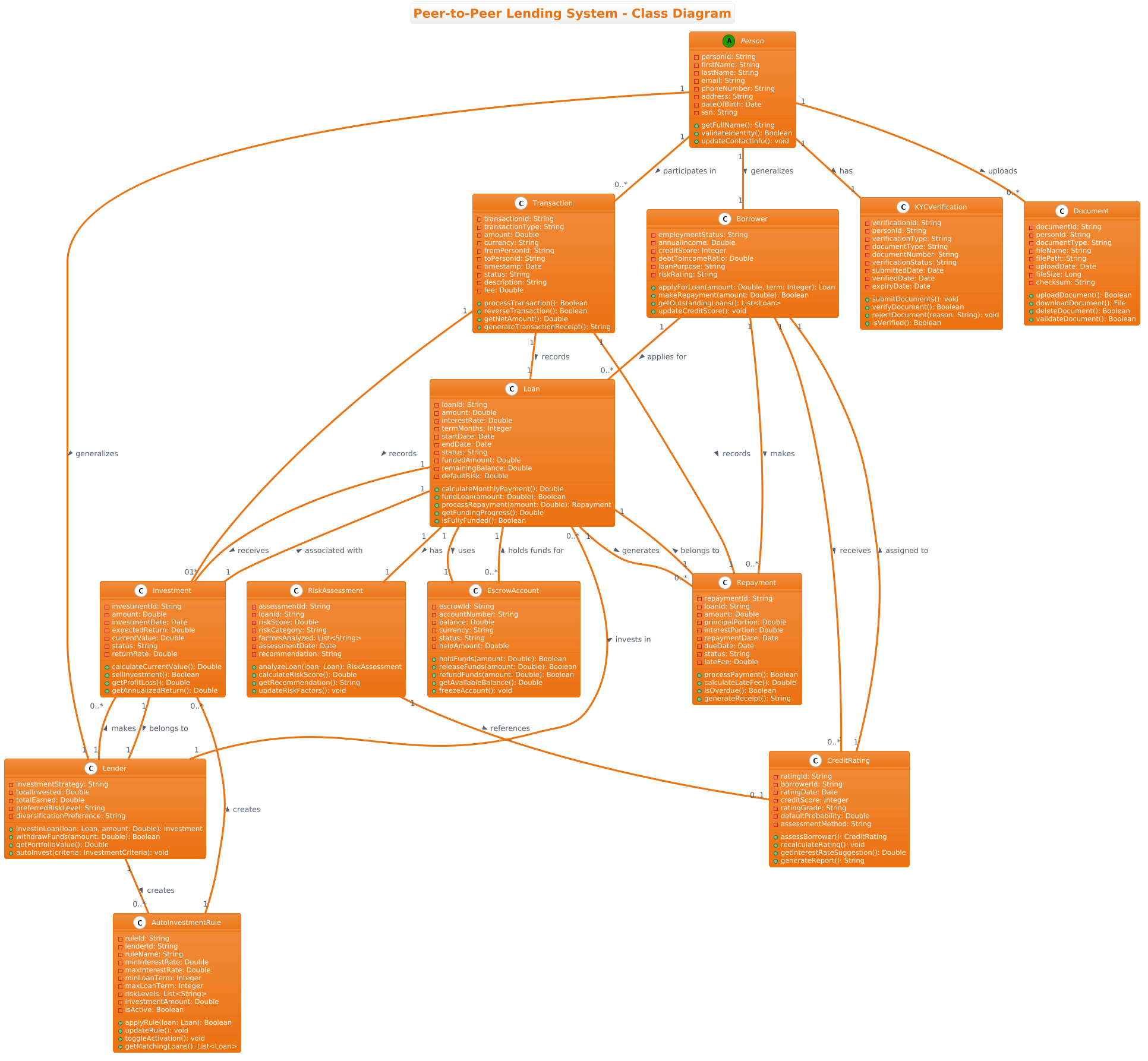
@startuml
!theme aws-orange
title Peer-to-Peer Lending System - Class Diagram

' Core Person classes - Generalization
abstract class Person {
  - personId: String
  - firstName: String
  - lastName: String
  - email: String
  - phoneNumber: String
  - address: String
  - dateOfBirth: Date
  - ssn: String
  + getFullName(): String
  + validateIdentity(): Boolean
  + updateContactInfo(): void
}

class Borrower {
  - employmentStatus: String
  - annualIncome: Double
  - creditScore: Integer
  - debtToIncomeRatio: Double
  - loanPurpose: String
  - riskRating: String
  + applyForLoan(amount: Double, term: Integer): Loan
  + makeRepayment(amount: Double): Boolean
  + getOutstandingLoans(): List<Loan>
  + updateCreditScore(): void
}

class Lender {
  - investmentStrategy: String
  - totalInvested: Double
  - totalEarned: Double
  - preferredRiskLevel: String
  - diversificationPreference: String
  + investInLoan(loan: Loan, amount: Double): Investment
  + withdrawFunds(amount: Double): Boolean
  + getPortfolioValue(): Double
  + autoInvest(criteria: InvestmentCriteria): void
}

' Loan and Investment classes
class Loan {
  - loanId: String
  - amount: Double
  - interestRate: Double
  - termMonths: Integer
  - startDate: Date
  - endDate: Date
  - status: String
  - fundedAmount: Double
  - remainingBalance: Double
  - defaultRisk: Double
  + calculateMonthlyPayment(): Double
  + fundLoan(amount: Double): Boolean
  + processRepayment(amount: Double): Repayment
  + getFundingProgress(): Double
  + isFullyFunded(): Boolean
}

class Investment {
  - investmentId: String
  - amount: Double
  - investmentDate: Date
  - expectedReturn: Double
  - currentValue: Double
  - status: String
  - returnRate: Double
  + calculateCurrentValue(): Double
  + sellInvestment(): Boolean
  + getProfitLoss(): Double
  + getAnnualizedReturn(): Double
}

class Repayment {
  - repaymentId: String
  - loanId: String
  - amount: Double
  - principalPortion: Double
  - interestPortion: Double
  - repaymentDate: Date
  - dueDate: Date
  - status: String
  - lateFee: Double
  + processPayment(): Boolean
  + calculateLateFee(): Double
  + isOverdue(): Boolean
  + generateReceipt(): String
}

' Risk and Rating classes
class CreditRating {
  - ratingId: String
  - borrowerId: String
  - ratingDate: Date
  - creditScore: Integer
  - ratingGrade: String
  - defaultProbability: Double
  - assessmentMethod: String
  + assessBorrower(): CreditRating
  + recalculateRating(): void
  + getInterestRateSuggestion(): Double
  + generateReport(): String
}

class RiskAssessment {
  - assessmentId: String
  - loanId: String
  - riskScore: Double
  - riskCategory: String
  - factorsAnalyzed: List<String>
  - assessmentDate: Date
  - recommendation: String
  + analyzeLoan(loan: Loan): RiskAssessment
  + calculateRiskScore(): Double
  + getRecommendation(): String
  + updateRiskFactors(): void
}

' Verification and Document classes
class KYCVerification {
  - verificationId: String
  - personId: String
  - verificationType: String
  - documentType: String
  - documentNumber: String
  - verificationStatus: String
  - submittedDate: Date
  - verifiedDate: Date
  - expiryDate: Date
  + submitDocuments(): void
  + verifyDocument(): Boolean
  + rejectDocument(reason: String): void
  + isVerified(): Boolean
}

class Document {
  - documentId: String
  - personId: String
  - documentType: String
  - fileName: String
  - filePath: String
  - uploadDate: Date
  - fileSize: Long
  - checksum: String
  + uploadDocument(): Boolean
  + downloadDocument(): File
  + deleteDocument(): Boolean
  + validateDocument(): Boolean
}

' Transaction and Payment classes
class EscrowAccount {
  - escrowId: String
  - accountNumber: String
  - balance: Double
  - currency: String
  - status: String
  - heldAmount: Double
  + holdFunds(amount: Double): Boolean
  + releaseFunds(amount: Double): Boolean
  + refundFunds(amount: Double): Boolean
  + getAvailableBalance(): Double
  + freezeAccount(): void
}

class Transaction {
  - transactionId: String
  - transactionType: String
  - amount: Double
  - currency: String
  - fromPersonId: String
  - toPersonId: String
  - timestamp: Date
  - status: String
  - description: String
  - fee: Double
  + processTransaction(): Boolean
  + reverseTransaction(): Boolean
  + getNetAmount(): Double
  + generateTransactionReceipt(): String
}

class AutoInvestmentRule {
  - ruleId: String
  - lenderId: String
  - ruleName: String
  - minInterestRate: Double
  - maxInterestRate: Double
  - minLoanTerm: Integer
  - maxLoanTerm: Integer
  - riskLevels: List<String>
  - investmentAmount: Double
  - isActive: Boolean
  + applyRule(loan: Loan): Boolean
  + updateRule(): void
  + toggleActivation(): void
  + getMatchingLoans(): List<Loan>
}

' Relationships
Person "1" -- "1" KYCVerification : has >
Person "1" -- "0..*" Document : uploads >
Person "1" -- "0..*" Transaction : participates in >

Borrower "1" -- "0..*" Loan : applies for >
Borrower "1" -- "0..*" CreditRating : receives >
Borrower "1" -- "0..*" Repayment : makes >

Lender "1" -- "0..*" Investment : makes >
Lender "1" -- "0..*" AutoInvestmentRule : creates >
Lender "1" -- "0..*" Loan : invests in >

Loan "1" -- "1" RiskAssessment : has >
Loan "1" -- "1" EscrowAccount : uses >
Loan "1" -- "0..*" Investment : receives >
Loan "1" -- "0..*" Repayment : generates >

Investment "1" -- "1" Loan : associated with >
Investment "1" -- "1" Lender : belongs to >

Repayment "1" -- "1" Loan : belongs to >

EscrowAccount "0..*" -- "1" Loan : holds funds for >

CreditRating "1" -- "1" Borrower : assigned to >

AutoInvestmentRule "1" -- "0..*" Investment : creates >

Person "1" -- "1" Lender : generalizes >
Person "1" -- "1" Borrower : generalizes >

RiskAssessment "1" -- "0..1" CreditRating : references >

Transaction "1" -- "1" Investment : records >
Transaction "1" -- "1" Repayment : records >
Transaction "1" -- "1" Loan : records >

@endumlStep-by-Step Architectural Walkthrough
Now, let’s deconstruct how to build this diagram from scratch using the VPasCode web editor. We will follow a phased approach to ensure logical organization and clarity.
Phase 1: Canvas Configuration & Layout Directives
Every PlantUML diagram begins with configuration directives that set the global theme and layout. For a finance-focused diagram, we want a professional, clean look.
First, we define the diagram type and theme. The @startuml directive tells PlantUML we are starting a diagram. We then apply the !theme aws-orange directive to give the diagram a modern, warm color palette suitable for financial branding.
Additionally, we add a title to provide immediate context to anyone viewing the diagram.
@startuml
!theme aws-orange
title Peer-to-Peer Lending System - Class Diagram
Phase 2: Declaring Core Entities, Actors, and Boundaries
The foundation of any P2P system is the user. We model this using Object-Oriented Inheritance. Instead of duplicating common fields (like name, email) for Borrowers and Lenders, we create a parent class.
We define an abstract class Person. This indicates that you cannot instantiate a generic “Person” directly; they must be a Borrower or Lender. We then define the specific attributes and methods for Borrower and Lender.
abstract class Person {
  - personId: String
  - firstName: String
  + getFullName(): String
}

class Borrower {
  - creditScore: Integer
  + applyForLoan(amount: Double): Loan
}

class Lender {
  - investmentStrategy: String
  + investInLoan(loan: Loan, amount: Double): Investment
}
Phase 3: Mapping Data Flows & Key Interactions
With the actors defined, we model the financial instruments. The Loan class is the central entity. It tracks the money, the terms, and the status.
We also introduce supporting classes like Repayment and Investment. A Loan generates multiple Repayment records over time. A Lender creates an Investment record when they fund a portion of a Loan.
class Loan {
  - amount: Double
  - interestRate: Double
  + calculateMonthlyPayment(): Double
}

class Repayment {
  - principalPortion: Double
  - interestPortion: Double
  + calculateLateFee(): Double
}
Phase 4: Grouping, Annotations & Visual Polish
The final phase involves connecting these entities with relationships. We use the -- syntax to draw association lines and define cardinality (e.g., “1” to “0..*”).
We also add comments using the ' character to organize sections of the code, making it easier to read and maintain. Finally, we close the diagram with @enduml.
Borrower "1" -- "0..*" Loan : applies for >
Lender "1" -- "0..*" Investment : makes >

@enduml
Syntax & Keyword Deep Dive
Understanding the specific PlantUML syntax used in this diagram is crucial for customization and future expansion.
abstract class: Defines a class that cannot be instantiated on its own. In our model,Personis abstract because a user must always have a specific role (Borrower or Lender).-vs+: These define visibility.-means private (attributes likessnorpassword), while+means public (methods likegetFullName()that can be called externally).--(Association): The standard line connecting classes. It implies a structural relationship.:(Label): The text after the colon (e.g.,: applies for) defines the semantic meaning of the relationship."0..*"(Cardinality): This notation defines multiplicity.0..*means “zero or more,” allowing a Borrower to have zero loans or many loans.!theme: A directive to load a specific visual theme, in this case,aws-orange, which applies consistent colors to the diagram elements.
Best Practices & Pitfalls to Avoid
When modeling complex financial systems, clarity is paramount. Follow these best practices to ensure your PlantUML diagrams remain maintainable.
- Keep Classes Focused: Avoid creating “God Classes” that do too much. For example, keep
Loanseparate fromTransaction. The Loan represents the contract; the Transaction represents the movement of funds. - Use Meaningful Names: Avoid generic names like
Entity1orData. Use domain-specific terms likeEscrowAccountorAutoInvestmentRule. - Document Cardinality: Always specify the “1” to “0..*” relationships. This helps developers understand if a relationship is mandatory (1) or optional (0..1).
- Group Related Classes: Use comments (lines starting with
') to visually group related sections in your code, such as “Risk and Rating classes” or “Transaction and Payment classes”.
Try It Yourself with VPasCode
Start Building PlantUML Class Diagrams Faster with VPasCode
Experience instant live browser preview and zero local installation for your financial architecture diagrams.