


In the high-stakes world of financial technology and tax compliance, clarity is not just a design preference—it is a regulatory requirement. When designing a Tax Filing System, architects must ensure that the flow of data between the end-user and the backend processing engine is both intuitive and robust. A single point of failure in the submission logic can lead to lost revenue, compliance penalties, or severe user frustration.

Visual modeling serves as the bridge between abstract requirements and concrete implementation. Specifically, an Activity Diagram provides the necessary granularity to map out state transitions, decision points, and parallel processing requirements. By leveraging PlantUML within the VPasCode editor, software architects can create living documentation that evolves with the codebase. This approach eliminates the friction of manual diagramming tools, allowing teams to iterate on complex financial workflows instantly without leaving the browser.
This masterclass guides you through constructing a professional Return Submission Process diagram. We will focus on separating concerns using swimlanes, handling critical validation logic, and managing asynchronous tasks like email notifications alongside system updates.
Understanding the Model: Purpose, Scope & Problem Framing
Diagram Abstraction & Representation
An Activity Diagram is the ideal abstraction for modeling the procedural logic of a business process. Unlike a class diagram which focuses on static structure, or a sequence diagram which focuses on message timing, an Activity Diagram excels at showing what happens in a specific workflow and when it happens.
In this context, the diagram models the lifecycle of a tax return from the moment a user logs in until the filing status is confirmed. It captures:
- Control Flow: The sequential steps of the process.
- Decision Logic: Where the system validates data and branches based on success or failure.
- Concurrency: Parallel tasks that can occur simultaneously (e.g., saving a copy and sending an email).
Target Domain Scope & Scenario
The scope of this model is strictly limited to the Return Submission phase. It does not cover user registration, tax calculation, or payment processing. The boundary is defined by the User (the taxpayer) and the System (the Tax Filing Platform). This separation is crucial for auditing purposes, as it clearly delineates where human intervention is required versus where automated processing occurs.
Key Takeaways & Educational Insights
By completing this tutorial, you will gain the ability to:
- Design swimlanes that clearly assign responsibility between actors and systems.
- Implement robust error handling using nested
if/elseblocks for retry logic. - Utilize
forkandfork againto model parallel system actions efficiently.
Complete Diagram & Full Source Code
Before diving into the construction phases, review the complete blueprint below. This diagram encapsulates the entire workflow, including theme application, swimlane definition, and complex branching logic.
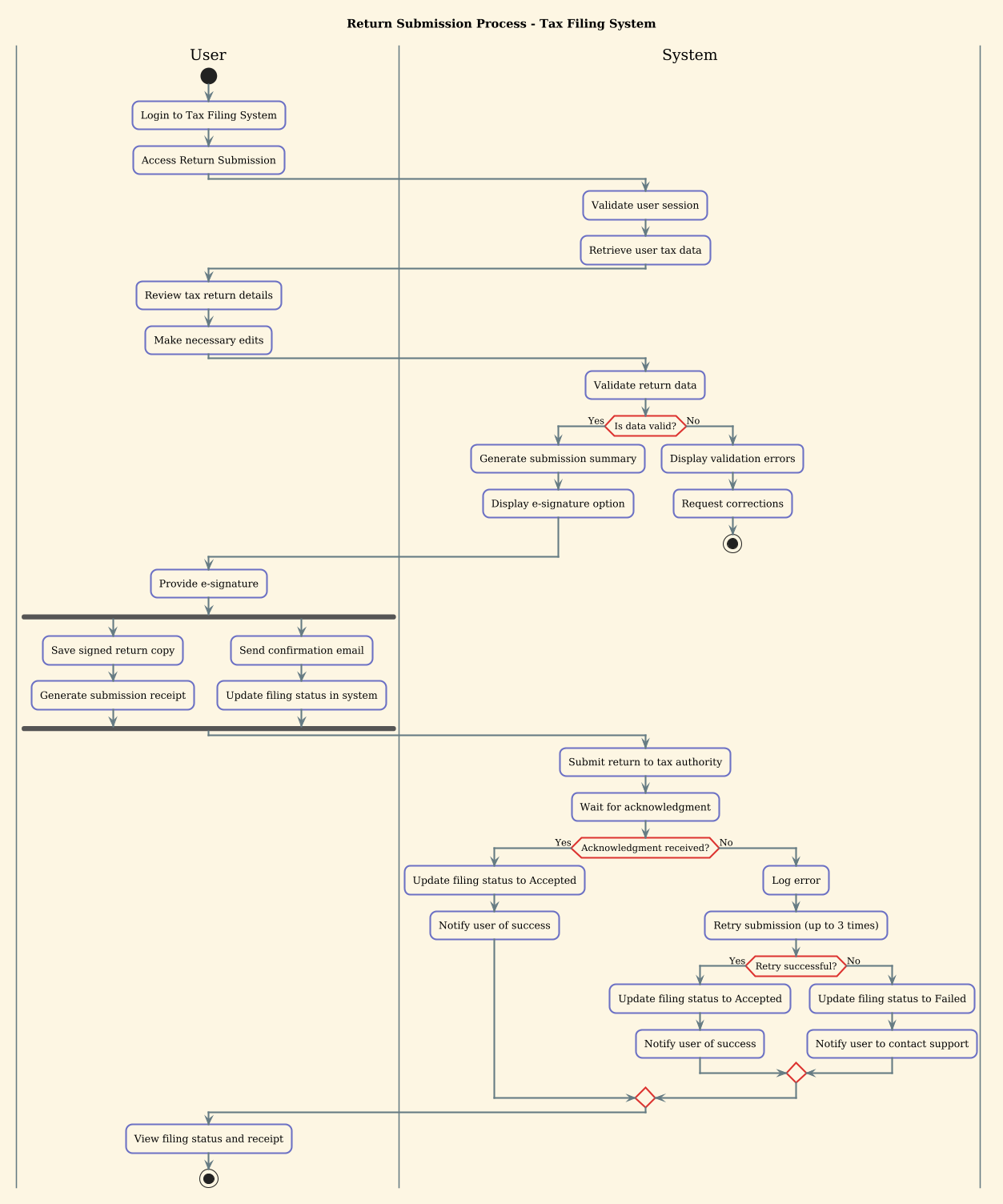
@startuml
!theme sunlust
title Return Submission Process - Tax Filing System

|User|
start
:Login to Tax Filing System;
:Access Return Submission;

|System|
:Validate user session;
:Retrieve user tax data;

|User|
:Review tax return details;
:Make necessary edits;

|System|
:Validate return data;

if (Is data valid?) then (Yes)
  :Generate submission summary;
  :Display e-signature option;
else (No)
  :Display validation errors;
  :Request corrections;
  stop
endif

|User|
:Provide e-signature;

fork
  :Save signed return copy;
  :Generate submission receipt;
fork again
  :Send confirmation email;
  :Update filing status in system;
end fork

|System|
:Submit return to tax authority;
:Wait for acknowledgment;

if (Acknowledgment received?) then (Yes)
  :Update filing status to Accepted;
  :Notify user of success;
else (No)
  :Log error;
  :Retry submission (up to 3 times);
  if (Retry successful?) then (Yes)
    :Update filing status to Accepted;
    :Notify user of success;
  else (No)
    :Update filing status to Failed;
    :Notify user to contact support;
  endif
endif

|User|
:View filing status and receipt;
stop
@endumlStep-by-Step Architectural Walkthrough
Constructing a complex financial workflow requires a phased approach. We will build this diagram in four distinct stages, ensuring each component is logically sound before moving to the next.
Phase 1: Canvas Configuration & Layout Directives
Every PlantUML diagram begins with configuration directives that set the visual tone and structural rules. In VPasCode, you start by defining the theme and the diagram title.
First, we apply the !theme sunlust directive. This theme provides a modern, high-contrast color palette suitable for technical documentation, ensuring readability across different devices. Next, we define the title. This metadata is crucial for accessibility and helps users quickly identify the diagram’s purpose when browsing multiple models.
@startuml
!theme sunlust
title Return Submission Process - Tax Filing System
Phase 2: Declaring Core Entities, Actors, and Boundaries
Financial systems rely on clear separation of duties. We achieve this using Swimlanes. Swimlanes partition the diagram horizontally, assigning specific actions to specific actors.
We define two primary lanes: |User| and |System|. Any activity placed inside the |User| block represents an action performed by the taxpayer. Actions inside |System| represent backend processing. This visual separation prevents confusion regarding who is responsible for validation and who is responsible for data entry.
|User|
start
:Login to Tax Filing System;
:Access Return Submission;

|System|
:Validate user session;
:Retrieve user tax data;
Phase 3: Mapping Data Flows & Key Interactions
This phase handles the core logic: validation and decision-making. We use the if/else syntax to model conditional flows. In the tax context, data validity is a critical gatekeeper.
If the data is invalid, we must stop the process immediately to prevent corrupted data from entering the submission pipeline. If valid, we proceed to the e-signature phase. The if block allows us to visualize the branching paths clearly.
if (Is data valid?) then (Yes)
  :Generate submission summary;
  :Display e-signature option;
else (No)
  :Display validation errors;
  :Request corrections;
  stop
endif
Phase 4: Grouping, Annotations & Visual Polish
Finally, we handle parallel processing and retry logic. Using fork and fork again, we can model actions that happen simultaneously. For example, saving a receipt and sending an email do not need to wait for each other.
We also implement a robust retry mechanism for the final submission to the tax authority. This nested if structure demonstrates how to handle transient network errors without blocking the user experience indefinitely. The diagram concludes with a stop node, marking the successful or failed termination of the workflow.
fork
  :Save signed return copy;
  :Generate submission receipt;
fork again
  :Send confirmation email;
  :Update filing status in system;
end fork
Syntax & Keyword Deep Dive
To fully master diagram-as-code, you must understand the specific keywords that drive the rendering engine. Here is a breakdown of the critical syntax used in this Tax Filing diagram.
|Label|: Defines a swimlane. The content following this declaration belongs to that specific actor until a new swimlane is declared.start&stop: These nodes mark the entry and exit points of the activity flow. Every valid activity diagram must have exactly one start node.if/else: Creates a diamond-shaped decision point. Thethenandelsebranches must be explicitly labeled to indicate the boolean outcome.fork&fork again: Initiates a split in the flow where multiple threads of execution run in parallel.end forkmerges them back into a single flow.!theme sunlust: A directive that applies a predefined CSS-like theme to the diagram, altering colors and fonts for consistency.
Best Practices & Pitfalls to Avoid
When modeling financial workflows, precision is paramount. Follow these best practices to maintain high-quality diagrams:
- Keep Swimlanes Balanced: Avoid creating too many swimlanes. Two or three (User, System, External Service) is usually sufficient for clarity. Too many lanes make the diagram difficult to read horizontally.
- Consistent Naming: Use imperative verbs for actions (e.g.,
:Validate user session;) rather than nouns. This implies action and flow. - Manage Complexity: If a process becomes too deep (e.g., nested retries), consider breaking it into a sub-process diagram. However, for a standard submission flow, the nested retry logic shown here is acceptable.
- Visual Polish: Always define a theme. Without a theme, PlantUML uses a default style that may not align with your documentation standards.
Try It Yourself with VPasCode
Start Building PlantUML Diagrams Faster with VPasCode
Experience instant live browser preview and zero local installation. Test, preview, and customize this Tax Filing diagram online in VPasCode without installing any tools.