



2. 標準統一建模語言(UML)圖表
PlantUML 的核心設計旨在簡化官方 UML 圖表的建立。它主要分為兩大類別:結構圖與行為圖。
結構圖
類別與物件圖
直接從程式碼定義中建模物件導向結構、類別階層、介面、屬性與關係(繼承、聚合、組合)。
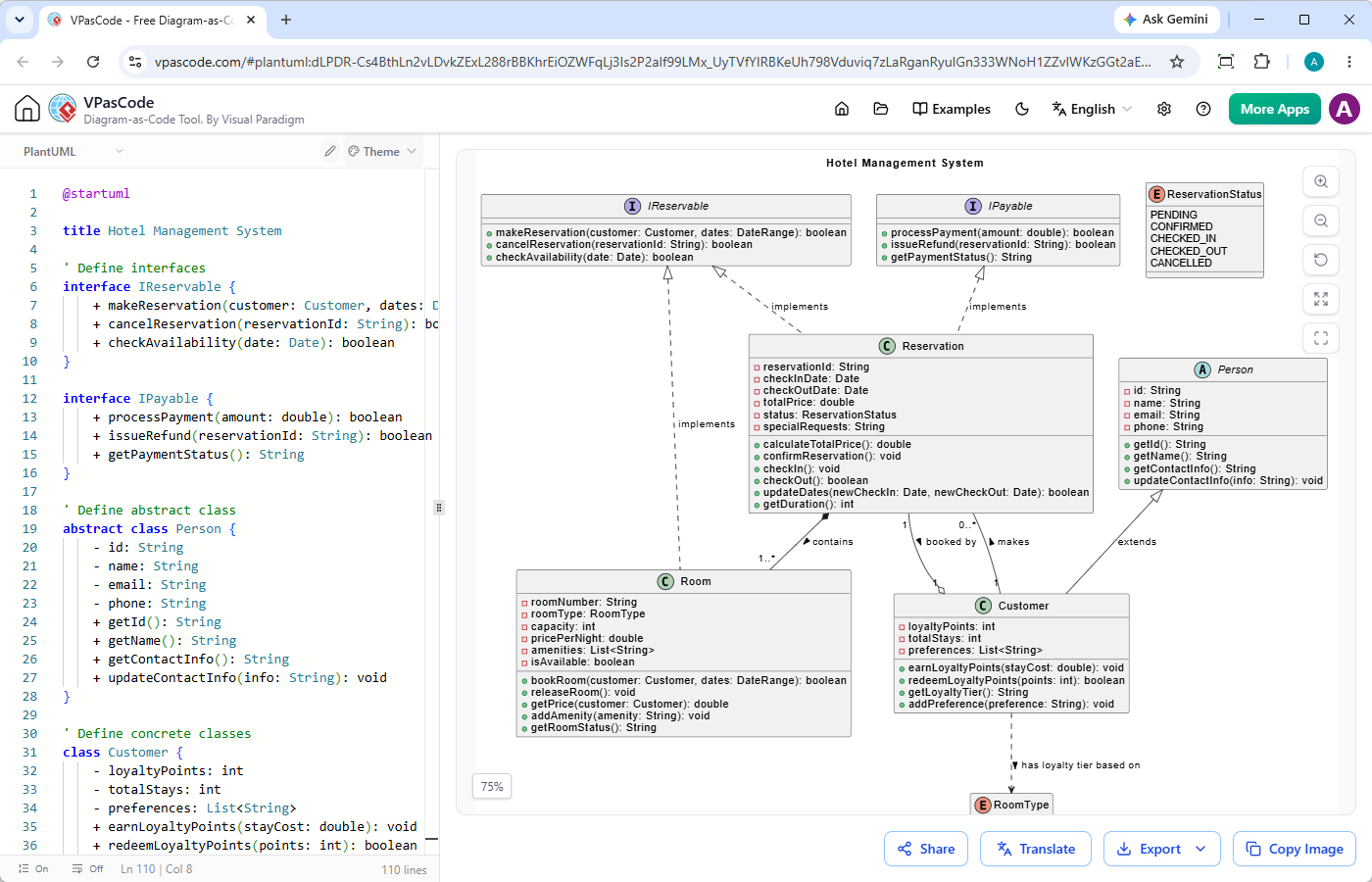
@startuml

title 飯店管理系統

' 定義介面
interface IReservable {
    + makeReservation(customer: Customer, dates: DateRange): boolean
    + cancelReservation(reservationId: String): boolean
    + checkAvailability(date: Date): boolean
}

interface IPayable {
    + processPayment(amount: double): boolean
    + issueRefund(reservationId: String): boolean
    + getPaymentStatus(): String
}

' 定義抽象類別
abstract class Person {
    - id: String
    - name: String
    - email: String
    - phone: String
    + getId(): String
    + getName(): String
    + getContactInfo(): String
    + updateContactInfo(info: String): void
}

' 定義具體類別
class Customer {
    - loyaltyPoints: int
    - totalStays: int
    - preferences: List
    + earnLoyaltyPoints(stayCost: double): void
    + redeemLoyaltyPoints(points: int): boolean
    + getLoyaltyTier(): String
    + addPreference(preference: String): void
}

class Room {
    - roomNumber: String
    - roomType: RoomType
    - capacity: int
    - pricePerNight: double
    - amenities: List
    - isAvailable: boolean
    + bookRoom(customer: Customer, dates: DateRange): boolean
    + releaseRoom(): void
    + getPrice(customer: Customer): double
    + addAmenity(amenity: String): void
    + getRoomStatus(): String
}

class Reservation {
    - reservationId: String
    - checkInDate: Date
    - checkOutDate: Date
    - totalPrice: double
    - status: ReservationStatus
    - specialRequests: String
    + calculateTotalPrice(): double
    + confirmReservation(): void
    + checkIn(): void
    + checkOut(): boolean
    + updateDates(newCheckIn: Date, newCheckOut: Date): boolean
    + getDuration(): int
}

' 列舉
enum RoomType {
    STANDARD
    DELUXE
    SUITE
    PRESIDENTIAL
}

' 列舉
enum ReservationStatus {
    PENDING
    CONFIRMED
    CHECKED_IN
    CHECKED_OUT
    CANCELLED
}

' 關係
' 介面實作(虛線加三角形)
IReservable <|.. Reservation : implements
IPayable <|.. Reservation : implements

' 抽象繼承(實線加三角形)
Person <|-- Customer : extends
' 組合(實心菱形)- Room 是 Reservation 的一部分
Reservation *-- "1..*" Room : contains

' 關聯(簡單實線)並帶有多重性
Customer "1" -- "0..*" Reservation : makes

' 依賴(虛線箭頭)- Customer 依賴於 RoomType
Customer ..> RoomType : has loyalty tier based on

' 帶自訂標籤的關聯
Reservation "1" --o "1" Customer : booked by

' 抽象類別實現介面(可選的額外連接器)
IReservable <|.. Room : implements

@enduml元件與部署圖
將軟體元件、實體節點、構建產物與部署環境進行映射,以視覺化軟體在硬體或雲端基礎設施上的分佈。
@startuml
title 網頁應用程式元件圖

package "客戶端層" {
    [Web Browser] as Browser
    [Mobile App] as Mobile
}

package "應用程式伺服器" {
    [API Gateway] as Gateway
    [User Service] as UserService
    [Order Service] as OrderService
    [Payment Service] as PaymentService
}

package "資料庫層" {
    database "User Database" as UserDB
    database "Order Database" as OrderDB
}

package "第三方服務" {
    [Stripe API] as Stripe
}

' 連接
Browser --> Gateway : HTTP / REST
Mobile --> Gateway : HTTP / REST

Gateway --> UserService : 內部 REST
Gateway --> OrderService : 內部 REST

UserService --> UserDB : 讀取 / 寫入
OrderService --> OrderDB : 讀取 / 寫入
OrderService --> PaymentService : 處理付款

PaymentService --> Stripe : HTTPS / API
@enduml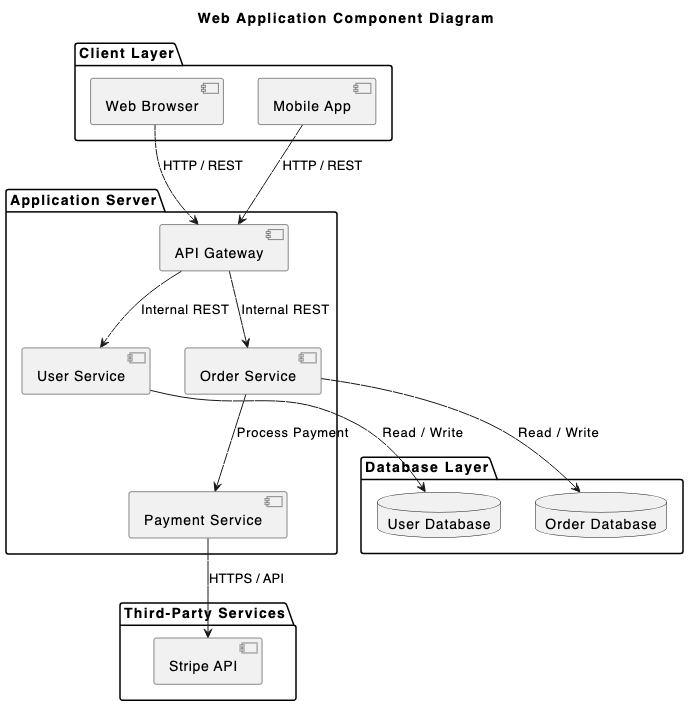
@startuml
title 部署圖 - 三層式網頁應用程式

skinparam componentStyle rectangle

node "客戶端桌面" as clientNode {
  node "Web Browser" as browser {
    artifact "Web App Frontend (HTML/JS)" as frontend
  }
}

node "應用程式伺服器" as appServerNode {
  node "Servlet Container (Tomcat)" as tomcat {
    artifact "Backend API (WAR file)" as appApi
  }
}

node "資料庫伺服器" as databaseNode {
  database "PostgreSQL" as postgres {
    artifact "Application Database Schema" as dbSchema
  }
}

clientNode -- appServerNode : HTTPS (Port 443)
appServerNode -- databaseNode : JDBC (Port 5432)

@enduml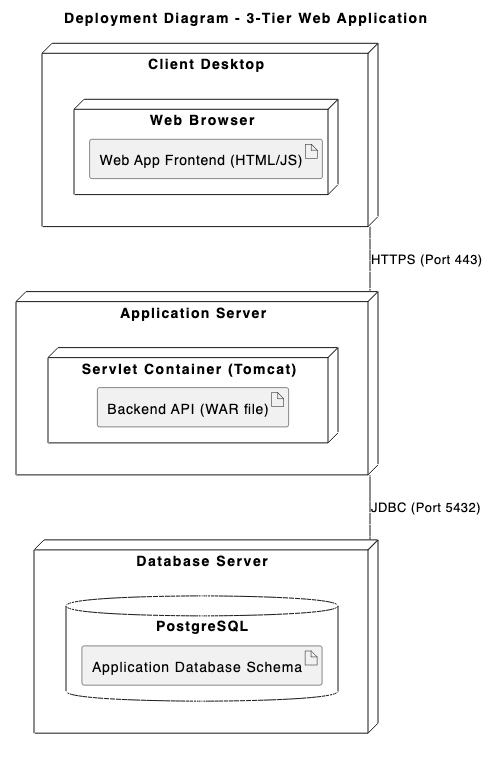
行為與互動圖
序列圖
最流行的 PlantUML 圖表類型。追蹤逐步互動、同步/非同步 API 呼叫,以及參與者與系統之間隨時間變化的訊息流程。
@startuml
title 使用者驗證流程

actor "使用者" as user
participant "Web App" as app
participant "Auth API" as auth
database "使用者資料庫" as db

user -> app : 輸入憑證
activate app

app -> auth : POST /api/v1/login
activate auth

auth -> db : 透過電子郵件查詢使用者
activate db
db --> auth : 回傳使用者記錄與雜湊值
deactivate db

alt 有效憑證
    auth -> auth : 驗證密碼並產生 JWT
    auth --> app : 200 OK (Token 與個人資料)
    app --> user : 重新導向至主控台
else 無效憑證
    auth --> app : 401 Unauthorized (錯誤)
    app --> user : 顯示「無效憑證」
end

deactivate auth
deactivate app
@enduml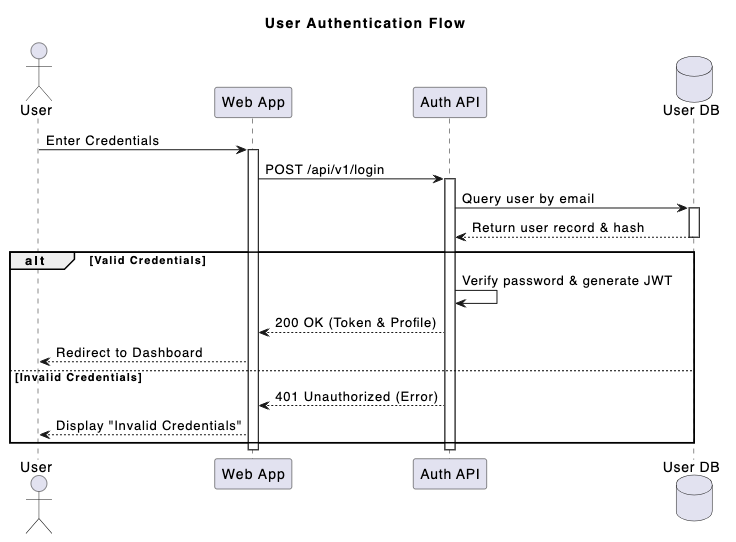
使用案例圖
定義系統邊界、參與者、使用者目標與功能範圍。
@startuml
title 線上購物系統 - 使用案例圖

left to right direction

actor 顧客
actor "註冊顧客" as RegCustomer
actor "金流閘道" as PaymentSystem

Customer <|-- RegCustomer rectangle "電子商務系統" { usecase "瀏覽商品" as UC_Browse usecase "搜尋項目" as UC_Search usecase "管理購物車" as UC_Cart usecase "結帳訂單" as UC_Checkout usecase "套用折扣券" as UC_Coupon usecase "處理付款" as UC_Payment usecase "檢視訂單歷史" as UC_History } Customer --> UC_Browse
Customer --> UC_Search
Customer --> UC_Cart
Customer --> UC_Checkout

RegCustomer --> UC_History

UC_Checkout .> UC_Payment : <>
UC_Checkout <.. UC_Coupon : <>

UC_Payment -- PaymentSystem
@enduml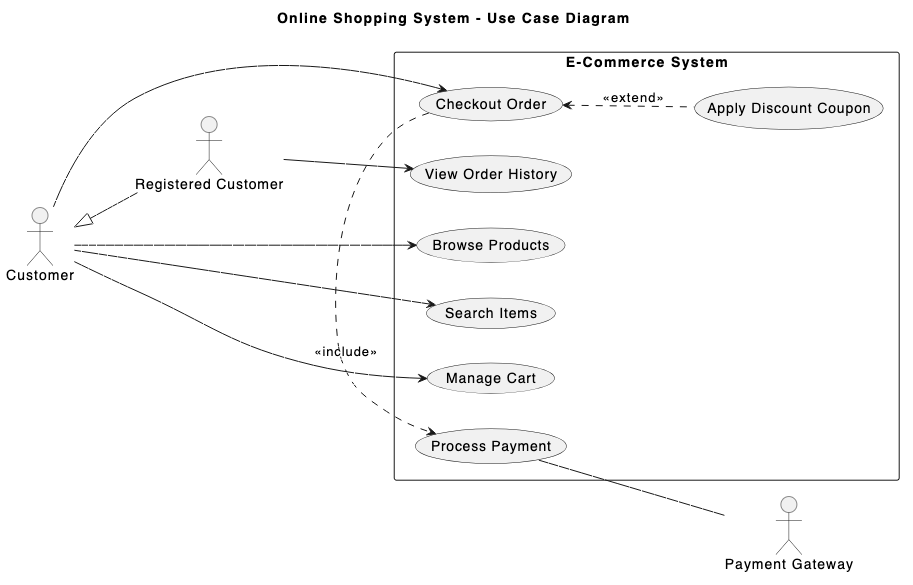
活動圖與狀態圖
繪製複雜的業務邏輯、演算法流程、狀態機轉換與並行處理。
@startuml
title 訂單履行流程

|顧客|
start
:下訂單;
:提交付款詳情;

|訂單系統|
if (付款有效?) then (是)
    :保留庫存;

    ' 並行處理分割
    fork
        |倉庫|
        :從貨架撿貨;
        :將商品裝箱;
    fork again
        |帳務|
        :產生發票 PDF;
        :扣款;
    end fork

    |運送|
    :貼上運送標籤;
    :交給快遞;

    |顧客|
    :接收包裹;
    stop
else (否)
    |訂單系統|
    :發送付款失敗通知;
    |顧客|
    :更新付款方式;
    stop
endif
@enduml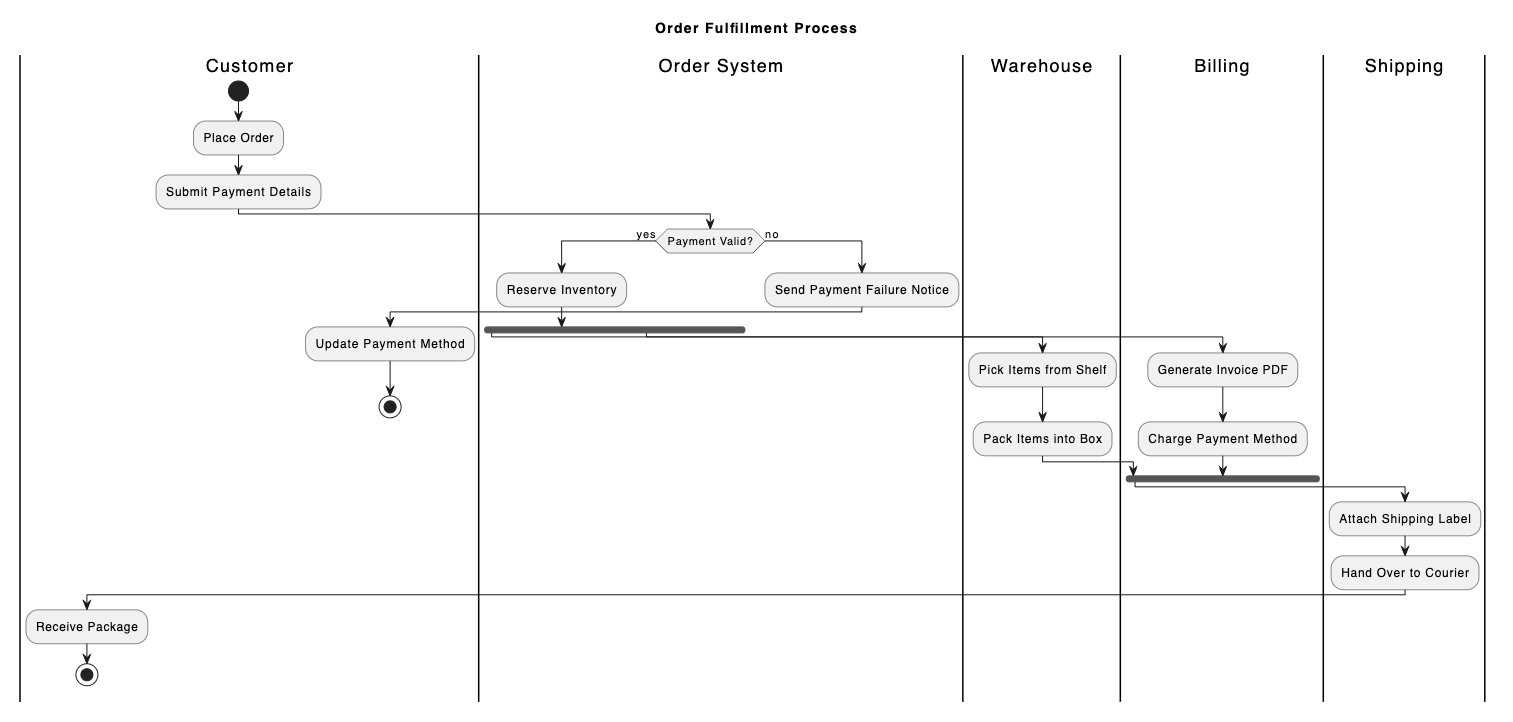
@startuml
title 電子商務訂單生命週期

[*] --> Pending : 訂單已下達

state Pending {
    [*] --> AwaitingPayment
    AwaitingPayment --> PaymentFailed : 付款錯誤
    PaymentFailed --> AwaitingPayment : 重試付款
}

Pending --> Processing : 付款已授權
Pending --> Cancelled : 使用者取消訂單

state Processing {
    [*] --> Packing
    Packing --> ReadyForShipment : 品質檢查通過
}

Processing --> Shipped : 運送商交接
Shipped --> Delivered : 送達確認
Shipped --> Returned : 送達失敗 / 拒收

Delivered --> [*]
Cancelled --> [*]
Returned --> [*]
@enduml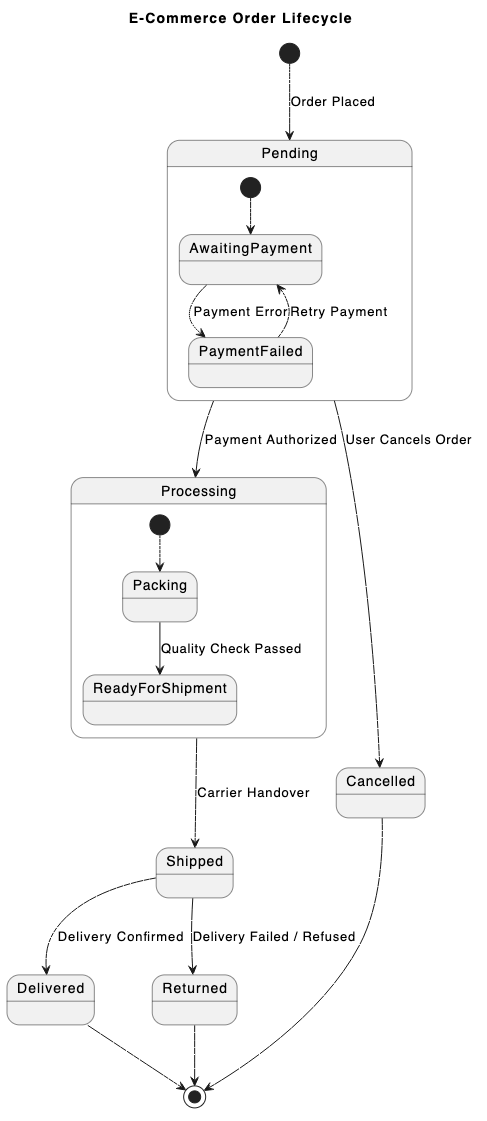
時序圖
詳細描述離散時間框架內的精確狀態轉換與物件互動——適合嵌入式系統或即時硬體設計。
@startuml
title SPI 資料傳輸時序圖

robust "時脈 (SCLK)" as CLK
binary "晶片選擇 (CS)" as CS
binary "主機輸出 (MOSI)" as MOSI
concise "資料匯流排 (MISO)" as MISO

@0
CS 為高電位
CLK 為低電位
MOSI 為低電位
MISO 為「閒置」

@1
CS 為低電位
MISO 為「標頭」

@2
CLK 為高電位
MOSI 為高電位

@3
CLK 為低電位

@4
CLK 為高電位
MOSI 為低電位
MISO 為「有效負載」

@5
CLK 為低電位

@6
CS 為高電位
CLK 為低電位
MOSI 為低電位
MISO 為「閒置」

@enduml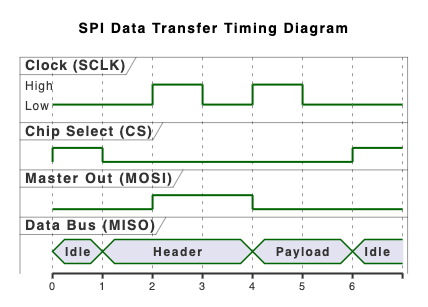
3. 高階架構與領域專用圖
超越傳統 UML,PlantUML 利用專門的擴充函式庫,擅長呈現多層次的軟體系統與資料架構。
C4 模型圖
以不同抽象層級(情境、容器、組件與程式碼)表達軟體架構,讓系統設計對技術與非技術利害關係人都能輕易理解。
@startuml
!include https://raw.githubusercontent.com/plantuml-stdlib/C4-PlantUML/master/C4_Context.puml

TITLE 網路銀行系統之系統情境圖

Person(customer, "個人銀行客戶", "擁有個人銀行帳戶的銀行客戶。")
System(banking_system, "網路銀行系統", "允許客戶查看其銀行帳戶資訊並進行付款。")

System_Ext(mainframe, "主機銀行系統", "儲存所有關於客戶、帳戶、交易等核心銀行資訊。")
System_Ext(email_system, "電子郵件系統", "內部 Microsoft Exchange 電子郵件系統。")

Rel(customer, banking_system, "查看帳戶餘額並使用此系統進行付款")
Rel(banking_system, mainframe, "從主機系統取得帳戶資訊並使用其進行付款")
Rel(banking_system, email_system, "使用此系統發送電子郵件")
Rel_Back(email_system, customer, "發送電子郵件給客戶")
@enduml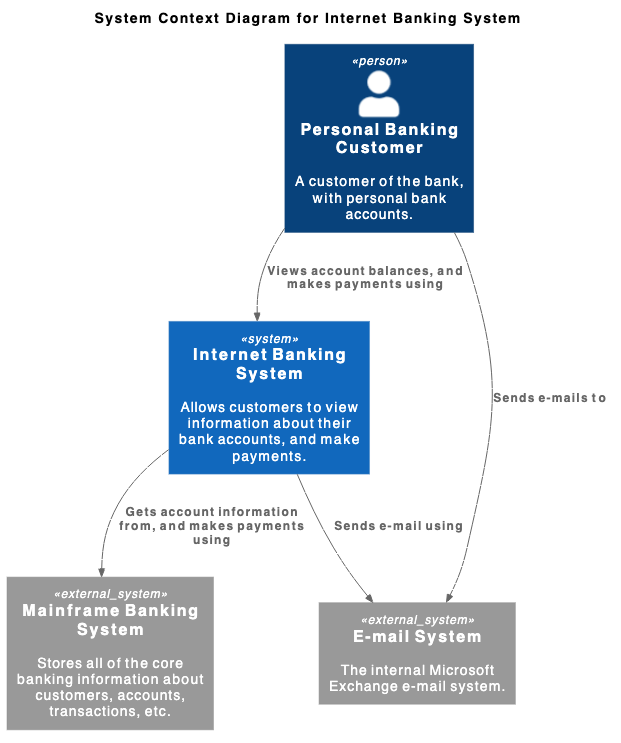
ArchiMate 圖
支援跨業務、應用程式與技術層級之企業架構建模,將組織策略映射至營運系統。
@startuml
!include <archimate/Archimate>

title ArchiMate 範例 - 線上帳單付款

Grouping(business, "業務層"){
    Business_Process(payBillProcess, "付款流程")
    Business_Object(bankAccount, "客戶銀行帳戶")
    Business_Service(paymentService, "帳單付款業務服務")
}

Grouping(application, "應用程式層"){
    Application_Component(bankingApp, "行動銀行應用程式")
    Application_Function(paymentProcessing, "處理付款邏輯")
    Application_DataObject(transactionRecord, "交易資料載體")
}

Grouping(technology, "技術層"){
    Technology_Artifact(jwtToken, "加密的會話權杖")
    Technology_Service(apiGateway, "API 閘道服務")
    Technology_Service(dbService, "核心資料庫服務")
}

Rel_Flow_Right(payBillProcess, bankAccount, "")
Rel_Serving_Up(paymentService, payBillProcess, "")
Rel_Specialization_Up(paymentProcessing, paymentService, "")
Rel_Flow_Right(transactionRecord, paymentProcessing, "")
Rel_Assignment_Left(bankingApp, paymentProcessing, "")
Rel_Realization_Up(jwtToken, transactionRecord, "")
Rel_Serving_Up(apiGateway, paymentProcessing, "")
Rel_Serving_Up(dbService, apiGateway, "")
@enduml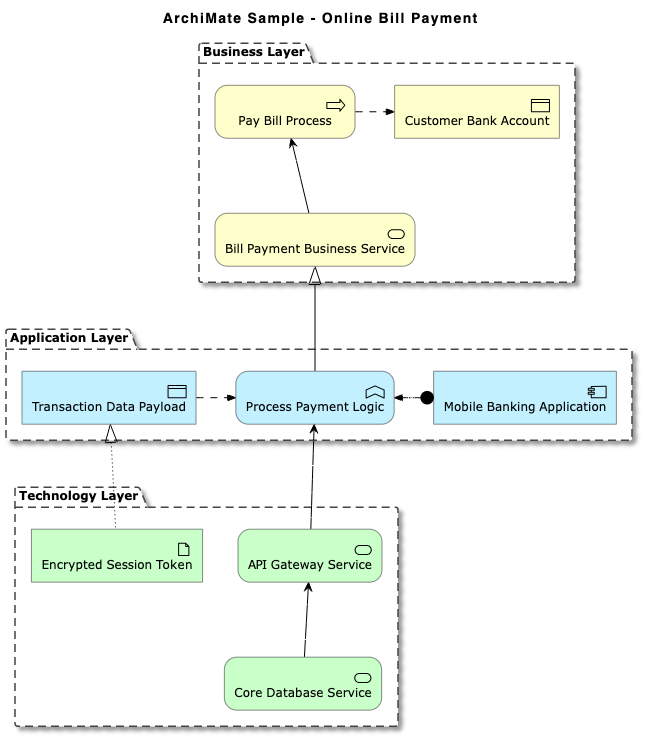
實體關聯圖 (ERD)
產生清晰的資料庫結構視覺化圖,包含標準的鴉腳記號與 Chen ERD 模型。
@startuml
title 電子商務資料庫結構 (鴉腳記號)

' 隱藏實體的圓形圖示
hide circle
skinparam linetype ortho

entity "使用者" as user {
    * user_id : INT <>
    --
    * email : VARCHAR(255)
    * password_hash : VARCHAR(255)
    * created_at : TIMESTAMP
}

entity "客戶個人資料" as profile {
    * profile_id : INT <>
    --
    * user_id : INT <>
    * first_name : VARCHAR(100)
    * last_name : VARCHAR(100)
      phone : VARCHAR(20)
}

entity "訂單" as order {
    * order_id : INT <>
    --
    * user_id : INT <>
    * order_date : TIMESTAMP
    * total_amount : DECIMAL(10,2)
    * status : VARCHAR(50)
}

entity "訂單項目" as item {
    * order_item_id : INT <>
    --
    * order_id : INT <>
    * product_id : INT <>
    * quantity : INT
    * unit_price : DECIMAL(10,2)
}

entity "商品" as product {
    * product_id : INT <>
    --
    * sku : VARCHAR(50)
    * name : VARCHAR(150)
      description : TEXT
    * price : DECIMAL(10,2)
}

' 關聯
user ||--o| profile : "擁有"
user ||--o{ order : "下單"
order ||--|{ item : "包含"
product ||--o{ item : "出現在"

@enduml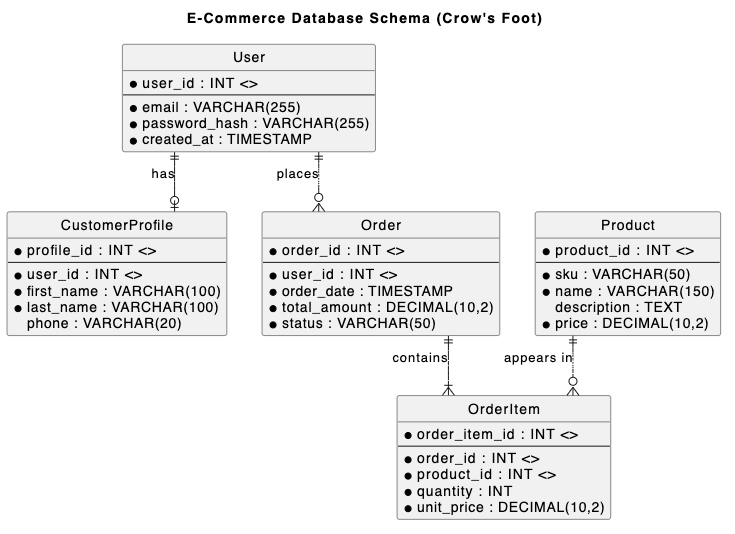
網路與基礎設施地圖
輕鬆呈現網路拓撲、伺服器節點、雲端連線與防火牆。
@startnwdiag
title 企業網路拓撲

nwdiag {
    network External_Internet {
        address = "0.0.0.0/0"
        user_client [address = "203.0.113.15", description = "遠端使用者"];
        edge_firewall [address = "192.168.1.1", description = "周界防火牆"];
    }

    network DMZ_Zone {
        address = "192.168.1.0/24"
        edge_firewall;
        load_balancer [address = "192.168.1.10", description = "Nginx 負載平衡器"];
        mail_server [address = "192.168.1.25", description = "SMTP 伺服器"];
        internal_firewall [address = "192.168.1.254", description = "內部防火牆"];
    }

    network Private_LAN {
        address = "10.0.1.0/24"
        internal_firewall;
        app_server_01 [address = "10.0.1.50", description = "API 節點 1"];
        app_server_02 [address = "10.0.1.51", description = "API 節點 2"];
        db_master [address = "10.0.1.100", description = "PostgreSQL 主節點"];
    }

    network Management_Subnet {
        address = "10.0.99.0/24"
        internal_firewall;
        admin_bastion [address = "10.0.99.5", description = "SSH 堡壘主機"];
        monitoring_node [address = "10.0.99.20", description = "Prometheus 主機"];
    }
}
@endnwdiag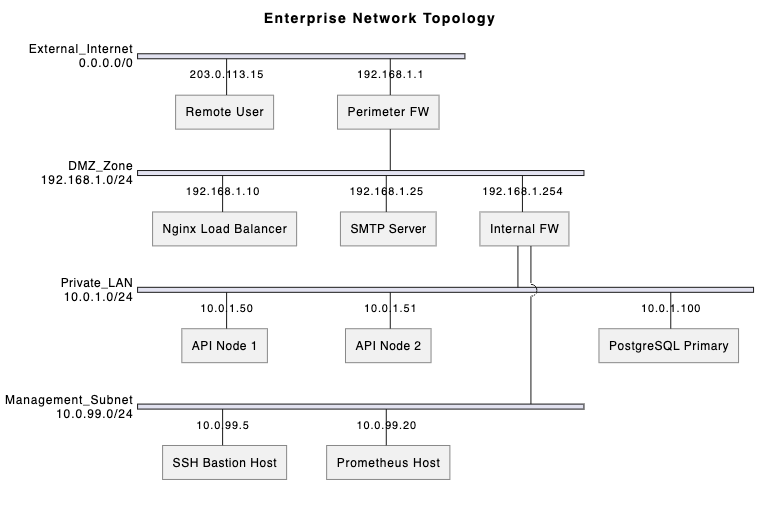
4. 規劃、管理與腦力激盪視覺化
PlantUML 不僅限於軟體設計,它也是專案管理與團隊腦力激盪的強大工具。
甘特圖
使用簡潔的文字標記來規劃專案時程、任務相依性、里程碑與資源配置。
gantt
    title 軟體產品發布時程
    dateFormat  YYYY-MM-DD
    axisFormat  %b %d

    section 規劃與設計
    需求收集   :a1, 2026-09-01, 10d
    架構設計      :a2, 在 a1 之後, 10d

    section 開發
    後端 API 開發  :b1, 在 a2 之後, 15d
    前端 UI 開發  :b2, 在 a2 之後, 15d

    section 測試與發布
    整合測試      :c1, 在 b1 和 b2 之後, 8d
    安全審計           :c2, 在 c1 之後, 5d
    生產發布       :milestone, m1, 在 c2 之後, 0d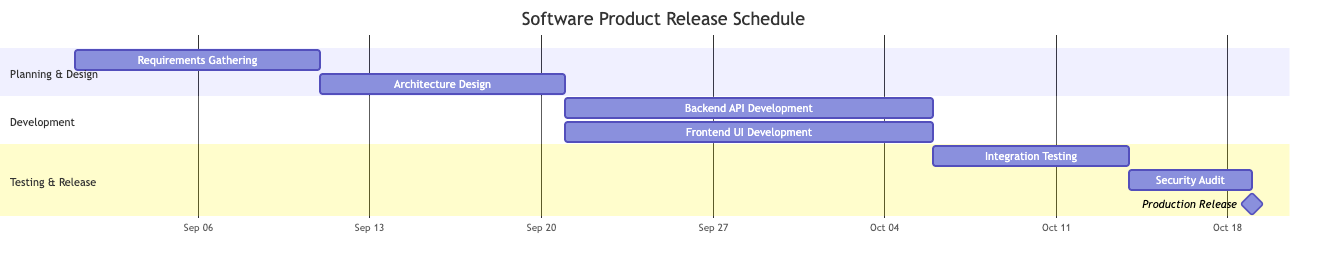
工作分解結構 (WBS)
將複雜專案分解為層級化的交付成果與可管理的任務區塊。
@startwbs
title 網站重新設計 WBS

* 網站重新設計專案
** 1. 探索與策略
*** 1.1 利害關係人訪談
*** 1.2 競爭對手審計
*** 1.3 範圍與策略簽核
** 2. UX/UI 設計
*** 2.1 線框圖
**** 2.1.1 桌面版面
**** 2.1.2 行動版面
*** 2.2 設計系統
**** 2.2.1 元件庫
**** 2.2.2 字體與風格指南
** 3. 技術開發
*** 3.1 前端
**** 3.1.1 頁面範本
**** 3.1.2 API 整合
*** 3.2 CMS 與後端
**** 3.2.1 自訂文章類型
**** 3.2.2 資料庫遷移
** 4. 品質保證與上線
*** 4.1 跨瀏覽器測試
*** 4.2 內容遷移
*** 4.3 DNS 切換與上線
@endwbs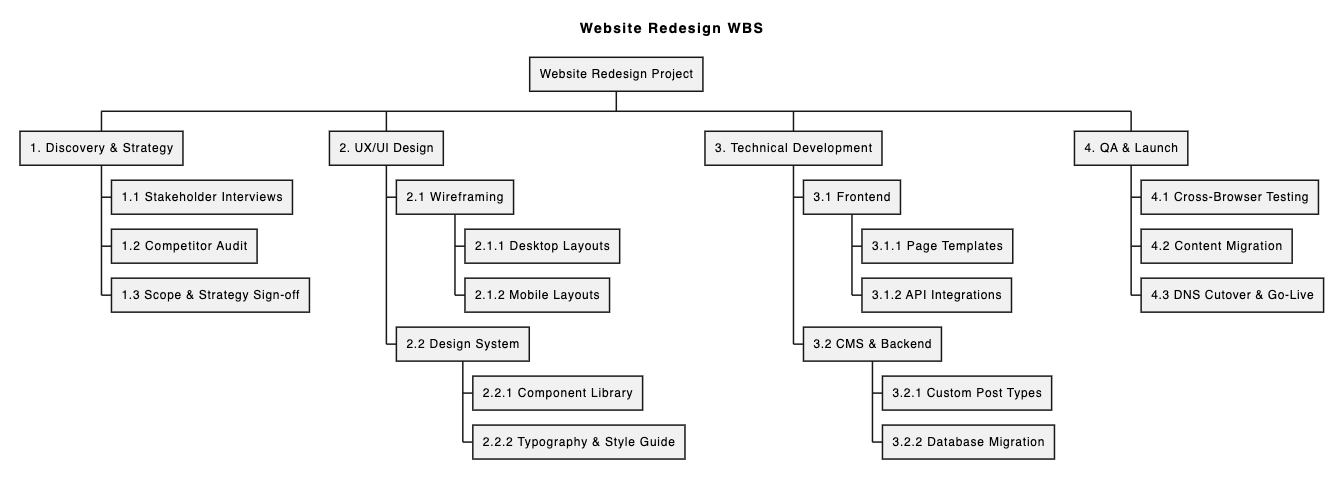
心智圖
在團隊會議期間快速記錄結構化的想法、功能分類與技術探索筆記。
@startmindmap
title 電商平台功能地圖

* 電商平台
** 使用者帳戶管理
*** 社群登入 (Google, Apple)
*** 多重要素驗證
*** 訂單歷史與追蹤
** 產品目錄與搜尋
*** 分面搜尋與篩選
*** 庫存同步
*** 產品評論與評分
** 結帳與付款
*** 付款閘道 (Stripe, PayPal)
*** 優惠券與促銷引擎
*** 一鍵訪客結帳
** 客戶支援
*** 即時聊天助理
*** 自動化退貨門戶
@endmindmap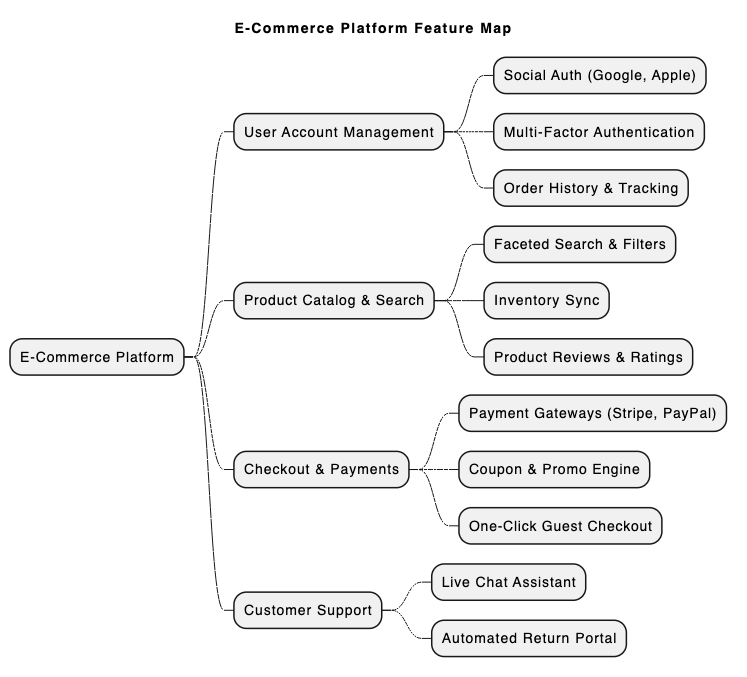
5. 快速撰寫與渲染 PlantUML:VPasCode 的優勢
雖然 PlantUML 功能強大,但設定本機 Java 環境、Graphviz 相依性與命令列工具可能會造成不便。使用專用的網頁版PlantUML 工具即可完全消除這些障礙。
Visual Paradigm VPasCode是一個統一的圖形即程式碼平台,專門設計用於簡化文字轉圖形的流程。根據我們最近強調的重大 VPasCode 更新:使用 AI 即時生成與修改圖形,它現在已在編輯器內支援原生 AI 功能。
VPasCode 的主要優勢:
- 原生 AI 圖形生成與修改: 使用自然語言提示(例如:「為 ATM 系統生成 PlantUML 使用案例圖」」,或指示 AI 即時修改現有程式碼。
- 零設定線上平台: 立即在 vpascode.com 存取強大的編輯器,無需安裝本機編譯器或外掛程式。請在VPasCode 概覽.
- 自動格式偵測與即時預覽:貼上您的腳本,VPasCode 會自動偵測其為 PlantUML、Mermaid 或 Graphviz,並在您輸入時即時渲染更新。
- AI 驅動的程式碼錯誤修正:如果遇到語法錯誤,只需點擊「由 AI 修正」。VPasCode 會修正程式碼,並提供並排差異比對與清晰說明,讓您能更快掌握 PlantUML 語法。
- 原生 AI 圖表翻譯:直接在編輯器內將圖表標籤與註解翻譯成多種語言——非常適合全球開發團隊。
- 彈性匯出與文件整合:免費匯出高解析度 PNG 或可縮放 SVG 向量圖形。您也可以利用他們的「圖表即程式碼功能指南」.
(註:進階 AI 圖表生成、修改與錯誤修正功能僅在 Visual Paradigm Online 進階版 / Visual Paradigm Desktop 專業版+ 中提供。)
6. 快速開始範例:在 VPasCode 中渲染序列圖
要體驗使用免費 UML 編輯器(如 VPasCode)有多麼簡單,請參考以下基本的 PlantUML 序列圖腳本:
@startuml
autonumber
actor User
participant "VPasCode Editor" as Editor
participant "AI Engine" as AI

User -> Editor: 貼上 PlantUML 程式碼
Editor -> Editor: 自動偵測格式與即時渲染
alt 偵測到語法錯誤
    User -> Editor: 點擊「由 AI 修正」
    Editor -> AI: 傳送錯誤程式碼
    AI --> Editor: 回傳修正後的程式碼與差異比對
end
Editor --> User: 顯示乾淨的向量圖形 (SVG/PNG)
@enduml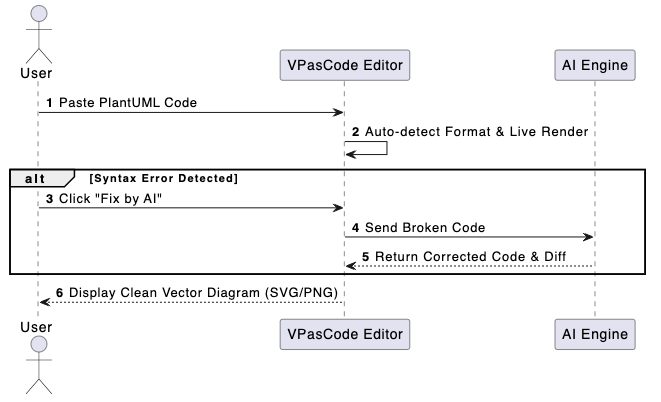
只需複製上述程式碼,開啟 VPasCode,將其貼上至編輯器,即可立即檢視即時渲染效果,並體驗自動化的 AI 增強功能。
7. 結論與後續步驟
PlantUML 讓團隊能夠維護清晰、可版本控制且一致的視覺化文件,涵蓋 UML、架構、資料庫結構與專案管理圖表。搭配現代的PlantUML 工具(如 VPasCode),技術寫作將變得更快、無誤且無縫協作。
準備好簡化您的圖表製作流程了嗎?立即免費開始編輯與渲染 PlantUML 圖表,請造訪vpascode.com.