



2. Standardowe diagramy języka Unified Modeling Language (UML)
W swojej istocie PlantUML został stworzony, aby uprościć tworzenie oficjalnych diagramów UML. Dzieli się na dwie główne kategorie: diagramy strukturalne i behawioralne.
Diagramy strukturalne
Diagramy klas i obiektów
Modeluj struktury obiektowe, hierarchie klas, interfejsy, atrybuty i relacje (dziedziczenie, agregacja, kompozycja) bezpośrednio z definicji kodu.
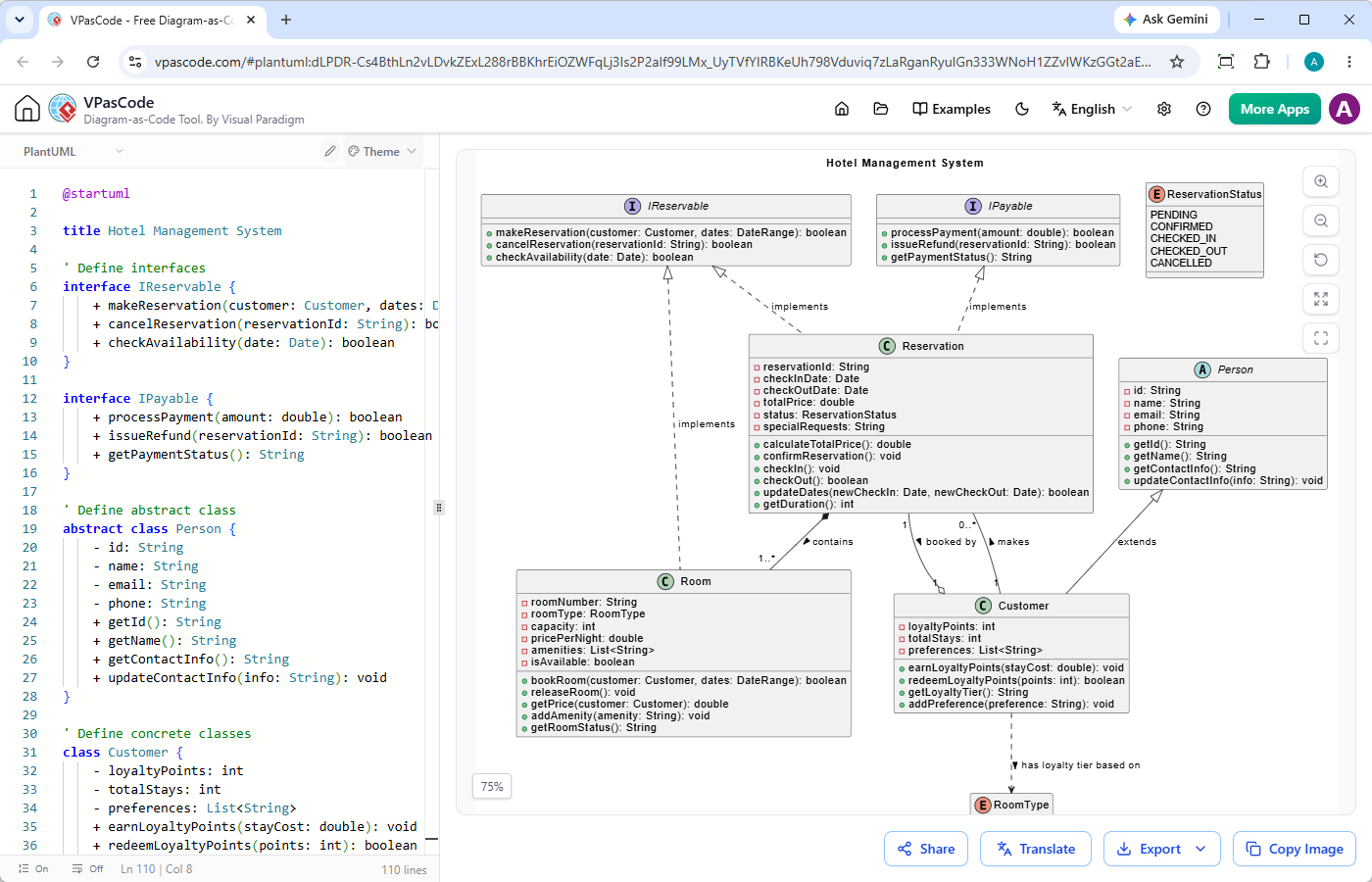
@startuml

title System Zarządzania Hotelem

' Definicja interfejsów
interface IReservable {
    + makeReservation(klient: Klient, daty: ZakresDat): boolean
    + cancelReservation(idRezerwacji: String): boolean
    + checkAvailability(data: Date): boolean
}

interface IPayable {
    + processPayment(kwota: double): boolean
    + issueRefund(idRezerwacji: String): boolean
    + getPaymentStatus(): String
}

' Definicja klasy abstrakcyjnej
abstract class Osoba {
    - id: String
    - name: String
    - email: String
    - phone: String
    + getId(): String
    + getName(): String
    + getContactInfo(): String
    + updateContactInfo(info: String): void
}

' Definicja klas konkretnych
class Klient {
    - punktyLojalnościowe: int
    - całkowitaLiczbaPobytów: int
    - preferencje: List
    + earnLoyaltyPoints(kosztPobytu: double): void
    + redeemLoyaltyPoints(punkty: int): boolean
    + getLoyaltyTier(): String
    + addPreference(preferencja: String): void
}

class Pokój {
    - numerPokoiu: String
    - typPokoiu: TypPokoiu
    - pojemność: int
    - cenaZaNoc: double
    - udogodnienia: List
    - jestDostępny: boolean
    + bookRoom(klient: Klient, daty: ZakresDat): boolean
    + releaseRoom(): void
    + getPrice(klient: Klient): double
    + addAmenity(udogodnienie: String): void
    + getRoomStatus(): String
}

class Rezerwacja {
    - idRezerwacji: String
    - dataZameldowania: Date
    - dataWymeldowania: Date
    - całkowityKoszt: double
    - status: StatusRezerwacji
    - specjalneWymagania: String
    + calculateTotalPrice(): double
    + confirmReservation(): void
    + checkIn(): void
    + checkOut(): boolean
    + updateDates(nowaDataZameldowania: Date, nowaDataWymeldowania: Date): boolean
    + getDuration(): int
}

' Enumeracja
enum TypPokoiu {
    STANDARD
    DELUXE
    SUITE
    PRESIDENTIAL
}

' Enumeracja
enum StatusRezerwacji {
    OCZEKUJĄCA
    POTWIERDZONA
    ZAMELDOWANA
    WYMELDOWANA
    ANULOWANA
}

' Relacje
' Implementacja interfejsu (przerywana linia z trójkątem)
IReservable <|.. Rezerwacja : implements
IPayable <|.. Rezerwacja : implements

' Dziedziczenie abstrakcyjne (ciągła linia z trójkątem)
Person <|-- Klient : extends ' Kompozycja (ciągły romb) - Pokój jest częścią Rezerwacji Rezerwacja *-- "1..*" Pokój : contains >

' Asocjacja (prosta ciągła linia) z mnożnością
Klient "1" -- "0..*" Rezerwacja : tworzy >

' Zależność (przerywana strzałka) - Klient zależy od TypPokoiu
Klient ..> TypPokoiu : ma poziom lojalności oparty na >

' Asocjacja z niestandardową etykietą
Rezerwacja "1" --o "1" Klient : zarezerwowana przez >

' Realizacja interfejsu przez klasę abstrakcyjną (opcjonalny dodatkowy łącznik)
IReservable <|.. Pokój : implements

@endumlDiagramy komponentów i wdrożeń
Mapuj komponenty oprogramowania, węzły fizyczne, artefakty i środowiska wdrożeń, aby wizualizować dystrybucję oprogramowania na sprzęcie lub infrastrukturze chmurowej.
@startuml
title Diagrama komponentów aplikacji internetowej

package "Warstwa klienta" {
    [Przeglądarka internetowa] jako Przeglądarka
    [Aplikacja mobilna] jako Mobilna
}

package "Serwer aplikacji" {
    [Brama API] jako Brama
    [Usługa użytkownika] jako UsługaUżytkownika
    [Usługa zamówień] jako UsługaZamówień
    [Usługa płatności] jako UsługaPłatności
}

package "Warstwa bazy danych" {
    baza_danych "Baza danych użytkowników" jako UserDB
    baza_danych "Baza danych zamówień" jako OrderDB
}

package "Usługi zewnętrzne" {
    [API Stripe] jako Stripe
}

' Połączenia
Przeglądarka --> Brama : HTTP / REST
Mobilna --> Brama : HTTP / REST

Brama --> UsługaUżytkownika : Wewnętrzne REST
Brama --> UsługaZamówień : Wewnętrzne REST

UsługaUżytkownika --> UserDB : Odczyt / Zapis
UsługaZamówień --> OrderDB : Odczyt / Zapis
UsługaZamówień --> UsługaPłatności : Przetwarzanie płatności

UsługaPłatności --> Stripe : HTTPS / API
@enduml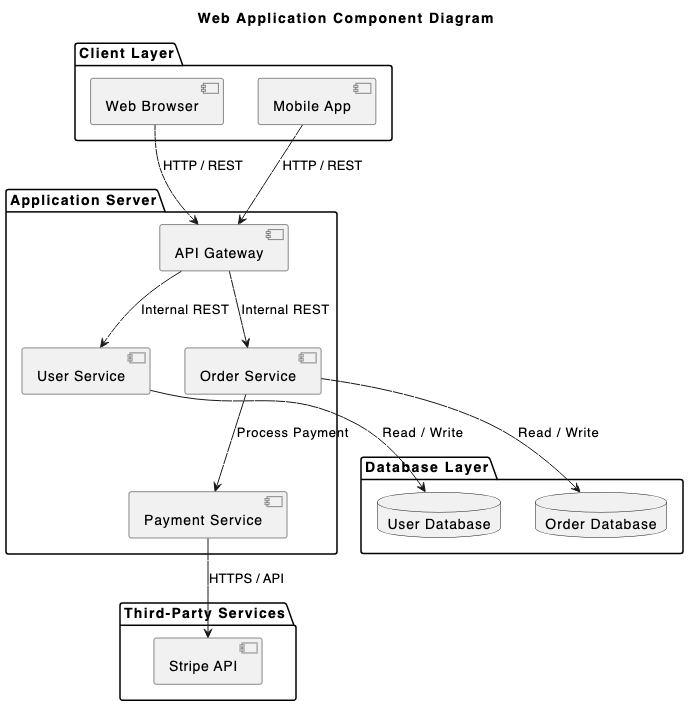
@startuml
title Diagrama wdrożenia - 3-warstwowa aplikacja internetowa

skinparam componentStyle rectangle

node "Klient (Pulpit)" jako clientNode {
  node "Przeglądarka internetowa" jako browser {
    artifact "Frontend aplikacji internetowej (HTML/JS)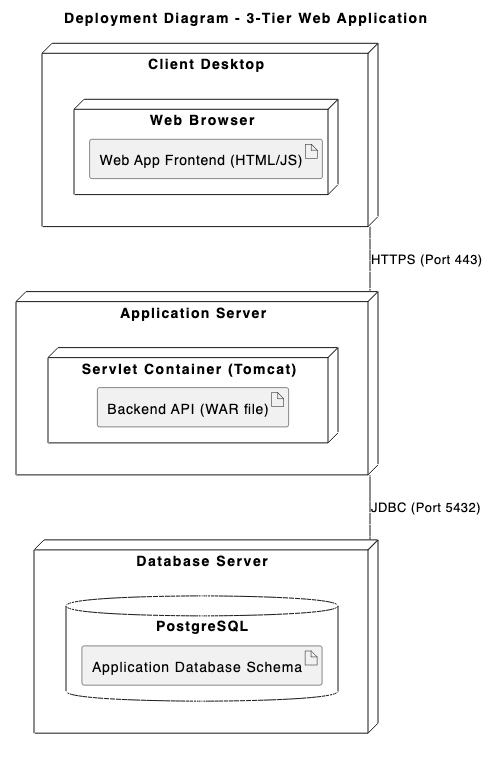
Diagramy behawioralne i interakcji
Diagramy sekwencji
Najpopularniejszy typ diagramu PlantUML. Śledź krok po kroku interakcje, synchroniczne/asynchroniczne wywołania API oraz przepływy wiadomości między aktorami i systemami w czasie.
@startuml
tytuł: Przepływ autoryzacji użytkownika

aktor "Użytkownik" jako user
uczestnik "Aplikacja Webowa" jako app
uczestnik "API Autoryzacji" jako auth
baza danych "Baza Użytkowników" jako db

user -> app : Wprowadź dane logowania
aktywuj app

app -> auth : POST /api/v1/login
aktywuj auth

auth -> db : Wyszukaj użytkownika po e-mailu
aktywuj db
db --> auth : Zwróć rekord użytkownika i hash
deaktywuj db

alt Poprawne dane logowania
    auth -> auth : Zweryfikuj hasło i wygeneruj JWT
    auth --> app : 200 OK (Token i Profil)
    app --> user : Przekieruj do pulpitu
else Niepoprawne dane logowania
    auth --> app : 401 Unauthorized (Błąd)
    app --> user : Wyświetl "Niepoprawne dane logowania"
end

deaktywuj auth
deaktywuj app
@enduml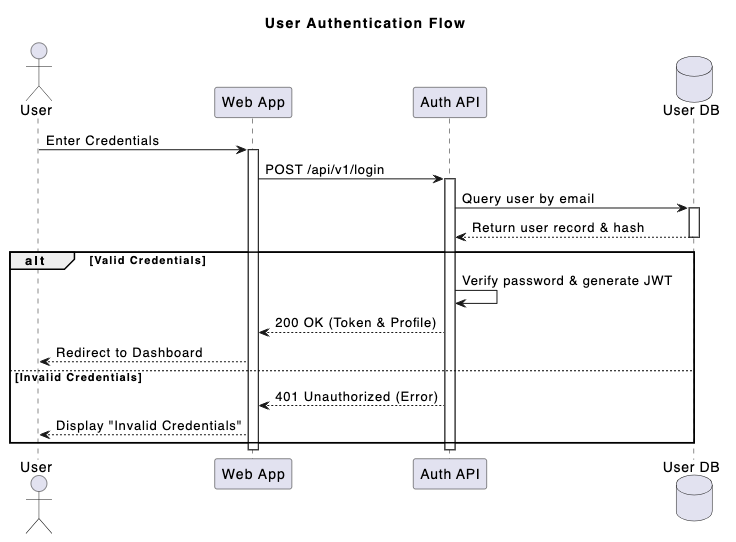
Diagramy przypadków użycia
Określ granice systemu, aktorów, cele użytkowników i zakres funkcjonalny.
@startuml
tytuł: System zakupów online - Diagram przypadków użycia

kierunek od lewej do prawej

aktor Klient
aktor "Zarejestrowany Klient" jako RegCustomer
aktor "Brama Płatności" jako PaymentSystem

Klient <|-- RegCustomer prostokąt "System E-Commerce" { przypadek_użycia "Przeglądaj produkty" jako UC_Browse przypadek_użycia "Szukaj przedmiotów" jako UC_Search przypadek_użycia "Zarządzaj koszykiem" jako UC_Cart przypadek_użycia "Zamówienie" jako UC_Checkout przypadek_użycia "Zastosuj kupon rabatowy" jako UC_Coupon przypadek_użycia "Przetwórz płatność" jako UC_Payment przypadek_użycia "Zobacz historię zamówień" jako UC_History } Klient --> UC_Browse
Klient --> UC_Search
Klient --> UC_Cart
Klient --> UC_Checkout

RegCustomer --> UC_History

UC_Checkout .> UC_Payment : <>
UC_Checkout <.. UC_Coupon : <>

UC_Payment -- PaymentSystem
@enduml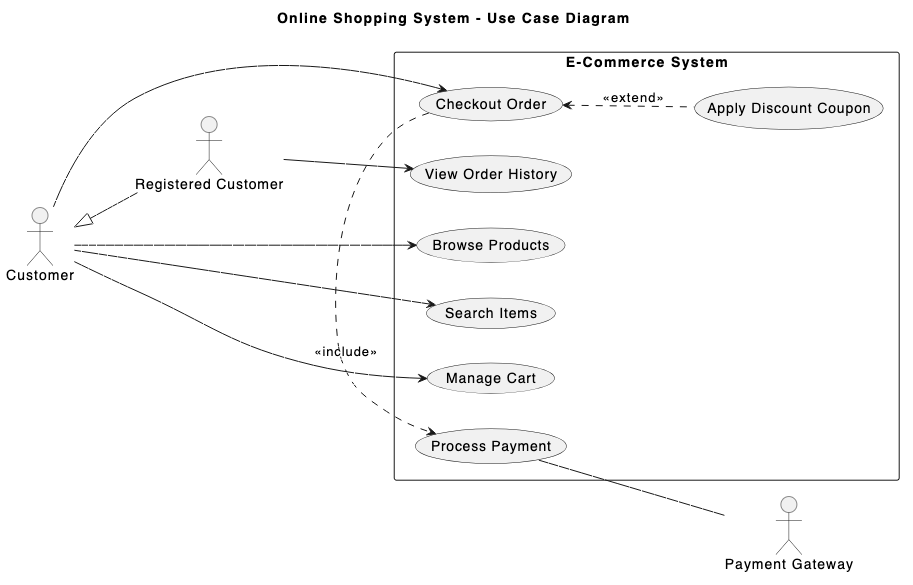
Diagramy aktywności i stanów
Twórz schematy blokowe złożonej logiki biznesowej, przepływów algorytmicznych, przejść maszyn stanów i współbieżności.
@startuml
tytuł: Proces realizacji zamówienia

|Klient|
start
:Złóż zamówienie;
:Podaj dane płatności;

|System Zamówień|
if (Płatność poprawna?) then (tak)
    :Zarezerwuj zapasy;

    ' Podział współbieżny
    fork
        |Magazyn|
        :Wybierz przedmioty z półki;
        :Spakuj przedmioty do pudełka;
    fork again
        |Fakturowanie|
        :Wygeneruj fakturę PDF;
        :Obciąż metodę płatności;
    end fork

    |Wysyłka|
    :Przyklej etykietę wysyłkową;
    :Przekaz kurierowi;

    |Klient|
    :Odbierz paczkę;
    stop
else (nie)
    |System Zamówień|
    :Wyślij powiadomienie o niepowodzeniu płatności;
    |Klient|
    :Zaktualizuj metodę płatności;
    stop
endif
@enduml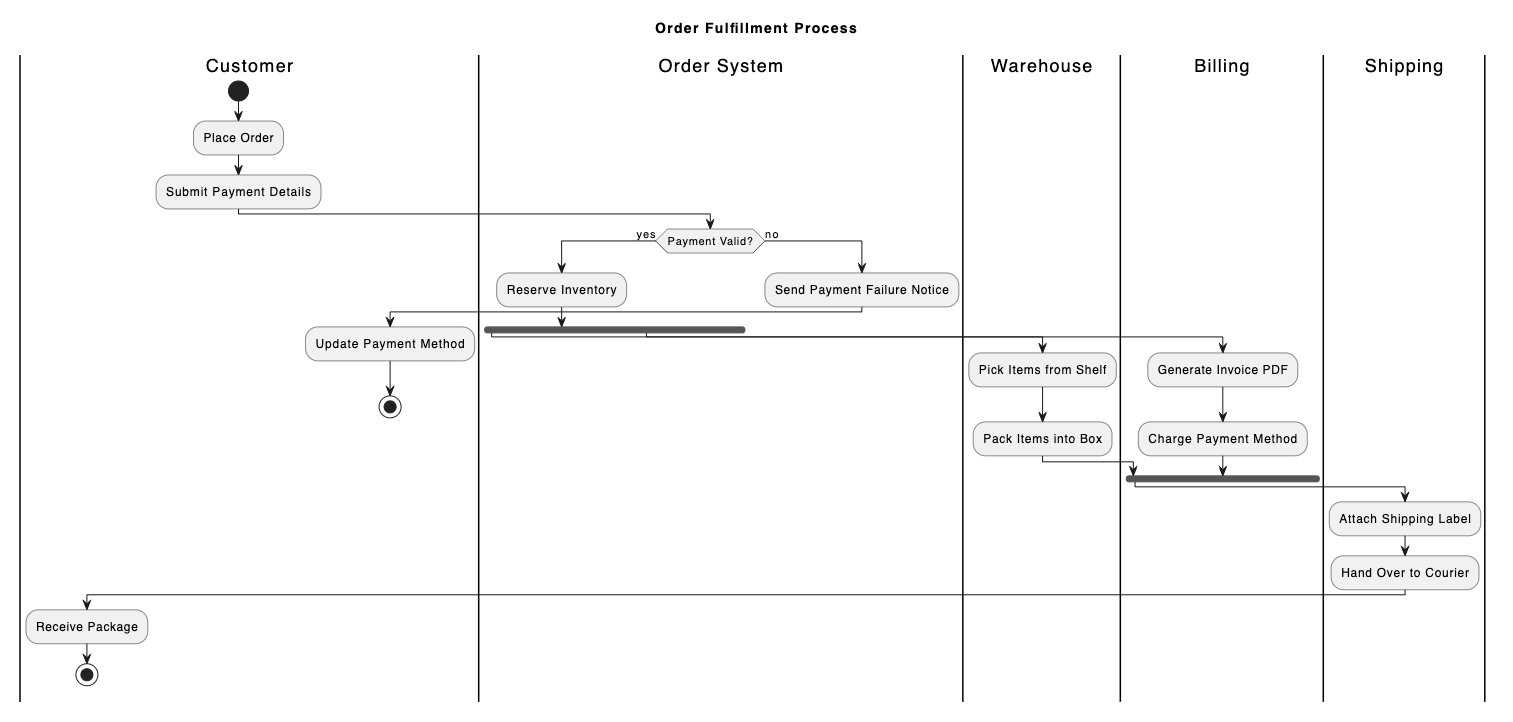
@startuml
tytuł: Cykl życia zamówienia w e-commerce

[*] --> Oczekujące : Zamówienie złożone

stan Oczekujące {
    [*] --> Oczekiwanie na płatność
    Oczekiwanie na płatność --> Płatność nieudana : Błąd płatności
    Płatność nieudana --> Oczekiwanie na płatność : Ponów płatność
}

Oczekujące --> Przetwarzanie : Płatność autoryzowana
Oczekujące --> Anulowane : Użytkownik anuluje zamówienie

stan Przetwarzanie {
    [*] --> Pakowanie
    Pakowanie --> Gotowe do wysyłki : Sprawdzenie jakości zakończone sukcesem
}

Przetwarzanie --> Wysłane : Przekazanie przewoźnikowi
Wysłane --> Dostarczone : Potwierdzenie dostawy
Wysłane --> Zwrócone : Dostawa nieudana / Odmowa

Dostarczone --> [*]
Anulowane --> [*]
Zwrócone --> [*]
@enduml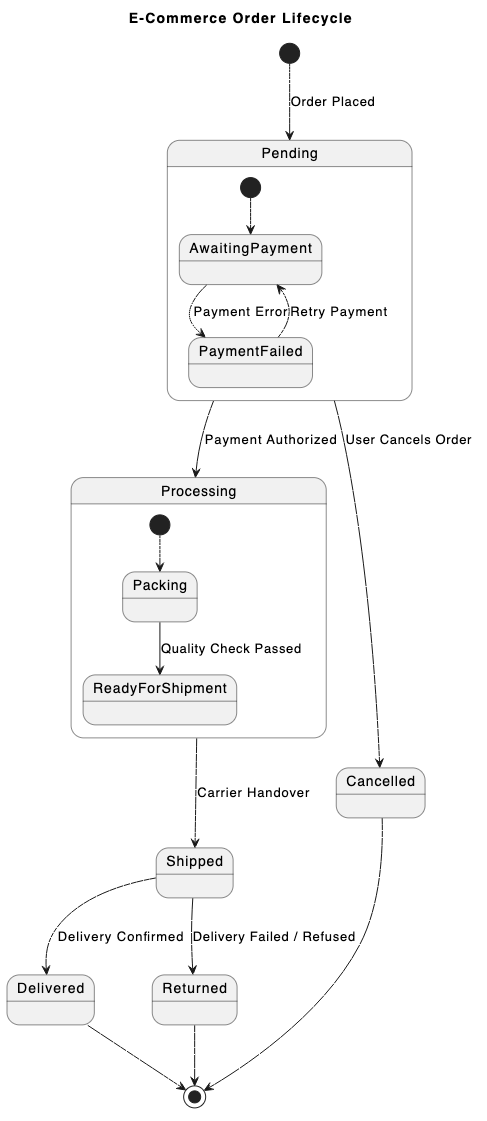
Diagramy czasowe
Szczegółowo przedstawiają precyzyjne przejścia stanów i interakcje obiektów w dyskretnych przedziałach czasowych — idealne dla systemów wbudowanych lub projektowania sprzętu czasu rzeczywistego.
@startuml
tytuł: Diagram czasowy transferu danych SPI

robust "Zegar (SCLK)" jako CLK
binary "Wybór układu (CS)" jako CS
binary "Wyjście Mistrz (MOSI)" jako MOSI
concise "Szyna danych (MISO)" jako MISO

@0
CS jest wysoki
CLK jest niski
MOSI jest niski
MISO jest "Oczekiwanie"

@1
CS jest niski
MISO jest "Nagłówek"

@2
CLK jest wysoki
MOSI jest wysoki

@3
CLK jest niski

@4
CLK jest wysoki
MOSI jest niski
MISO jest "Dane"

@5
CLK jest niski

@6
CS jest wysoki
CLK jest niski
MOSI jest niski
MISO jest "Oczekiwanie"

@enduml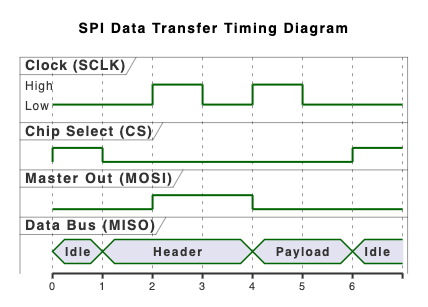
3. Architektura wysokiego poziomu i diagramy domenowe
Poza tradycyjnym UML, PlantUML wyróżnia się w reprezentowaniu wielowarstwowych systemów oprogramowania i architektur danych przy użyciu specjalistycznych bibliotek rozszerzeń.
Diagramy modelu C4
Prezentuj architekturę oprogramowania na różnych poziomach abstrakcji — Kontekst, Kontener, Komponent i Kod — czyniąc projekt systemu zrozumiałym dla zarówno technicznych, jak i nietechnicznych interesariuszy.
@startuml
!include https://raw.githubusercontent.com/plantuml-stdlib/C4-PlantUML/master/C4_Context.puml

TITLE Diagram kontekstu systemu dla systemu bankowości internetowej

Person(customer, "Klient bankowości osobistej", "Klient banku posiadający osobiste konta bankowe.")
System(banking_system, "System bankowości internetowej", "Umożliwia klientom przeglądanie informacji o swoich kontach bankowych i dokonywanie płatności.")

System_Ext(mainframe, "System bankowości na mainframe", "Przechowuje wszystkie podstawowe informacje bankowe o klientach, kontach, transakcjach itp.")
System_Ext(email_system, "System e-mailowy", "Wewnętrzny system e-mailowy Microsoft Exchange.")

Rel(customer, banking_system, "Przegląda salda kont i dokonuje płatności za pomocą")
Rel(banking_system, mainframe, "Pobiera informacje o kontach i dokonuje płatności za pomocą")
Rel(banking_system, email_system, "Wysyła e-maile za pomocą")
Rel_Back(email_system, customer, "Wysyła e-maile do")
@enduml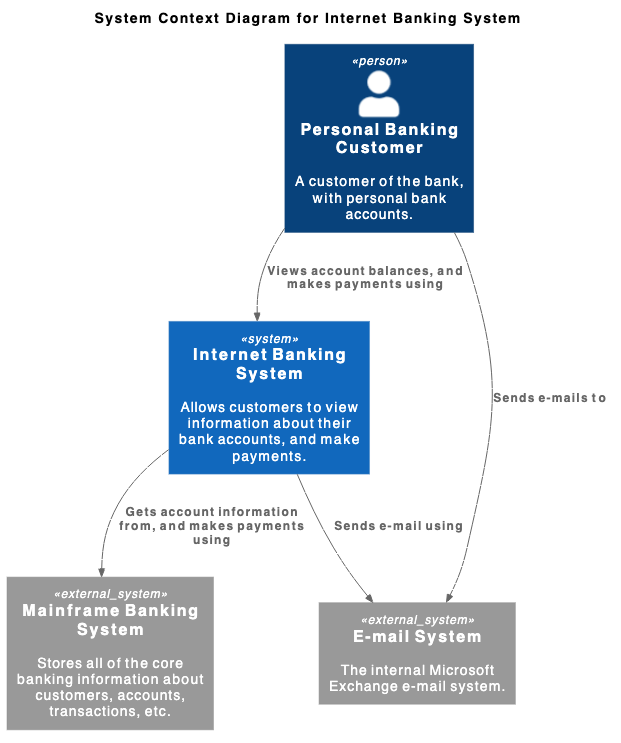
Diagramy ArchiMate
Wspieraj modelowanie architektury przedsiębiorstwa na warstwach biznesowych, aplikacyjnych i technologicznych, aby mapować strategię organizacji na systemy operacyjne.
@startuml
!include <archimate/Archimate>

tytuł Przykład ArchiMate - Płatność rachunków online

Grouping(business, "Warstwa biznesowa"){
    Business_Process(payBillProcess, "Proces płatności rachunków")
    Business_Object(bankAccount, "Konto bankowe klienta")
    Business_Service(paymentService, "Usługa biznesowa płatności rachunków")
}

Grouping(application, "Warstwa aplikacyjna"){
    Application_Component(bankingApp, "Aplikacja bankowości mobilnej")
    Application_Function(paymentProcessing, "Logika przetwarzania płatności")
    Application_DataObject(transactionRecord, "Pakiet danych transakcji")
}

Grouping(technology, "Warstwa technologiczna"){
    Technology_Artifact(jwtToken, "Zaszyfrowany token sesji")
    Technology_Service(apiGateway, "Usługa bramki API")
    Technology_Service(dbService, "Usługa bazy danych podstawowej")
}

Rel_Flow_Right(payBillProcess, bankAccount, "")
Rel_Serving_Up(paymentService, payBillProcess, "")
Rel_Specialization_Up(paymentProcessing, paymentService, "")
Rel_Flow_Right(transactionRecord, paymentProcessing, "")
Rel_Assignment_Left(bankingApp, paymentProcessing, "")
Rel_Realization_Up(jwtToken, transactionRecord, "")
Rel_Serving_Up(apiGateway, paymentProcessing, "")
Rel_Serving_Up(dbService, apiGateway, "")
@enduml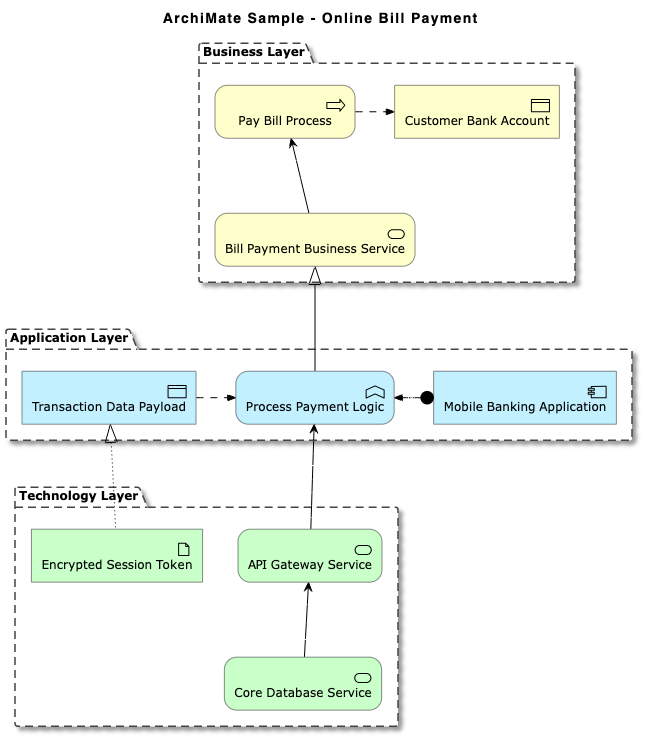
Diagramy encja-relacja (ERD)
Generuj czyste wizualizacje schematów baz danych, w tym standardową notację “krowiej stopy” i modele Chen ERD.
@startuml
tytuł Schemat bazy danych e-commerce (Krowia stopa)

' Ukryj ikony kół dla encji
hide circle
skinparam linetype ortho

entity "User" as user {
    * user_id : INT <>
    --
    * email : VARCHAR(255)
    * password_hash : VARCHAR(255)
    * created_at : TIMESTAMP
}

entity "CustomerProfile" as profile {
    * profile_id : INT <>
    --
    * user_id : INT <>
    * first_name : VARCHAR(100)
    * last_name : VARCHAR(100)
      phone : VARCHAR(20)
}

entity "Order" as order {
    * order_id : INT <>
    --
    * user_id : INT <>
    * order_date : TIMESTAMP
    * total_amount : DECIMAL(10,2)
    * status : VARCHAR(50)
}

entity "OrderItem" as item {
    * order_item_id : INT <>
    --
    * order_id : INT <>
    * product_id : INT <>
    * quantity : INT
    * unit_price : DECIMAL(10,2)
}

entity "Product" as product {
    * product_id : INT <>
    --
    * sku : VARCHAR(50)
    * name : VARCHAR(150)
      description : TEXT
    * price : DECIMAL(10,2)
}

' Relacje
user ||--o| profile : "posiada"
user ||--o{ order : "składa"
order ||--|{ item : "zawiera"
product ||--o{ item : "występuje w"

@enduml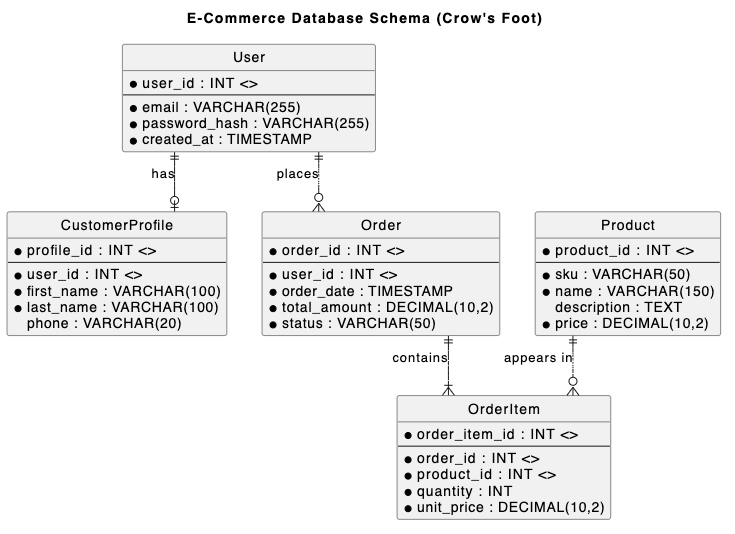
Mapy sieci i infrastruktury
Łatwo generuj topologie sieci, węzły serwerów, połączenia chmurowe i zapory ogniowe.
@startnwdiag
tytuł Topologia sieci przedsiębiorstwa

nwdiag {
    network External_Internet {
        address = "0.0.0.0/0"
        user_client [address = "203.0.113.15", description = "Zdalny użytkownik"];
        edge_firewall [address = "192.168.1.1", description = "Zapora peryferyjna"];
    }

    network DMZ_Zone {
        address = "192.168.1.0/24"
        edge_firewall;
        load_balancer [address = "192.168.1.10", description = "Nginx Load Balancer"];
        mail_server [address = "192.168.1.25", description = "Serwer SMTP"];
        internal_firewall [address = "192.168.1.254", description = "Zapora wewnętrzna"];
    }

    network Private_LAN {
        address = "10.0.1.0/24"
        internal_firewall;
        app_server_01 [address = "10.0.1.50", description = "Węzeł API 1"];
        app_server_02 [address = "10.0.1.51", description = "Węzeł API 2"];
        db_master [address = "10.0.1.100", description = "PostgreSQL Primary"];
    }

    network Management_Subnet {
        address = "10.0.99.0/24"
        internal_firewall;
        admin_bastion [address = "10.0.99.5", description = "Host bastionowy SSH"];
        monitoring_node [address = "10.0.99.20", description = "Host Prometheus"];
    }
}
@endnwdiag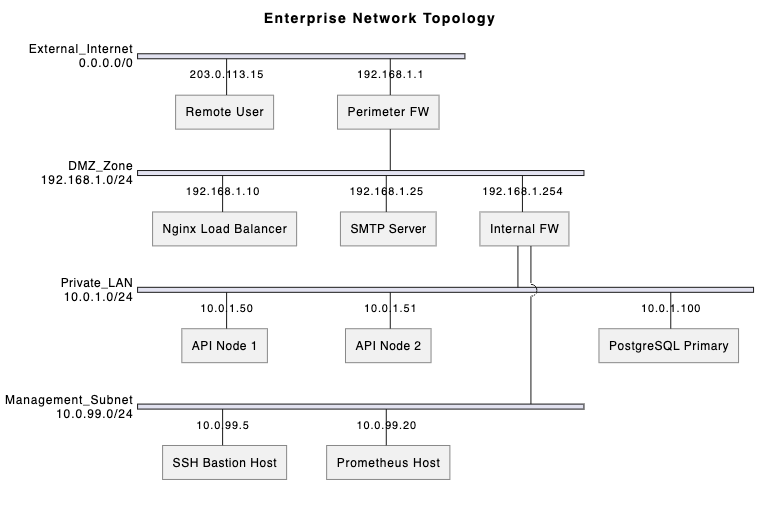
4. Wizualizacje planowania, zarządzania i burzy mózgów
PlantUML nie ogranicza się do projektowania oprogramowania — jest również potężnym narzędziem do zarządzania projektami i burzy mózgów w zespole.
Wykresy Gantta
Planuj harmonogramy projektów, zależności zadań, kamienie milowe i alokację zasobów, używając czystego znacznika tekstowego.
gantt
    title Harmonogram wydania produktu oprogramowania
    dateFormat  YYYY-MM-DD
    axisFormat  %b %d

    section Planowanie i projektowanie
    Zbieranie wymagań        :a1, 2026-09-01, 10d
    Projektowanie architektury :a2, po a1, 10d

    section Rozwój
    Rozwój backendowego API  :b1, po a2, 15d
    Rozwój interfejsu UI     :b2, po a2, 15d

    section Testowanie i wydanie
    Testy integracyjne       :c1, po b1 i b2, 8d
    Audyt bezpieczeństwa     :c2, po c1, 5d
    Wydanie produkcyjne      :milestone, m1, po c2, 0d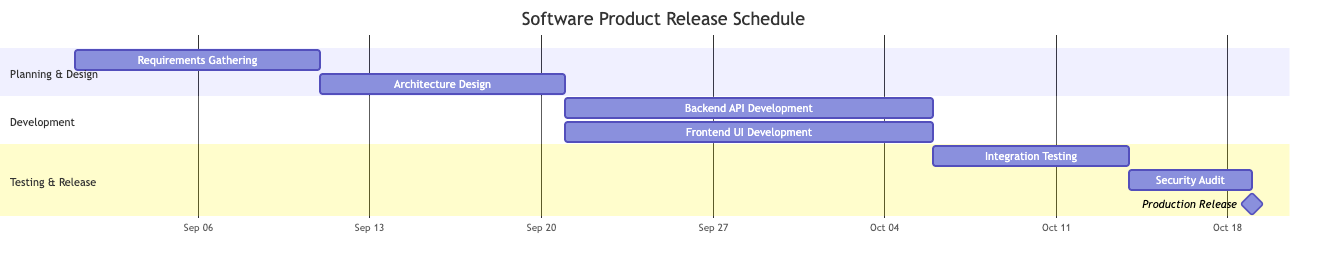
Struktura podziału prac (WBS)
Rozkładaj złożone projekty na hierarchiczne dostawy i zarządzalne fragmenty zadań.
@startwbs
    title Struktura podziału prac (WBS) dla przebudowy strony internetowej

    * Projekt przebudowy strony internetowej
    ** 1. Badania i strategia
    *** 1.1 Wywiady z interesariuszami
    *** 1.2 Audyt konkurencji
    *** 1.3 Zatwierdzenie zakresu i strategii
    ** 2. Projektowanie UX/UI
    *** 2.1 Tworzenie szkiców (wireframing)
    **** 2.1.1 Układy na desktop
    **** 2.1.2 Układy na urządzenia mobilne
    *** 2.2 System projektowy
    **** 2.2.1 Biblioteka komponentów
    **** 2.2.2 Typografia i przewodnik stylu
    ** 3. Rozwój techniczny
    *** 3.1 Frontend
    **** 3.1.1 Szablony stron
    **** 3.1.2 Integracje API
    *** 3.2 CMS i backend
    **** 3.2.1 Niestandardowe typy postów
    **** 3.2.2 Migracja bazy danych
    ** 4. Testy i uruchomienie
    *** 4.1 Testy wieloprzeglądarkowe
    *** 4.2 Migracja treści
    *** 4.3 Przełączenie DNS i uruchomienie
    @endwbs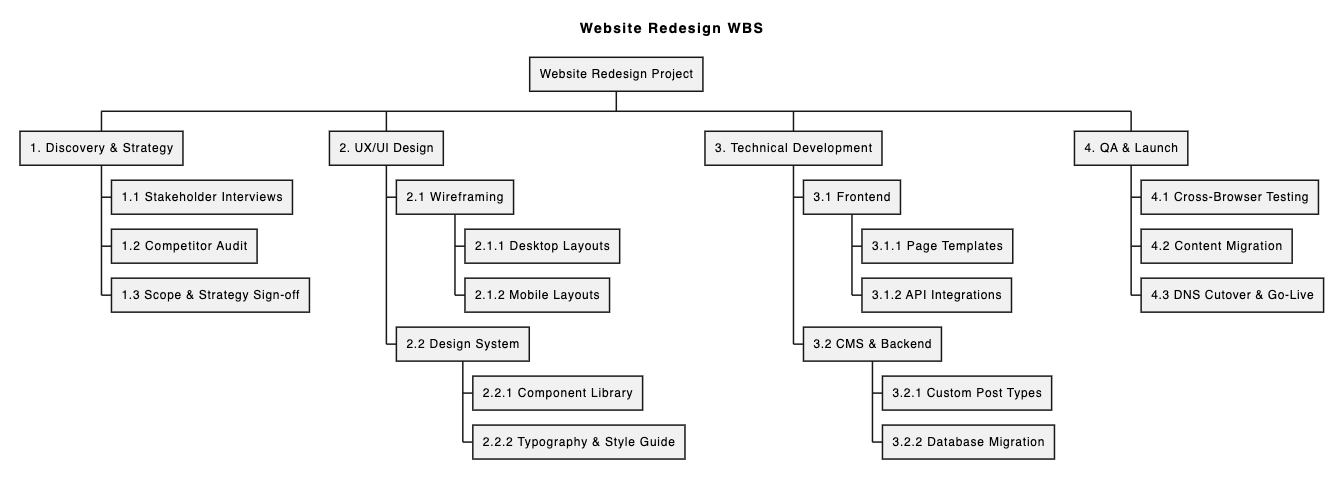
Mapy myśli
Szybko rejestruj ustrukturyzowane pomysły, taksonomie funkcji oraz notatki z badań technicznych podczas spotkań zespołu.
@startmindmap
    title Mapa funkcji platformy e-commerce

    * Platforma e-commerce
    ** Zarządzanie kontem użytkownika
    *** Autoryzacja społecznościowa (Google, Apple)
    *** Autoryzacja wieloskładnikowa
    *** Historia zamówień i śledzenie
    ** Katalog produktów i wyszukiwanie
    *** Wyszukiwanie wielokryterialne i filtry
    *** Synchronizacja stanów magazynowych
    *** Opinie i oceny produktów
    ** Koszyk i płatności
    *** Bramki płatności (Stripe, PayPal)
    *** Silnik kuponów i promocji
    ** Szybkie zamówienie gościa jednym kliknięciem
    ** Obsługa klienta
    *** Asystent czatu na żywo
    *** Zautomatyzowany portal zwrotów
    @endmindmap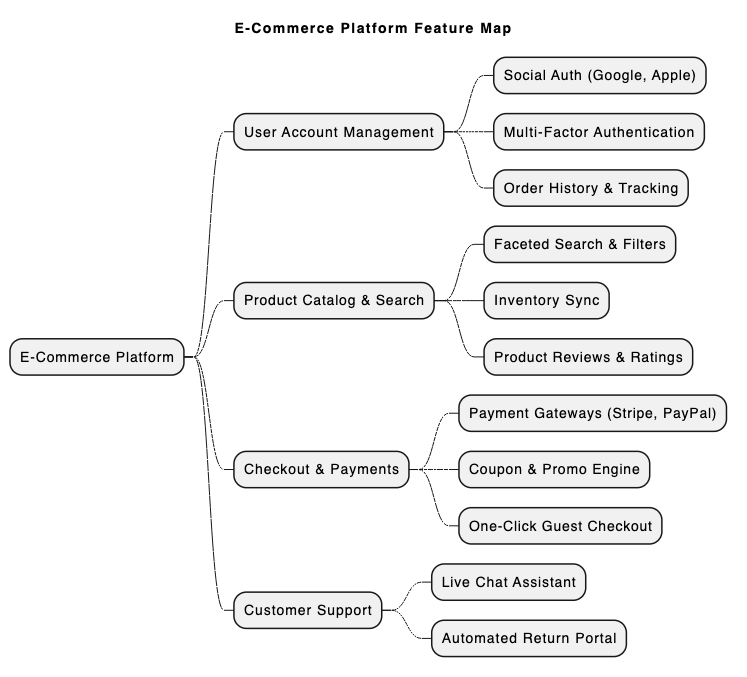
5. Szybkie pisanie i renderowanie PlantUML: Przewaga VPasCode
Mimo że PlantUML jest niezwykle potężny, konfiguracja lokalnych środowisk Java, zależności Graphviz oraz narzędzi wiersza poleceń może powodować trudności. Użycie dedykowanego, opartego na sieci narzędzia PlantUMLeliminuje te przeszkody całkowicie.
Visual Paradigm VPasCodeto zintegrowana platforma diagramów jako kodu zaprojektowana specjalnie w celu usprawnienia przepływu pracy od tekstu do diagramu. Dzięki niedawnym ulepszeniom podkreślonym w naszym Wielka aktualizacja VPasCode: Generowanie i modyfikacja diagramów natychmiastowo z wykorzystaniem AIteraz obsługuje natywne funkcje AI bezpośrednio w edytorze.
Kluczowe korzyści z VPasCode:
- Natywne generowanie i modyfikacja diagramów z wykorzystaniem AI:Twórz pełne diagramy PlantUML, Mermaid lub Graphviz natychmiast, używając poleceń w języku naturalnym (np. „Wygeneruj diagram przypadków użycia w PlantUML dla systemu bankomatu”) lub poproś AI o modyfikację istniejącego kodu w czasie rzeczywistym.
- Platforma online bez konieczności konfiguracji:Dostęp do zaawansowanego edytora natychmiast na stronie vpascode.com bez instalowania lokalnych kompilatorów ani wtyczek. Dowiedz się więcej w Przegląd VPasCode.
- Automatyczne wykrywanie formatu i podgląd w czasie rzeczywistym:Wklej swój skrypt, a VPasCode automatycznie wykryje, czy jest to PlantUML, Mermaid lub Graphviz, natychmiast renderując aktualizacje na żywo w miarę pisania.
- Naprawianie błędów w kodzie przy użyciu AI:Jeśli napotkasz błąd składni, po prostu kliknij„Napraw przez AI”. VPasCode naprawia kod i przedstawia porównanie obok siebie z jasnymi wyjaśnieniami, dzięki czemu szybciej opanujesz składnię PlantUML.
- Tłumaczenie diagramów przy użyciu natywnego AI:Tłumacz etykiety i notatki na diagramach na wiele języków bezpośrednio w edytorze — idealne dla międzynarodowych zespołów deweloperskich.
- Elastyczny eksport i integracja z dokumentacją:Eksportuj wysokiej rozdzielczości pliki PNG lub skalowalne obrazy wektorowe SVG za darmo. Możesz również przesyłać diagramy bezpośrednio do Visual Paradigm OpenDocs, korzystając z ichprzewodnika po funkcji diagramu jako kodu.
(Uwaga: Zaawansowane funkcje generowania, modyfikacji i naprawiania błędów diagramów przy użyciu AI są dostępne w wersji Visual Paradigm Online Deluxe Edition / Visual Paradigm Desktop Professional Edition+).
6. Szybki przykład: Renderowanie diagramu sekwencji w VPasCode
Aby zobaczyć, jak łatwo jest używaćdarmowego edytora UMLtakiego jak VPasCode, rozważ ten podstawowy skrypt diagramu sekwencji PlantUML:
@startuml
autonumber
actor User
participant "VPasCode Editor" as Editor
participant "AI Engine" as AI

User -> Editor: Wklej kod PlantUML
Editor -> Editor: Automatyczne wykrywanie formatu i renderowanie na żywo
alt Wykryto błąd składni
    User -> Editor: Kliknij "Napraw przez AI"
    Editor -> AI: Wyślij uszkodzony kod
    AI --> Editor: Zwróć poprawiony kod i różnice
end
Editor --> User: Wyświetl czysty diagram wektorowy (SVG/PNG)
@enduml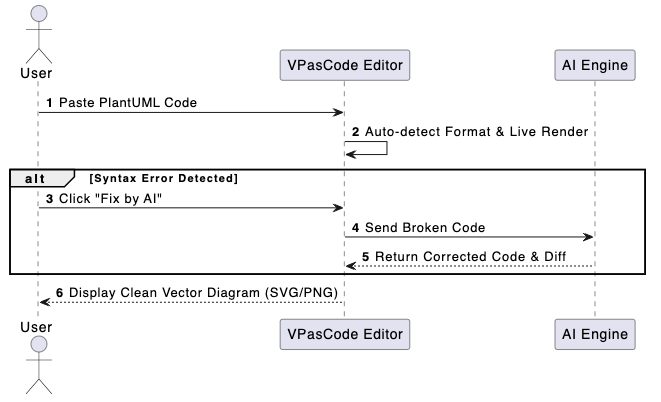
Po prostu skopiuj powyższy kod, otwórz VPasCode i wklej go do edytora, aby zobaczyć natychmiastowe renderowanie na żywo i eksperymentować z zautomatyzowanymi ulepszeniami AI.
7. Podsumowanie i kolejne kroki
PlantUML umożliwia zespołom utrzymywanie jasnej, wersjonowalnej i spójnej dokumentacji wizualnej w zakresie UML, architektury, schematów baz danych i wykresów zarządzania projektami. W połączeniu z nowoczesnymnarzędziem PlantUMLtakim jak VPasCode, pisanie techniczne staje się szybsze, pozbawione błędów i bezproblemowo współpracujące.
Gotowy do usprawnienia procesu tworzenia diagramów? Zacznij edytować i renderować diagramy PlantUML za darmo już dziś navpascode.com.