Welcome to another masterclass tutorial from the technical team at Visual Paradigm! When designing complex enterprise architectures, keeping your diagrams clean, organized, and structurally sound can be a challenge. Traditional drag-and-drop tools often slow you down when layouts shift or requirements change. That is why many software architects and enterprise designers rely on diagram-as-code workflows.
In this guide, I will walk you through my exact thought process for building a comprehensive, multi-layer ArchiMate architecture diagram for a
Library Management System. Using PlantUML inside the
free PlantUML editor on
Visual Paradigm VPasCode, we will break down how to structure enterprise layers, define elements cleanly, and map out precise cross-layer relationships.
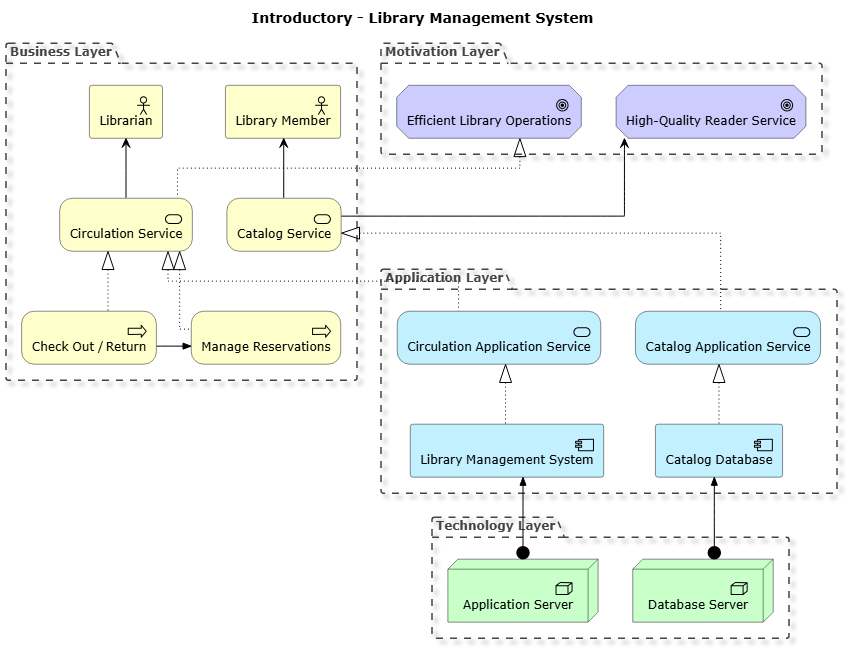
Understanding the ArchiMate Architecture Layers
When I set out to model an enterprise system, I always start by defining the structural boundaries. ArchiMate separates concerns into distinct architectural layers, helping stakeholders understand business value, functional logic, application components, and technical infrastructure at a glance.
For our library system, we organize the diagram into four distinct vertical and horizontal groupings:
- Motivation Layer: Captures the high-level goals and drivers steering the organization.
- Business Layer: Highlights actors, services, and core business processes like book checkouts and reservations.
- Application Layer: Defines the software services and application components handling the core logic.
- Technology Layer: Represents the physical or virtual hardware nodes hosting our application stack.
Step 1: Setting Up the Foundational Structure
To begin writing our code, I start by configuring the global rendering rules and importing the official ArchiMate standard library for PlantUML. Setting an orthogonal linetype keeps connector lines crisp and aligned at right angles, which is vital for clean enterprise blueprints.
skinparam linetype ortho
!include https://static.visual-paradigm.com/plantuml-stdlib/Archimate-PlantUML/master/Archimate.puml
remove @unlinked
top to bottom direction
title Introductory - Library Management System
By enforcing
top to bottom direction and removing unlinked elements, I ensure the layout flows naturally from top-level business motivations down to the technology infrastructure.
Step 2: Defining the Core Layers and Elements
Next, I populate each grouping container with its respective elements. I prefer grouping related components explicitly using PlantUML grouping blocks so that visual boundaries match enterprise domains.
Grouping(motivation_layer, "Motivation Layer") {
  Motivation_Goal(g_ops, "Efficient Library Operations")
  Motivation_Goal(g_service, "High-Quality Reader Service")
}

Grouping(business_layer, "Business Layer") {
  Business_Actor(ba_librarian, "Librarian")
  Business_Actor(ba_member, "Library Member")
  Business_Service(bs_circulation, "Circulation Service")
  Business_Service(bs_catalog, "Catalog Service")
  Business_Process(bp_checkout, "Check Out / Return")
  Business_Process(bp_reserve, "Manage Reservations")
}

Grouping(application_layer, "Application Layer") {
  Application_Service(as_circulation, "Circulation Application Service")
  Application_Service(as_catalog, "Catalog Application Service")
  Application_Component(ac_lms, "Library Management System")
  Application_Component(ac_catalog, "Catalog Database")
}

Grouping(technology_layer, "Technology Layer") {
  Technology_Node(tn_server, "Application Server")
  Technology_Node(tn_db, "Database Server")
}
Why structure it this way? Explicitly prefixing elements (like
ba_ for business actors,
bp_ for processes, and
tn_ for technology nodes) makes writing complex relational mappings much easier later on. It prevents naming collisions and keeps your script self-documenting.
Step 3: Mapping Relationships Across Layers
With our elements in place, the final step is wiring them together. ArchiMate relies on precise relationship types—such as realization, serving, triggering, and assignment—to model dependencies accurately.
' Business processes realize business services
Rel_Realization_Up(bp_checkout, bs_circulation, "")
Rel_Realization_Up(bp_reserve, bs_circulation, "")
Rel_Triggering_Right(bp_checkout, bp_reserve, "")

' Business services realize motivation goals
Rel_Realization_Up(bs_circulation, g_ops, "")
Rel_Serving_Up(bs_catalog, g_service, "")

' Actors are served by business services
Rel_Serving_Up(bs_circulation, ba_librarian, "")
Rel_Serving_Up(bs_catalog, ba_member, "")

' Application services realize business services
Rel_Realization_Up(as_circulation, bs_circulation, "")
Rel_Realization_Up(as_catalog, bs_catalog, "")

' Application components realize application services
Rel_Realization_Up(ac_lms, as_circulation, "")
Rel_Realization_Up(ac_catalog, as_catalog, "")

' Technology nodes assign (deploy) application components
Rel_Assignment_Up(tn_server, ac_lms, "")
Rel_Assignment_Up(tn_db, ac_catalog, "")
By using directional relationship tags like
Rel_Realization_Up and
Rel_Triggering_Right, I maintain precise control over how connectors route through the canvas, preventing messy overlapping lines.
Complete Source Code
Here is the complete, production-ready PlantUML script for our Library Management System architecture diagram:
@startuml
skinparam linetype ortho
!include https://static.visual-paradigm.com/plantuml-stdlib/Archimate-PlantUML/master/Archimate.puml
remove @unlinked
top to bottom direction
title Introductory - Library Management System

Grouping(motivation_layer, "Motivation Layer") {
  Motivation_Goal(g_ops, "Efficient Library Operations")
  Motivation_Goal(g_service, "High-Quality Reader Service")
}

Grouping(business_layer, "Business Layer") {
  Business_Actor(ba_librarian, "Librarian")
  Business_Actor(ba_member, "Library Member")
  Business_Service(bs_circulation, "Circulation Service")
  Business_Service(bs_catalog, "Catalog Service")
  Business_Process(bp_checkout, "Check Out / Return")
  Business_Process(bp_reserve, "Manage Reservations")
}

Grouping(application_layer, "Application Layer") {
  Application_Service(as_circulation, "Circulation Application Service")
  Application_Service(as_catalog, "Catalog Application Service")
  Application_Component(ac_lms, "Library Management System")
  Application_Component(ac_catalog, "Catalog Database")
}

Grouping(technology_layer, "Technology Layer") {
  Technology_Node(tn_server, "Application Server")
  Technology_Node(tn_db, "Database Server")
}

' Business processes realize business services
Rel_Realization_Up(bp_checkout, bs_circulation, "")
Rel_Realization_Up(bp_reserve, bs_circulation, "")
Rel_Triggering_Right(bp_checkout, bp_reserve, "")

' Business services realize motivation goals
Rel_Realization_Up(bs_circulation, g_ops, "")
Rel_Serving_Up(bs_catalog, g_service, "")

' Actors are served by business services
Rel_Serving_Up(bs_circulation, ba_librarian, "")
Rel_Serving_Up(bs_catalog, ba_member, "")

' Application services realize business services
Rel_Realization_Up(as_circulation, bs_circulation, "")
Rel_Realization_Up(as_catalog, bs_catalog, "")

' Application components realize application services
Rel_Realization_Up(ac_lms, as_circulation, "")
Rel_Realization_Up(ac_catalog, as_catalog, "")

' Technology nodes assign (deploy) application components
Rel_Assignment_Up(tn_server, ac_lms, "")
Rel_Assignment_Up(tn_db, ac_catalog, "")

@enduml
Bring Your Architecture to Life with VPasCode
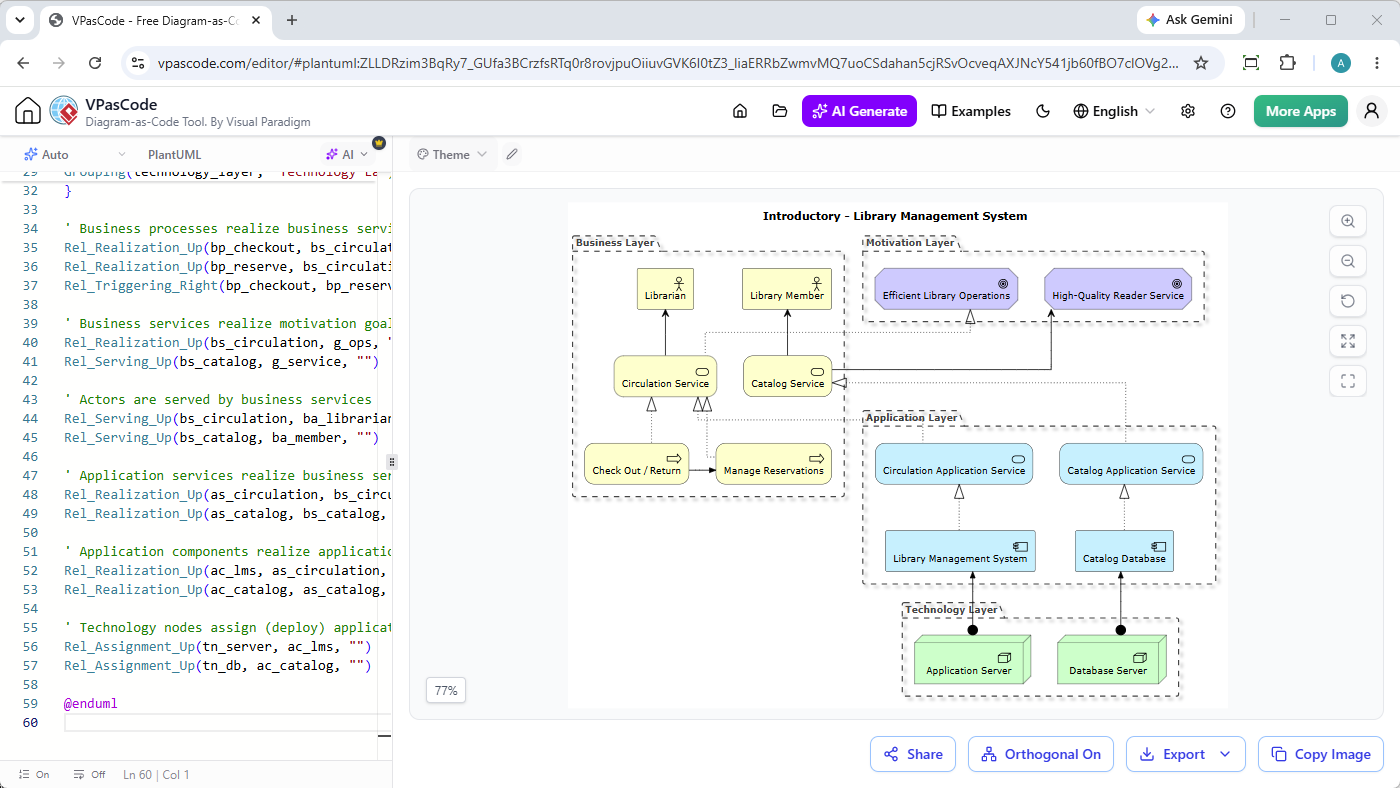
Diagramming-as-code empowers you to version-control your architecture, collaborate seamlessly, and generate flawless diagrams in seconds. Whether you are building ArchiMate enterprise models, C4 software architectures, or standard UML sequence diagrams, doing it in a robust environment makes all the difference.
Ready to build your own diagrams?
Test drive our real-time rendering engine, experiment with AI-powered diagram generation, and export clean vector graphics instantly.
Try the Free Diagram-as-Code Tool Now


