



2. 标准统一建模语言(UML)图表
PlantUML 的核心目标是简化官方 UML 图表的创建。它主要分为两大类:结构图和行为图。
结构图
类图与对象图
直接从代码定义中建模面向对象结构、类层次结构、接口、属性以及关系(继承、聚合、组合)。
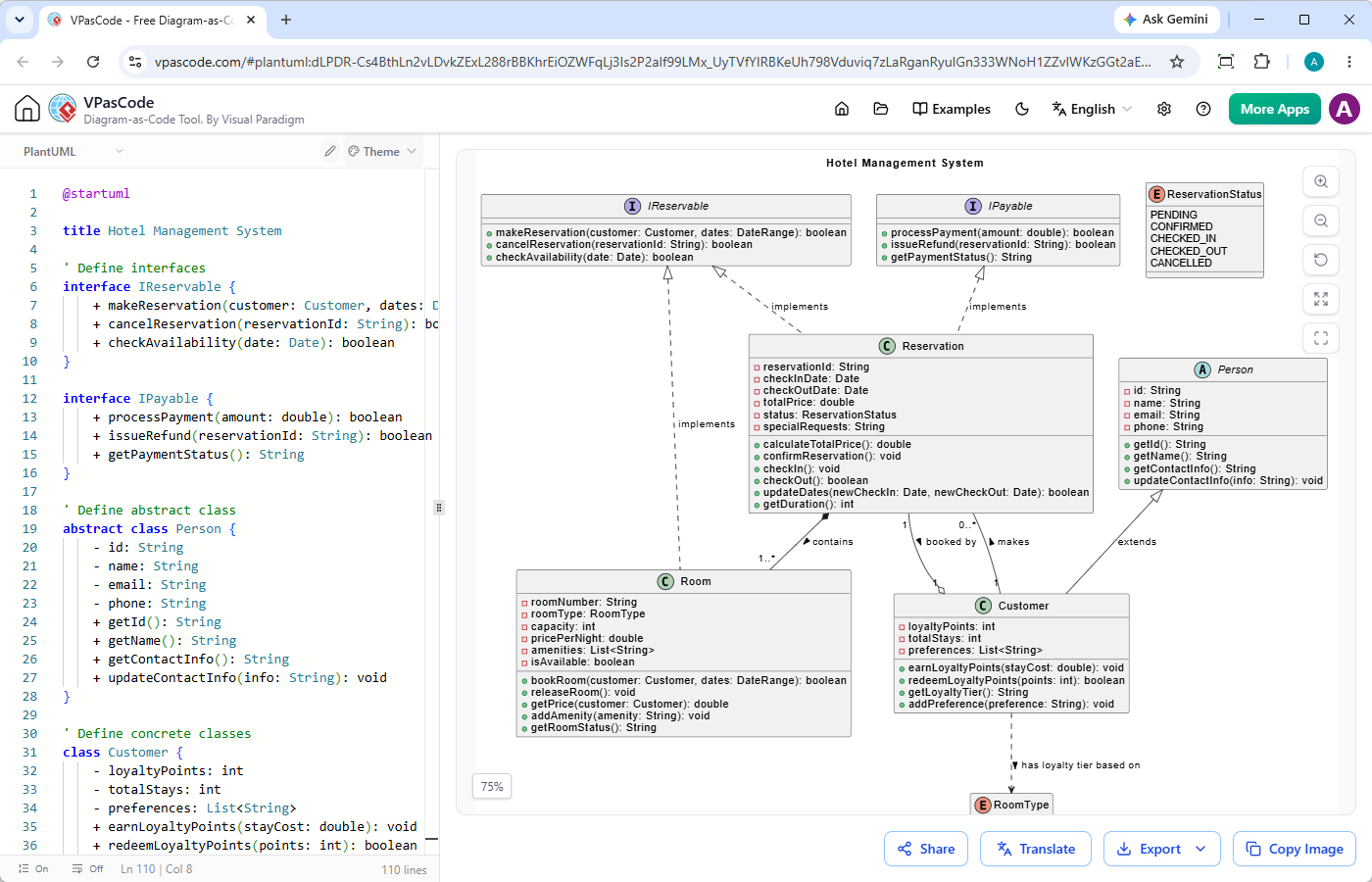
@startuml

title 酒店管理系统

' 定义接口
interface IReservable {
    + makeReservation(customer: Customer, dates: DateRange): boolean
    + cancelReservation(reservationId: String): boolean
    + checkAvailability(date: Date): boolean
}

interface IPayable {
    + processPayment(amount: double): boolean
    + issueRefund(reservationId: String): boolean
    + getPaymentStatus(): String
}

' 定义抽象类
abstract class Person {
    - id: String
    - name: String
    - email: String
    - phone: String
    + getId(): String
    + getName(): String
    + getContactInfo(): String
    + updateContactInfo(info: String): void
}

' 定义具体类
class Customer {
    - loyaltyPoints: int
    - totalStays: int
    - preferences: List
    + earnLoyaltyPoints(stayCost: double): void
    + redeemLoyaltyPoints(points: int): boolean
    + getLoyaltyTier(): String
    + addPreference(preference: String): void
}

class Room {
    - roomNumber: String
    - roomType: RoomType
    - capacity: int
    - pricePerNight: double
    - amenities: List
    - isAvailable: boolean
    + bookRoom(customer: Customer, dates: DateRange): boolean
    + releaseRoom(): void
    + getPrice(customer: Customer): double
    + addAmenity(amenity: String): void
    + getRoomStatus(): String
}

class Reservation {
    - reservationId: String
    - checkInDate: Date
    - checkOutDate: Date
    - totalPrice: double
    - status: ReservationStatus
    - specialRequests: String
    + calculateTotalPrice(): double
    + confirmReservation(): void
    + checkIn(): void
    + checkOut(): boolean
    + updateDates(newCheckIn: Date, newCheckOut: Date): boolean
    + getDuration(): int
}

' 枚举
enum RoomType {
    STANDARD
    DELUXE
    SUITE
    PRESIDENTIAL
}

' 枚举
enum ReservationStatus {
    PENDING
    CONFIRMED
    CHECKED_IN
    CHECKED_OUT
    CANCELLED
}

' 关系
' 接口实现(虚线加三角形)
IReservable <|.. Reservation : implements
IPayable <|.. Reservation : implements

' 抽象继承(实线加三角形)
Person <|-- Customer : extends
' 组合(实心菱形)- Room 是 Reservation 的一部分
Reservation *-- "1..*" Room : contains

' 关联(简单实线)带多重性
Customer "1" -- "0..*" Reservation : makes

' 依赖(虚线箭头)- Customer 依赖于 RoomType
Customer ..> RoomType : has loyalty tier based on

' 带自定义标签的关联
Reservation "1" --o "1" Customer : booked by

' 抽象类实现接口(可选附加连接器)
IReservable <|.. Room : implements

@enduml组件图与部署图
映射软件组件、物理节点、制品和部署环境,以可视化软件在硬件或云基础设施上的分布情况。
@startuml
title Web 应用组件图

package "客户端层" {
    [Web 浏览器] as Browser
    [移动应用] as Mobile
}

package "应用服务器" {
    [API 网关] as Gateway
    [用户服务] as UserService
    [订单服务] as OrderService
    [支付服务] as PaymentService
}

package "数据库层" {
    database "用户数据库" as UserDB
    database "订单数据库" as OrderDB
}

package "第三方服务" {
    [Stripe API] as Stripe
}

' 连接
Browser --> Gateway : HTTP / REST
Mobile --> Gateway : HTTP / REST

Gateway --> UserService : 内部 REST
Gateway --> OrderService : 内部 REST

UserService --> UserDB : 读/写
OrderService --> OrderDB : 读/写
OrderService --> PaymentService : 处理支付

PaymentService --> Stripe : HTTPS / API
@enduml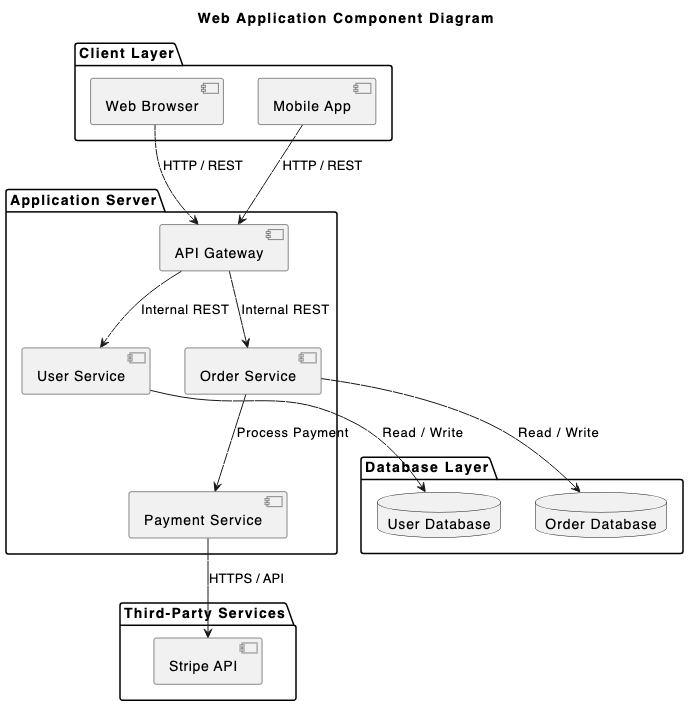
@startuml
title 部署图 - 三层 Web 应用

skinparam componentStyle rectangle

node "客户端桌面" as clientNode {
  node "Web 浏览器" as browser {
    artifact "Web 应用前端 (HTML/JS)" as frontend
  }
}

node "应用服务器" as appServerNode {
  node "Servlet 容器 (Tomcat)" as tomcat {
    artifact "后端 API (WAR 文件)" as appApi
  }
}

node "数据库服务器" as databaseNode {
  database "PostgreSQL" as postgres {
    artifact "应用数据库模式" as dbSchema
  }
}

clientNode -- appServerNode : HTTPS (端口 443)
appServerNode -- databaseNode : JDBC (端口 5432)

@enduml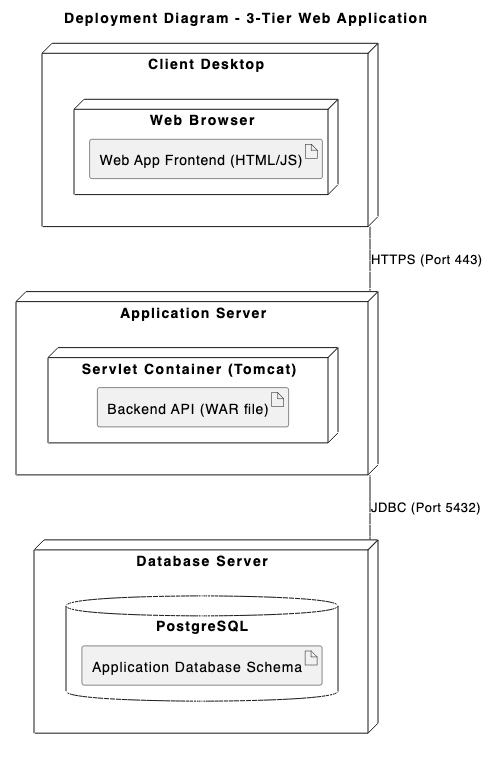
行为与交互图
序列图
最受欢迎的 PlantUML 图表类型。按步骤追踪交互、同步/异步 API 调用,以及随时间推移在参与者与系统之间的消息流。
@startuml
标题:用户认证流程

参与者 "用户" 为 user
参与者 "Web 应用" 为 app
参与者 "认证 API" 为 auth
数据库 "用户数据库" 为 db

user -> app : 输入凭据
激活 app

app -> auth : POST /api/v1/login
激活 auth

auth -> db : 按邮箱查询用户
激活 db
db --> auth : 返回用户记录及哈希值
deactivate db

alt 凭据有效
    auth -> auth : 验证密码并生成 JWT
    auth --> app : 200 OK (令牌与配置文件)
    app --> user : 重定向至仪表板
else 凭据无效
    auth --> app : 401 未授权 (错误)
    app --> user : 显示“凭据无效”
end

deactivate auth
deactivate app
@enduml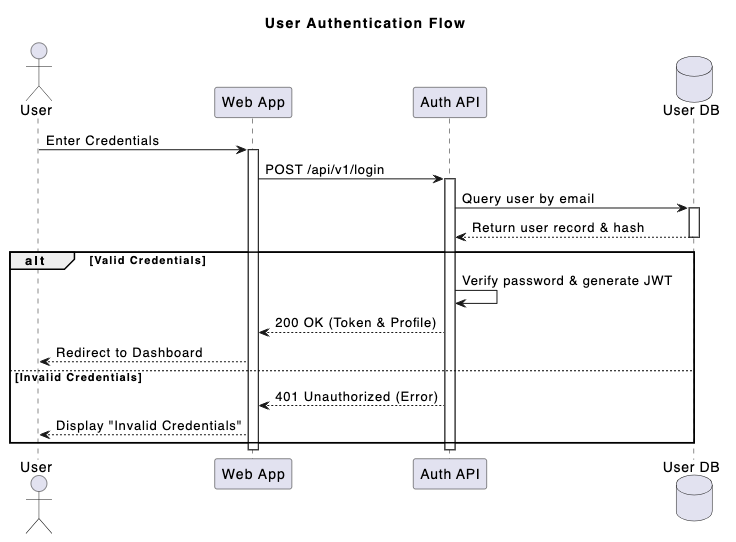
用例图
定义系统边界、参与者、用户目标和功能范围。
@startuml
标题:在线购物系统 - 用例图

从左到右方向

参与者 顾客
参与者 "已注册顾客" 为 RegCustomer
参与者 "支付网关" 为 PaymentSystem

顾客 <|-- RegCustomer 矩形 "电子商务系统" { 用例 "浏览商品" 为 UC_Browse 用例 "搜索商品" 为 UC_Search 用例 "管理购物车" 为 UC_Cart 用例 "结账订单" 为 UC_Checkout 用例 "应用折扣券" 为 UC_Coupon 用例 "处理支付" 为 UC_Payment 用例 "查看订单历史" 为 UC_History } 顾客 --> UC_Browse
顾客 --> UC_Search
顾客 --> UC_Cart
顾客 --> UC_Checkout

RegCustomer --> UC_History

UC_Checkout .> UC_Payment : <>
UC_Checkout <.. UC_Coupon : <>

UC_Payment -- PaymentSystem
@enduml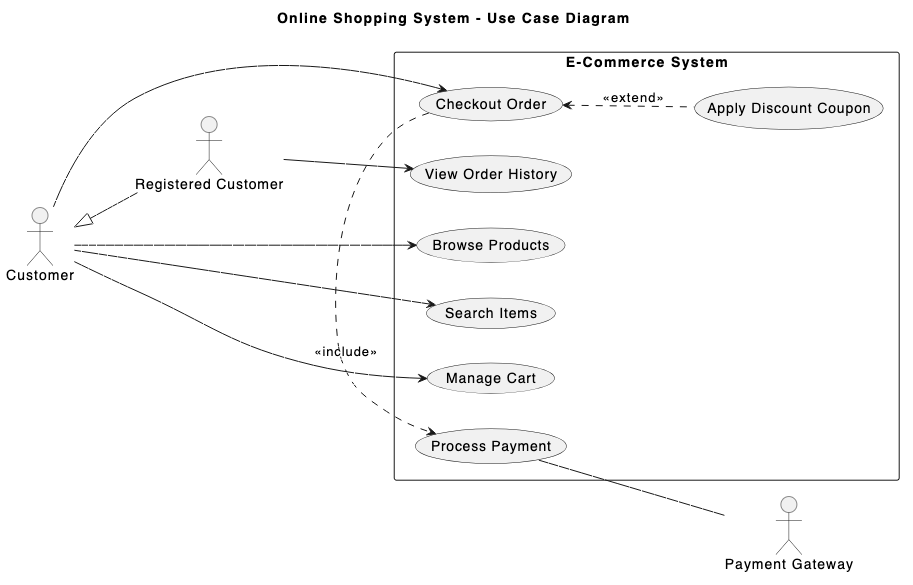
活动图与状态图
绘制复杂的业务逻辑、算法流程、状态机转换及并发行为。
@startuml
标题:订单履行流程

|顾客|
开始
:下订单;
:提交支付详情;

|订单系统|
if (支付有效?) then (是)
    :预留库存;

    ' 并发分支
    fork
        |仓库|
        :从货架拣选商品;
        :将商品装箱;
    fork again
        |计费|
        :生成发票 PDF;
        :扣款支付;
    end fork

    |物流|
    :粘贴物流标签;
    :移交快递;

    |顾客|
    :接收包裹;
    结束
else (否)
    |订单系统|
    :发送支付失败通知;
    |顾客|
    :更新支付方式;
    结束
endif
@enduml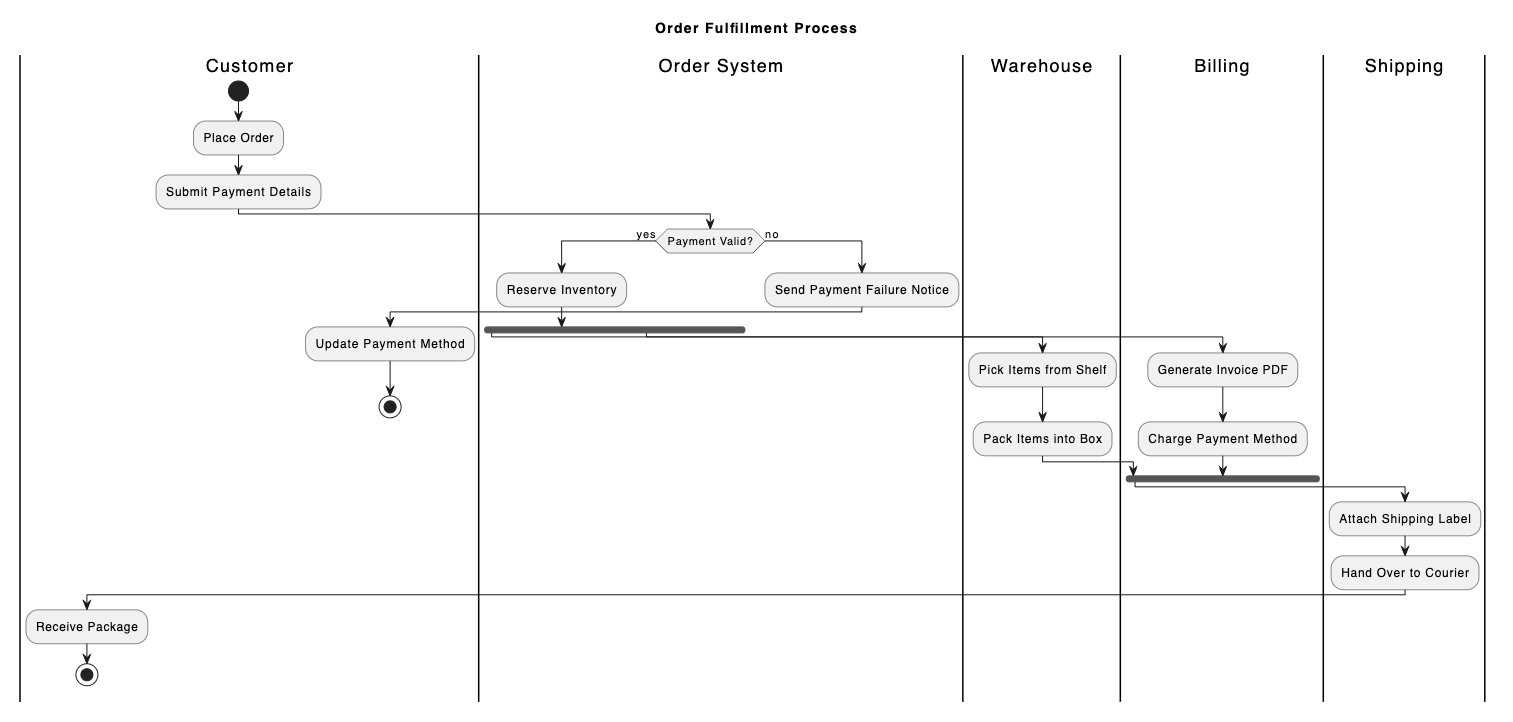
@startuml
标题:电子商务订单生命周期

[*] --> 待处理 : 订单已下

状态 待处理 {
    [*] --> 等待支付
    等待支付 --> 支付失败 : 支付错误
    支付失败 --> 等待支付 : 重试支付
}

待处理 --> 处理中 : 支付已授权
待处理 --> 已取消 : 用户取消订单

状态 处理中 {
    [*] --> 打包
    打包 --> 待发货 : 质检通过
}

处理中 --> 已发货 : 承运商交接
已发货 --> 已送达 : 配送确认
已发货 --> 已退回 : 配送失败 / 拒收

已送达 --> [*]
已取消 --> [*]
已退回 --> [*]
@enduml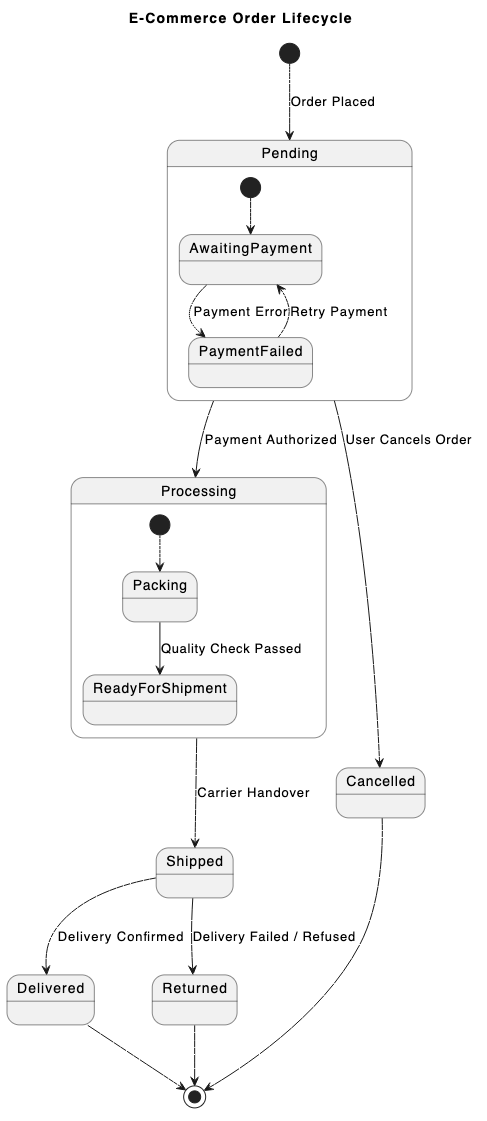
时序图
详细展示离散时间帧内的精确状态转换与对象交互——适用于嵌入式系统或实时硬件设计。
@startuml
标题:SPI 数据传输时序图

强类型 "时钟 (SCLK)" 为 CLK
二进制 "片选 (CS)" 为 CS
二进制 "主出 (MOSI)" 为 MOSI
简洁 "数据总线 (MISO)" 为 MISO

@0
CS 为高电平
CLK 为低电平
MOSI 为低电平
MISO 为“空闲”

@1
CS 为低电平
MISO 为“头部”

@2
CLK 为高电平
MOSI 为高电平

@3
CLK 为低电平

@4
CLK 为高电平
MOSI 为低电平
MISO 为“载荷”

@5
CLK 为低电平

@6
CS 为高电平
CLK 为低电平
MOSI 为低电平
MISO 为“空闲”

@enduml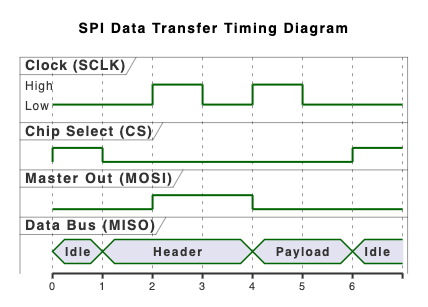
3. 高层架构与领域专用图
超越传统 UML,PlantUML 利用专用扩展库,在表示多层软件系统和数据架构方面表现出色。
C4 模型图
以不同抽象层次(上下文、容器、组件和代码)表达软件架构,使系统设计对技术利益相关者和非技术利益相关者都易于理解。
@startuml
!include https://raw.githubusercontent.com/plantuml-stdlib/C4-PlantUML/master/C4_Context.puml

TITLE 互联网银行系统系统上下文图

Person(customer, "个人银行客户", "银行的客户,拥有个人银行账户。")
System(banking_system, "互联网银行系统", "允许客户查看其银行账户信息并进行支付。")

System_Ext(mainframe, "主机银行系统", "存储所有关于客户、账户、交易等的核心银行信息。")
System_Ext(email_system, "电子邮件系统", "内部 Microsoft Exchange 电子邮件系统。")

Rel(customer, banking_system, "查看账户余额,并使用该系统进行支付")
Rel(banking_system, mainframe, "从主机获取账户信息,并使用该系统进行支付")
Rel(banking_system, email_system, "使用该系统进行电子邮件发送")
Rel_Back(email_system, customer, "向客户发送电子邮件")
@enduml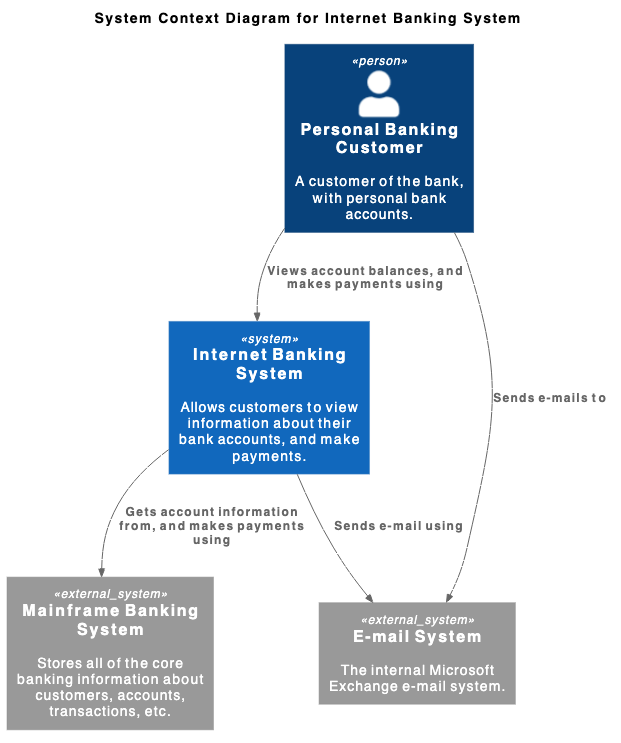
ArchiMate 图
支持跨业务层、应用层和技术层的企业架构建模,将组织战略映射到运营系统。
@startuml
!include <archimate/Archimate>

title ArchiMate 示例 - 在线账单支付

Grouping(business, "业务层"){
    Business_Process(payBillProcess, "支付账单流程")
    Business_Object(bankAccount, "客户银行账户")
    Business_Service(paymentService, "账单支付业务服务")
}

Grouping(application, "应用层"){
    Application_Component(bankingApp, "移动银行应用")
    Application_Function(paymentProcessing, "处理支付逻辑")
    Application_DataObject(transactionRecord, "交易数据负载")
}

Grouping(technology, "技术层"){
    Technology_Artifact(jwtToken, "加密会话令牌")
    Technology_Service(apiGateway, "API 网关服务")
    Technology_Service(dbService, "核心数据库服务")
}

Rel_Flow_Right(payBillProcess, bankAccount, "")
Rel_Serving_Up(paymentService, payBillProcess, "")
Rel_Specialization_Up(paymentProcessing, paymentService, "")
Rel_Flow_Right(transactionRecord, paymentProcessing, "")
Rel_Assignment_Left(bankingApp, paymentProcessing, "")
Rel_Realization_Up(jwtToken, transactionRecord, "")
Rel_Serving_Up(apiGateway, paymentProcessing, "")
Rel_Serving_Up(dbService, apiGateway, "")
@enduml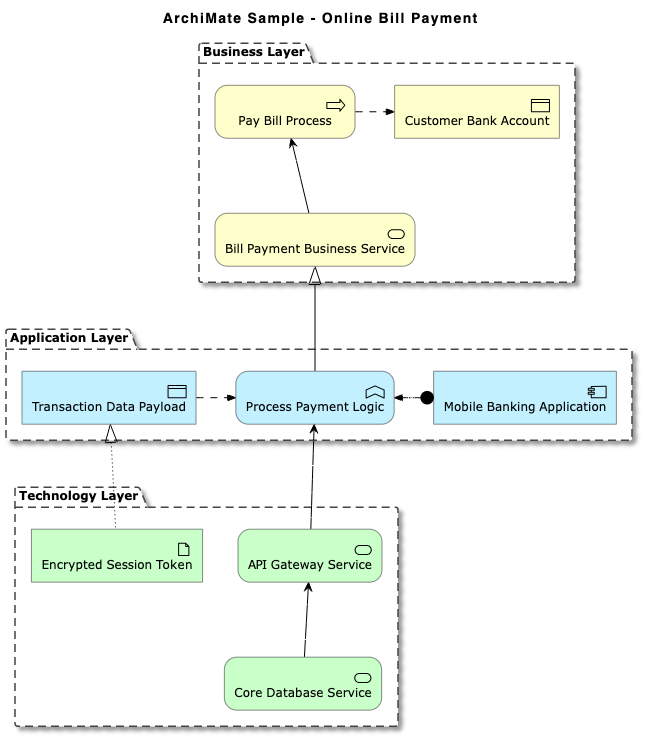
实体关系图 (ERD)
生成清晰的数据库模式可视化,包括标准乌鸦脚符号和 Chen ERD 模型。
@startuml
title 电子商务数据库模式(乌鸦脚)

' 隐藏实体的圆形图标
hide circle
skinparam linetype ortho

entity "用户" as user {
    * user_id : INT <>
    --
    * email : VARCHAR(255)
    * password_hash : VARCHAR(255)
    * created_at : TIMESTAMP
}

entity "客户资料" as profile {
    * profile_id : INT <>
    --
    * user_id : INT <>
    * first_name : VARCHAR(100)
    * last_name : VARCHAR(100)
      phone : VARCHAR(20)
}

entity "订单" as order {
    * order_id : INT <>
    --
    * user_id : INT <>
    * order_date : TIMESTAMP
    * total_amount : DECIMAL(10,2)
    * status : VARCHAR(50)
}

entity "订单项" as item {
    * order_item_id : INT <>
    --
    * order_id : INT <>
    * product_id : INT <>
    * quantity : INT
    * unit_price : DECIMAL(10,2)
}

entity "产品" as product {
    * product_id : INT <>
    --
    * sku : VARCHAR(50)
    * name : VARCHAR(150)
      description : TEXT
    * price : DECIMAL(10,2)
}

' 关系
user ||--o| profile : "拥有"
user ||--o{ order : "下订单"
order ||--|{ item : "包含"
product ||--o{ item : "出现在"

@enduml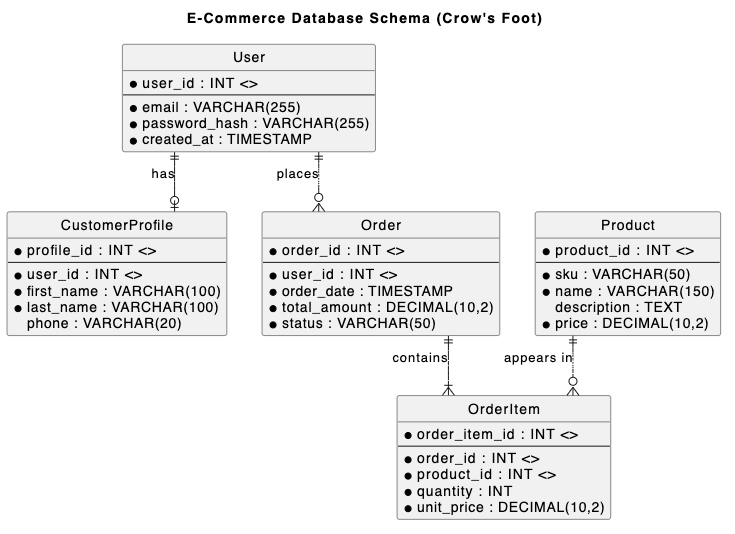
网络与基础设施地图
轻松渲染网络拓扑、服务器节点、云连接和防火墙。
@startnwdiag
title 企业网络拓扑

nwdiag {
    network External_Internet {
        address = "0.0.0.0/0"
        user_client [address = "203.0.113.15", description = "远程用户"];
        edge_firewall [address = "192.168.1.1", description = "边界防火墙"];
    }

    network DMZ_Zone {
        address = "192.168.1.0/24"
        edge_firewall;
        load_balancer [address = "192.168.1.10", description = "Nginx 负载均衡器"];
        mail_server [address = "192.168.1.25", description = "SMTP 服务器"];
        internal_firewall [address = "192.168.1.254", description = "内部防火墙"];
    }

    network Private_LAN {
        address = "10.0.1.0/24"
        internal_firewall;
        app_server_01 [address = "10.0.1.50", description = "API 节点 1"];
        app_server_02 [address = "10.0.1.51", description = "API 节点 2"];
        db_master [address = "10.0.1.100", description = "PostgreSQL 主库"];
    }

    network Management_Subnet {
        address = "10.0.99.0/24"
        internal_firewall;
        admin_bastion [address = "10.0.99.5", description = "SSH 堡垒主机"];
        monitoring_node [address = "10.0.99.20", description = "Prometheus 主机"];
    }
}
@endnwdiag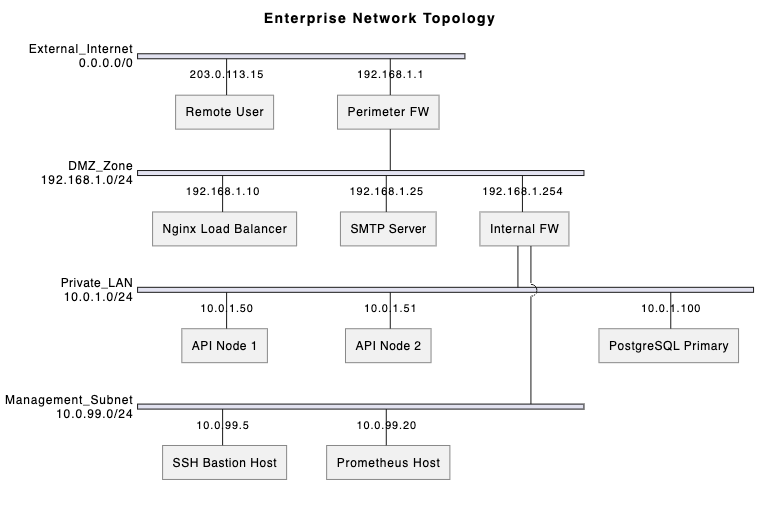
4. 规划、管理与头脑风暴可视化
PlantUML 不仅限于软件设计,它也是项目管理和团队头脑风暴的强大工具。
甘特图
使用简洁的文本标记来规划项目时间表、任务依赖关系、里程碑和资源分配。
gantt
    title 软件产品发布计划
    dateFormat  YYYY-MM-DD
    axisFormat  %b %d

    section 规划与设计
    需求收集   :a1, 2026-09-01, 10d
    架构设计      :a2, 在 a1 之后, 10d

    section 开发
    后端 API 开发  :b1, 在 a2 之后, 15d
    前端 UI 开发  :b2, 在 a2 之后, 15d

    section 测试与发布
    集成测试      :c1, 在 b1 和 b2 之后, 8d
    安全审计           :c2, 在 c1 之后, 5d
    生产发布       :里程碑, m1, 在 c2 之后, 0d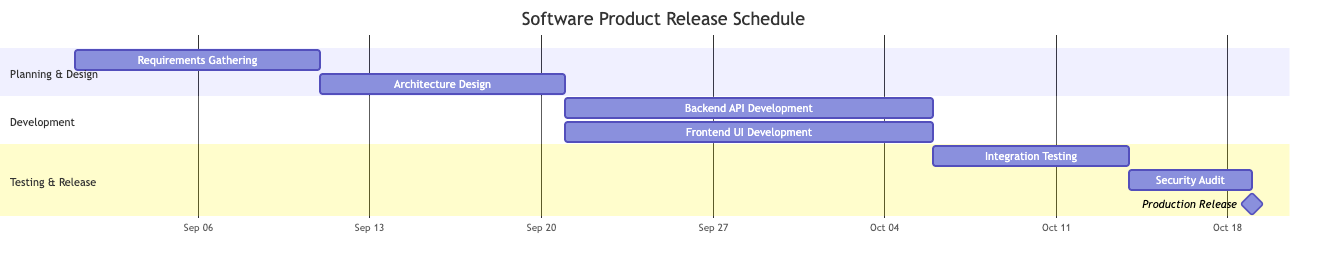
工作分解结构 (WBS)
将复杂项目分解为分层交付物和可管理的任务块。
@startwbs
    title 网站改版 WBS

* 网站改版项目
** 1. 调研与策略
*** 1.1 利益相关者访谈
*** 1.2 竞争对手审计
*** 1.3 范围与策略确认
** 2. UX/UI 设计
*** 2.1 线框图
**** 2.1.1 桌面布局
**** 2.1.2 移动布局
*** 2.2 设计系统
**** 2.2.1 组件库
**** 2.2.2 排版与风格指南
** 3. 技术开发
*** 3.1 前端
**** 3.1.1 页面模板
**** 3.1.2 API 集成
*** 3.2 CMS 与后端
**** 3.2.1 自定义文章类型
**** 3.2.2 数据库迁移
** 4. 质量保证与发布
*** 4.1 跨浏览器测试
*** 4.2 内容迁移
*** 4.3 DNS 切换与上线
@endwbs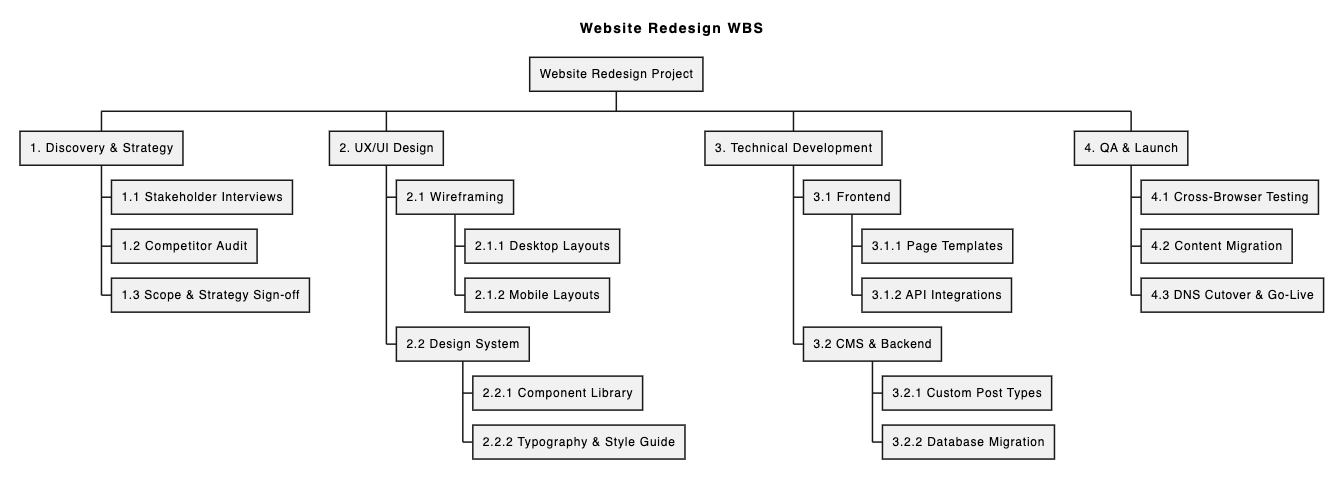
思维导图
在团队会议期间快速捕捉结构化想法、功能分类和技术探索笔记。
@startmindmap
    title 电商平台功能地图

* 电商平台
** 用户账户管理
*** 社交认证 (Google, Apple)
*** 多因素认证
*** 订单历史与追踪
** 产品目录与搜索
*** 分面搜索与筛选
*** 库存同步
*** 产品评论与评分
** 结账与支付
*** 支付网关 (Stripe, PayPal)
*** 优惠券与促销引擎
*** 一键访客结账
** 客户支持
*** 实时聊天助手
*** 自动化退货门户
@endmindmap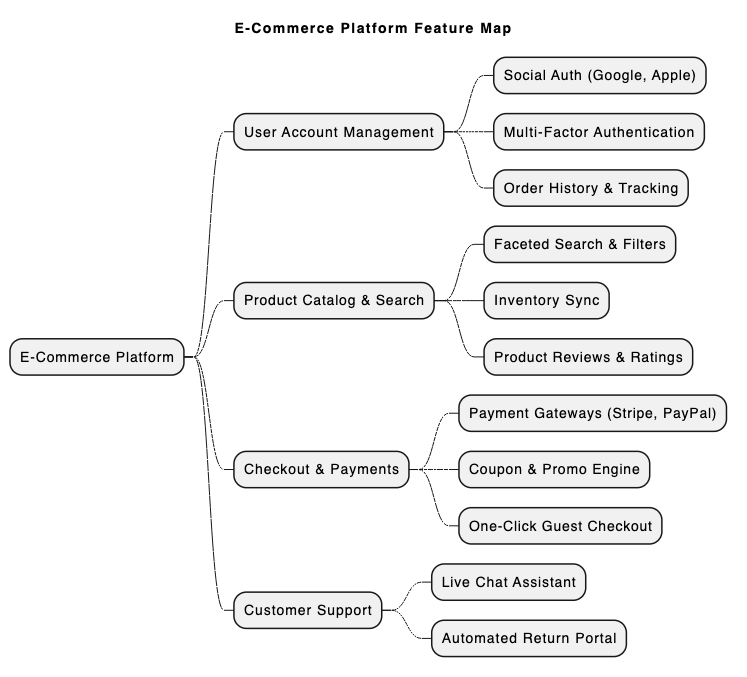
5. 快速编写和渲染 PlantUML:VPasCode 的优势
虽然 PlantUML 功能强大,但配置本地 Java 环境、Graphviz 依赖项和命令行工具可能会带来不便。使用专用的、基于 Web 的PlantUML 工具可以完全消除这些障碍。
Visual Paradigm VPasCode是一个统一的“图表即代码”平台,专为简化文本到图表的工作流而设计。根据我们最近强调的VPasCode 重大更新:利用 AI 即时生成和修改图表,它现在在编辑器内原生支持 AI 功能。
VPasCode 的主要优势:
- 原生 AI 图表生成与修改:使用自然语言提示(例如,“为 ATM 系统生成 PlantUML 用例图”)或指示 AI 即时修改现有代码。
- 零设置在线平台:无需安装本地编译器或插件,即可立即访问 vpascode.com 上的强大编辑器。了解更多内容,请查看VPasCode 概述.
- 自动格式检测与实时预览:粘贴您的脚本,VPasCode 会自动检测它是 PlantUML、Mermaid 还是 Graphviz,并在您输入时即时渲染实时更新。
- AI 驱动的代码错误修复:如果遇到语法错误,只需点击“由 AI 修复”。VPasCode 会修复代码,并提供带有清晰说明的并排差异对比,帮助您更快地掌握 PlantUML 语法。
- 原生 AI 图表翻译:直接在编辑器中将图表标签和注释翻译成多种语言——非常适合全球开发团队。
- 灵活的导出与文档集成:免费导出高分辨率 PNG 或可缩放的 SVG 矢量图像。您还可以使用他们的“图表即代码”功能指南.
(注:高级 AI 图表生成、修改和错误修复功能仅在 Visual Paradigm Online 高级版 / Visual Paradigm Desktop 专业版+中提供。)
6. 快速入门示例:在 VPasCode 中渲染序列图
要体验使用免费 UML 编辑器(如 VPasCode)有多简单,请考虑以下基本的 PlantUML 序列图脚本:
@startuml
autonumber
actor User
participant "VPasCode Editor" as Editor
participant "AI Engine" as AI

User -> Editor: 粘贴 PlantUML 代码
Editor -> Editor: 自动检测格式并实时渲染
alt 检测到语法错误
    User -> Editor: 点击“由 AI 修复”
    Editor -> AI: 发送错误代码
    AI --> Editor: 返回修正后的代码及差异对比
end
Editor --> User: 显示干净的矢量图(SVG/PNG)
@enduml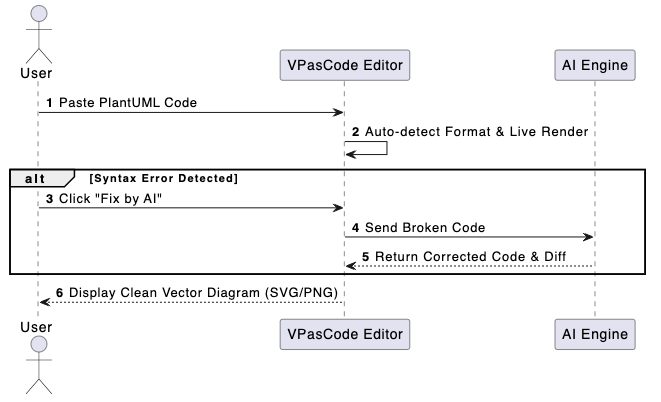
只需复制上述代码,打开 VPasCode,将其粘贴到编辑器中,即可查看即时实时渲染效果,并体验自动化 AI 增强功能。
7. 结论与后续步骤
PlantUML 使团队能够在 UML、架构、数据库模式以及项目管理图表中维护清晰、可版本化且一致的可视化文档。搭配现代化的PlantUML 工具(如 VPasCode),技术写作将变得更快速、无错误且无缝协作。
准备好简化您的图表绘制流程了吗?今天即可在vpascode.com.