


Jeśli kiedykolwiek spędzałeś godziny na ręczne przeciąganie pudełek, wyrównywanie strzałek lub naprawianie przerwanych linii łączących w edytorze wizualnym, wiesz, jak bolesne może być ręczne dokumentowanie. W momencie zmiany architektury systemu Twoje mapy wizualne natychmiast stają się nieaktualne. Ręczne utrzymywanie wizualizacji technicznych szybko zamienia się w nudny obowiązek, którego zespoły inżynierii oprogramowania unikają, co prowadzi do przestarzałej dokumentacji i luk w komunikacji.
Na szczęście istnieje znacznie szybszy i bardziej niezawodny sposób. Korzystając z nowoczesnego narzędzia do tworzenia diagramów z tekstu, możesz konwertować proste skrypty tekstowe — a nawet polecenia w języku naturalnym dzięki wbudowanej sztucznej inteligencji — bezpośrednio na czyste modele wizualne w mniej niż pięć minut. Zamiast walczyć z pozycjonowaniem na płótnie, po prostu piszesz instrukcje kodu lub opisujesz, czego potrzebujesz, a silnik automatycznie zajmuje się układem i wyrównaniem. Aby uzyskać pełne informacje o najnowszych funkcjach natywnych, sprawdź naszą Wielką aktualizację VPasCode.

Dlaczego używać kodu zamiast edytorów typu przeciągnij i upuść?
Tradycyjne narzędzia typu przeciągnij i upuść działają dobrze dla małych rysunków, ale zawodzą, gdy projekty się powiększają. Aktualizacja złożonego przepływu pracy oznacza ręczne przestawianie każdego kształtu na płótnie, ponowne łączenie przerwanych ścieżek strzałek i żmudne ponowne eksportowanie za każdym razem, gdy zmieni się nawet drobny wymóg.
Przejście na dedykowane narzędzie diagram-as-code całkowicie zmienia proces. Zamiast malować kształty, opisujesz swój przepływ pracy za pomocą prostych instrukcji tekstowych lub języka naturalnego. Oprogramowanie automatycznie zajmuje się układem, odstępami i wyrównaniem, co pozwala programistom traktować dokumentację jak kod źródłowy.
Kluczowe korzyści wizualizacji opartych na tekście:
- Niezrównana szybkość:Wpisz swoje pomysły naturalnie, używając zwykłego tekstu, lub generuj wizualizacje natychmiast za pomocą zintegrowanych poleceń AI.
- Automatyczne układy:Węzły, strzałki, ścieżki pływowe i kontenery pozycjonują się idealnie bez ręcznej regulacji.
- Brak problemów z wyrównaniem:Nigdy więcej nie martw się o krzywe linie, niewyrównane marginesy lub źle umieszczone pola tekstowe.
- Natychmiastowe edycje globalne:Zaktualizuj nazwę komponentu na ogromnej mapie architektury w kilka sekund, używając podstawowego wyszukiwania i zamiany tekstu w swoim narzędziu diagram-as-code.
Krok 1: Napisz proste instrukcje tekstowe lub użyj polecenia dla AI
Tworzenie pierwszej wizualizacji nie wymaga żadnego doświadczenia w projektowaniu. Korzystając z niezawodnej platformy takiej jak VPasCode, możesz wybrać preferowany język specyficzny dla danej dziedziny, taki jak PlantUML lub Mermaid — lub wykorzystać natywne, wbudowane w aplikację generowanie diagramów przez AIbezpośrednio w interfejsie aplikacji.
Wpisując polecenie w języku naturalnym — takie jak “Wygeneruj diagram przypadków użycia w PlantUML dla systemu bankomatowego”—VPasCode natywnie i natychmiast tworzy dla Ciebie diagram. (Możesz również obejrzeć nasz film instruktażowy na YouTubeaby zobaczyć to w działaniu).
Alternatywnie, jeśli piszesz ręcznie, oto przykład prostego przepływu uwierzytelniania napisanego w standardowym tekście PlantUML:
@startuml
User -> WebApp: Wprowadź dane logowania
WebApp -> AuthServer: Zweryfikuj logowanie
AuthServer --> WebApp: Token przyznany
WebApp --> User: Dostęp do pulpitu
@enduml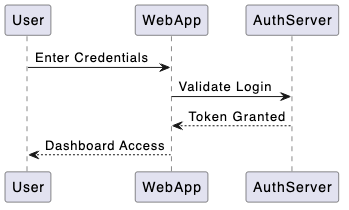
Gdy wklejasz kod lub podajesz polecenie AI w narzędziu do tworzenia diagramów z tekstu, silnik natychmiast analizuje relacje i rysuje Diagramy sekwencjiautomatycznie, generując wyraźne linie życia uczestników i strzałki wiadomości.

Krok 2: Natychmiastowe renderowanie i automatyczne wykrywanie kodu
Jednym z częstych problemów w oprogramowaniu wielkosilnikowym jest ustalenie, jakiego składnia skryptu aktualnie przeglądasz, lub ręczne przełączanie trybów dla różnych typów danych. VPasCode rozwiązuje ten problem dzięki automatycznemu wykrywaniu kodu. Niezależnie od tego, czy wklejasz SQLschematy baz danych, JSONpłyny JSON, PlantUML lub Graphvizskrypty, renderer rozpoznaje format bez konieczności ręcznego przełączania złożonych ustawień.
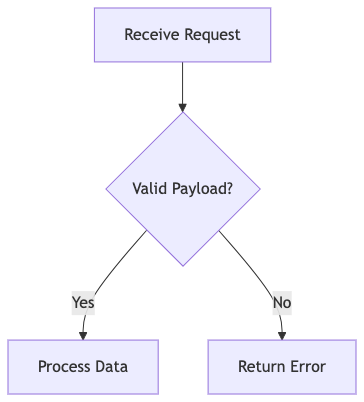
Podczas edycji tekstu w narzędziu typu diagram jako kod, podgląd na żywo renderuje się natychmiast na ekranie. Jeśli preferujesz składnię Mermaid do mapowania Diagramów przepływumożesz tak samo szybko utworzyć przepływ decyzyjny logiki procesu:
graph TD;
    A[Odbierz żądanie] --> B{Poprawny ładunek?};
    B -- Tak --> C[Przetwórz dane];
    B -- Nie --> D[Zwróć błąd];
Krok 3: Napraw błędy składni jednym kliknięciem AI
Pisanie skryptów kodu może czasami prowadzić do błędów składni. Brakująca nawias, literówka w znaczniku lub źle umieszczony średnik może natychmiast zatrzymać renderowanie. Zamiast ręcznie przeszukiwać linie kodu w poszukiwaniu brakującego znaku, zaawansowane narzędzie typu diagram jako kod oferuje funkcję automatycznego naprawiania błędów kodu przy użyciu AI.
Po jednym kliknięciu przycisku „Napraw za pomocą AI” narzędzie identyfikuje błąd składni, przedstawia porównanie kodu obok siebie, wyjaśnia przyczynę błędu prostym językiem i natychmiast stosuje poprawkę.Uwaga: Zaawansowane funkcje generowania, modyfikowania i naprawiania błędów diagramów przy użyciu AI są dostępne w wyższych pakietach, takich jak Visual Paradigm Online Deluxe Edition lub Visual Paradigm Desktop Professional Edition+.

Krok 4: Eksportuj i udostępniaj swoje diagramy
Gdy Twój wizualny diagram zostanie wygenerowany w VPasCode, udostępnienie go członkom zespołu zajmuje tylko kilka sekund. Możesz eksportować wysokiej jakości pliki wektorowe SVG do ostrego skalowania w specyfikacjach technicznych lub standardowe obrazy PNG do raportów prezentacyjnych.
Oprócz bezpośredniego pobierania obrazów, natychmiastowe adresy URL internetowe i kody QR pozwalają członkom zespołu przeglądać i współpracować nad Twoimi modelami bezpośrednio, bez instalowania dodatkowych aplikacji desktopowych. Możesz również połączyć swoje wizualizacje z żywymi ekosystemami dokumentacji, takimi jak Visual Paradigm OpenDocs, aby synchronizować dokumentację zespołu ze zmianami w kodzie.
Porównanie popularnych silników diagramów jako kodu
Wybierając narzędzie do tworzenia diagramów z tekstu, dostęp do wielu silników renderowania zapewnia, że zawsze masz odpowiedni format do danego zadania:
| Silnik | Najlepsze zastosowanie | Kluczowe funkcje |
|---|---|---|
| PlantUML | Modele UML, przepływy sekwencyjne, architektura oprogramowania | Bogata obsługa UML, szczegółowe mapowanie komponentów |
| Mermaid | Schematy blokowe, Wykresy Gantta, lekka dokumentacja | Czysty, nowoczesny wygląd, prosty składnia |
| Graphviz | Grafy sieciowe, złożone mapy strukturalne | Zaawansowana kontrola układu, drzewa grafów węzłów |
| Markmap | Mapy myśli, wizualne burzenie mózgu | Generowanie drzew na podstawie Markdown |
Zacznij tworzyć diagramy szybciej już dziś
Nie potrzebujesz drogiego oprogramowania graficznego ani godzin wolnego czasu, aby tworzyć przejrzystą, profesjonalną dokumentację oprogramowania. Korzystając z zjednoczonej platformy diagramów jako kodu, takiej jak VPasCode, możesz pisać zwykły tekst lub używać natywnych poleceń AI w elastycznym narzędziu do konwersji tekstu na diagramy, renderować wizualizacje w czasie rzeczywistym i udostępniać czyste modele swojej drużynie w mniej niż pięć minut.
Gotowy do przekształcenia swojego tekstu w czyste diagramy?
Doświadcz natychmiastowego renderowania, wsparcia dla wielu silników i generowania diagramów napędzanego przez AI dzięki VPasCode już dziś.