


When managing human-written configuration files, API specs, or complex settings, standard JSON syntax rules can feel overly rigid. The JSON5 Visualizer transforms flexible JSON5 documents into clean, interactive tree-structured node graphs. By parsing expanded syntax rules—such as unquoted object keys, single-quoted strings, trailing commas, and hexadecimal numbers—developers can maintain clean, human-friendly configuration files while visually inspecting application structures.
The Mechanics of JSON5 Visualizations
In VPasCode, JSON5 rendering parses human-friendly syntax rules and converts key-value pairs, nested objects, and arrays into interactive visual diagrams. Object keys serve as parent nodes, primitive values (including special numeric formats) display as leaf nodes, and expanded syntax features render effortlessly without breaking graph generation.
1. Essential Setup
To visualize a JSON5 file, you can write unquoted keys, use single-quoted strings, and include trailing commas across objects and arrays:
{
  // Server runtime parameters
  serviceName: 'authentication-api',
  version: '1.4.0',
  debugMode: true,

  // Network and timeout thresholds
  network: {
    port: 8080,
    timeoutMs: 5000,
    allowedHosts: [
      'localhost',
      '127.0.0.1',
    ],
  },
}
Advanced Structural Techniques
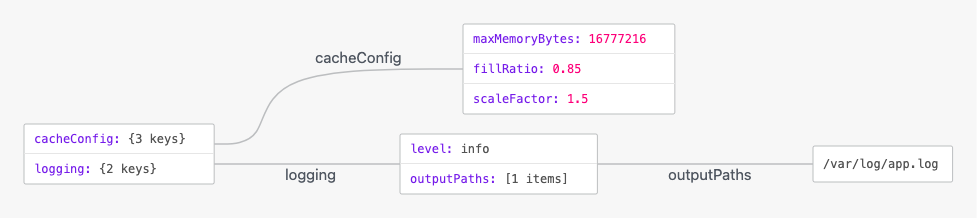
JSON5 visualizations excel at displaying complex application configurations, memory thresholds, and numeric calculations that leverage advanced JSON5 primitive types like hexadecimal numbers, leading decimals, and explicit signs.
1. Resource Allocations and Numeric Constants
By utilizing unquoted keys alongside hexadecimal numbers and explicit numeric constants, VPasCode cleanly expands complex system limits into readable node branches:
{
  // Cache and memory management
  cacheConfig: {
    maxMemoryBytes: 0x1000000, // 16MB written in hexadecimal
    fillRatio: .85,           // Leading decimal without zero
    scaleFactor: +1.5,        // Explicit positive sign
  },

  /* Feature flags and logging options */
  logging: {
    level: 'info',
    outputPaths: [
      '/var/log/app.log',
    ],
  },
}
Structuring Build and Tooling Files
Using JSON5 for build tool settings or project configurations allows multi-line strings, single quotes, and trailing commas to stay clean and maintainable across team environments.
1. Build and Bundler Pipeline Settings
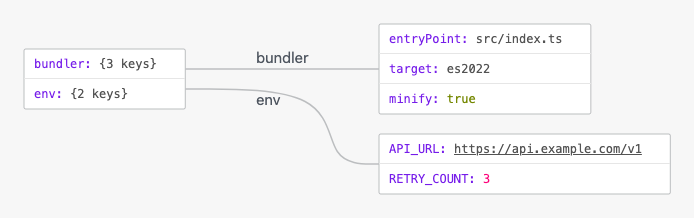
Organize bundler entry points, asset rules, and plugin options into structured sub-objects for smooth visual navigation:
{
  /* Bundler pipeline options */
  bundler: {
    entryPoint: 'src/index.ts',
    target: 'es2022',
    minify: true,
  },

  // Environment variable fallbacks
  env: {
    API_URL: 'https://api.example.com/v1',
    RETRY_COUNT: 3,
  },
}
Strategic Best Practices
- Leverage Unquoted Keys and Single Quotes: Omit quote marks around standard identifier keys and use single quotes for strings to keep source files concise and readable.
- Use Trailing Commas for Cleaner Diffs: Include trailing commas at the end of objects and arrays so adding new elements in git-tracked configuration files produces single-line changes.
- Convert to Standard JSON for Incompatible Parsers: While JSON5 is ideal for human-edited settings and tool configs, ensure you transpile or parse JSON5 into strict JSON before sending payloads to strict REST or GraphQL endpoints.