


Ja, PlantUML kann effizient Sequenzdiagramme mit einfachem, reinem Textcode erstellen.Indem deklarative Domain-Specific-Language-(DSL)-Skripte in visuelle Modelle übersetzt werden, ermöglicht PlantUML Entwicklern und Softwarearchitekten, komplexe Interaktionsabläufe zwischen Systemen zu dokumentieren, ohne manuell Formen zeichnen zu müssen. Ob Sie nach einem zuverlässigen Workflow suchen oder nach dem besten Sequenzdiagramm-Editorum Ihre visuelle Dokumentation zu beschleunigen, behandelt dieser Leitfaden alles von der grundlegenden Syntax bis zum Echtzeit-Rendering mit KI-Unterstützung.
Schnelle Antwort & ein einfaches PlantUML-Sequenzdiagramm-Beispiel
PlantUML erstellt Sequenzdiagramme, indem es Teilnehmer und Nachrichtenübermittlung mit einfachen Pfeilen definiert (z. B. ->für synchrone Aufrufe und -->für Antwortnachrichten).
Hier ist ein einfaches PlantUML-Skript, das einen Authentifizierungsablauf veranschaulicht:
@startuml
actor User
participant "Web App" as App
database Database

User -> App: POST /login (Anmeldedaten)
App -> Database: Benutzerdatensatz abfragen
Database --> App: Benutzer gefunden & verifiziert
App --> User: 200 OK (JWT-Token)
@enduml
Grundlagen der PlantUML-Sequenzdiagramm-Syntax
- Teilnehmer & Akteure:Deklarieren Sie Entitäten mit
actor,participant,boundary,control,entity, oderdatabase. - Synchrone Nachrichten (
->):Feste Pfeile stellen direkte Ausführungsaufrufe dar. - Asynchrone & Antwortnachrichten (
-->):Gestrichelte Linien stellen zurückgegebene Daten oder asynchrone Signale dar. - Aliasnamen (
als):Vereinfachen Sie lange Teilnehmernamen zu kurzen Bezeichnern (z. B.participant "Zahlungs-Gateway-Dienst" as PG).
Erweiterte PlantUML-Sequenzfunktionen: Schleifen, Bedingungen und parallele Logik
Echte Microservices- und API-Workflows erfordern bedingte Pfade, Wiederholungen und parallele Aktionen. PlantUML unterstützt komplexe Logikrahmen nativ direkt im Text.
- Bedingungen:
alt / else / end(Umgang mit erfolgreichen Zahlungen im Vergleich zu abgelehnten Transaktionen) - Optionale Pfade:
opt / end(Ausführen optionaler Schritte, wie das Senden einer E-Mail-Benachrichtigung) - Schleifen:
loop / end(Abfragen eines API-Endpunkts, bis eine Aufgabe abgeschlossen ist) - Parallele Ausführung:
par / else / end(Gleichzeitiges Auslösen mehrerer Hintergrunddienste)
Strukturierung komplexer Microservice- und API-Flows
Um aktive Verarbeitungszeitfenster explizit anzuzeigen, verwenden Sie activate und deaktivieren (oder anhängen “++ und “-- an Nachrichtenziele). Dies verdeutlicht visuell Ausführungslebenszyklen und vermeidet Verwirrung in Diagrammen für mehrstufige Architekturen.
@startuml
Client -> API: Bestellung anfordern
API aktivieren
API -> Service: Zahlung verarbeiten
Service aktivieren
alt Zahlung erfolgreich
    Service --> API: Zahlung bestätigt
    API --> Client: Bestellung bestätigt
else Zahlung fehlgeschlagen
    Service --> API: Unzureichende Mittel
    API --> Client: Bestellung abgelehnt
end
Service deaktivieren
API deaktivieren
@enduml
Häufige PlantUML-Syntaxfehler (und wie man sie behebt)
Beim manuellen Schreiben von Syntax können kleine Tippfehler verhindern, dass Diagramme gerendert werden. Typische Problemstellen sind:
- Nicht geschlossene Logikblöcke: Das Vergessen, ein “
alt,loop, oder “opt-Block mit “end. - Falsche Pfeilnotation: Verwenden ungültiger Pfeillängen oder nicht übereinstimmender Zeichen (z. B. Verwechseln von “
->>und “->). - Nicht escape-zeichen Sonderzeichen: Weglassen von Anführungszeichen um Teilnehmerbeschriftungen, die Leerzeichen oder nicht-alphanumerische Zeichen enthalten.
Fehlerbehebung und Echtzeit-Syntaxkorrektur mit KI
Anstatt manuell nach fehlerhaften Zeilen in langen Skripten zu suchen, können Sie Ihren Workflow mit Visual Paradigm VPasCode. Als dediziertes kostenloses Sequenzdiagramm-Tool, erkennt VPasCode automatisch Ihr Codeformat und rendert Ihre Änderungen in Echtzeit. Tritt ein Syntaxfehler auf, repariert die integrierte KI-gestützte Reparatur-Funktion beschädigte Skriptstrukturen sofort und zeigt einen transparenten Code-Diff nebeneinander an, damit Sie Fehler schnell erkennen können.
Wie Sie mühelos PlantUML-Sequenzdiagramme rendern, generieren und exportieren
Das Einrichten lokaler Java-Laufzeitumgebungen, Graphviz-Abhängigkeiten oder komplexer IDE-Erweiterungen nur zum Anzeigen eines Diagramms kann technische Teams verlangsamen. Moderne Dokumentationsworkflows profitieren erheblich von webbasierten Rendering-Lösungen, die von nativen KI-Funktionen angetrieben werden.
Sofortige KI-Diagrammerstellung und -Bearbeitung
Wie in unserem Großes VPasCode-Update: Diagramme sofort mit KI generieren und bearbeiten, können Sie manuelles Codieren vollständig umgehen, indem Sie natürliche Sprachanweisungen eingeben – wie zum Beispiel „Erstellen Sie ein Sequenzdiagramm in PlantUML für einen OAuth-Login-Flow“– wodurch Sie Sequenzflüsse nativ innerhalb des Editors in Sekundenschnelle erstellen und refaktorisieren können.
Sofortiges Browser-Rendering und Vektor-Export über VPasCode
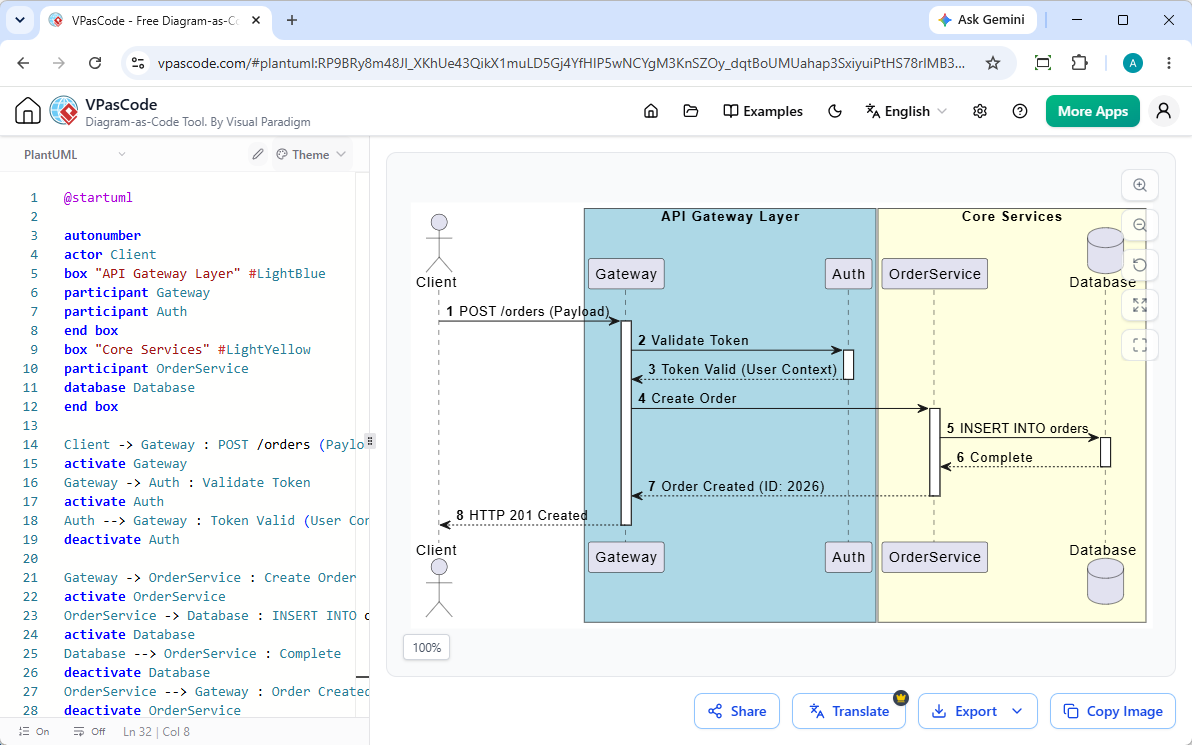
Mit VPasCode, können Sie rohe PlantUML-Skripte oder natürliche Sprachanforderungen direkt in Ihren Browser einfügen, um Live-Updates sofort anzuzeigen. Sobald Ihr Sequenzdiagramm fertig ist, können Sie:
- Klare, skalierbare Vektorgrafiken (exportierenSVG) oder hochauflösende Rasterbilder (exportierenPNG).
- Live-Diagramme sofort über öffentliche URLs oder QR-Codes teilen.
- Ergebnisse nahtlos in Team-Dokumentationsplattformen wie OpenDocs integrieren.
(Hinweis: Erweiterte KI-Funktionen zur Diagrammerstellung, Codebearbeitung und Fehlerbehebung sind in der Visual Paradigm Online Deluxe Edition / Visual Paradigm Desktop Professional Edition+ verfügbar).
Jenseits des Codierens: Generierung von PlantUML-Sequenzdiagrammen mit KI
Das manuelle Schreiben von deklarativem Code kann Zeit in Anspruch nehmen, wenn mehrstufige Architekturflüsse von Grund auf entworfen werden. Konversationelle KI überbrückt die Lücke zwischen hochrangigen Ingenieurskonzepten und gültigen Diagrammskripten.
Konversationelle Sequenzdiagrammerstellung mit dem Visual Paradigm AI-Chatbot
Wenn Sie es vorziehen, das Systemverhalten in einfacher englischer Sprache zu beschreiben, anstatt rohen Code zu schreiben, bietet der Visual Paradigm AI-Diagrammier-Chatbot ermöglicht es Ihnen, vollständige, syntaktisch korrekte Sequenzdiagramme durch einfache Eingabeaufforderungen zu generieren. Sie können einzelne Teilnehmer oder Interaktionsschleifen iterativ mit Chat-Befehlen verfeinern und Ihr Skript anschließend nahtlos in VPasCode überführen, um präzise Anpassungen auf Code-Ebene vorzunehmen.
Häufig gestellte Fragen (FAQs)
Ist PlantUML für Sequenzdiagramme vollständig kostenlos?
Ja. PlantUML ist eine Open-Source-Sprachspezifikation. Sie können PlantUML-Sequenzdiagramme mit Webplattformen wie VPasCode vollständig kostenlos schreiben, vorschauen und exportieren.
Was ist der Unterschied zwischen PlantUML- und Mermaid-Sequenzdiagrammen?
Während beide DSLs Text in Diagramme umwandeln, bietet PlantUML eine tiefe Syntaxflexibilität für unternehmensweite UML-Modellierung, während Mermaid sich auf eine leichte Markdown-Integration konzentriert. Tools wie VPasCode unterstützen sowohl das Standard-PlantUML- als auch das Mermaid-Format standardmäßig mit automatischer Spracherkennung.
Wie binde ich PlantUML-Sequenzdiagramme in technische Dokumentationen ein?
Sie können Ihr gerendertes Sequenzdiagramm als SVG- oder PNG-Datei exportieren und direkt in Ihre Repositories einfügen oder interaktive Links über Online-Dokumentationstools wie Visual Paradigm OpenDocs teilen.
Probieren Sie VPasCode jetzt aus unter: https://www.vpascode.com/editor/