


Oui, PlantUML peut générer efficacement des diagrammes de séquence en utilisant un code simple en texte brut. En traduisant des scripts de langage spécifique au domaine (DSL) déclaratifs en modèles visuels, PlantUML permet aux développeurs et aux architectes logiciels de documenter des flux d’interaction complexes entre des systèmes sans avoir à dessiner manuellement des formes. Que vous recherchiez un flux de travail fiable ou que vous cherchiez le meilleur éditeur de diagrammes de séquence pour accélérer votre documentation visuelle, ce guide couvre tout, de la syntaxe de base au rendu en temps réel assisté par IA.
Réponse rapide et exemple de base d’un diagramme de séquence PlantUML
PlantUML crée des diagrammes de séquence en définissant des participants et des échanges de messages à l’aide de flèches simples (par exemple, -> pour les appels synchrones et --> pour les messages de réponse).
Voici un script PlantUML de base illustrant un flux d’authentification :
@startuml
actor User
participant "Web App" as App
database Database

User -> App: POST /login (identifiants)
App -> Database: Requête d'enregistrement utilisateur
Database --> App: Utilisateur trouvé et vérifié
App --> User: 200 OK (Jeton JWT)
@enduml
Bases de la syntaxe des diagrammes de séquence PlantUML
- Participants et acteurs : Déclarez des entités en utilisant
actor,participant,boundary,control,entity, oudatabase. - Messages synchrones (
->):Les flèches pleines représentent des appels d’exécution directs. - Messages asynchrones et de réponse (
-->):Les lignes pointillées représentent les données retournées ou les signaux asynchrones. - Alias (
as): Simplifiez les noms longs des participants en identifiants courts (par exemple,participant "Service de passerelle de paiement" as PG).
Fonctionnalités avancées des séquences PlantUML : boucles, conditions et logique parallèle
Les workflows réels de microservices et d’API nécessitent des chemins conditionnels, des tentatives de reprise et des actions parallèles. PlantUML prend en charge nativement des cadres de logique complexes directement dans le texte.
- Conditions :
alt / else / end(Gestion des paiements réussis par rapport aux transactions refusées) - Chemins optionnels :
opt / end(Exécution d’étapes optionnelles, comme l’envoi d’une notification par e-mail) - Boucles :
loop / end(Interrogation d’un point de terminaison d’API jusqu’à ce qu’une tâche soit terminée) - Exécution parallèle :
par / else / end(Déclenchement simultané de plusieurs services d’arrière-plan)
Structuration des flux complexes de microservices et d’API
Pour afficher explicitement les fenêtres de traitement actives, utilisez activate et désactiver (ou ajouter “++ et -- aux cibles de message). Cela clarifie visuellement les cycles de vie d’exécution et évite la confusion dans les diagrammes d’architecture multi-niveaux.
@startuml
Client -> API: Commander
désactiver API
API -> Service: Traiter le paiement
désactiver Service
alt Paiement Réussi
    Service --> API: Paiement Vérifié
    API --> Client: Commande Confirmée
sinon Paiement Échoué
    Service --> API: Fonds Insuffisants
    API --> Client: Commande Refusée
end
désactiver Service
désactiver API
@enduml
Erreurs de syntaxe courantes dans PlantUML (et comment les corriger)
Lors de l’écriture de la syntaxe à la main, de petites fautes de frappe peuvent empêcher le rendu des diagrammes. Les points de friction typiques incluent :
- Blocs logiques non fermés : Oublier de fermer un
alt,boucle, ouoptbloc avecend. - Notation de flèche incorrecte : Utilisation de longueurs de flèche invalides ou de caractères incohérents (par exemple, mélanger “
->>et->). - Caractères spéciaux non échappés : Omission de guillemets autour des étiquettes de participants contenant des espaces ou des caractères non alphanumériques.
Dépannage et réparation de la syntaxe en temps réel avec l’IA
Au lieu de rechercher manuellement les lignes cassées dans de longs scripts, vous pouvez rationaliser votre flux de travail en utilisant Visual Paradigm VPasCode. Agissant en tant qu’outil dédié outil gratuit de diagramme de séquence, VPasCode détecte automatiquement le format de votre code et rend vos modifications en temps réel. Si une erreur de syntaxe se produit, son fonctionnalité intégrée Correction par IArépare instantanément les structures de script cassées tout en affichant une comparaison de code transparente côte à côte afin que vous puissiez repérer rapidement les erreurs.
Comment rendre, générer et exporter facilement des diagrammes de séquence PlantUML
La configuration d’environnements d’exécution Java locaux, de dépendances Graphviz ou d’extensions d’IDE complexes rien que pour afficher un diagramme peut ralentir les équipes techniques. Les flux de travail de documentation modernes bénéficient considérablement des solutions de rendu basées sur le web alimentées par des capacités d’IA natives.
Génération et modification instantanées de diagrammes par IA
Comme mis en évidence dans notre Mise à jour majeure de VPasCode : Générez et modifiez des diagrammes instantanément avec l’IA, vous pouvez contourner entièrement la programmation manuelle en saisissant des invites en langage naturel—telles que « Générer un diagramme de séquence en PlantUML pour un flux de connexion OAuth »—ce qui vous permet de créer et de refactoriser des flux de séquence nativement dans l’éditeur en quelques secondes.
Rendu navigateur instantané et export vectoriel via VPasCode
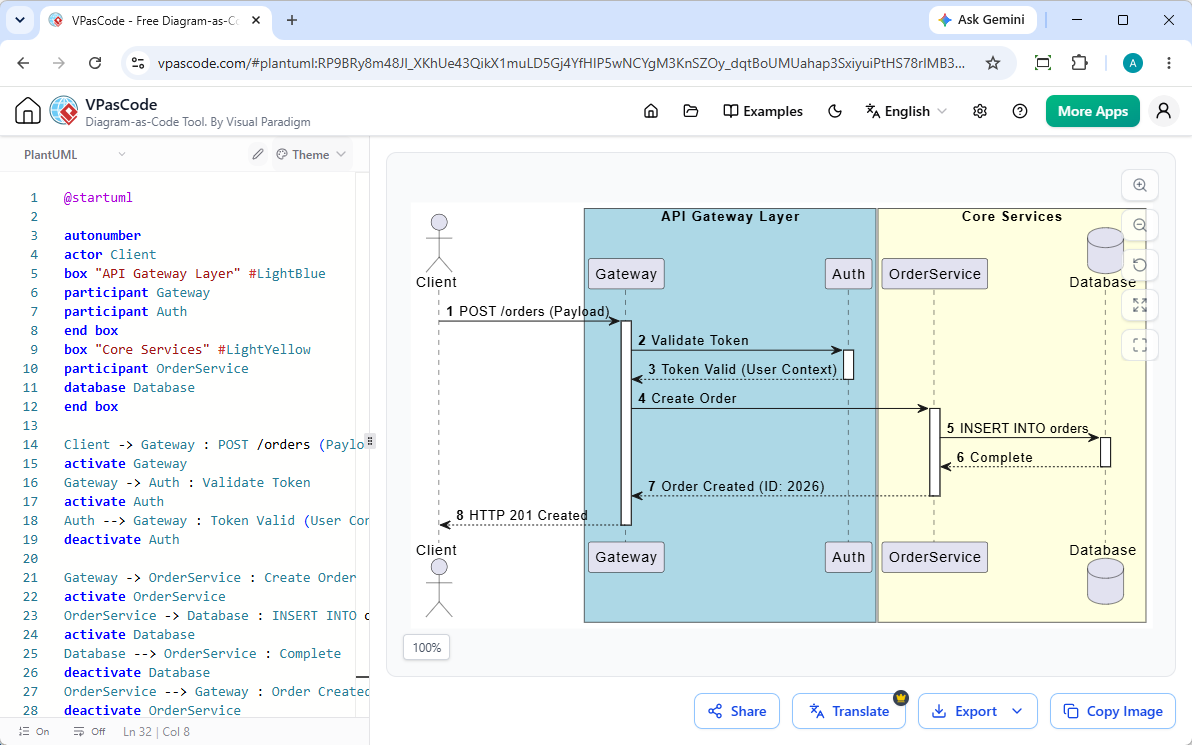
Avec VPasCode, vous pouvez coller des scripts PlantUML bruts ou formuler des requêtes en langage naturel directement dans votre navigateur pour voir les mises à jour en direct instantanément. Une fois votre diagramme de séquence terminé, vous pouvez :
- Exporter des graphiques vectoriels nets et évolutifs (SVG) ou des images raster haute résolution (PNG).
- Partager instantanément des diagrammes en direct via des URL publiques ou des codes QR.
- Intégrer les sorties de manière fluide dans les plateformes de documentation d’équipe comme OpenDocs.
(Note : Les fonctionnalités avancées de génération de diagrammes par IA, de modification de code et de correction d’erreurs sont disponibles dans l’édition Deluxe de Visual Paradigm Online / l’édition Professionnelle+ de Visual Paradigm Desktop).
Au-delà de l’écriture de code : Génération de diagrammes de séquence PlantUML avec l’IA
L’écriture manuelle de code déclaratif peut prendre du temps lors de la conception de flux d’architecture multi-étapes à partir de zéro. L’IA conversationnelle comble le fossé entre les concepts d’ingénierie de haut niveau et les scripts de diagrammes valides.
Diagrammation de séquences conversationnelle avec le chatbot IA Visual Paradigm
Si vous préférez décrire le comportement du système en anglais simple plutôt que d’écrire du code brut, le chatbot IA de diagrammation Visual Paradigmvous permet de générer des diagrammes de séquence complets et syntaxiquement corrects grâce à des invites simples. Vous pouvez affiner de manière itérative des participants individuels ou des boucles d’interaction à l’aide de commandes de chat, puis intégrer sans couture votre script dans VPasCode pour des ajustements précis au niveau du code.
Questions fréquemment posées (FAQ)
PlantUML est-il entièrement gratuit pour les diagrammes de séquence ?
Oui. PlantUML est une spécification de langage open source. Vous pouvez écrire, prévisualiser et exporter des diagrammes de séquence PlantUML entièrement gratuitement en utilisant des plateformes web comme VPasCode.
Quelle est la différence entre les diagrammes de séquence PlantUML et Mermaid ?
Bien que ces deux langages de spécification (DSL) convertissent du texte en diagrammes, PlantUML offre une grande flexibilité syntaxique pour la modélisation UML d’entreprise, tandis que Mermaid se concentre sur une intégration légère avec Markdown. Des outils comme VPasCode prennent en charge nativement les formats standard PlantUML et Mermaid avec une détection automatique de la langue.
Comment intégrer des diagrammes de séquence PlantUML dans une documentation technique ?
Vous pouvez exporter votre diagramme de séquence rendu sous forme de fichier SVG ou PNG et l’insérer directement dans vos dépôts, ou partager des liens interactifs via des outils de documentation en ligne comme Visual Paradigm OpenDocs.
Essayez VPasCode dès maintenant à : https://www.vpascode.com/editor/