


When designing relational databases, managing migrations, or auditing table structures, reading raw DDL (Data Definition Language) scripts can make it difficult to visualize entity relationships. The SQL Schema Visualizer transforms SQL table DDL scripts into clear, interactive entity-relationship (ER) diagrams and table node maps. By parsing table definitions, column data types, primary keys, and foreign key constraints, database architects and backend engineers can visually map database schemas and verify relational integrity at a glance.
The Mechanics of SQL Visualizations
In VPasCode, SQL rendering automatically parses CREATE TABLE statements, column declarations, and constraint definitions into structured visual entity nodes. Table names serve as parent nodes, column definitions list as fields with data types, and foreign key relationships generate connecting lines between related entity nodes.
1. Essential Setup
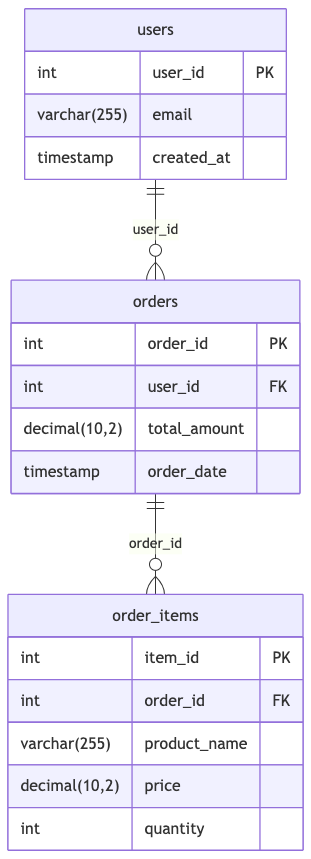
To visualize a SQL schema, write standard DDL statements defining tables, primary keys, and foreign key relations. Core relational models like E-Commerce schemas demonstrate fundamental entity mapping:
CREATE TABLE users (
  user_id INT PRIMARY KEY,
  email VARCHAR(255) NOT NULL,
  created_at TIMESTAMP DEFAULT CURRENT_TIMESTAMP
);

CREATE TABLE orders (
  order_id INT PRIMARY KEY,
  user_id INT REFERENCES users(user_id),
  total_amount DECIMAL(10,2) NOT NULL,
  order_date TIMESTAMP DEFAULT CURRENT_TIMESTAMP
);

CREATE TABLE order_items (
  item_id INT PRIMARY KEY,
  order_id INT REFERENCES orders(order_id),
  product_name VARCHAR(255) NOT NULL,
  price DECIMAL(10,2) NOT NULL,
  quantity INT NOT NULL
);
Advanced Structural Techniques
SQL visualizations excel at rendering content management systems, multi-author blogging platforms, and publishing relational graphs.
1. Blog and Content Management System Schema
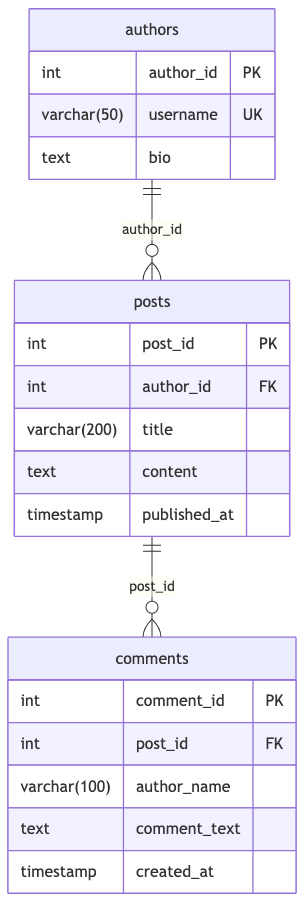
By linking author accounts, posts, categories, and comment threads, VPasCode transforms multi-table DDL scripts into comprehensive ER node diagrams:
CREATE TABLE authors (
  author_id INT PRIMARY KEY,
  username VARCHAR(50) UNIQUE NOT NULL,
  bio TEXT
);

CREATE TABLE posts (
  post_id INT PRIMARY KEY,
  author_id INT REFERENCES authors(author_id),
  title VARCHAR(200) NOT NULL,
  content TEXT NOT NULL,
  published_at TIMESTAMP
);

CREATE TABLE comments (
  comment_id INT PRIMARY KEY,
  post_id INT REFERENCES posts(post_id),
  author_name VARCHAR(100) NOT NULL,
  comment_text TEXT NOT NULL,
  created_at TIMESTAMP DEFAULT CURRENT_TIMESTAMP
);
Structuring Multi-Tenant Platforms and SaaS Workspaces
Visualizing SaaS platform schemas helps developers map multi-tenant isolation, subscription tiers, and team membership structures.
1. SaaS Multi-Tenant Platform Schema
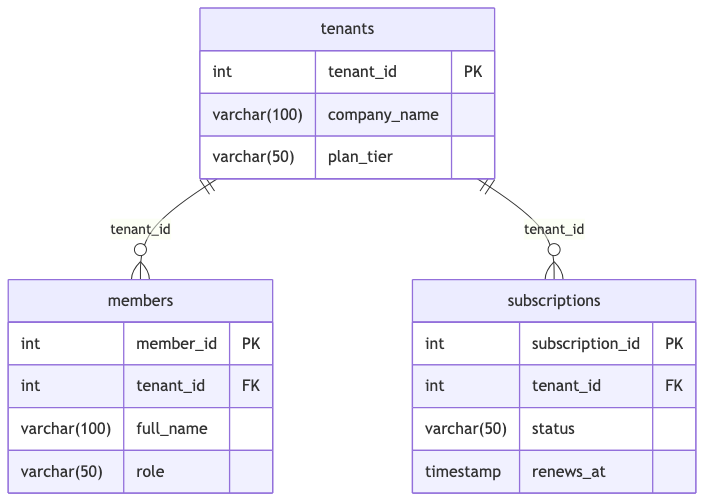
Define tenant accounts, user subscriptions, and workspace memberships to map complex authorization and billing models:
CREATE TABLE tenants (
  tenant_id INT PRIMARY KEY,
  company_name VARCHAR(100) NOT NULL,
  plan_tier VARCHAR(50) DEFAULT 'free'
);

CREATE TABLE members (
  member_id INT PRIMARY KEY,
  tenant_id INT REFERENCES tenants(tenant_id),
  full_name VARCHAR(100) NOT NULL,
  role VARCHAR(50) NOT NULL
);

CREATE TABLE subscriptions (
  subscription_id INT PRIMARY KEY,
  tenant_id INT REFERENCES tenants(tenant_id),
  status VARCHAR(50) NOT NULL,
  renews_at TIMESTAMP NOT NULL
);
Strategic Best Practices
- Declare Explicit Foreign Keys: Include explicit
REFERENCES table(column)clauses or standardFOREIGN KEYstatements so the renderer can automatically draw connection lines between entities. - Use Standard Column Constraints: Clearly specify
PRIMARY KEY,NOT NULL, andUNIQUEflags to keep attribute metadata visible inside rendered table cards. - Stick to Clean DDL Statements: Keep statements focused on table structure (such as
CREATE TABLE) rather than procedural logic or raw data inserts for clean, focused diagram generation.