


Ja, KI kann UML-Diagramme erstellen, jedoch nicht durch das direkte Zeichnen von Pixeln. Moderne KI-UML-Tools generieren strukturierte Textformate – wie PlantUML- und Mermaid-Code –, die sofort in bearbeitbare, vektorbasierte Architekturdiagramme gerendert werden.
Für Softwarearchitekten und Entwickler führt die Nutzung standardmäßiger KI-Tools wie ChatGPT oder Claude häufig zu subtilen Syntaxfehlern oder Renderingsfehlern. Dieser Leitfaden erläutert, wie Text-zu-Diagramm-Engines funktionieren, wie fehlerhafte KI-Ausgaben behoben werden und wie spezialisierte Plattformen wieVisual Paradigm VPasCode den gesamten Workflow vom ersten Prompt bis zur vollständigen technischen Dokumentation optimieren.
1. Die kurze Antwort: Wie KI Architektur tatsächlich „zeichnet
Wenn Ingenieure fragen, ob einKI-UML-Tool Diagramme erstellen kann, erwarten sie oft eine visuelle Pixelrendering. In der Praxis ist generative KI hervorragend darin, komplexe Problemstellungen in standardisierteDiagram-as-Code (DaC) domänenspezifische Sprachen (DSLs) zu übersetzen.
| Ansatz | Ausgabeformat | Bearbeitbarkeit | Versionskontrolle |
|---|---|---|---|
| Raster-/Pixel-KI | PNG, JPG | Unmöglich (Neuzeichnung erforderlich) | Nein |
| Diagram-as-Code-KI | PlantUML, Mermaid, Graphviz | Sofortige Textbearbeitung | Git-freundlich (Klartext) |
Indem KI Klartext-Code statt flacher statischer Bilder ausgibt, ermöglicht sie Entwicklern, ihr Softwaredesign in Git-Repositories versionskontrolliert zu verwalten, Diffs auszuführen und sofortige Mikro-Bearbeitungen vorzunehmen.
2. Text-zu-Diagramm: Warum KI + Diagram-as-Code (DaC) die Gewinnkombination ist
2.1 Die Grenzen von KI-generierten Bildern im Vergleich zu Vektorcode
Allgemeine Bildmodelle (wie DALL-E oder Midjourney) scheitern konsequent beim Erstellen von Diagrammen, da sie Logik, Verbindungen oder Softwaremodellierungssemantik nicht verstehen. Sie erzeugen fehljustierte Formen, unlesbare Texte und nicht bearbeitbare Pixelartefakte. Die Verwendung einesKI-PlantUML-Tools stellt sicher, dass Ihre Systemkomponenten, Kardinalitäten und Interaktionsflüsse mathematisch und syntaktisch präzise bleiben.
2.2 PlantUML & Mermaid: Die Sprachen, in denen KI am besten spricht
Große Sprachmodelle (LLMs) werden umfassend auf Open-Source-Code-Repositories trainiert. Da die Syntax von PlantUML und Mermaid auf Plattformen wie GitHub und GitLab allgegenwärtig ist, verarbeitet die KI deren Syntaxstruktur besser als fast jede andere visuelle Darstellungssprache.
3. Vom Prompt zum Modell: Sofortige UML-Erstellung durch conversational AI
3.1 Ideenfindung & iterative Verfeinerung: Nutzung des KI-Diagramm-Chatbots von Visual Paradigm
Anstatt sich in generischen Chat-Schnittstellen mit Prompt-Engineering herumschlagen zu müssen, optimieren spezialisierte Tools die Modellerstellung. Der KI-Diagramm-Chatbot von Visual Paradigm ermöglicht es Teams, rohe Geschäftsanforderungen direkt durch natürliche Konversation in präzise Sequenz-, Klassen- oder Bereitstellungsdiagramme umzuwandeln.
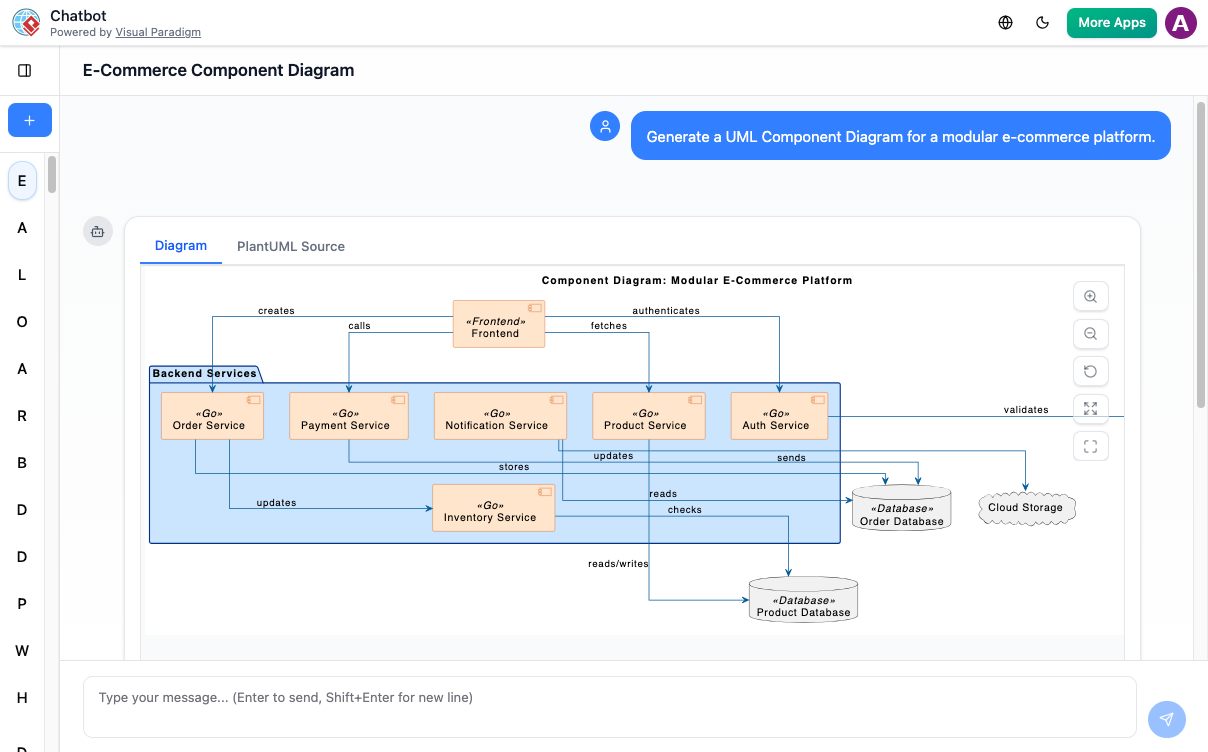
3.2 Tiefgehende Erweiterung: Erstellung von Unterdiagrammen
Ein häufiger Reibungspunkt beim architektonischen Modellieren ist die Detailerweiterung. Conversational AI ermöglicht es Entwicklern, hochstufige Subsystemblöcke auszuwählen und detaillierte Sequenzdiagramme auf niedrigerer Ebene anzufordern, ohne den Kontext zu verlieren oder von vorne beginnen zu müssen.
4. Präzisionsabstimmung: Übergang zur Code-Level-Bearbeitung
4.1 Die VPasCode-Brücke: Vom Chatbot zur Live-Code-Bearbeitung
Die Generierung auf hoher Ebene ist perfekt für erste Entwürfe, aber Entwickler-Workflows erfordern Mikroanpassungen. Die VPasCode-Brücke verbindet visuelle Chat-Ausgaben direkt mit einem Echtzeit-, browserbasierten PlantUML-Editor.
Mit automatischer Formaterkennung wird das Einfügen eines rohen Skripts in VPasCode sofort in die entsprechende visuelle Ansicht umgewandelt, ohne dass eine manuelle Sprachauswahl erforderlich ist.
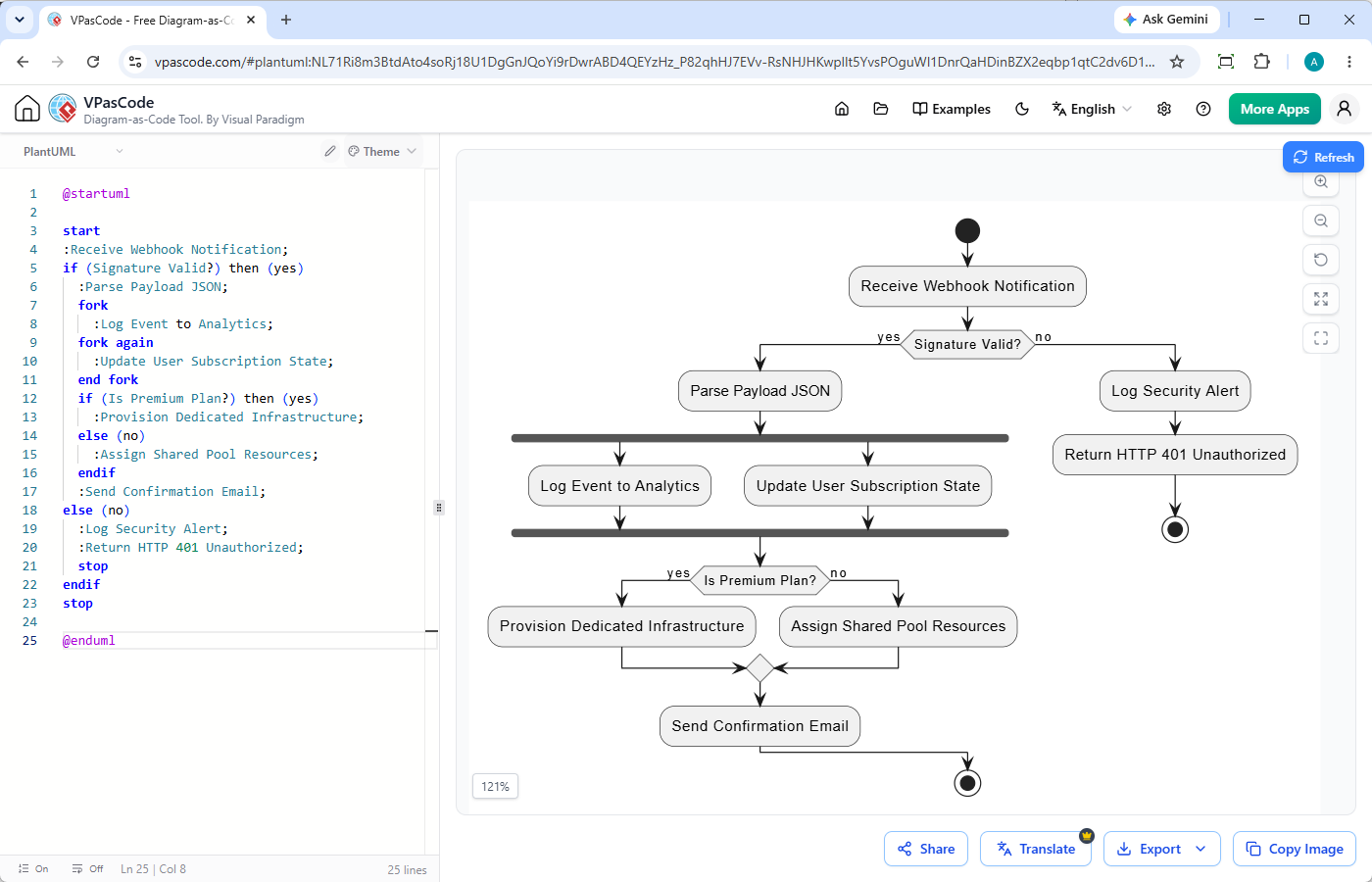
4.2 Beseitigung von Syntax-Reibungspunkten mit KI-Diagnose in einem Klick
LLMs erzeugen gelegentlich Syntaxfehler aufgrund von Versionsunterschieden oder veralteten Syntax-Tags. Wenn ein Skript fehlschlägt, bietet VPasCode eine integrierte „Fix by AI“-Engine:
- Automatische Diagnose: Erkennt defekte Tags oder fehlende Sequenzverbindungen sofort.
- Transparente Code-Diffs: Zeigt nebeneinanderliegende Vergleiche an, die genau darstellen, was sich geändert hat und warum, und entwickelt Entwicklern im Laufe der Zeit ein besseres Syntaxverständnis.
5. Skalierung des architektonischen Werts im gesamten Team
5.1 Native KI-Übersetzung für globale Entwicklungsteams
Globale Teams stehen bei der Überprüfung von Systemspezifikationen häufig vor Kommunikationsbarrieren. VPasCode enthält eine native KI-Übersetzung direkt im Code-Editor, die es Ingenieuren ermöglicht, Beschriftungen, Komponentenhinweise und Swimlanes in einer einzigen Klickaktion in lokale Sprachen zu konvertieren, ohne die Code-Logik zu beeinträchtigen.
5.2 Vom Diagramm zur Dokumentation: Integration mit OpenDocs
Diagramme sollten nicht isoliert existieren. Sobald sie in VPasCode gerendert wurden, können sie direkt an Visual Paradigm OpenDocseingebettet werden, wobei Echtzeit-Architekturvisualisierungen in umfassende Software-Spezifikationen, API-Dokumentationen und technische Handbücher integriert werden.
6. Auswahl des richtigen Tools für Ihren Workflow
Die Entscheidung zwischen conversational AI und direkter Code-Bearbeitung hängt von Ihrer Zielsetzung ab:
- Verwenden Sie den KI-Diagramm-Chatbot, wenn: Sie bei Null anfangen, Systemarchitekturen brainstormen oder einen hochleveligen Umfang zerlegen.
- Verwenden Sie den VPasCode-Editor, wenn: Sie einen dedizierten, Echtzeit-PlantUML-Editor oder Mermaid-Editor benötigen, um Layout-Details zu verfeinern, Syntaxfehler zu beheben, SVG/PNG-Dateien zu exportieren oder Modelle direkt mit technischer Dokumentation zu verknüpfen.
7. Das Fazit: Automatisieren Sie Ihre Systemarchitektur noch heute
KI kann zuverlässig UML-Diagramme generieren, wenn sie mit strukturierten Textausgaben wie PlantUML und Mermaid kombiniert wird. Durch die Verbindung von Ideenfindung in natürlicher Sprache mit präzisen, Code-Ebene-Bearbeitungsumgebungen eliminieren technische Teams manuelle visuelle Layout-Arbeiten und behalten gleichzeitig eine strenge Versionskontrolle bei.
Erleben Sie schnelles, Echtzeit-Diagramm-Editing ohne Einrichtung – probieren Sie Visual Paradigm VPasCode noch heute aus.