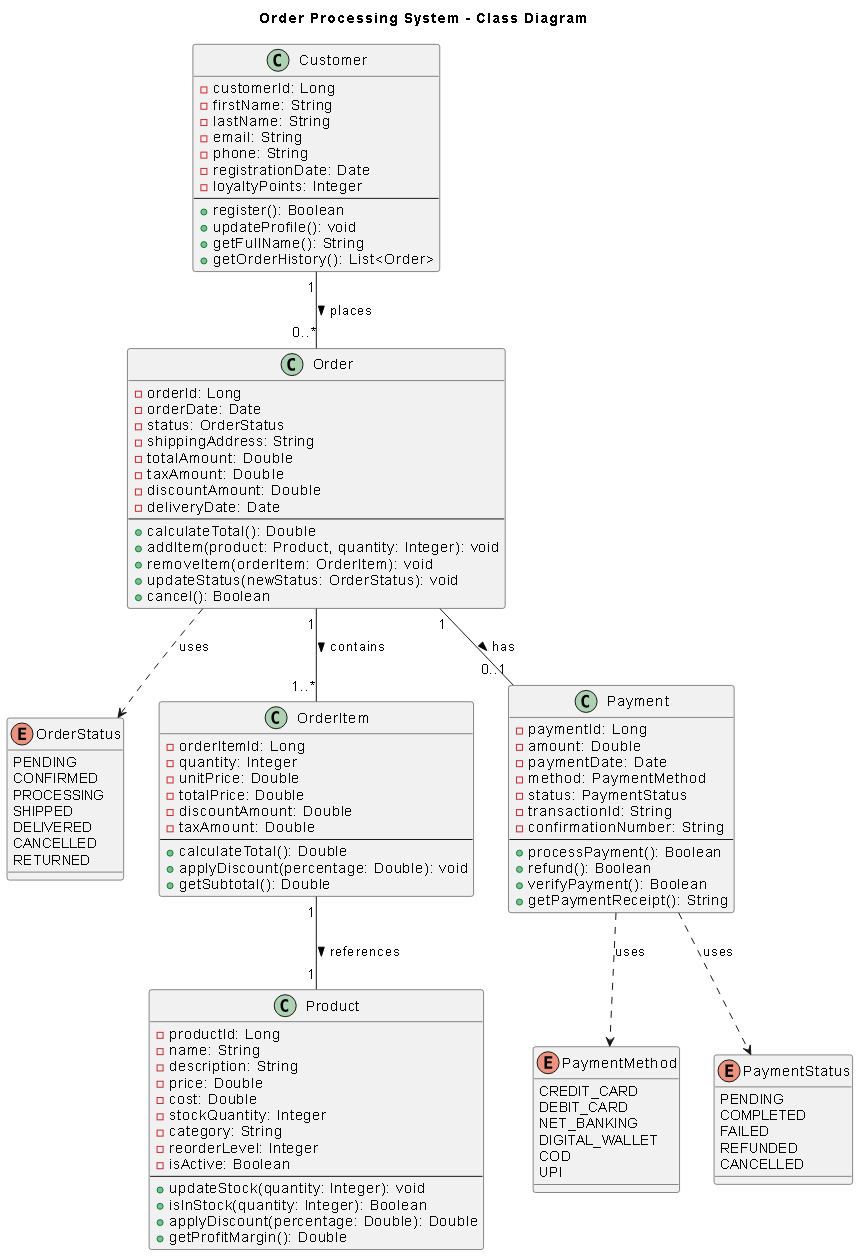
Understanding the Business Requirements
Before diving into code, let’s establish the business requirements for our order processing system:- Customers can place orders containing multiple products
- Each order must track order date, shipping address, and status
- Products have names, prices, and inventory quantities
- Payments can be made via credit card, PayPal, or bank transfer
- The system must calculate order totals including taxes and shipping
- Orders can have multiple status updates throughout their lifecycle
Getting Started with VPasCode
VPasCode is a powerful diagram-as-code tool and unified text to diagram platform supporting popular formats like PlantUML, Mermaid, and Graphviz. The platform offers a free code editor with real-time rendering, making it perfect for iterative design.Why Choose VPasCode for UML Class Diagrams?
- Live Preview: See your diagram update instantly as you type
- AI Error Fixing: Automatically detect and fix syntax errors with AI assistance
- Multiple Formats: Support for PlantUML, Mermaid.js, and Graphviz
- Easy Sharing: Generate shareable URLs for collaboration
- Export Options: Download as SVG or PNG for documentation
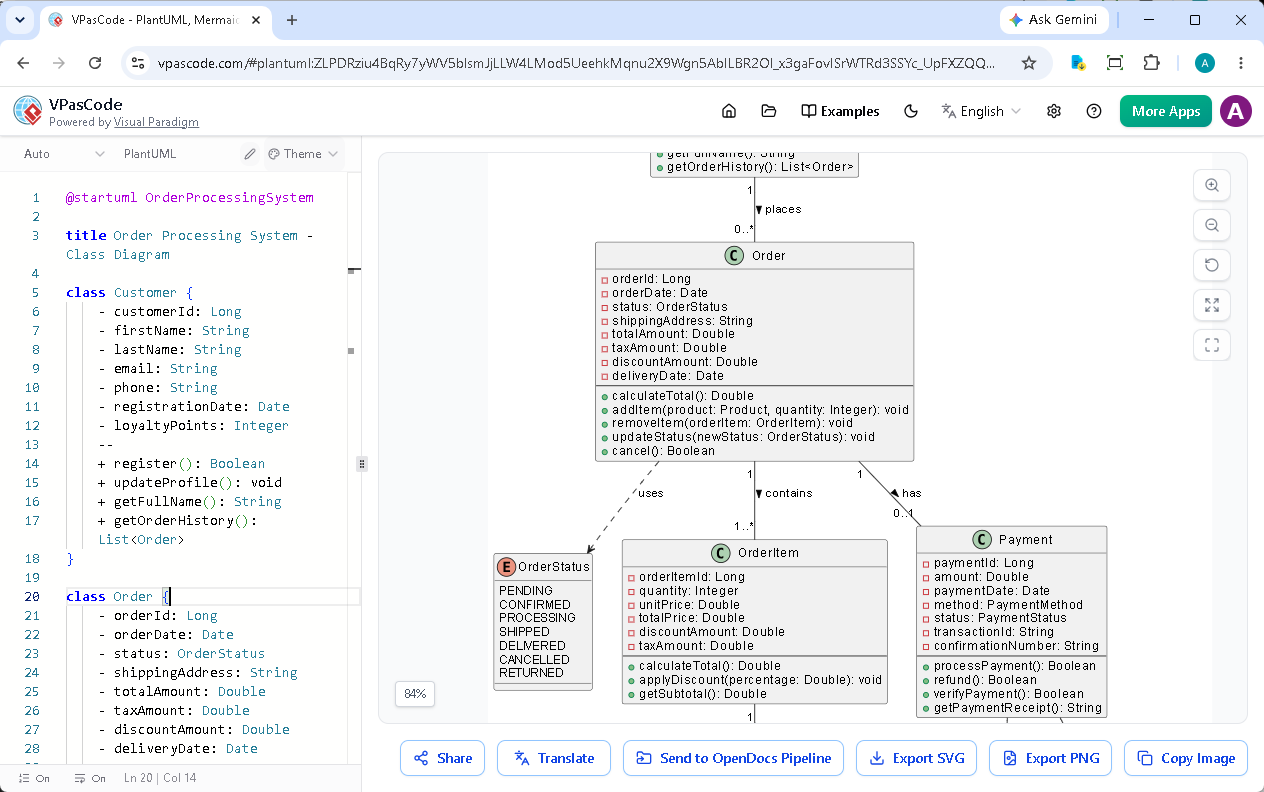
Building the Class Diagram Step by Step
Step 1: Define the Core Classes
Let’s start by defining our main classes using PlantUML syntax. Open VPasCode and begin with the basic structure:
PlantUML
Edit PlantUML in VPasCode
@startuml OrderProcessingSystem

title Order Processing System - Class Diagram

class Customer {
    - customerId: Long
    - firstName: String
    - lastName: String
    - email: String
    - phone: String
    - registrationDate: Date
    - loyaltyPoints: Integer
    --
    + register(): Boolean
    + updateProfile(): void
    + getFullName(): String
    + getOrderHistory(): List
}

@enduml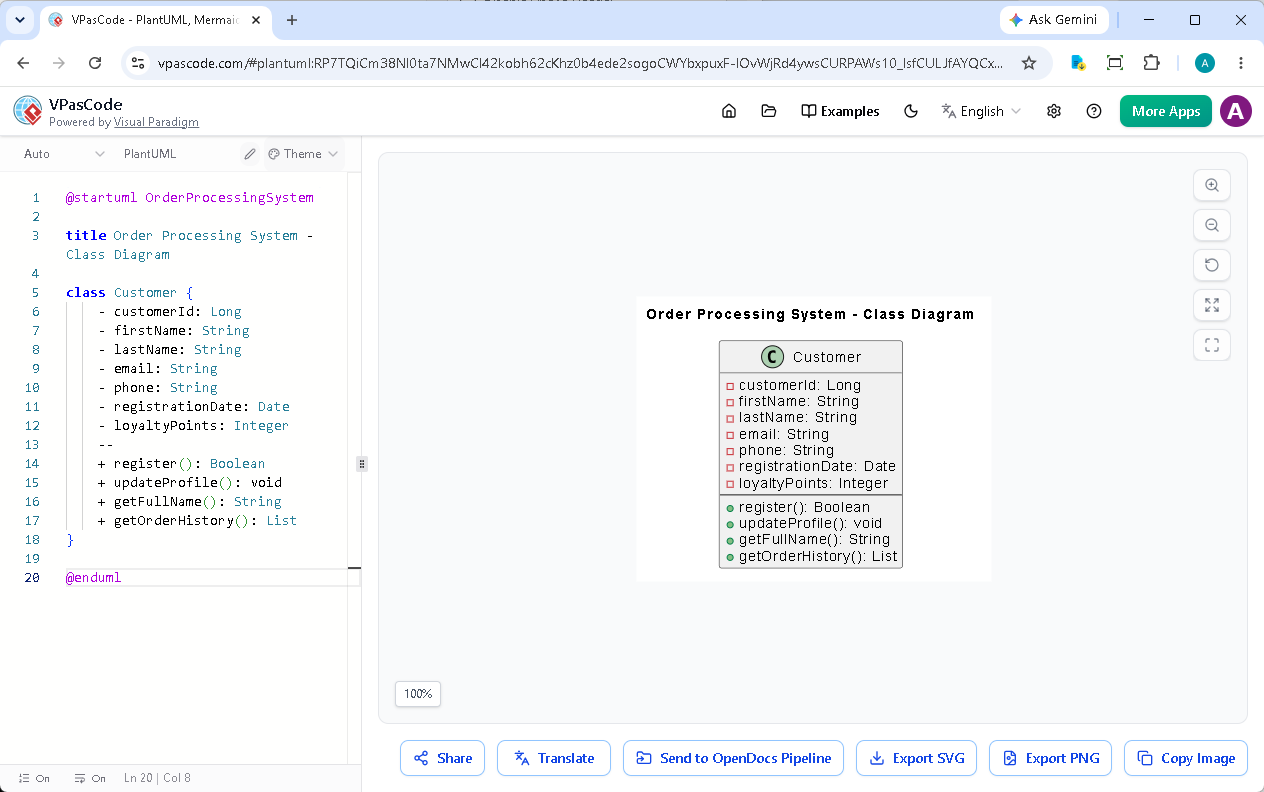
Step 2: Add the Order Class
Now let’s add the Order class, which serves as the central entity in our system:
PlantUML
Edit PlantUML in VPasCode
class Order {
    - orderId: Long
    - orderDate: Date
    - status: OrderStatus
    - shippingAddress: String
    - totalAmount: Double
    - taxAmount: Double
    - discountAmount: Double
    - deliveryDate: Date
    --
    + calculateTotal(): Double
    + addItem(product: Product, quantity: Integer): void
    + removeItem(orderItem: OrderItem): void
    + updateStatus(newStatus: OrderStatus): void
    + cancel(): Boolean
}

enum OrderStatus {
    PENDING
    CONFIRMED
    PROCESSING
    SHIPPED
    DELIVERED
    CANCELLED
    RETURNED
}Step 3: Define Product and OrderItem
Products and order items form the inventory and line items of each order:
PlantUML
Edit PlantUML in VPasCode
class Product {
    - productId: Long
    - name: String
    - description: String
    - price: Double
    - cost: Double
    - stockQuantity: Integer
    - category: String
    - reorderLevel: Integer
    - isActive: Boolean
    --
    + updateStock(quantity: Integer): void
    + isInStock(quantity: Integer): Boolean
    + applyDiscount(percentage: Double): Double
    + getProfitMargin(): Double
}

class OrderItem {
    - orderItemId: Long
    - quantity: Integer
    - unitPrice: Double
    - totalPrice: Double
    - discountAmount: Double
    - taxAmount: Double
    --
    + calculateTotal(): Double
    + applyDiscount(percentage: Double): void
    + getSubtotal(): Double
}Step 4: Implement Payment Processing
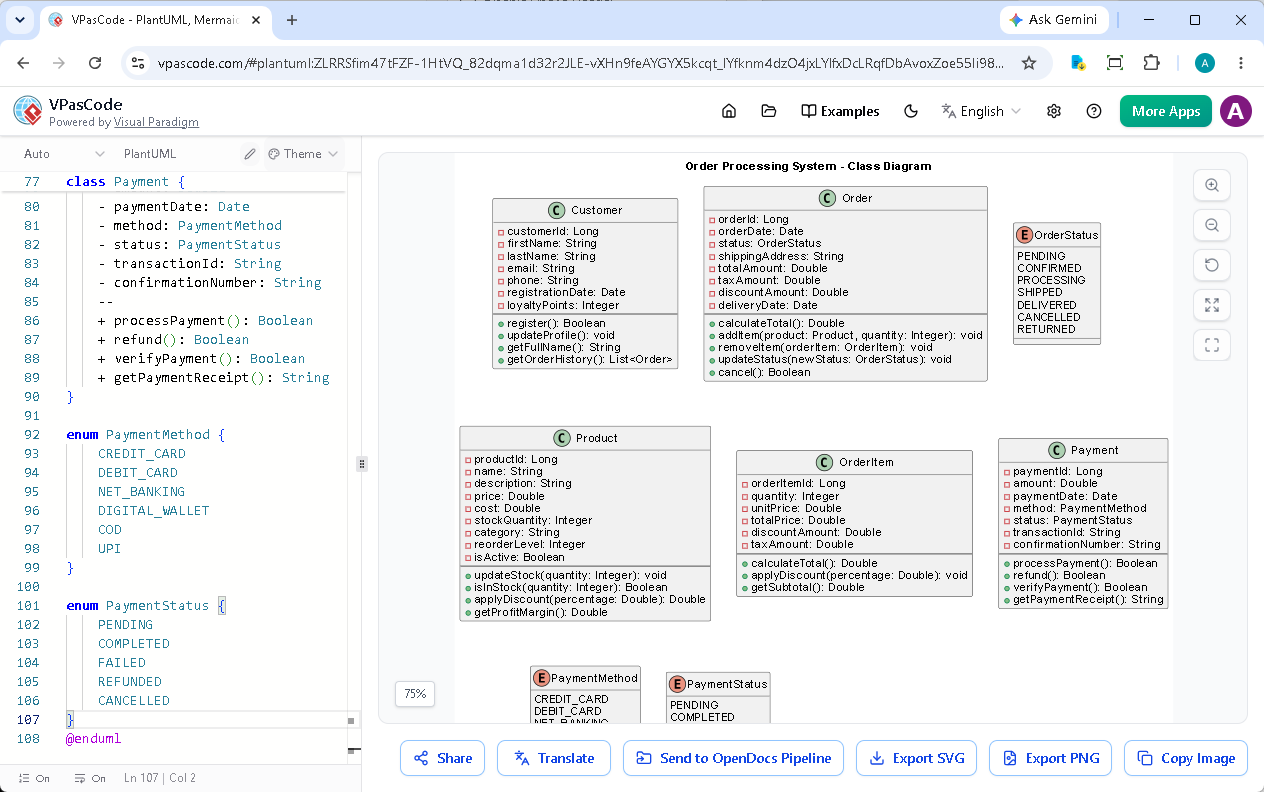
A robust order processing system needs flexible payment handling:
PlantUML
Edit PlantUML in VPasCode
class Payment {
    - paymentId: Long
    - amount: Double
    - paymentDate: Date
    - method: PaymentMethod
    - status: PaymentStatus
    - transactionId: String
    - confirmationNumber: String
    --
    + processPayment(): Boolean
    + refund(): Boolean
    + verifyPayment(): Boolean
    + getPaymentReceipt(): String
}

enum PaymentMethod {
    CREDIT_CARD
    DEBIT_CARD
    NET_BANKING
    DIGITAL_WALLET
    COD
    UPI
}

enum PaymentStatus {
    PENDING
    COMPLETED
    FAILED
    REFUNDED
    CANCELLED
}
Establishing Relationships
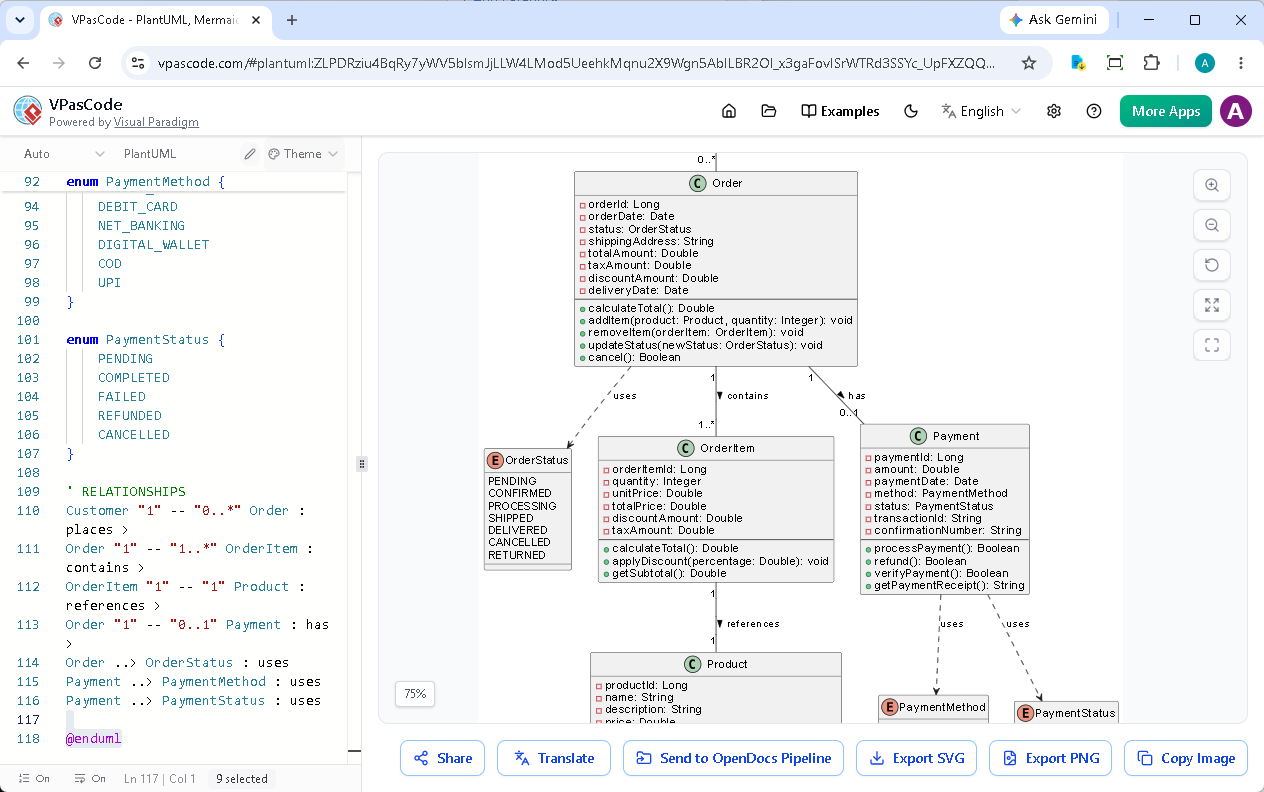
Now comes the crucial part: defining relationships between classes. This is where your object-oriented design skills truly shine.
PlantUML
Edit PlantUML in VPasCode
' RELATIONSHIPS
Customer "1" -- "0..*" Order : places >
Order "1" -- "1..*" OrderItem : contains >
OrderItem "1" -- "1" Product : references >
Order "1" -- "0..1" Payment : has >
Order ..> OrderStatus : uses
Payment ..> PaymentMethod : uses
Payment ..> PaymentStatus : uses
Understanding the Relationships
- Customer to Order (1 to many): A customer can place multiple orders
- Order to OrderItem (1 to many): Each order contains multiple line items
- OrderItem to Product (many to 1): Multiple order items can reference the same product
- Order to Payment (1 to 1): Each order has one payment transaction
- Composition: OrderItems compose an Order (strong ownership)
Bonus – Leveraging AI-Powered Features
AI Code Error Fixing
One of VPasCode’s standout features is AI code error fixing. When you encounter syntax errors, simply click “Fix by AI” to get instant corrections. The AI doesn’t just fix the code—it explains what was wrong, helping you learn and improve your PlantUML skills. For example, if you forget a closing brace or misuse a relationship operator, VPasCode’s AI will:- Detect the error automatically
- Suggest the correct syntax
- Provide a side-by-side diff showing changes
- Explain the reasoning behind the fix
AI Translation for Global Teams
Working with international teams? VPasCode’s AI translation feature allows you to translate class names, attributes, and comments into different languages while maintaining the diagram structure. This is invaluable for documentation and stakeholder communication across language barriers.Validating Your Design
With the complete diagram in place, let’s validate our design against the original requirements:Design Validation Checklist
- ✓ Customers can place multiple orders (1-to-many relationship)
- ✓ Orders track date, status, and shipping address
- ✓ Products maintain inventory and pricing
- ✓ Multiple payment methods supported through inheritance
- ✓ Order totals calculated from items, tax, and shipping
- ✓ Order status tracked through enum
- ✓ Address reused for both customer and shipping
Design Principles Applied
Our class diagram demonstrates several key object-oriented design principles:- Single Responsibility: Each class has one clear purpose
- Open/Closed Principle: Payment system is open for extension (new payment types) but closed for modification
- DRY (Don’t Repeat Yourself): Address class reused instead of duplicating address fields
- Encapsulation: Private attributes with public methods
Exporting and Sharing Your Diagram
Once satisfied with your design, VPasCode makes it easy to share and integrate your work:Export Options
- SVG: Vector format perfect for documentation and presentations
- PNG: Raster format for quick sharing and web use
- Shareable URL: Generate a link for team collaboration
Integration with Visual Paradigm Ecosystem
For comprehensive documentation, you can send your diagrams directly to Visual Paradigm OpenDocs, creating professional technical documentation that combines diagrams with detailed specifications. Additionally, if you’re using Visual Paradigm AI App Studio, you can leverage your class diagram as a foundation for AI-assisted application development. The AI can help generate boilerplate code, suggest design patterns, and even identify potential improvements to your model.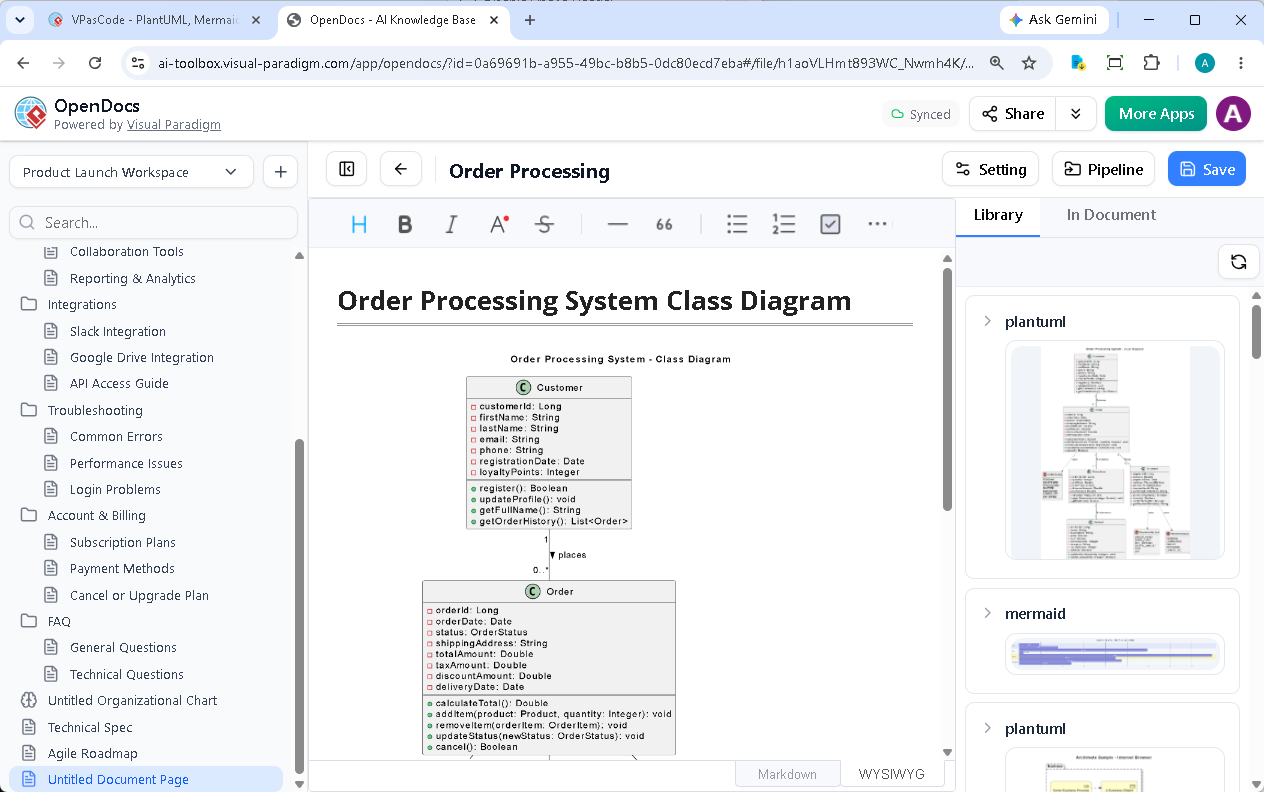
Complete PlantUML Code
Here’s the complete PlantUML code for our order processing system class diagram. You can copy this directly into VPasCode to see the live rendering:
PlantUML
Edit PlantUML in VPasCode
@startuml OrderProcessingSystem

title Order Processing System - Class Diagram

class Customer {
    - customerId: Long
    - firstName: String
    - lastName: String
    - email: String
    - phone: String
    - registrationDate: Date
    - loyaltyPoints: Integer
    --
    + register(): Boolean
    + updateProfile(): void
    + getFullName(): String
    + getOrderHistory(): List
}

class Order {
    - orderId: Long
    - orderDate: Date
    - status: OrderStatus
    - shippingAddress: String
    - totalAmount: Double
    - taxAmount: Double
    - discountAmount: Double
    - deliveryDate: Date
    --
    + calculateTotal(): Double
    + addItem(product: Product, quantity: Integer): void
    + removeItem(orderItem: OrderItem): void
    + updateStatus(newStatus: OrderStatus): void
    + cancel(): Boolean
}

enum OrderStatus {
    PENDING
    CONFIRMED
    PROCESSING
    SHIPPED
    DELIVERED
    CANCELLED
    RETURNED
}

class Product {
    - productId: Long
    - name: String
    - description: String
    - price: Double
    - cost: Double
    - stockQuantity: Integer
    - category: String
    - reorderLevel: Integer
    - isActive: Boolean
    --
    + updateStock(quantity: Integer): void
    + isInStock(quantity: Integer): Boolean
    + applyDiscount(percentage: Double): Double
    + getProfitMargin(): Double
}

class OrderItem {
    - orderItemId: Long
    - quantity: Integer
    - unitPrice: Double
    - totalPrice: Double
    - discountAmount: Double
    - taxAmount: Double
    --
    + calculateTotal(): Double
    + applyDiscount(percentage: Double): void
    + getSubtotal(): Double
}

class Payment {
    - paymentId: Long
    - amount: Double
    - paymentDate: Date
    - method: PaymentMethod
    - status: PaymentStatus
    - transactionId: String
    - confirmationNumber: String
    --
    + processPayment(): Boolean
    + refund(): Boolean
    + verifyPayment(): Boolean
    + getPaymentReceipt(): String
}

enum PaymentMethod {
    CREDIT_CARD
    DEBIT_CARD
    NET_BANKING
    DIGITAL_WALLET
    COD
    UPI
}

enum PaymentStatus {
    PENDING
    COMPLETED
    FAILED
    REFUNDED
    CANCELLED
}

' RELATIONSHIPS
Customer "1" -- "0..*" Order : places >
Order "1" -- "1..*" OrderItem : contains >
OrderItem "1" -- "1" Product : references >
Order "1" -- "0..1" Payment : has >
Order ..> OrderStatus : uses
Payment ..> PaymentMethod : uses
Payment ..> PaymentStatus : uses

@endumlNext Steps and Best Practices
Extending the Design
As your system grows, consider these extensions:- Add a ShoppingCart class for temporary order storage
- Implement Discount and Coupon classes
- Create an Inventory management system
- Add Shipping and Tracking classes
- Implement Review and Rating functionality