


When defining API contracts, data models, or validation rules, reading raw JSON Schema syntax can become difficult to navigate. The JSON Schema Visualizer transforms abstract validation rules, type definitions, and nested properties into a clear, interactive tree-structured visual map. By converting structural constraints into node-based diagrams, developers and data architects can immediately audit payload definitions, inspect required fields, and verify data constraints.
The Mechanics of JSON Schema Visualizations
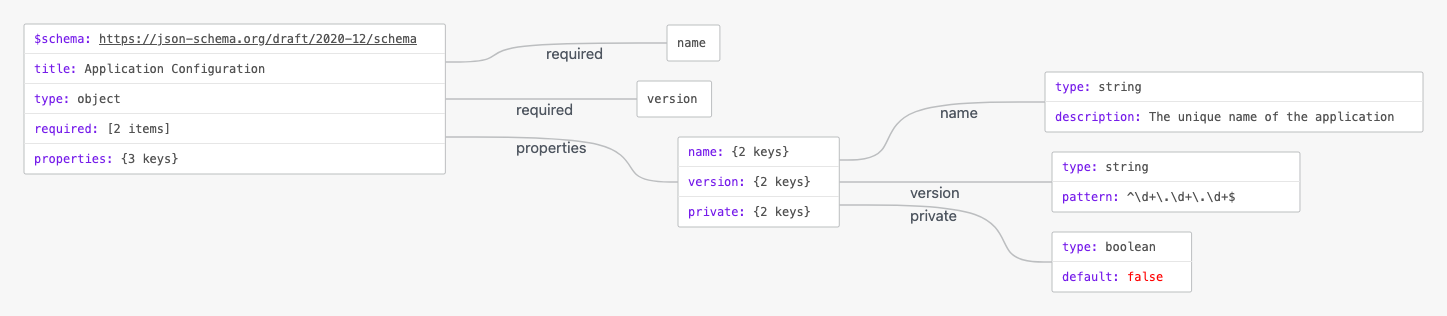
In VPasCode, JSON Schema rendering automatically parses object declarations, property trees, and array definitions into intuitive visual nodes. Keys like properties, required, and primitive data types branch out into organized sub-trees to map out expected structural shapes.
1. Essential Setup
To visualize a standard JSON Schema document, define a root schema object containing standard metadata keys like $schema, type, and properties:
{
  "$schema": "https://json-schema.org/draft/2020-12/schema",
  "title": "Application Configuration",
  "type": "object",
  "required": [
    "name",
    "version"
  ],
  "properties": {
    "name": {
      "type": "string",
      "description": "The unique name of the application"
    },
    "version": {
      "type": "string",
      "pattern": "^\\d+\\.\\d+\\.\\d+$"
    },
    "private": {
      "type": "boolean",
      "default": false
    }
  }
}
Advanced Structural Techniques
JSON Schema visualizations excel at displaying complex, multi-tiered data definitions, including nested objects and string or array constraints.
1. Complex Nested Property Definitions
By nesting sub-objects inside property definitions, VPasCode cleanly expands sub-schemas for dependencies, build scripts, and engine compatibility into dedicated diagram branches:
{
  "$schema": "https://json-schema.org/draft/2020-12/schema",
  "title": "Package Manifest Schema",
  "type": "object",
  "required": [
    "name",
    "dependencies"
  ],
  "properties": {
    "name": {
      "type": "string"
    },
    "dependencies": {
      "type": "object",
      "additionalProperties": {
        "type": "string"
      }
    },
    "scripts": {
      "type": "object",
      "properties": {
        "build": {
          "type": "string"
        },
        "dev": {
          "type": "string"
        },
        "test": {
          "type": "string"
        }
      }
    }
  }
}
Structuring Reusable Schema Definitions
Organizing complex schemas into explicit definitions keeps large validation frameworks modular and easy to interpret in node graphs.
1. Modular Reusable Definitions
Use standard sub-schemas or definitions to maintain clear visual boundaries across complex component specs and shared model entities:
{
  "$schema": "https://json-schema.org/draft/2020-12/schema",
  "title": "Compiler Settings Schema",
  "type": "object",
  "properties": {
    "compilerOptions": {
      "type": "object",
      "properties": {
        "target": {
          "type": "string",
          "enum": ["ES2020", "ES2022", "ESNext"]
        },
        "strict": {
          "type": "boolean"
        },
        "outDir": {
          "type": "string"
        }
      },
      "required": ["target", "strict"]
    },
    "include": {
      "type": "array",
      "items": {
        "type": "string"
      }
    }
  }
}
Strategic Best Practices
- Maintain Valid JSON Schema Draft Standards: Include explicit
$schemadeclarations and adhere strictly to JSON key-value formatting rules. - Declare Explicit Property Types: Always specify the
typefield (e.g., object, array, string) so the renderer creates clear, typed visual nodes. - Use Clear Property Names: Label properties consistently in camelCase or kebab-case to ensure legible label display across automatically generated visual branches.