


When configuring Rust crates, Python packages, or static site generators, navigating deeply nested TOML tables can become complex. The TOML Visualizer transforms section-based TOML documents into clear, interactive tree-structured node graphs. By converting root keys, table headers ([table]), and array-of-tables ([[array]]) into visual branches, developers and build engineers can inspect project metadata and dependency graphs at a glance.
The Mechanics of TOML Visualizations
In VPasCode, TOML rendering automatically parses key-value pairs, nested tables, and inline objects into structured visual trees. Root keys serve as top-level parent nodes, bracketed table headers branch out into sub-trees, and primitive data types (including dates, booleans, and arrays) render cleanly without clutter.
1. Essential Setup
To visualize a standard TOML document, define top-level keys followed by bracketed table sections. Standard package manifests like Rust’s Cargo descriptor demonstrate basic section hierarchy:
[package]
name = "my-rust-app"
version = "0.1.0"
edition = "2021"
authors = ["Alice Smith <[email protected]>"]

[dependencies]
serde = { version = "1.0", features = ["derive"] }
tokio = { version = "1.38", features = ["full"] }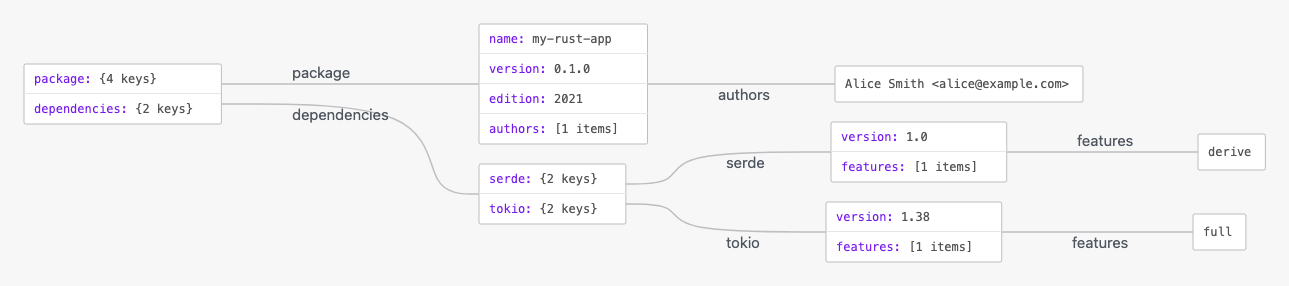
Advanced Structural Techniques
TOML visualizations excel at displaying multi-tool Python project definitions and build backend configurations.
1. Python pyproject.toml Configuration
By organizing build systems, package metadata, and linter settings into explicit sub-tables, VPasCode cleanly expands tool configurations into distinct diagram branches:
[build-system]
requires = ["poetry-core>=1.0.0"]
build-backend = "poetry.core.masonry.api"

[tool.poetry]
name = "data-processor"
version = "2.5.0"
description = "High-throughput telemetry ingestion service"

[tool.poetry.dependencies]
python = "^3.11"
requests = "^2.31.0"
pandas = "^2.2.0"
Structuring Site Themes and Navigation Arrays
Visualizing Hugo site configurations or static generator settings helps content teams audit site parameters and multi-item navigation menus that utilize array of tables ([[menu.main]]).
1. Hugo Site Configuration
Use structured TOML tables and array-of-table entries to map out site parameters, taxonomies, and main navigation links:
baseURL = "https://example.com/"
title = "Developer Documentation"
languageCode = "en-us"
theme = "ananke"

[params]
author = "Doc Team"
showReadingTime = true

[[menu.main]]
name = "Home"
url = "/"
weight = 1

[[menu.main]]
name = "Guides"
url = "/guides/"
weight = 2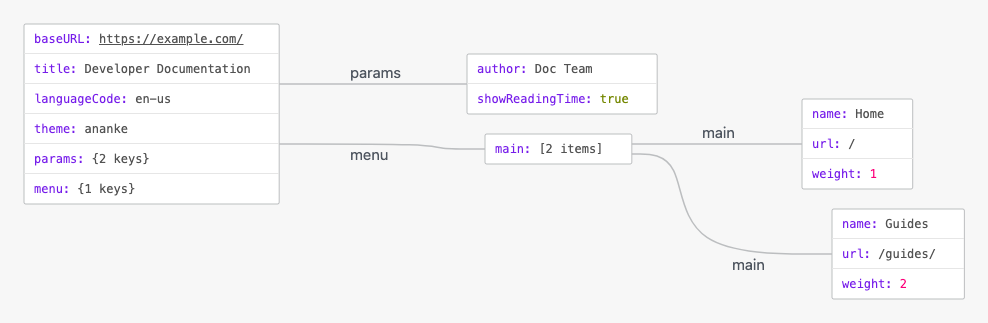
Strategic Best Practices
- Use Explicit Table Headers: Group related properties under
[table.subtable]headers to prevent flat key-value lists and ensure clean horizontal tree growth. - Leverage Inline Tables for Small Objects: Use inline syntax (e.g.,
dep = { version = "1.0", path = "../" }) for concise, single-line dependency declarations. - Use Double Brackets for Array of Objects: Declare repeated structured items (like site navigation links) using
[[double_brackets]]so each item renders as a distinct record node.