


When configuring Kubernetes manifests, CI/CD pipelines, or microservice infrastructure, developers rely on YAML for its clean, human-readable syntax. The YAML Visualizer transforms indentation-based YAML documents into clear, interactive tree-structured node graphs. By converting nested mappings, sequences, and anchor references into visual nodes, developers and DevOps engineers can inspect complex application states and pipeline structures at a glance.
The Mechanics of YAML Visualizations
In VPasCode, YAML rendering automatically parses space-indented key-value pairs, multi-line scalar blocks, and list sequences into interactive node-based diagrams. Key mappings serve as parent nodes, sequence items display as branch elements, and primitive values map out as leaf nodes without requiring heavy bracket notation.
1. Essential Setup
To visualize a standard YAML configuration file, define nested keys using consistent 2-space indentation and denote list items with hyphens:
# Application server configuration
server:
  host: localhost
  port: 8080
  debug: true

# Database connection pool
database:
  driver: postgresql
  max_connections: 20
  hosts:
    - db-primary.internal
    - db-replica.internal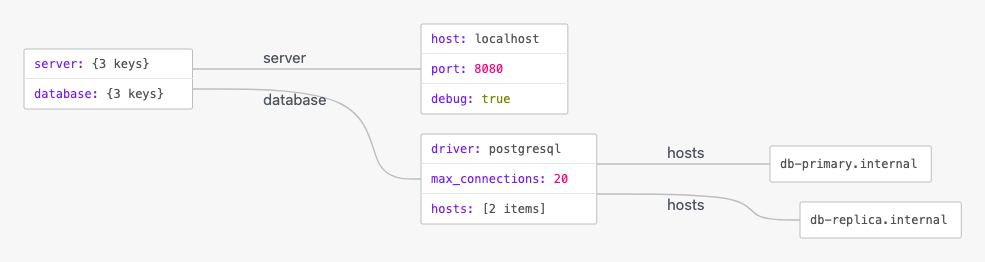
Advanced Structural Techniques
YAML visualizations excel at rendering deployment manifests, multi-stage pipelines, and reusable configuration blocks that utilize YAML anchors (&) and aliases (*).
1. CI/CD Pipeline with Reusable Anchors
By defining base job settings with anchors and merging or referencing them across pipeline steps, VPasCode cleanly resolves step dependencies into visual workflow branches:
# Shared job template anchor
.base_job: &job_defaults
  image: node:20-alpine
  timeout_minutes: 15

pipeline:
  build:
    <<: *job_defaults
    script:
      - pnpm install
      - pnpm build

  test:
    <<: *job_defaults
    script:
      - pnpm test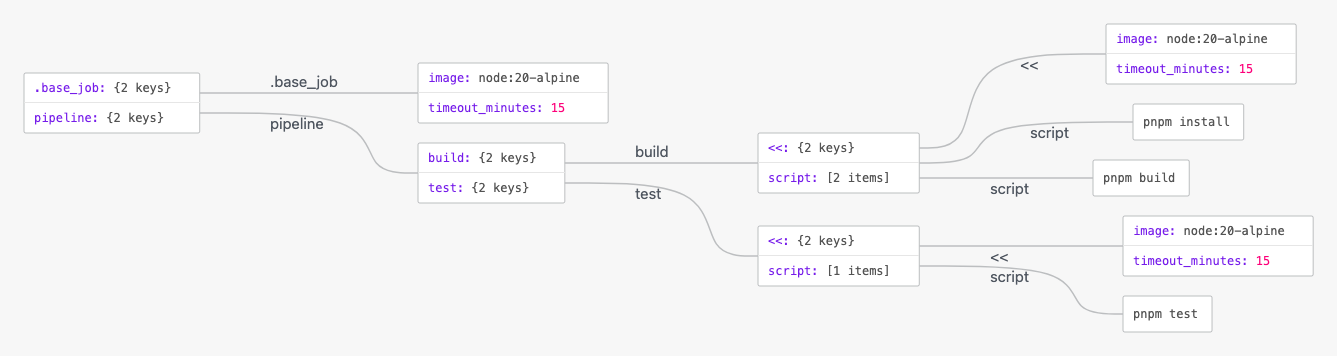
Structuring Multi-Line and Cloud Infrastructure Files
Documenting Kubernetes services or container orchestration manifests keeps complex deployment options clear and maintainable across team environments.
1. Kubernetes Deployment Spec
Organize pod specs, environment variables, and multi-line script blocks (using | or > operators) into structured sub-objects for smooth visual exploration:
apiVersion: apps/v1
kind: Deployment
metadata:
  name: web-api
  labels:
    app: backend
spec:
  replicas: 3
  template:
    spec:
      containers:
        - name: api-server
          image: registry.example.com/api:v2.1.0
          ports:
            - containerPort: 3000
          notes: |
            This container handles primary API traffic.
            Auto-scaling is managed via HPA.
Strategic Best Practices
- Use Spaces, Never Tabs: Always use consistent spaces (typically 2 spaces per level) for indentation, as tabs break standard YAML parsers.
- Leverage Anchors for DRY Configurations: Utilize
&anchorand*aliassyntax to reduce duplication across repeated environment or job definitions. - Quote Strings with Special Characters: Wrap string values in quotes when they contain colons, indicators (
:,{,},[,]), or template variables (e.g.,"{{ env.VAR }}") to prevent parsing errors.