


graph keyword) is the industry standard for representing systems where relationships are mutual, egalitarian, or non-hierarchical. In an undirected graph, the connection operator -- indicates a bond between two nodes without implying that one node leads to, causes, or manages the other.
The Philosophy of Undirected Relationships
Undirected graphs are the natural language of physical and logical networks. In scenarios like server mesh clusters, peer-to-peer (P2P) file sharing, social connectivity, or hardware cabling, the “direction” of data is often fluid or bidirectional. Using an undirectedgraph declaration removes the cognitive bias of “source” and “destination,” allowing the reader to focus on the topology—the structural integrity and density of the network itself.
1. Syntax Mechanics
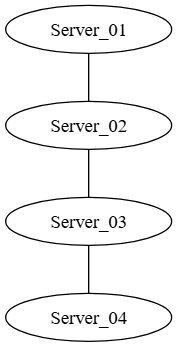
Defining an undirected graph follows a syntax almost identical to a digraph, with one critical change: the operator. By replacing-> with --, you instruct the DOT compiler that these connections represent symmetrical associations.
Graphviz
Edit Graphviz in VPasCode
graph NetworkTopology {
    // A bidirectional association
    "Server_01" -- "Server_02";

    // A multi-node mesh connection
    "Server_02" -- "Server_03" -- "Server_04";
}
Advanced Layout Strategies: The “Spring-Model”
A common pitfall for new Graphviz users is attempting to render undirected graphs using the defaultdot engine. Because the dot engine is optimized for hierarchical ranking, it will often produce unbalanced, awkward layouts for undirected data. Instead, for your undirected graph definitions, you should utilize engines designed for equilibrium:
- neato: The primary choice for undirected graphs. It uses the “Kamada-Kawai” algorithm, which treats every edge like a physical spring. Nodes that are connected move closer together, while unrelated nodes push apart until the system reaches a state of minimum energy.
- fdp: A variation of the spring-model algorithm specifically optimized for larger datasets. It is highly effective at preventing “node overlap” in dense network maps.
Implementation Example
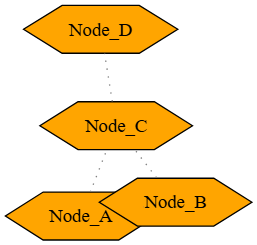
By specifying thelayout engine within your DOT file, you ensure that anyone who renders your code will get the correct, balanced visual output regardless of their local installation.
Graphviz
Edit Graphviz in VPasCode
graph MeshArchitecture {
    layout=neato; // Forces the spring-model engine

    // Aesthetic global defaults
    node [shape=hexagon, style=filled, fillcolor=orange];
    edge [color=gray, style=dotted];

    // Defining the mesh
    "Node_A" -- "Node_B";
    "Node_A" -- "Node_C";
    "Node_B" -- "Node_C";
    "Node_C" -- "Node_D";
}
Optimizing Undirected Visuals for SEO and Readability
When mapping undirected networks, the visual layout can quickly become cluttered. Follow these strategies to maintain professional-grade outputs:- Avoid “Hairball” Graphs: If a network map is too dense to understand, the Graphviz solution is not more edges—it is grouping. Use subgraphs to break a large mesh into logical “neighborhoods” that are connected by fewer, but more significant, bridges.
- Leverage Edge Lengths: In
neato, you can definelenattributes on edges (e.g.,"A" -- "B" [len=2.0]). This allows you to mathematically increase the physical distance between nodes, effectively giving your network “breathing room” in dense areas. - Focus on Node Clusters: Even without the
cluster_prefix used in digraphs, you can group nodes into subgraphs to help the spring-model engine understand that certain nodes should remain physically proximate.