


The Architectural Philosophy of DOT
The DOT language is a declarative text format specifically engineered to describe graphs. When you write a DOT file, you are not telling the computer where to draw a line; you are telling it what connects to what. This abstraction is what makes Graphviz essential for DevOps, systems engineering, and data science—it allows you to represent massive, volatile architectures that would be impossible to maintain in a graphical editor.Foundational Components of a DOT File
Every Graphviz document is built upon a rigid, logical hierarchy. Understanding these components is the first step toward mastering automated diagramming:1. Graph Definition and Scoping
The entire document is wrapped in a graph definition. You must declare the graph type at the very beginning:digraph: Used for directed graphs where directionality is the primary concern (e.g., dependency chains).graph: Used for undirected graphs where relationships are mutual (e.g., network topology).
2. The Identity of Nodes
Nodes are the vertices of your graph. In DOT, they are first-class citizens. You can define them simply by typing their name, but for production-grade documentation, you should always define them with labels. If your ID contains spaces or special characters, the DOT language requires you to enclose the identifier in double quotes to prevent syntax errors.3. Defining Edges and Relationships
Edges are the links between your nodes. The DOT language provides two primary operators to define these relationships:->: Used withindigraphto denote direction (e.g.,Source -> Destination).--: Used withingraphto denote a mutual association (e.g.,NodeA -- NodeB).
Global Attribute Management
One of the most powerful features of the DOT language is the ability to apply styles globally. Rather than setting thecolor, shape, or fontname for every single node, you can define these at the start of your graph. This ensures consistency across your entire documentation suite.
Graphviz
Edit Graphviz in VPasCode
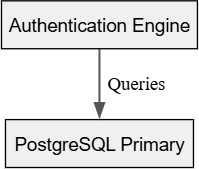
digraph SystemArchitecture {
    // Global style overrides
    node [shape=rect, style=filled, fillcolor="#f0f0f0", fontname="Arial"];
    edge [color="#555555", penwidth=1.5];

    // Node declarations with unique labels
    "AuthService" [label="Authentication Engine"];
    "UserDB" [label="PostgreSQL Primary"];

    // Relationship definition
    "AuthService" -> "UserDB" [label="Queries"];
}
Choosing the Right Layout Engine
A major part of understanding Graphviz syntax is recognizing that the DOT code is only half the equation. The Layout Engine determines how that code is translated into pixels. Choosing the right engine is critical for SEO-friendly and readable diagrams:- Dot: The default and most stable engine for hierarchical, top-down workflows.
- Neato: Employs a spring-model algorithm, perfect for balanced, undirected networks.
- Fdp: Similar to Neato but optimized for larger datasets where node overlap needs to be strictly avoided.
- Circo: Ideal for circular or radial system representations.
Best Practices for Maintainable Syntax
- Use Meaningful ID Names: While the engine doesn’t care about your naming convention, your teammates do. Use descriptive ID strings like
svc_gateway_01rather than genericn1. - Comment Your Code: DOT supports both
//single-line and/* ... */block comments. Use them to explain *why* a specific connection exists. - Modularize with Include: If you are working on a massive enterprise diagram, you can break your DOT files into smaller, logical chunks and use external scripts to concatenate them before rendering.