What is a Mind Map?
A Mind Map is a hierarchical tree-based visualization used to capture, organize, and structure complex information flows, brainstormed ideas, or project taxonomies. Unlike flowcharts that dictate linear procedural steps, mind maps represent connections between a central core concept and its various sub-nodes, making them ideal for high-level roadmap planning, feature breakdown structures, or knowledge management. With Mermaid.js, you define your hierarchical structure using standard Markdown list indentation. The engine automatically handles node positioning, calculates tree growth, and applies distinct node shapes based on the hierarchy level, allowing you to visualize hundreds of interconnected nodes without manual pixel alignment.Core Syntax Guide: Elements and Constructs
Designing a valid, production-grade Mind Map in Mermaid requires mastering root node definition, indentation-based level nesting, and visual decorative tokens.1. Initializing the Mind Map Root
You initialize a mind map canvas on line one using themindmap keyword. The structure is built by defining a root node (the center of your map) and then nesting sub-nodes beneath it using standard space-based indentation:
Mermaid
Edit Mermaid in VPasCode
mindmap
  root((Central Core Concept))
    Level 1 Node
      Level 2 Sub-node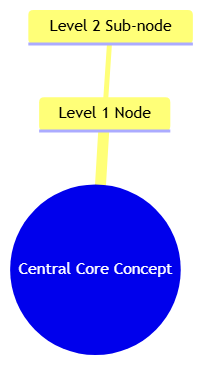
2. Controlling Node Geometry
Just like in Flowcharts, you can inject visual context by enclosing your text in specific bracket tokens. This is highly recommended for differentiating between primary categories, secondary tasks, and actionable items:(Text)— Rounded node (Default).((Text))— Double-rounded node (Usually reserved for the root).[Text]— Square node.)Text(— Convex/Asymmetric node.{Text}— Hexagonal/Bracket node.
3. Integrating Icons and External Formatting
You can enhance node legibility by adding visual icons directly inside the text string using the::icon(...) syntax. This allows you to quickly distinguish between different types of nodes (e.g., people, software, hardware, or external APIs) at a glance:
Mermaid
Edit Mermaid in VPasCode
mindmap
  root((System Architecture))
    (UI Layer)
    ::icon(fa fa-desktop)
      [Web App]
    (Data Layer)
    ::icon(fa fa-database)
      [Primary DB]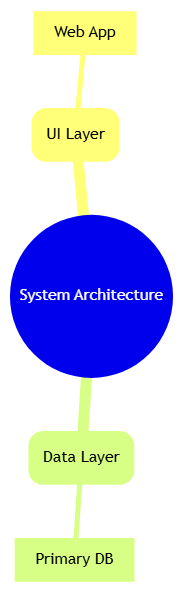
Best Practices for Clear Hierarchy Layouts
- Keep Node Text Brief: Mind maps should be used for rapid scanning. Keep your node labels to three words or less so the text does not stretch the tree branches beyond the screen width.
- Use Consistent Geometry: Maintain a strict logic for shapes across your entire tree (e.g., use Square nodes for code components, Hexagonal nodes for API endpoints, and Rounded nodes for physical infrastructure). This consistency makes the map much easier to process.
- Limit Nesting Depth: Try to keep your map nested no deeper than four or five levels. If a branch requires deeper nesting, consider breaking it out into its own dedicated mind map to keep the overall canvas size manageable.
Real-World Mermaid.js Mind Map Examples & Boilerplates
Example 1: Software Development Lifecycle (SDLC) Taxonomy
This functional blueprint organizes the standard SDLC phases into a categorized tree, using icons to visually highlight the nature of each task grouping.
Mermaid
Edit Mermaid in VPasCode
mindmap
  root((SDLC Phases))
    (Planning)
    ::icon(fa fa-tasks)
      [Requirements]
      [Feasibility]
    (Development)
    ::icon(fa fa-code)
      [Architecture]
      [Implementation]
    (Quality)
    ::icon(fa fa-bug)
      [Unit Tests]
      [Integration Tests]
    (Deployment)
    ::icon(fa fa-cloud)
      [CI/CD Pipelines]
      [Monitoring]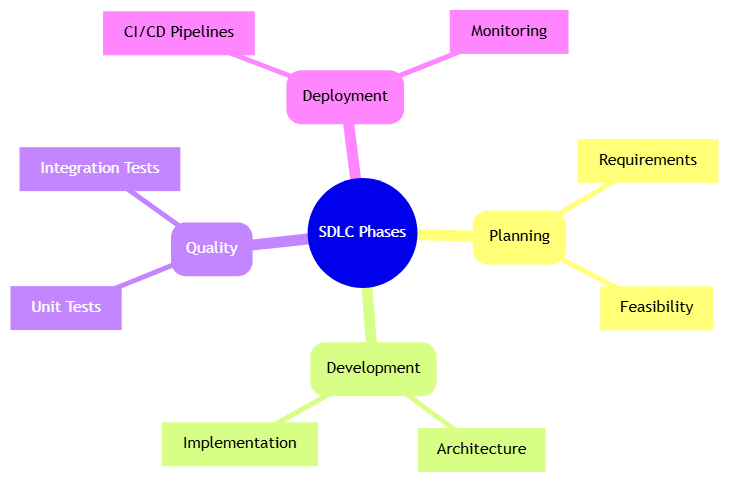
root node in the center and indentation for levels, the engine generates branches symmetrically. The ::icon(fa fa-...) syntax injects FontAwesome-compatible glyphs, turning abstract phases into visually distinct, scannable nodes.
Example 2: Enterprise Microservice Feature Breakdown
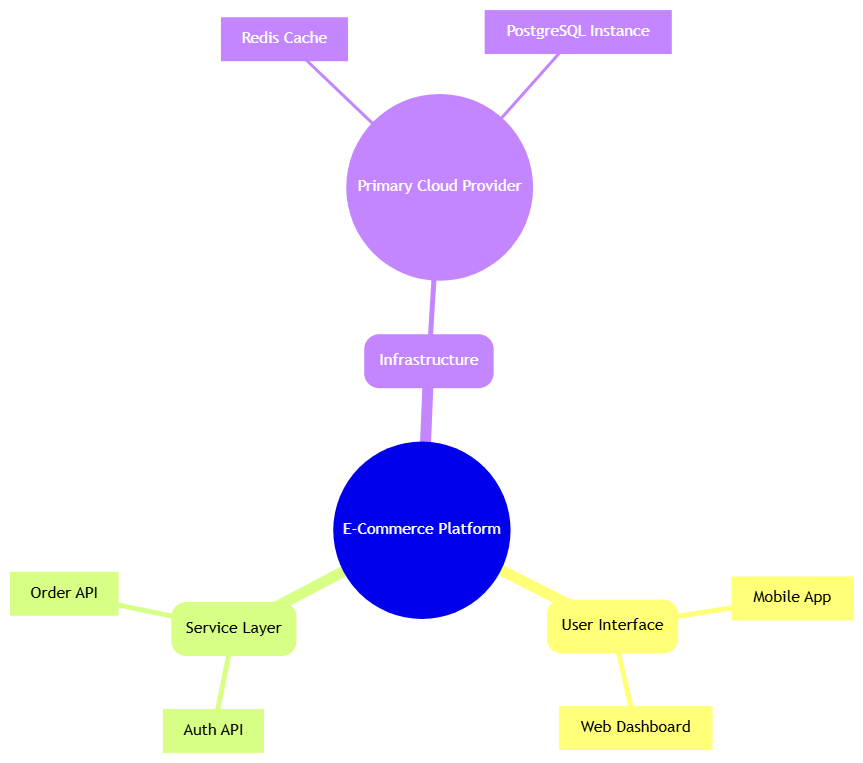
This advanced blueprint breaks down an e-commerce platform into technical feature sets, using geometric shapes to distinguish between infrastructure modules and customer-facing interfaces.
Mermaid
Edit Mermaid in VPasCode
mindmap
  root((E-Commerce Platform))
    (User Interface)
      [Mobile App]
      [Web Dashboard]
    (Service Layer)
      [Auth API]
      [Order API]
    (Infrastructure)
      ((Primary Cloud Provider))
        [Redis Cache]
        [PostgreSQL Instance]