


c4 engine follows the four core tiers of the C4 model: Context (the macro ecosystem), Containers (applications, services, and databases), Components (internal structural modules), and Dynamic interactions. This tool removes the hassle of custom CSS styling by applying consistent, presentation-ready architectural blocks based on your text declarations.
Understanding C4 Diagram Abstractions & Keywords
Mermaid supports four specialized diagram initialization headers depending on the level of detail your system layout requires:C4Context: Focuses on the big-picture view, displaying users, core software ecosystems, and high-level external dependencies.C4Container: Zooms in one level to break down standalone applications, frontend interfaces, microservices, database storage systems, and queues.C4Component: Digs deep inside a container to showcase internal code-level modules, such as Controllers, Services, and Repositories.C4Dynamic: Focuses on tracking runtime data interactions or step-by-step transaction sequencing between infrastructure blocks.
Basic Syntax Structure
Every C4 diagram begins with its specific tier header, followed by an optional title statement and comma-separated macro components. Parentheses house the parameters, with strings bounded by double quotation marks.
Mermaid
Edit Mermaid in VPasCode
C4Context
  title "System Context Blueprint for Internet Core"
  Person(customer, "Banking Customer", "A customer of the bank with personal accounts.")
  System(banking_system, "Internet Banking System", "Allows customers to view account info.")
  Rel(customer, banking_system, "Uses", "HTTPS")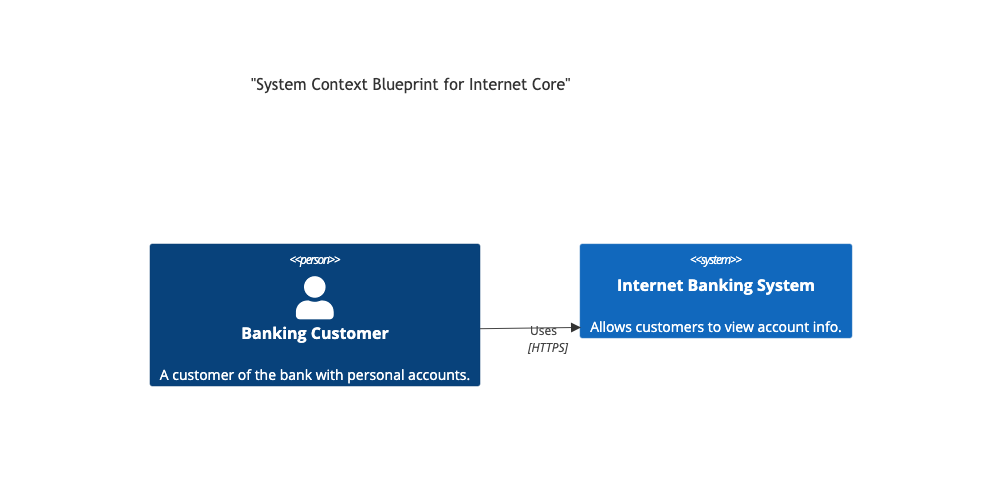
The Complete C4 Element Macro Taxonomy
The Mermaid C4 library provides an extensive set of specialized macros to clearly distinguish between internal components, external systems, and database layers across all abstraction tiers.1. Person & User Macros
Person(alias, label, [descr], [sprite], [tags]): Models an internal human user or stakeholder.Person_Ext(alias, label, [descr], [sprite], [tags]): Models an external user (e.g., a third-party vendor or auditor) outside your core organizational boundary.
2. System & Software Ecosystem Macros
System(alias, label, [descr], [sprite], [tags]): Represents an internal, in-scope software system cluster under your direct management.System_Ext(alias, label, [descr], [sprite], [tags]): Models a crucial external software system managed by a third party (e.g., identity providers, core banking ledgers).SystemDb(alias, label, [descr], [sprite], [tags]): Renders a system-level data repository box shaped like a cylinder.SystemDb_Ext(alias, label, [descr], [sprite], [tags]): Renders an external, third-party database tier.
3. Container Layer Macros (C4Container Tier)
Container(alias, label, technology, [descr], [sprite], [tags]): Models a separate runnable application, API server, or frontend interface.ContainerDb(alias, label, technology, [descr], [sprite], [tags]): Renders a container-level relational or non-relational database engine wrapper.Container_Ext(alias, label, technology, [descr], [sprite], [tags]): Represents an external cloud container or application service.ContainerDb_Ext(alias, label, technology, [descr], [sprite], [tags]): Represents an external, managed cloud database storage tier.
4. Component Layer Macros (C4Component Tier)
Component(alias, label, technology, [descr], [sprite], [tags]): Maps an internal code-level module, layer, or class controller.ComponentDb(alias, label, technology, [descr], [sprite], [tags]): Models an internal micro-component storage or low-level file caching system.
Boundary Containers & Structural Wrapping
To indicate security perimeters, corporate firewalls, or logical application boundaries, Mermaid provides three dedicated bracket-enclosed container wrappers. Elements nested inside are visually grouped together.Enterprise_Boundary(alias, label) { ... }: Wraps high-level systems inside a broad visual boundary representing the overall corporate or company infrastructure perimeter.System_Boundary(alias, label) { ... }: Groups closely related application containers or microservices inside a unified software ecosystem box.Container_Boundary(alias, label) { ... }: Isolates code-level components inside a single application module context layer.
Advanced Relationship Directional Operators
Connecting blocks in C4 diagrams relies on theRel macro or its explicitly directed variations. Rather than passing raw flowchart lines, you track connections semantically by declaring technology vectors directly inside the logic blocks.
| Relationship Syntax Token | Visual Arrow Direction | Usage Alignment Context |
|---|---|---|
Rel(from, to, label, [tech]) |
Dynamic / Automated | Default relationship. Let the layout algorithm determine the best line path. |
BiRel(from, to, label, [tech]) |
Bidirectional (<–>) | Indicates two-way interactive handshakes, duplex protocols, or sync processes. |
Rel_Back(from, to, label, [tech]) |
Reversed Arrow Top (<–) | Draws the relation forward in code logic but flips the visible visual arrow backward. |
Rel_Neighbor(from, to, label, [tech]) |
Horizontal Layout Prefer | Forces the target node to stay directly next to the source node on the same horizontal row. |
Rel_Down(from, to, label, [tech]) / Rel_D(...) |
Straight Downwards (v) | Forces vertical data flows down to database layers or subsequent background processes. |
Rel_Up(from, to, label, [tech]) / Rel_U(...) |
Straight Upwards (^) | Forces relationship tracks to travel straight up to client UI components. |
Rel_Left(from, to, label, [tech]) / Rel_L(...) |
Straight Leftwards (<-) | Routes paths horizontally to the left side of the canvas element. |
Rel_Right(from, to, label, [tech]) / Rel_R(...) |
Straight Rightwards (->) | Routes paths horizontally to the right side of the canvas element. |
Custom Dynamic Styling & Tagging (C4 Shape Overrides)
To flag legacy applications, call out premium systems, or highlight secure data flows, you can create custom styles by using the element tag engine. You define a tag properties matrix at the top of your document and then append that tag label onto your element definitions.Styling Modification Keywords:
UpdateElementStyle(elementName, bgColor, fontColor, [borderColor], [shadowing]): Direct override of an explicit element box’s default background palette.UpdateRelStyle(from, to, lineColor, textColor): Explicitly targets a connection route to recolor line paths or connection descriptions.
Mermaid
Edit Mermaid in VPasCode
C4Context
  title "Custom Color-Coded Global Architecture Map"

  System(legacy_api, "Legacy Billing Core", "Processes subscription renewals.")
  System(modern_portal, "Customer Dashboard Portal", "Modern user web view engine.")

  %% Direct color customizations
  UpdateElementStyle(legacy_api, "#d9534f", "#ffffff", "#c9302c")
  UpdateElementStyle(modern_portal, "#5cb85c", "#ffffff", "#4cae4c")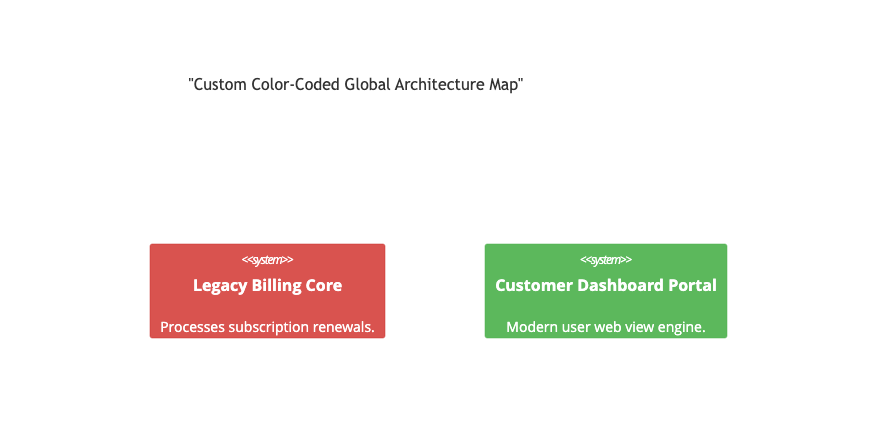
Real-World Blueprint: Enterprise E-Commerce System Boundary Container Map
This comprehensive, multi-tiered container blueprint tracks an online e-commerce ecosystem. It isolates internal core servers using aSystem_Boundary block container, implements external cloud notification relays via System_Ext, maps internal relational database storages alongside external tracking microservices, and pins communication pipelines using explicit tech-stack parameters.
Mermaid
Edit Mermaid in VPasCode
C4Container
  title "Container Blueprint for Enterprise E-Commerce Platform"

  Person(customer, "Online Shopper", "Browses catalog items and adds products to their digital cart.")
  System_Ext(payment_gateway, "Stripe API Service", "Third-party credit card vault and processing engine.")

  System_Boundary(ecommerce_scope, "E-Commerce Core Perimeter") {
    Container(frontend_app, "Storefront Web App", "Next.js, React", "Delivers static assets and handles user cart sessions.")
    Container(checkout_service, "Checkout Microservice", "Node.js, Express", "Processes shopping cart workflows and calculates tax.")
    ContainerDb(order_db, "Order Ledger Database", "PostgreSQL", "Stores historical transaction lines and secure ledger records.")
  }

  %% Architectural Interaction Paths
  Rel(customer, frontend_app, "Views products and places orders using", "HTTPS/Browser")
  Rel_Down(frontend_app, checkout_service, "Sends shopping payload transactions via", "JSON/REST API")

  Rel_Right(checkout_service, order_db, "Persists transactional states inside", "SQL/JDBC Connection")
  Rel_Left(checkout_service, payment_gateway, "Authorizes tokenized charge calls with", "Secure TLS/HTTPS API")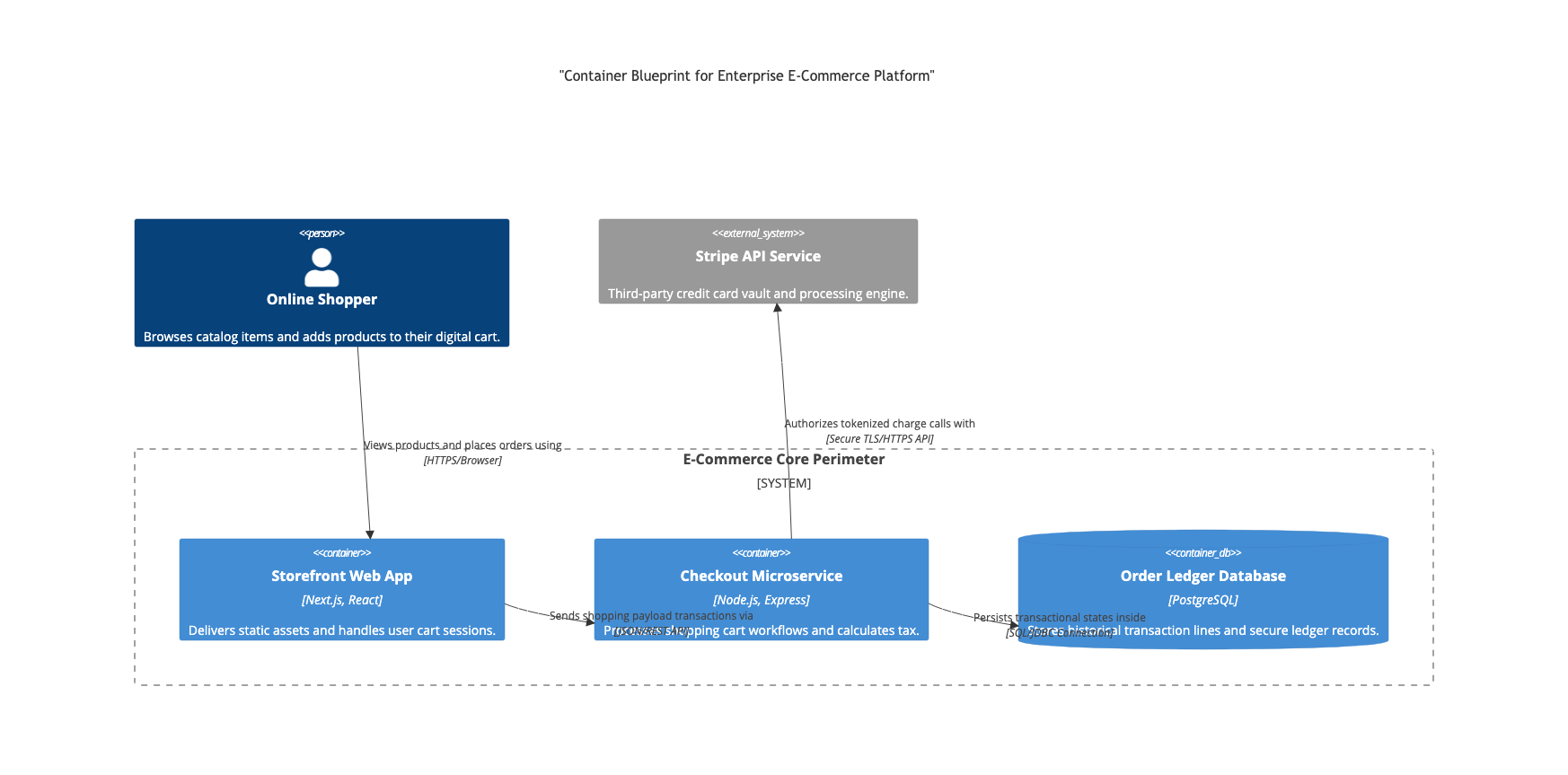
Common Syntax Pitfalls & System Constraints
When compiling clean C4 maps for software frameworks, watch out for these execution parameters to prevent diagram breaking:- Comma Separator Formatting: Unlike almost every other Mermaid schema, C4 macros require strict commas between parameters:
Person(id, "Label", "Desc"). Forgetting a separating comma will crash the layout builder completely. - Reserved Label Quotes: Display fields, tech tags, and description blocks inside macros *must* be wrapped in clear double quotation marks. Dropping raw texts into fields without quote wrappers throws breaking parsing faults.
- Boundary Nesting Order: When wrapping elements inside a
System_BoundaryorEnterprise_Boundaryblock, you must explicitly clear its workspace contents using standard curly brackets{ }. Leaving a boundary bracket open or matching them incorrectly breaks rendering layouts. - Dynamic Alias Instantiation: You cannot draw relationships (
Rel) to an alias identifier that has not been explicitly initialized by an element macro block above it. Keep your declaration flow running progressively top-to-bottom.