


gitGraph engine utilizes a declarative, sequential timeline model. This maps real-world terminal commands directly to an accurate visual timeline map without requiring manual image editing.
Understanding the GitGraph Timeline Matrix
Unlike free-form system flowcharts, a GitGraph diagram follows strict, sequential, order-of-occurrence logic modeling real version-control workspaces:- Automatic Root Branching: Every diagram workspace initialized automatically spins up a primary root timeline track. By default, this track is named
main, and all trailing actions track against it unless a clean alternate branch path is created. - Order Precedence: Elements render along a chronological axis from left to right based on the insertion order of commands in your code source file.
Basic Syntax Structure
Every timeline begins with the camelCasegitGraph declaration keyword. It is followed by a sequential column listing of atomic execution commands such as commits, checkouts, and merges.
Mermaid
Edit Mermaid in VPasCode
gitGraph
  commit
  commit
  branch feature-login
  checkout feature-login
  commit
  checkout main
  merge feature-login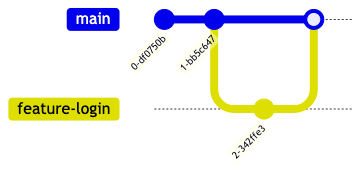
The Complete Git Action Command Reference
The layout engine interprets specific, lowercase action commands to progress line weights, split tracks, or blend endpoints together across the workspace canvas.| Git Command Token | Parameter Argument Modifiers | Technical Action & Layout Behavior |
|---|---|---|
commit |
id: "hash", type: TYPE, tag: "v1.0" |
Appends a new milestone node directly onto the active target branch path line. |
branch |
name, order: Integer |
Creates a new branch lane split. You can force its vertical stacking position using an optional explicit order value. |
checkout / switch |
branch-name |
Shifts the active recording index pointer over to the specified target branch line. Subsequent actions track against this lane. |
merge |
target-branch-name, id: "hash", tag: "v2" |
Merges the specified branch lane back into the current branch, creating a distinct visual blending intersection point. |
cherry-pick |
id: "commit-hash", parent: "parent-hash" |
Duplicates a specific commit from an external branch onto the current branch lane without blending the lanes. |
Advanced Feature: Commit Types & Tag Customizations
To distinguish between regular patches, system rollbacks, or major releases, you can assign an explicittype and tag string modifier inside an argument block using json-like key-value properties.
Supported Commit Shape Classifications:
type: NORMAL: The default configuration. Renders as a filled solid circle node along the timeline lane.type: REVERSE: Highlights an architectural or programmatic rollback. Renders as a crossed solid circle node ($X$).type: HIGHLIGHT: Calls attention to critical structural alterations or security fixes. Renders as an elongated, filled rectangle box.
Mermaid
Edit Mermaid in VPasCode
gitGraph
  commit id: "Initial"
  commit type: HIGHLIGHT id: "Security-Hotfix" tag: "v1.0.1"
  commit type: REVERSE id: "Rollback-Feature-X"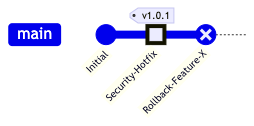
Advanced Feature: Cherry-Pick Logic & Strict Constraints
Thecherry-pick command copies a specific isolated node from a different branch lane onto your current active branch. To execute a cherry-pick without throwing compiler layout faults, you must follow these strict workspace validation requirements:
- Exclusion Constraint: The target commit ID you are cherry-picking *must not* already exist on the branch lane you are currently tracking.
- Prerequisite History: The current active branch line must contain at least one valid commit node prior to calling a cherry-pick action.
- Merge Parent Requirement: If you are cherry-picking a merge node, you must explicitly pass the immediate direct upstream parent identification string using the
parent: "hash"modifier block.
Mermaid
Edit Mermaid in VPasCode
gitGraph
  commit id: "setup"
  branch staging
  checkout staging
  commit id: "feature-patch"
  checkout main
  commit id: "baseline"
  cherry-pick id: "feature-patch"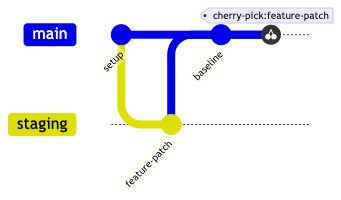
Advanced Feature: Frontmatter Parameter Configurations
You can fine-tune global visual behaviors (like toggling branch labels, modifying row indexes, or stacking timelines) by declaring a%%{init: { 'logLevel': 'debug', 'theme': 'default' , 'config': { 'gitGraph': { ... } } } }%% configuration directive block at the absolute top of your graph script.
Configurable Parameters Matrix
| Configuration Key String | Type Definition | Default Value | Visual Interface Alteration Result |
|---|---|---|---|
showBranches |
Boolean | true |
Toggles the visibility of individual branch tracking labels on the left side of the canvas grid. |
showCommitLabel |
Boolean | true |
Toggles the rendering of text titles and alphanumeric hashes directly over individual timeline nodes. |
mainBranchName |
String | "main" |
Changes the default starting root branch name tracking text (e.g., swapping to "master" or "trunk"). |
mainBranchOrder |
Integer | 0 |
Sets the top-to-bottom vertical stacking order position index for the primary root timeline tracking lane. |
parallelCommits |
Boolean | false |
If modified to true, separate commits that share identical parent step distances align symmetrically on the same vertical level. |
Real-World Blueprint: Enterprise Git-Flow Release Management Pipeline
This comprehensive enterprise blueprint demonstrates a standard production release pipeline. It overrides configuration parameters to rename the root lane totrunk, establishes a fixed branch order hierarchy, uses multiple branch lanes (develop and feature-auth), executes merges, applies custom tags, and deploys high-priority highlight commit shapes.
Mermaid
Edit Mermaid in VPasCode
%%{init: { 'gitGraph': { 'mainBranchName': 'trunk', 'showCommitLabel': true } } }%%
gitGraph
  commit id: "Initial-Core" tag: "v1.0.0"
  commit id: "Setup-CI"
  branch develop
  checkout develop
  commit id: "Sprint-1-Base"
  branch feature-auth
  checkout feature-auth
  commit id: "JWT-Logic"
  commit id: "MFA-Logic" type: HIGHLIGHT
  checkout develop
  merge feature-auth id: "Merge-Auth"
  commit id: "Beta-Compiled"
  checkout trunk
  merge develop id: "Release-Prod" tag: "v2.0.0"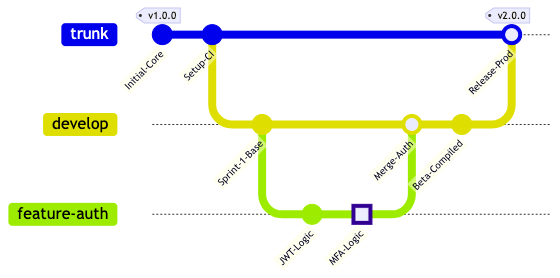
Common Syntax Pitfalls & System Constraints
When compiling precise version control graphs, keep these troubleshooting parameters in mind to prevent layout calculation bugs:- Case Sensitivity Faults: The primary initialization declaration must be written in explicit camelCase as
gitGraph. Writing it all in lowercase asgitgraphwill trigger a compiler parsing crash. - Unquoted Alphanumeric Identifiers: When passing custom commit parameters (e.g.,
id: core_init), values containing hyphens, spaces, or periods *must* be enclosed inside double quotation marks. Forgetting quote blocks will drop validation compilation errors. - Invalid Checkout Targets: Calling a
checkout branch_nameaction on a string identity that has not been initialized beforehand using thebranch branch_namecommand will instantly break graph building. - Branch Ordering Collisions: When utilizing the
orderconfiguration tag on branches, ensure multiple tracks are not mapped onto identical integers unless you want overlapping canvas path traces. Keep branch track numbers unique. - Space Separation Failures: Ensure clear argument spaces exist when separating properties inside parenthetical parameter matrices (e.g., use
id: "1", type: HIGHLIGHT). Dropping missing commas or spaces can cause parsing exceptions.