


What is an ArchiMate Diagram?
An ArchiMate Diagram is a high-level enterprise architecture modeling visualization that tracks strategies, business processes, software applications, and physical data infrastructure across an organization. Unlike traditional UML maps that look deep into software execution routines, ArchiMate helps business analysts, solutions architects, and CTOs map how high-level corporate goals depend on underlying IT systems. While basic PlantUML contains native primitives, production-grade enterprise layouts require the officialArchimate-PlantUML standard library extension. By utilizing declarative macros and standardized color bands, it allows you to maintain consistent, TOGAF-compliant models. With VPasCode, you can define your architectural blocks and relational threads entirely in text, letting the engine handle box color schemes and alignment dynamically.
Core Syntax Guide: Elements and Constructs
To use the official ArchiMate extension safely in PlantUML, you must include the standard library file, implement category macros correctly, handle nesting blocks, and apply explicit structural relationships.1. Initializing the ArchiMate Standard Library
To unlock the official macros, color palettes, and structural stereotypes, your script block must import the standard library file directly below your startup tag. You can optionally apply one of the official themes to ensure high-contrast visibility:@startuml
!include <archimate/Archimate>
!theme archimate-standard from <archimate/themes>
2. Declaring Elements Using Category Macros
The standard library simplifies element creation by wrapping native shapes inside category-prefixed macros. Elements follow a strictCategory_ElementName(ID, "Label") naming convention. The prefix determines the structural layer and auto-injects the correct color token:
- Strategy & Motivation (Purple):
Motivation_Stakeholder(),Strategy_Capability() - Business Layer (Yellow):
Business_Actor(),Business_Process(),Business_Service() - Application Layer (Blue):
Application_Component(),Application_Service() - Technology Layer (Green):
Technology_Node(),Technology_SystemSoftware()
PlantUML
Edit PlantUML in VPasCode
!include <archimate/Archimate>
Motivation_Stakeholder(CEO, "Chief Executive Officer")
Application_Component(CRM, "Salesforce CRM System")
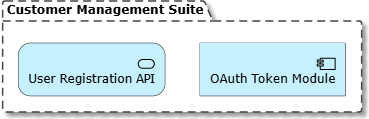
3. Defining Group Boundaries and Structural Nesting
Enterprise maps rely heavily on visual containment to represent ownership or runtime isolation. You can create bounding folders using theGroup() or Grouping() macros, or nest elements inside one another using curly braces:
PlantUML
Edit PlantUML in VPasCode
!include <archimate/Archimate>
Grouping(AppSubsystem, "Customer Management Suite") {
Application_Component(AuthMod, "OAuth Token Module")
Application_Service(UserReg, "User Registration API")
}
4. Mapping Standardized Enterprise Relationships
ArchiMate enforces a strict vocabulary for connections. Instead of raw arrows, the standard library offers dedicated relationship macros formatted asRel_RelationType(From_ID, To_ID, "Label"). To force manual orientation adjustments, you can append spatial directional hints (such as _Up, _Down, _Left, or _Right):
PlantUML
Edit PlantUML in VPasCode
!include <archimate/Archimate>
Motivation_Stakeholder(CEO, "Chief Executive Officer")
Application_Component(CRM, "Salesforce CRM System")
Grouping(AppSubsystem, "Customer Management Suite") {
Application_Component(AuthMod, "OAuth Token Module")
Application_Service(UserReg, "User Registration API")
}
' Structural & Behavioral relationship examples
Rel_Realization(UserReg, AuthMod, "Implements security")
Rel_Serving_Right(CRM, CEO, "Provides dashboards")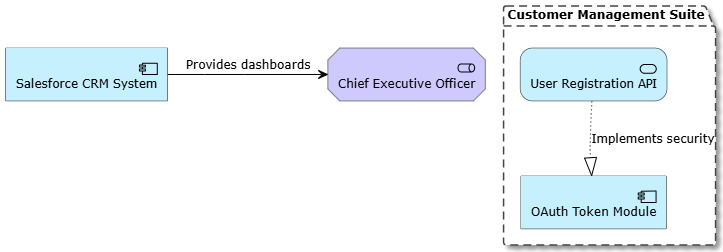
Best Practices for Layered Architecture Diagrams
- Isolate Distinct Layers: Organize your scripts sequentially from top to bottom (Motivation > Business > Application > Technology) to make your architecture layouts intuitive for stakeholders.
- Leverage Short Component IDs: Keep your internal macro tracking strings brief (e.g., use
AP_01orSrv_Auth), while reserving descriptive, customer-facing text for the double-quoted label parameter. - Enforce Explicit Directions on Cross-Layer Wires: Layout paths can shift unpredictably when crossing structural boundaries. Using directional macros like
Rel_Access_Down()ensures your data flows move smoothly downward across layer splits.
Real-World PlantUML ArchiMate Examples
Example 1: Classic Strategic Capabilities Mapping (Motivation & Strategy Tiers)
This functional blueprint documents the strategic layer of an organization, illustrating how corporate stakeholders align with business capabilities and realized technical outcomes.
PlantUML
Edit PlantUML in VPasCode
@startuml
!include <archimate/Archimate>
!theme archimate-standard from <archimate/themes>
title Strategic Enterprise Alignment Map
Motivation_Stakeholder(CFO, "Chief Financial Officer")
Motivation_Driver(CostEfficiency, "Operational Cost Reduction")
Strategy_Capability(AutomatedBilling, "Enterprise Invoicing Automation")
Business_Process(InvoiceRun, "End-of-Month Ledger Reconciliation")
' Wire strategic dependencies
Rel_Association(CFO, CostEfficiency, "Seeks to improve")
Rel_Influence(AutomatedBilling, CostEfficiency, "Positively impacts")
Rel_Realization(InvoiceRun, AutomatedBilling, "Fulfills capability")
@enduml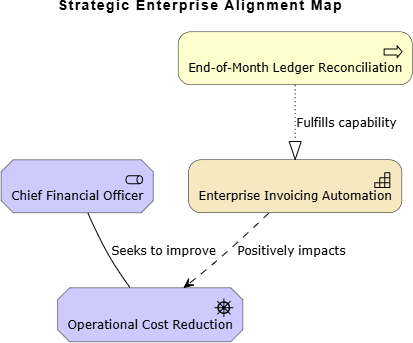
Example 2: End-to-End Three-Tier Enterprise System (Cross-Layer Mesh)
This advanced blueprint demonstrates a comprehensive, cross-layer architecture topology. It maps an operational business process down through supporting application microservices to the underlying cloud infrastructure host.
PlantUML
Edit PlantUML in VPasCode
@startuml
!include <archimate/Archimate>
!theme archimate-standard from <archimate/themes>

title Multi-Tier Application Architecture Alignment

Grouping(BizLayer, "Business Operations") {
    Business_Actor(Agent, "Customer Service Support Agent")
    Business_Process(Ticketing, "Process Enterprise Support Ticket")
}

Grouping(AppLayer, "Application Ecosystem") {
    Application_Service(TicketSvc, "Zendesk Integration API")
    Application_Component(DataRouter, "Event Processing Engine")
}

Grouping(TechLayer, "Infrastructure Tier") {
    Technology_SystemSoftware(K8sCluster, "Kubernetes Orchestration Cluster")
    Technology_Node(CloudVM, "AWS EC2 m6i.xlarge Compute Target")
}

' Establish cross-layer mappings smoothly using directional hints
Rel_Assignment(Agent, Ticketing, "Executes daily")
Rel_Serving_Down(TicketSvc, Ticketing, "Powers web desk ui")

Rel_Composition(DataRouter, TicketSvc, "Ingests webhooks from")
Rel_Realization_Down(K8sCluster, DataRouter, "Hosts application container")

Rel_Composition_Down(CloudVM, K8sCluster, "Provides core hypervisor bare-metal")
@enduml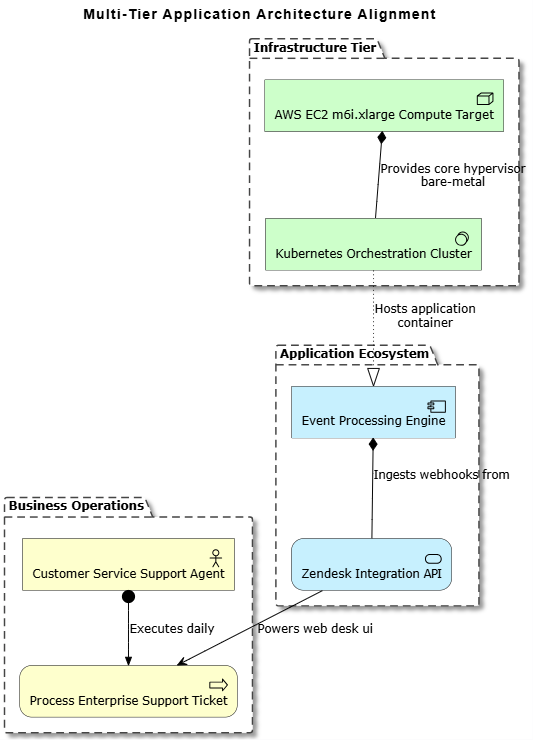
Grouping components. Elements automatically receive distinct, layer-specific color tints (Yellow, Blue, Green) based on their macro families. Directional relationship overrides like Rel_Serving_Down and Rel_Realization_Down force dependencies to cascade elegantly down the enterprise grid.