


Basic Syntax Structure
Every Kanban board begins with thekanban declaration header. Columns are defined using the section keyword, and individual task cards are listed sequentially underneath each column by utilizing indent spacing blocks.
Mermaid
Edit Mermaid in VPasCode
kanban
title "Sample Project Sprint"
section Todo
  Design database schema
  Draft API routes
section In Progress
  Implement auth middleware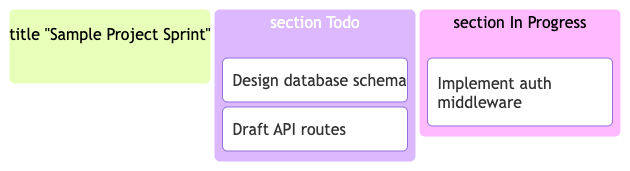
Syntax Reference
The table below breaks down the foundational data components and parameters used to build a Kanban board map in Mermaid.js.| Syntax Component | Type Requirement | Description & Usage Rules |
|---|---|---|
| Declaration | Keyword Identifier | Initializes the agile workflow block mapping parameters. Must use the exact kanban block. |
| Title | Quoted String | An optional global workspace heading centered neatly at the top of the Kanban canvas. |
| Section Column | Keyword + Name | Defines an independent workflow stage column. Use the section keyword followed by the column’s label. |
| Standard Task Card | Indented String | A plain-text description representing a single card. It must be tabbed or indented directly under its active section. |
| Task ID Card | Bracketed Identifier | An advanced task card tracking format using an explicit unique ID token alongside its display label: id[Card Text]. |
| Metadata Block | JSON Configuration Map | An optional properties block appended using the @{...} syntax rule to assign attributes like ticket priority or owners. |
Advanced Task Attributes & Metadata
For detailed engineering sprints or bug tracking workflows, you can assign metadata attributes directly onto a card. By pairing a unique node ID (liketask1[...]) with a trailing JSON configuration declaration block (@{}), you can print structured variables like task assignees, priorities, and internal tracking tickets directly on the face of the card element.
Supported Task Variables
| Attribute Key | Value Formatting | Visual Result |
|---|---|---|
assigned |
Quoted String Name | Renders the assigned owner or developer label directly inside the card details matrix. |
priority |
Quoted Scale String | Displays task severity benchmarks (e.g., 'High', 'Medium', 'Low'). |
ticket |
Integer or Alpha token | Tracks linked development task numbers or system project codes. |
Real-World Blueprint: Agile Development Release Sprint
This comprehensive blueprint tracks an infrastructure deployment release. It maps out three distinct columns (Backlog, In Progress, and Ready for Deployment) and utilizes advanced task IDs paired with structural metadata parameters to assign specific developers and ticket codes across features.
Mermaid
Edit Mermaid in VPasCode
kanban
title "Q3 Core Feature Release Board"
section Backlog
  task101[Create API Endpoint Documentation]@{ assigned: 'Sarah K', priority: 'Medium' }
  task102[Design Landing Page Wireframes]
section In Progress
  task201[Refine Database Query Synchronization]@{ assigned: 'Alex M', priority: 'High', ticket: 4012 }
  task202[Configure Lightbox UI Components]@{ assigned: 'Sarah K', priority: 'Low' }
section Ready for Deploy
  task301[Implement Multi-Factor User Authentication]@{ assigned: 'Dev Team', ticket: 3985 }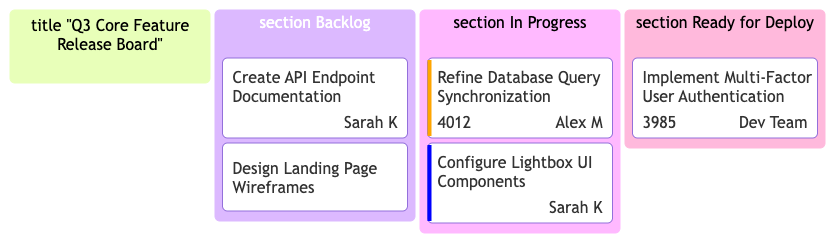
Syntax Tip: While simple tasks can be typed out as unquoted plain text lines, complex assignments that carry meta parameters *must* use a unique ID mapping string prefix (such as
id1[...]@{...}). Reusing the exact same task ID on different parts of the board will overwrite properties or throw layout errors.
Common Syntax Pitfalls & System Constraints
When engineering highly dense, multi-stage layout systems, keep these structural troubleshooting parameters in mind:- The Section Before Cards Rule: All task cards must reside underneath an active column block. Writing a task string line immediately below your main
kanbantitle without declaring asectioncolumn header first will halt compilation. - Whitespace and Indentation: The tracking layout engine groups cards based on line indentation tabs. Ensure all task card rows are uniformly indented beneath their active
sectiontags to prevent alignment breaks. - Metadata Delimiter Format: When building out custom attributes inside an
@{ }block, keys and values must map to valid system arguments. Separate multiple attributes with commas and use clean enclosing quotes around your string assignments. - Card Density Management: While the Kanban component is fully responsive, crowding a single board with more than 5 columns or adding dozens of dense metadata rows can decrease mobile scannability. Balance your layout spacing rules intentionally.