


What is a Class Diagram?
A Class Diagram is a structural UML diagram that visualizes the static architecture of an object-oriented software system. As an indispensable UML diagram type, it maps out the individual classes, interfaces, and data models within your application, explicitly documenting their internal fields (attributes), operational functions (methods), and the structural relationships that bind them together. This blueprint is vital for software engineers who need to translate high-level domain designs into clean, maintainable object structures. With Mermaid.js, you can outline your data models and system services using intuitive, text-based definitions. The layout engine automatically calculates box sizes, structures standard UML data compartments, and aligns relational arrows across your canvas without any manual formatting overhead.Core Syntax Guide: Elements and Constructs
To design an accurate, standards-compliant UML class diagram in Mermaid, you must master member declarations, access modifiers, and structural relationship arrows.1. Declaring Classes and Class Compartments
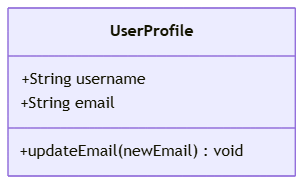
You can define a class using two valid formats. For a simple class, use theclass keyword followed by the class name. If you want to include fields and methods immediately, use trailing curly braces to create a clear body block:
Mermaid
Edit Mermaid in VPasCode
classDiagram
    class UserProfile {
        +String username
        +String email
        +updateEmail(newEmail) void
    }
2. Adding Visibility / Access Modifiers
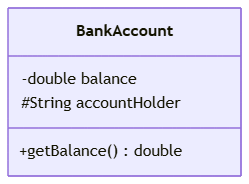
To document standard UML encapsulation rules, place a specific symbol directly before your attribute or method name to define its visibility level:+**Public:** Accessible from any other class.-**Private:** Accessible only within the declaring class.#**Protected:** Accessible within the class and its subclasses.~**Package / Internal:** Accessible within the same package boundary.
Mermaid
Edit Mermaid in VPasCode
classDiagram
    class BankAccount {
        -double balance
        #String accountHolder
        +getBalance() double
    }
3. Mastering Relationship Arrows and Inheritance Links
To show how classes interact within your UML diagram model, connect their IDs using specialized relationship strings. In Mermaid, the direction of the line matters: the arrow head points toward the parent or container class.- Inheritance / Generalization (Dashed or Solid Arrow):
Child --|> Parent(Represents an “is-a” relationship). - Realization / Implementation:
Class ..|> Interface(Represents a class fulfilling an interface contract). - Composition (Solid Diamond):
Child --* Parent(Represents strict ownership; if the parent dies, the child dies). - Aggregation (Clear Diamond):
Child --o Parent(Represents a loose collection relationship; the child can exist independently). - Dependency:
ClassA ..> ClassB(Represents a transient runtime reference).
Mermaid
Edit Mermaid in VPasCode
classDiagram
    Car --|> Vehicle : "Inherits from"
    Engine --* Car : "Is part of"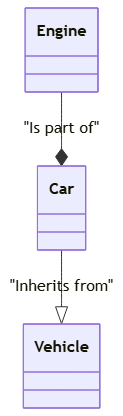
Best Practices for Clean Class Architecture Layouts
- Group Class Members Visually: Always group your class variables at the top of the body block and your functions at the bottom. This layout matches standard IDE class structures and makes your diagrams instantly readable.
- Specify Return Types: When declaring methods, append the return type to the end of the method line (e.g.,
+fetchData() DataSet). This gives your engineering team precise implementation context. - Keep Multiplicity Clear: To indicate array counts or collection sizes, append multiplicity text strings directly to the relationship line wrapper (e.g.,
Customer "1" --o "many" Order).
Real-World Mermaid.js Class Diagram Examples
Example 1: Payment Gateway Domain Subsystem (Encapsulation & Interfaces)
This functional blueprint models an online checkout domain service. It demonstrates how to use access modifiers, group class members, and implement interface relationships cleanly.
Mermaid
Edit Mermaid in VPasCode
classDiagram
    class PaymentProcessor {
        <<interface>>
        +processPayment(amount) boolean
        +refundPayment(txnId) boolean
    }

    class StripeGateway {
        -String apiKey
        -String endpointUrl
        +processPayment(amount) boolean
        +refundPayment(txnId) boolean
        -logTransaction(status) void
    }

    class PayPalGateway {
        -String merchantId
        +processPayment(amount) boolean
        +refundPayment(txnId) boolean
    }

    StripeGateway ..|> PaymentProcessor : "Implements"
    PayPalGateway ..|> PaymentProcessor : "Implements"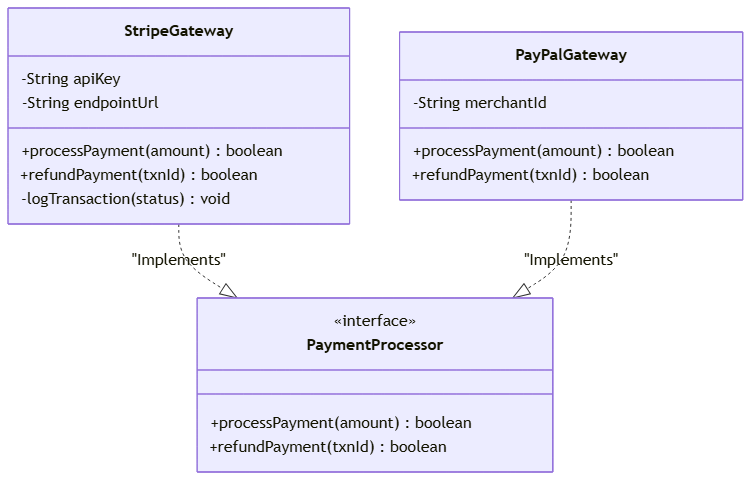
<<interface>> tag clearly marks `PaymentProcessor` as a high-level architectural contract. The two concrete gateway implementation classes use private fields (-apiKey) for sensitive credentials, while exposing public payment routines (+processPayment) linked via the realization arrow (..|>).
Example 2: Enterprise Order Processing Engine (Composition & Multiplicity)
This advanced system blueprint maps a complex e-commerce order management schema, demonstrating how to document structural ownership and object counts across multiple interconnected classes.
Mermaid
Edit Mermaid in VPasCode
classDiagram
    class Customer {
        +int customerId
        +String name
        +placeOrder() Order
    }

    class Order {
        +int orderId
        +Date dateCreated
        -String internalStatus
        +calculateTotal() double
    }

    class OrderItem {
        +int itemId
        +int quantity
        +double pricePerUnit
    }

    class Address {
        +String street
        +String city
        +String postalCode
    }

    Customer "1" --o "many" Order : "owns"
    OrderItem "1..*" --* "1" Order : "composes"
    Address "1" --> Order : "ships to"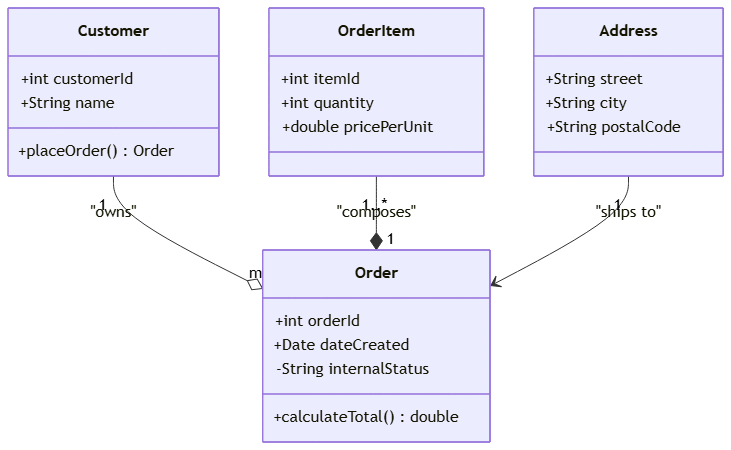
--*) shows that an `OrderItem` is tightly bound to an `Order` (if an order is deleted, its individual line items are destroyed too). Conversely, the clear diamond arrow (--o) indicates that a `Customer` owns multiple orders, but both entities can exist independently. Multiplicity strings (like "1..*") define the relational requirements of the system.