


Basic Syntax Structure
Every fishbone diagram utilizes theishikawa-beta declaration. The very first line immediately following the declaration establishes the main problem or event (the “fish head”). Subsections are then nested underneath using spaces or tabs to represent primary and secondary cause branches.
Mermaid
Edit Mermaid in VPasCode
ishikawa-beta
Main Problem Statement
  Primary Category A
    Detailed Cause Factor 1
    Detailed Cause Factor 2
  Primary Category B
    Detailed Cause Factor 3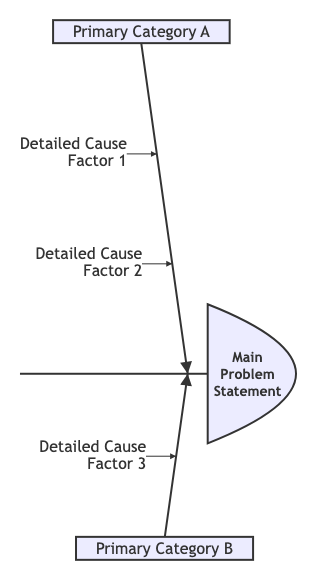
Syntax Reference
The table below breaks down the primary formatting requirements used to build an Ishikawa diagram map in Mermaid.js.| Component | Description | Syntax Rule |
|---|---|---|
| Declaration | Initializes the cause-and-effect engine rendering parameters. | ishikawa-beta |
| The “Fish Head” | The core incident, failure mode, or goal being analyzed. It must always sit on the line directly below the main declaration. | Slow API Response Time |
| Primary Bones | High-level structural buckets or categories (like the classic 6 Ms: Machine, Method, Material, Man, Measurement, Mother Nature). Indented by one level. | Idented 2 or 4 spaces beneath the main problem statement. |
| Secondary Bones | The detailed contributing root factors associated with that specific category. Indented further beneath the category heading. | Nested deeper beneath its parent category node. |
Real-World Blueprint: IT System Incident Postmortem
This blueprint showcases a standard DevOps and reliability engineering post-incident review tracing the root structural causes behind an unexpected infrastructure performance drop.
Mermaid
Edit Mermaid in VPasCode
ishikawa-beta
Slow Application API Response
  Infrastructure
    Underpowered server instances
    Missing regional CDN distribution
  Code Layer
    N+1 queries executed in loops
    Unoptimized database index structures
    Missing cache layers for static endpoints
  Team Process
    No strict performance budgets assigned
    Code reviews regularly skip load testing phases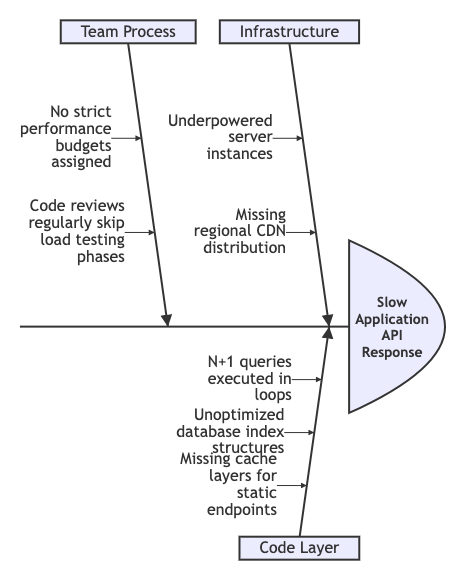
Syntax Tip: Because the Ishikawa rendering layout is determined solely by whitespace tab depth, you do not need to draw links, arrows, or lines explicitly. The engine groups lines based on your text hierarchy and dynamically projects them as branching ribs along the central horizontal spine.
Advanced Concept: The Classic “6 Ms” Quality Framework
For operations managers and manufacturing engineers, Mermaid seamlessly maps traditional Six Sigma frameworks by formatting nested blocks down into secondary and tertiary root layers.
Mermaid
Edit Mermaid in VPasCode
ishikawa-beta
Defective Product Assembly
  Machine
    Outdated calibrator tools
    Worn conveyor belt drives
  Method
    No standardized training guide
    Unclear quality inspection check steps
  Material
    Substandard raw plastic composites
    Defective internal fasteners
  Measurement
    Faulty gauge tracking sensors
    Manual logging errors
  Mother Nature
    High facility humidity variants
    Poor workstation ambient lighting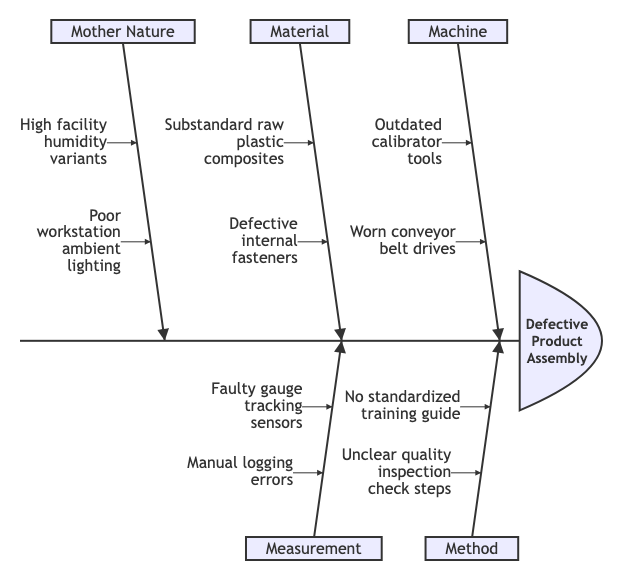
Common Syntax Pitfalls
Because the Ishikawa schema is currently in public beta, keeping your raw configuration blocks clean helps prevent parsing errors:- Consistent Indentation Styles: Mixing spaces and tabs on the same line can confuse the interpreter. Stick exclusively to either tabs or an exact space increment (like 2 or 4 spaces) throughout your layout script to preserve proper branch alignment.
- Single Main Target: You can only have one root event (“fish head”) line at the very top of your definition block. Attempting to provide two independent problem titles will result in a visual syntax error.
- Text-Only Constraints: Standard flow styling directives or connection operators (like
-->or==>) should not be used inside an Ishikawa script. Let the indentation manage your map lines natively.