


block engine treats the layout canvas as an absolute mathematical grid matrix. This provides precise control over column alignments, isolated layout nesting boundaries, structural spacing blocks, and explicit edge port linking configurations.
Understanding the Grid Matrix Strategy
Unlike standard free-form flowcharts that dynamically guess layout tracks, a Block diagram builds on a rigid linear coordinate grid system:- The Column Threshold: You set a strict horizontal ceiling using the
columnsmodifier. When the grid fills up with blocks, additional elements wrap cleanly to the next row automatically. - Sizing by Grid Fields: By default, each block occupies a single coordinate slot ($1 \times 1$). You can change this behavior by assigning explicit column widths to span elements across multiple tracks perfectly.
Basic Syntax Structure
Every layout begins with theblock declaration header. It is followed by establishing the row width capacity with the columns keyword, and declaring blocks on sequential lines.
Mermaid
Edit Mermaid in VPasCode
block
  columns 3
  componentA["First Block"]
  componentB["Middle Block"]
  componentC["Right Block"]
Syntax Reference
The table below breaks down the foundational data parameters, custom styling keywords, and structural containers natively recognized by the block interpreter.| Syntax Component | Type Requirement | Description & Visual Layout Rules |
|---|---|---|
| Declaration | Keyword Identifier | Initializes the matrix grid block canvas. Must use the exact block header string. |
| Column Set | Keyword + Integer | Defines the total horizontal slot count before wrapping rows (e.g., columns 4). |
| Standard Block | ID + Optional Label | Creates a standard data box: id["Label Text"]. Shape decorators match flowchart syntax (e.g., (()) for circles, [()] for databases). |
| Block Dimension Override | Colon Parameter Block | Overrides the default $1 \times 1$ layout scale grid footprint by explicitly assigning customized column width blocks: id:width. |
| Space Element | Reserved Keyword | Inserts an invisible, structural $1 \times 1$ blank spacing tile into the active row using the exact space keyword. You can multiply width spans inline like space:2. |
| Block Arrow | Specialized Entity ID | Renders a thick, structured transitional arrow box inside a grid slot: arrowId<["Label"]>(direction). Directions include up, down, left, right. |
| Composite Wrapper | Block / End Container | Nests a standalone isolated sub-grid matrix directly inside a parent block slot: block:SubID ... end. Sub-blocks can declare their own independent column limits. |
Advanced Feature: Explicit Block Dimensions & Space Modifiers
For asymmetry layouts, you can pass explicit horizontal size metrics directly onto standard blocks or space dividers using a colon notation separator (:width). This forces elements to stretch over multiple grid positions cleanly.
Mermaid
Edit Mermaid in VPasCode
block
  columns 4
  wideComponent["Wide Dashboard Header"]:4
  leftBar["Sidebar"] space:2 rightBar["Main Panel"]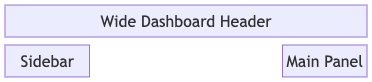
Advanced Feature: Edge Types, Directions, and Link Options
Connections within theblock engine are divided into standard semantic lines and structural layout block arrows. Standard connection lines support specifying explicit directional constraints to dictate how lines wrap around elements.
1. Standard Line Connectors
Block connections use the standard link operators (-->, --, <-->). However, you can control the routing by appending directions or modifiers inside parenthesis:
A --> B: Draws a standard directional line from element A to element B.A -- x B: Draws a connection path terminated by an “X” mark indicating a blocked path.A -- o B: Draws a connection path terminated with an open circle connector dot.
2. Dynamic Layout Block Arrows
Block arrows are treated as actual layout components that occupy an actual coordinate index block in your row budget matrix. They use greater-than and less-than syntax properties to map physical flow paths:
Mermaid
Edit Mermaid in VPasCode
block
  columns 3
  producer["Data Producer"]
  midArrow<["Transform Traffic"]>(right)
  consumer["Data Consumer"]
Advanced Feature: Sub-Block Matrix Nesting (Composite Grouping)
Theblock:id wrapper functions as an isolated layout box context environment. An application group container can establish its own unique horizontal column count inside a sub-block, allowing complex components to group tightly without influencing the spacing of the global parent canvas template grid.
Mermaid
Edit Mermaid in VPasCode
block
  columns 2
  rootGateway["Global Gateway"]

  block:microserviceCluster
    columns 3
    auth["Auth Node"]
    api["Core API"]
    worker["Worker Engine"]
  end
Real-World Blueprint: Multi-Tier Infrastructure with Cache
This comprehensive, multi-row blueprint demonstrates a clean production-grade infrastructure setup. It establishes a 3-column processing grid layout, uses structuralspace elements to isolate a database tier, maps a thick downward blockArrow, and isolates a separate internal sub-system container using a nested block:id ... end composite wrapper.
Mermaid
Edit Mermaid in VPasCode
block
  columns 3

  %% Row 1: Entrance Services
  dnsClient(("Web Client"))
  loadBalancer["Edge Load Balancer"]
  space

  %% Row 2: Connecting Flow down to Microservices
  space
  downRoute<["Forward Traffic"]>(down)
  space

  %% Row 3: Composite Application Environment Cluster
  block:appCluster
    columns 2
    authService["Authentication"]
    apiEngine["Core API Worker"]
  end
  space
  database[("PostgreSQL DB")]

  %% Establish clear matrix-to-matrix structural line alignments
  loadBalancer --> appCluster
  appCluster --> database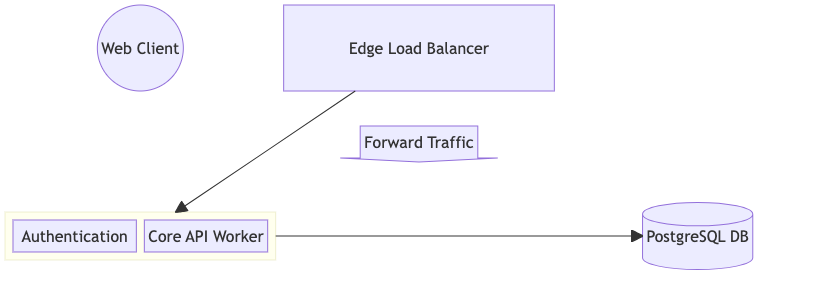
Common Syntax Pitfalls & System Constraints
When compiling precise grid matrix maps, keep these validation checks in mind to prevent parsing faults:- Column Budget Enforcement: Keep careful track of your column count. If you specify
columns 3and write 4 sequential blocks on a row, the fourth block will drop to row 2 automatically, which can break intended left-to-right connection paths. - Composite Nesting Order: When building inner containers with
block:id, you must always seal the sub-grid workspace using theendkeyword on an isolated line before declaring subsequent elements. Failing to close the block will halt diagram building. - Block Arrow Target Limitations: The direction property enclosed in parentheses after a block arrow (e.g.,
(up),(down)) must be a lowercase literal matching system keywords perfectly. Capitalizing the direction will drop processing errors. - Label Boundary Collisions: Standard flowchart shape decorators (like parentheses
()for round boxes or curly braces{}for diamonds) are fully supported. Ensure all display text labels inside shapes use clean double quotes to avoid character stripping.