


What is an Entity Relationship Diagram (ERD)?
An Entity Relationship Diagram (ERD) is a structural blueprint used to design, document, and analyze relational databases. It visualizes the tables (entities) within a system, the specific columns (attributes) they contain, and how those tables link together. In PlantUML, ERDs are authored using the Information Engineering (IE) notation, which implements standard crow’s foot notation to represent relational constraints. Whether you are designing a microservice data store, optimizing SQL join paths, or mapping out an enterprise-wide data warehouse architecture, a text-driven UML ERD ensures your database schemas are perfectly clear. With VPasCode, you can define your database tables, index keys, and logical relationships using a clean, declarative syntax. The engine automatically handles table box sizing and routes your foreign key connector strings without any overlapping layout lines.Core Syntax Guide: Elements and Constructs
Building a robust IE-style ERD in PlantUML relies on structured entity blocks, explicit key designations, and crow’s foot cardinality modifiers.1. Declaring Entities (Database Tables)
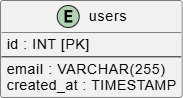
You declare a database table using theentity keyword, followed by the table name and a set of curly braces. Inside the braces, you list your table columns. To make your schema clean and readable, use a horizontal line separator (--) to separate your primary/foreign keys from standard data attributes:
PlantUML
Edit PlantUML in VPasCode
entity "users" as users_table {
    id : INT [PK]
    --
    email : VARCHAR(255)
    created_at : TIMESTAMP
}
2. Designating Primary and Foreign Keys
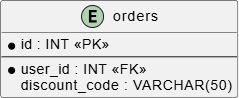
While text indicators like `[PK]` or `[FK]` work well, PlantUML’s IE engine also supports visual key icons. Placing an asterisk (*) before an attribute designates it as a **mandatory (not null)** column, while a clean text string or tag adds explicit indexing context:
PlantUML
Edit PlantUML in VPasCode
entity "orders" {
    * id : INT <<PK>>
    --
    * user_id : INT <<FK>>
    discount_code : VARCHAR(50)
}
3. Mapping Crow’s Foot Cardinality and Relationships
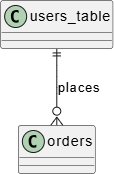
To connect tables and enforce referential integrity constraints, use a combination of dashes, brackets, and pipe characters. In IE notation, these symbols form distinct **crow’s foot** heads that represent database relationships:||--||**Exactly One to Exactly One:** A strict, mandatory one-to-one mapping.||--o|**Exactly One to Zero or One:** An optional one-to-one mapping.||--|{**Exactly One to One or Many:** A mandatory one-to-many dependency.||--o{**Exactly One to Zero, One, or Many:** A standard, optional one-to-many relationship.
Best Practices for Clean Database Schemas
- Maintain Casing Conventions: Keep your entity declarations predictable. Use lowercase snake_case (e.g.,
order_items) for actual SQL-mapped tables, or use uppercase CamelCase for conceptual domain models. - Always Document Foreign Keys: When linking two tables, always specify the foreign key column inside the child table block. This provides clear reference contexts for engineering teams during data migrations.
- Control Crow’s Foot Spacing: Complex database schemas with dozens of tables can quickly become crowded. If your relationship lines begin to cross unnaturally, replace your double-dash connectors (
--) with three or four dashes (---) to push the tables apart and allow the layout engine more room to organize the grid.
Real-World PlantUML ERD Examples
Example 1: Core Core E-Commerce Relational Model (Keys & Mappings)
This functional blueprint models a core e-commerce database transaction loop, showing how users, orders, and payment ledgers link together using strict crow’s foot relationships.
PlantUML
Edit PlantUML in VPasCode
@startuml
' Freeze entity box rendering into sharp modern squares
hide circle
skinparam LINETYPE ortho

entity "users" as user {
    * id : INT <<PK>>
    --
    * email : VARCHAR(100)
    * password_hash : VARCHAR(255)
    phone : VARCHAR(20)
}

entity "orders" as order {
    * id : INT <<PK>>
    --
    * user_id : INT <<FK>>
    * total_amount : DECIMAL(10,2)
    status : VARCHAR(50)
}

entity "payment_ledgers" as ledger {
    * id : INT <<PK>>
    --
    * order_id : INT <<FK>>
    * transaction_reference : VARCHAR(100)
    gateway : VARCHAR(50)
}

' Define relational schema bindings
user ||--o{ order : "places"
order ||--|| ledger : "generates"
@enduml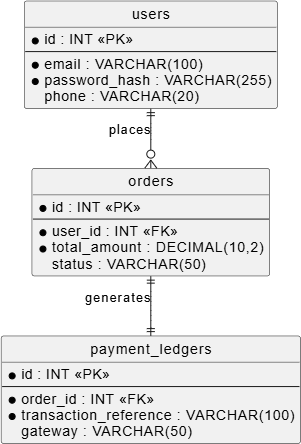
hide circle disables the default UML class token bubbles, while skinparam LINETYPE ortho forces relationship paths into clean 90-degree right angles. The schema clearly shows that a user can place zero or many orders (||--o{), while an order must have exactly one associated payment ledger record (||--||).
Example 2: Advanced Content Management System Schema (Many-to-Many Intersection)
This advanced enterprise blueprint maps a complete content management system (CMS) topology. It showcases how to handle many-to-many architectures cleanly by leveraging an intermediate mapping table.
PlantUML
Edit PlantUML in VPasCode
@startuml
hide circle
skinparam LINETYPE ortho

entity "posts" as post {
    * id : INT <<PK>>
    --
    * author_id : INT <<FK>>
    * title : VARCHAR(255)
    slug : VARCHAR(255)
    body : TEXT
}

entity "categories" as category {
    * id : INT <<PK>>
    --
    * name : VARCHAR(100)
    description : VARCHAR(255)
}

entity "post_category_mappings" as mapping {
    * post_id : INT <<PK>><<FK>>
    * category_id : INT <<PK>><<FK>>
    --
    assigned_at : TIMESTAMP
}

entity "comments" as comment {
    * id : INT <<PK>>
    --
    * post_id : INT <<FK>>
    author_name : VARCHAR(100)
    * content : TEXT
}

' Relational link structures
post ||--o{ mapping : "contains"
category ||--o{ mapping : "categorizes"
post ||--o{ comment : "attaches"
@enduml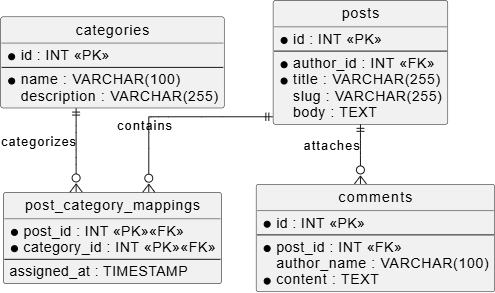
post_category_mappings) where both columns serve as a composite primary key. The crow’s foot indicators explicitly map the cascading relationships down to the comments layer.