


What is a Use Case Diagram?
A Use Case Diagram is a behavioral blueprint used to visualize the relationships between a system’s users (known as actors) and the specific actions or goals they want to accomplish (known as use cases). Rather than showing step-by-step logic loops, a use case diagram provides a high-level overview of a system’s functional scope, making it an excellent tool for defining project requirements, system boundaries, and stakeholder workflows. With VPasCode, you can instantly build clear, professional use case diagrams without fighting visual canvas alignment. This guide skips the obscure, legacy notations and focuses purely on the practical syntax elements you need for day-to-day software documentation.Core Syntax Guide: Elements and Constructs
Building a use case diagram in PlantUML relies on a few straightforward structural elements wrapped inside your standard@startuml and @enduml tags.
1. Declaring Actors
An actor represents an external entity that interacts with your application (such as a human user, a background service, or an external hardware API). You declare an actor by using theactor keyword followed by an internal shorthand ID:
PlantUML
Edit PlantUML in VPasCode
actor customer
actor admin as "System Administrator"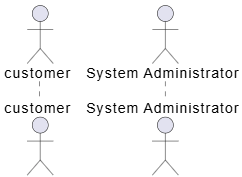
as keyword to assign a clean, human-readable display string to complex actor IDs.
2. Defining Use Cases
A use case represents a functional goal or business process. You can define a use case in two ways: by enclosing the text within parentheses(Your Use Case), or by explicitly using the usecase keyword for complex formatting:
PlantUML
Edit PlantUML in VPasCode
(Login to Dashboard)
usecase checkout as "Process Credit Card Payment"
3. Mapping Basic Interactions
To connect your actors to their corresponding use cases, use basic directed or undirected relationship lines. You can also append textual labels to add critical context to an interaction:
PlantUML
Edit PlantUML in VPasCode
customer --> (Login to Dashboard)
admin --> checkout : "Approves refunds"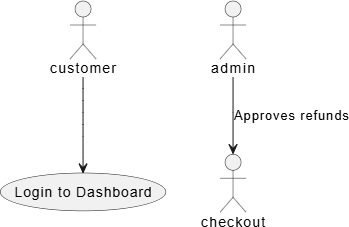
4. Advanced Relationships: Include and Extend
When modeling complex system behaviors, you frequently need to show dependencies between different use cases using standard UML stereotyping:- Include (Mandatory Dependency): Indicates that a base use case relies on another helper use case to successfully complete its execution. Use a dotted connector line (
..>) appended with a text label:PlantUML Edit PlantUML in VPasCode(Process Checkout) ..> (Verify Balance) : <<include>>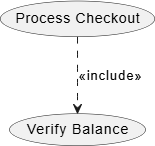
- Extend (Optional/Conditional Behavior): Indicates that an optional workflow can branch off from a base use case under specific conditions. Note that the arrow points from the *extension* use case back to the *base* use case:
PlantUML Edit PlantUML in VPasCode
(Apply Promo Code) ..> (Process Checkout) : <<extend>>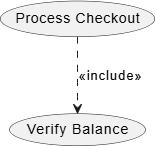
5. Enforcing System Boundaries
To clearly distinguish what happens inside your software application versus what happens externally, use therectangle keyword to wrap your internal use cases. Crucially, actors should remain outside of this container block to reflect their status as external participants:
PlantUML
Edit PlantUML in VPasCode
actor customer

rectangle "E-Commerce Platform" {
    (Browse Catalog)
    (Add to Cart)
}

customer --> (Browse Catalog)
customer --> (Add to Cart)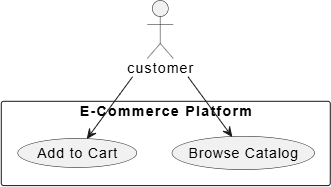
Best Practices for Clean Layouts
- Keep Text Brief: Use cases should always start with a clear, active verb (e.g., “Generate Report”, “Update Profile”) rather than a long sentence.
- Leverage Directional Anchors: If your actors and use cases clump together in a messy stack, use spatial direction arrows like
-right->or-down->to gently nudge the layout engine into a clean, readable structure. - Isolate System Boundaries: Always use a boundary rectangle when documenting applications that interact with multiple third-party microservices. It makes it instantly clear who owns which process.
Real-World PlantUML Use Case Diagram Examples
Copy and paste the following practical blueprints directly into your VPasCode live editor panel to see how they render dynamically.Example 1: Core User Authentication & Account Management
This blueprint models a standard application ecosystem containing a primary user, an administrative operator, and a boundary box containing core security mechanics.
PlantUML
Edit PlantUML in VPasCode
@startuml
' Set layout orientation from left to right
left to right direction

actor "End User" as user
actor "Security Admin" as admin

rectangle "Identity Provider Service" {
    (Sign In)
    (Reset Password)
    (Update Profile Data)
    (Review Security Logs)
    (Deactivate Accounts)
}

user --> (Sign In)
user --> (Reset Password)
user --> (Update Profile Data)

(Review Security Logs) <-- admin
(Deactivate Accounts) <-- admin
@enduml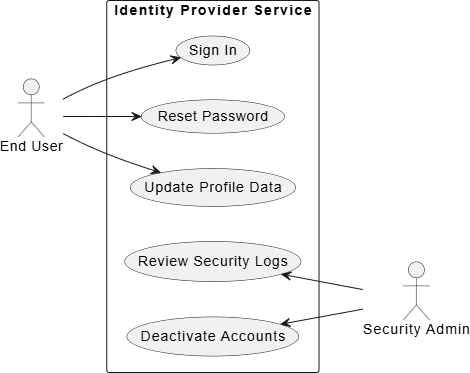
left to right direction forces the layout engine to position actors on the outer wings and grow the use cases horizontally rather than vertically. Notice how placing the actor declarations cleanly outside the rectangle wrapper keeps them organized, while reversing the arrow bracket direction for the admin user (<-- admin) pins them cleanly to the right-hand side of the diagram matrix.
Example 2: Advanced E-Commerce Checkout with External Dependencies
This real-world system layout maps a complex checkout workflow that relies on external banking APIs, structural inclusions, and optional extension flags.
PlantUML
Edit PlantUML in VPasCode
@startuml
left to right direction

actor "Customer" as customer
actor "Warehouse Staff" as staff
actor "Stripe Gateway" as stripe

rectangle "Online Store Fulfillment System" {
    (Place Order)
    (Apply Coupon)
    (Generate Invoice)
    (Pick Pack Items)
    (Update Shipping Status)
}

' External interactions to system boundaries
customer --> (Place Order)
(Place Order) --> stripe : "Authorize Funds"

' Include and Extend structures
(Place Order) ..> (Generate Invoice) : <<include>>
(Apply Coupon) ..> (Place Order) : <<extend>>

' Fulfillment paths
(Pick Pack Items) <-- staff
(Update Shipping Status) <-- staff
(Generate Invoice) --> staff : "Email Copy"
@enduml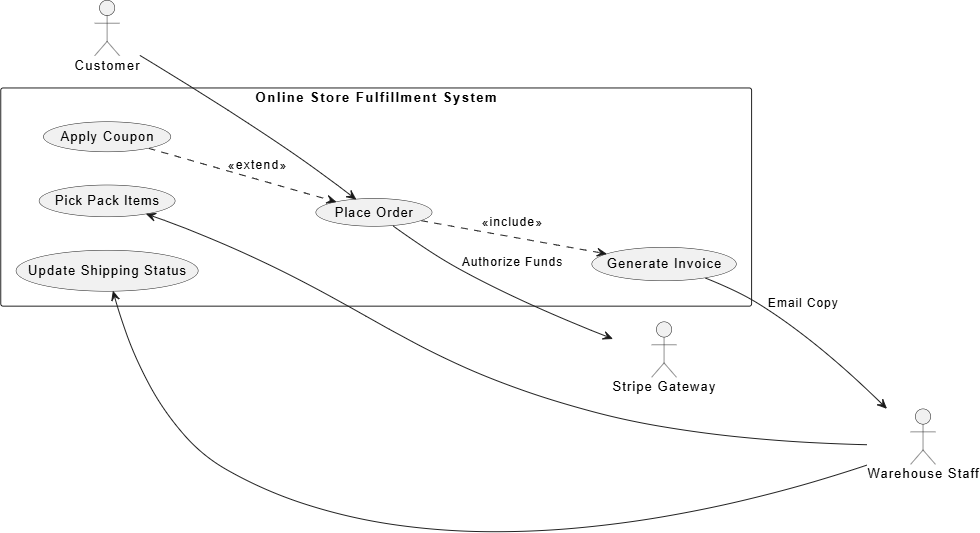
Place Order) mandates an invocation of (Generate Invoice) using the <<include>> tag over a dotted line. Meanwhile, applying a coupon code is correctly modeled as an optional branch via <<extend>> pointing backward toward the base execution. All external actors remain clearly isolated outside the system envelope.