


What is a Profile Diagram?
A UML Profile Diagram is an architectural extension mechanism used to adapt standard UML metamodels for specific domains, platforms, or industries (such as Cloud Computing, Cybersecurity, Healthcare, or Finance). Instead of modifying the core UML metamodel, Profile Diagrams allow architects to define custom Stereotypes, tagged values (attributes), and Extension relationships to extend existing UML Metaclasses. With VPasCode, you can quickly write text-based PlantUML scripts to generate precise, publication-ready Profile Diagrams without manually drawing extension arrows or formatting stereotype boxes on a visual canvas.Core Syntax Guide: Elements and Constructs
Building a Profile Diagram in VPasCode uses profile packages, stereotype declarations, metaclass references, and extension lines wrapped inside standard@startuml and @enduml block boundaries.
1. Defining Profiles and Stereotypes
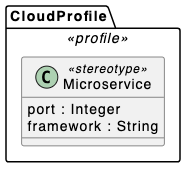
Declare a profile container using thepackage keyword styled with a <<profile>> stereotype. Inside the profile, define custom stereotypes using the class keyword decorated with <<stereotype>>:
PlantUML
Edit PlantUML in VPasCode
package "CloudProfile" <<profile>> {
  class Microservice <<stereotype>> {
    port : Integer
    framework : String
  }
}
2. Referencing UML Metaclasses
To extend standard UML elements, declare the target UML element (such asClass, Component, or Interface) as a <<metaclass>>:
PlantUML
Edit PlantUML in VPasCode
class Component <<metaclass>>
class Node <<metaclass>>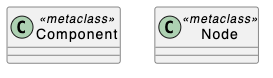
Pro Tip: Common UML Metaclasses used in domain profiling includeClass,Component,Node,Interface,Operation, andProperty.
3. Mapping Extension Relationships
To show that a custom stereotype extends a standard UML Metaclass, use the filled extension arrow (--|> or -up-|>):
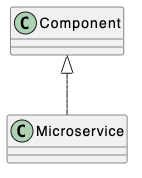
4. Adding Tagged Values (Attributes)
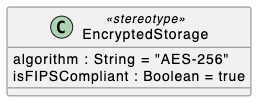
Stereotypes store custom operational metadata through tagged values defined as class attributes inside the stereotype body:
PlantUML
Edit PlantUML in VPasCode
class EncryptedStorage <<stereotype>> {
  algorithm : String = "AES-256"
  isFIPSCompliant : Boolean = true
}
Best Practices for Clean Layouts
- Keep Profiles Grouped: Always enclose custom stereotypes inside a
package "Name" <<profile>>container to make domain boundaries clear. - Anchor Metaclasses at the Top: Position
<<metaclass>>elements near the top of the diagram using upward extension arrows (-up-|>) so extensions point clearly to their base UML types. - Set Explicit Defaults for Tagged Values: Provide default values for attributes (e.g.,
timeout : Integer = 3000) to clearly document default domain behaviors.
Real-World PlantUML Profile Diagram Examples
Copy and paste these blueprints directly into your VPasCode editor panel to see them render in real time.Example 1: Cloud Microservice Architecture Profile
This blueprint models a domain-specific profile for cloud-native microservice deployments, extending standard UMLComponent and Node metaclasses.
PlantUML
Edit PlantUML in VPasCode
@startuml
title Cloud Infrastructure Domain Profile Diagram

skinparam classAttributeIconSize 0

package "UML Standard Metamodel" {
  class Component <<metaclass>>
  class Node <<metaclass>>
}

package "CloudArchitectureProfile" <<profile>> {
  class "RESTService" as rest <<stereotype>> {
    endpointPath : String
    authRequired : Boolean = true
  }

  class "DatabaseCluster" as db <<stereotype>> {
    engine : String
    replicaCount : Integer = 3
  }

  class "K8sPod" as pod <<stereotype>> {
    namespace : String = "default"
    maxMemory : String = "512Mi"
  }
}

rest -up-|> Component
db -up-|> Component
pod -up-|> Node
@enduml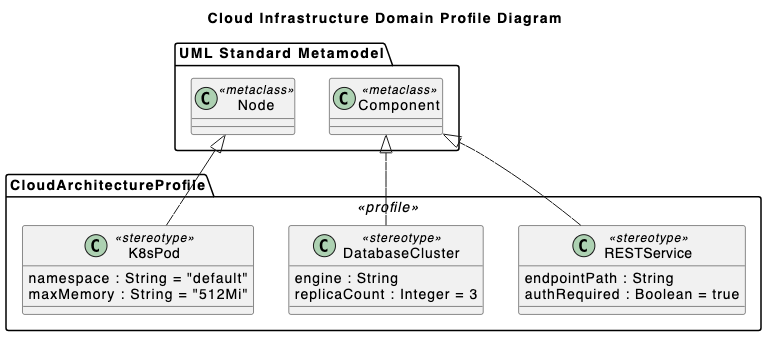
RESTService, DatabaseCluster, and K8sPod) with tagged metadata properties, extending base UML Component and Node metaclasses using extension arrows (-up-|>).
Example 2: Healthcare Security & Compliance Profile
This blueprint models a compliance profile for medical data processing systems, extending UMLClass and Interface elements with security attributes.
PlantUML
Edit PlantUML in VPasCode
@startuml
title HIPAA Healthcare Security Profile Diagram

skinparam classAttributeIconSize 0

package "UML Metamodel" {
  class Class <<metaclass>>
  class Interface <<metaclass>>
}

package "HealthcareSecurityProfile" <<profile>> {
  class "PHIEntity" as phi <<stereotype>> {
    retentionYears : Integer = 7
    isEncryptedAtRest : Boolean = true
  }

  class "SecureAPI" as api <<stereotype>> {
    tlsVersion : String = "1.3"
    auditLogging : Boolean = true
  }
}

phi -up-|> Class
api -up-|> Interface
@enduml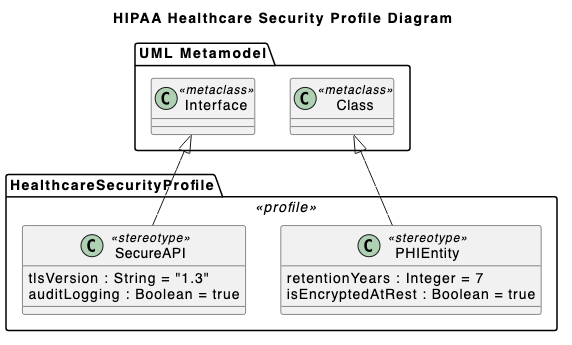
retentionYears and tlsVersion) across standard UML software model components.