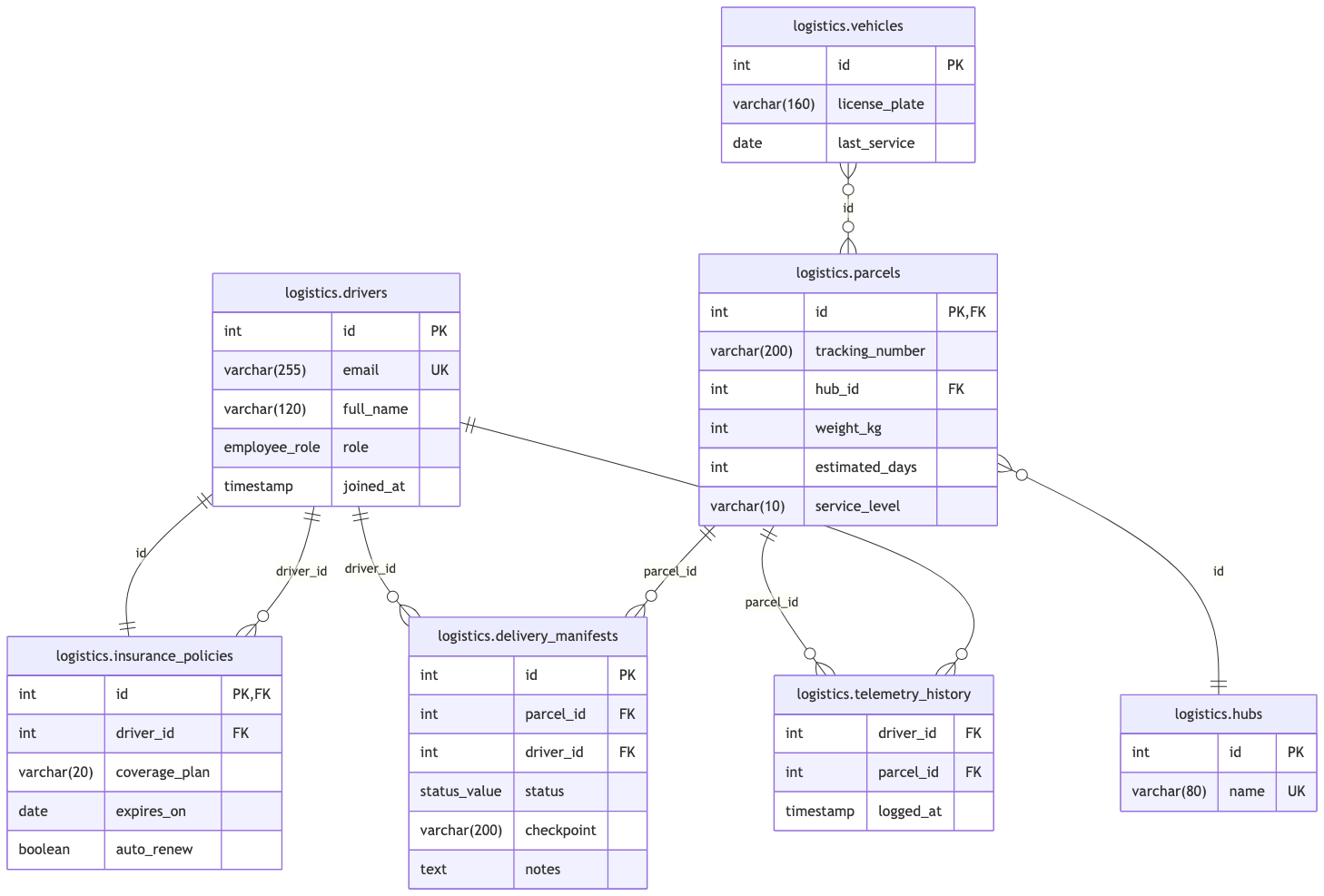
When architecting logistics platforms, supply chain operations, or fulfillment databases, reading raw DBML schema declarations can make it difficult to visualize how tables, enums, schemas, and references connect. The
DBML Schema Visualizer turns your DBML definitions into clear, interactive Entity-Relationship Diagrams (ERDs). By parsing table structures, schema prefixes, enum types, table groups, and reference relationships (
>,
<,
-,
<>), database administrators and software architects can inspect complex tracking systems at a glance.
The Mechanics of DBML Visualizations
In VPasCode, DBML rendering parses
Project settings,
Enum declarations,
TableGroup blocks, and
Table definitions into visual ERD nodes. Tables with schema namespaces (like
logistics.drivers) are displayed with their full paths, custom enums serve as strict column types, and foreign key references automatically generate visual links between entities.
1. Essential Setup: Complete FleetLogix Logistics Database Schema
To visualize the entire logistics ecosystem, define the project parameters, employee roles, fulfillment entities, shipment logs, and reference constraints in valid DBML syntax:
Project fleetlogix {
  database_type: 'PostgreSQL'
}

Enum employee_role {
  courier
  dispatcher
  manager
}

Enum status_value {
  pending
  sorting
  transit
  delivered
  exception
}

TableGroup fulfillment {
  logistics.parcels
  logistics.vehicles
  logistics.hubs
}

Table logistics.drivers {
  id int [pk, increment]
  email varchar(255) [not null, unique]
  full_name varchar(120)
  role employee_role [not null, default: 'courier']
  joined_at timestamp [not null, default: 'now()']
}

Table logistics.insurance_policies {
  id int [pk, increment]
  driver_id int [not null]
  coverage_plan varchar(20) [not null]
  expires_on date [not null]
  auto_renew boolean [not null, default: true]
}

Table logistics.parcels {
  id int [pk, increment]
  tracking_number varchar(200) [not null]
  hub_id int
  weight_kg int
  estimated_days int
  service_level varchar(10)
}

Table logistics.vehicles {
  id int [pk, increment]
  license_plate varchar(160) [not null]
  last_service date
}

Table logistics.hubs {
  id int [pk, increment]
  name varchar(80) [not null, unique]
}

Table logistics.delivery_manifests {
  id int [pk, increment]
  parcel_id int [not null]
  driver_id int [not null]
  status status_value [not null]
  checkpoint varchar(200)
  notes text

  Indexes {
    (parcel_id, driver_id) [unique]
  }
}

Table logistics.telemetry_history {
  driver_id int [not null]
  parcel_id int [not null]
  logged_at timestamp [not null, default: 'now()']

  Indexes {
    (driver_id, logged_at)
  }
}

Ref: logistics.insurance_policies.driver_id > logistics.drivers.id
Ref: logistics.delivery_manifests.parcel_id > logistics.parcels.id
Ref: logistics.delivery_manifests.driver_id > logistics.drivers.id
Ref: logistics.telemetry_history.driver_id > logistics.drivers.id
Ref: logistics.telemetry_history.parcel_id > logistics.parcels.id
Ref: logistics.hubs.id < logistics.parcels.hub_id
Ref: logistics.parcels.id <> logistics.vehicles.id
Ref: logistics.drivers.id - logistics.insurance_policies.id
Advanced Structural Techniques in FleetLogix
Breaking down specific sections of your DBML code helps illustrate how different database features work together.
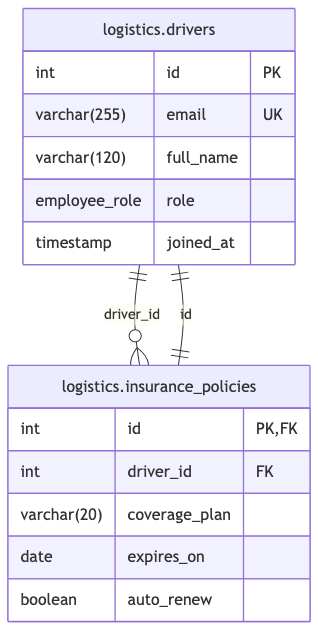
1. Driver Management, Insurance & Custom Enums
The driver registry and protection model uses custom Enums (
employee_role), strict constraints (
unique,
not null), and two relationship types: a standard one-to-many lookup and an explicit one-to-one link (
-).
Enum employee_role {
  courier
  dispatcher
  manager
}

Table logistics.drivers {
  id int [pk, increment]
  email varchar(255) [not null, unique]
  full_name varchar(120)
  role employee_role [not null, default: 'courier']
  joined_at timestamp [not null, default: 'now()']
}

Table logistics.insurance_policies {
  id int [pk, increment]
  driver_id int [not null]
  coverage_plan varchar(20) [not null]
  expires_on date [not null]
  auto_renew boolean [not null, default: true]
}

// One-to-many driver relationship
Ref: logistics.insurance_policies.driver_id > logistics.drivers.id

// One-to-one driver contract relationship
Ref: logistics.drivers.id - logistics.insurance_policies.id
2. Fulfillment Grouping & Many-to-Many Relationships
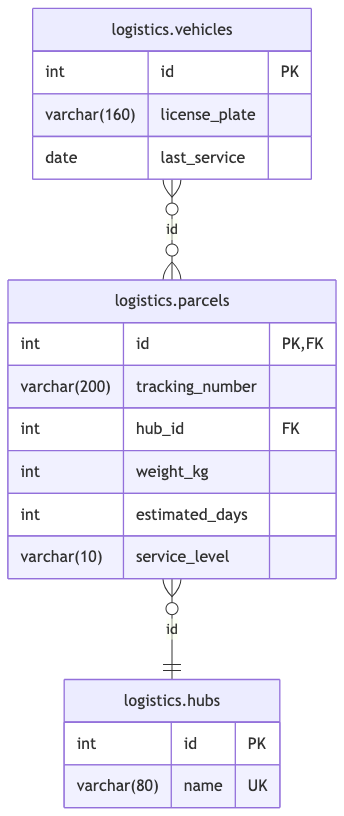
The physical asset tier features a
TableGroup containing
logistics.parcels,
logistics.vehicles, and
logistics.hubs. It uses the reverse relationship operator (
<) for regional distribution hubs and a many-to-many relationship operator (
<>) between parcels and delivery vehicles.
TableGroup fulfillment {
  logistics.parcels
  logistics.vehicles
  logistics.hubs
}

Table logistics.parcels {
  id int [pk, increment]
  tracking_number varchar(200) [not null]
  hub_id int
  weight_kg int
  estimated_days int
  service_level varchar(10)
}

Table logistics.vehicles {
  id int [pk, increment]
  license_plate varchar(160) [not null]
  last_service date
}

Table logistics.hubs {
  id int [pk, increment]
  name varchar(80) [not null, unique]
}

// One-to-many using reverse arrow direction (<)
Ref: logistics.hubs.id < logistics.parcels.hub_id

// Many-to-many relation (<>)
Ref: logistics.parcels.id <> logistics.vehicles.id
3. Real-Time Tracking, Composite Indexes & Status Enums
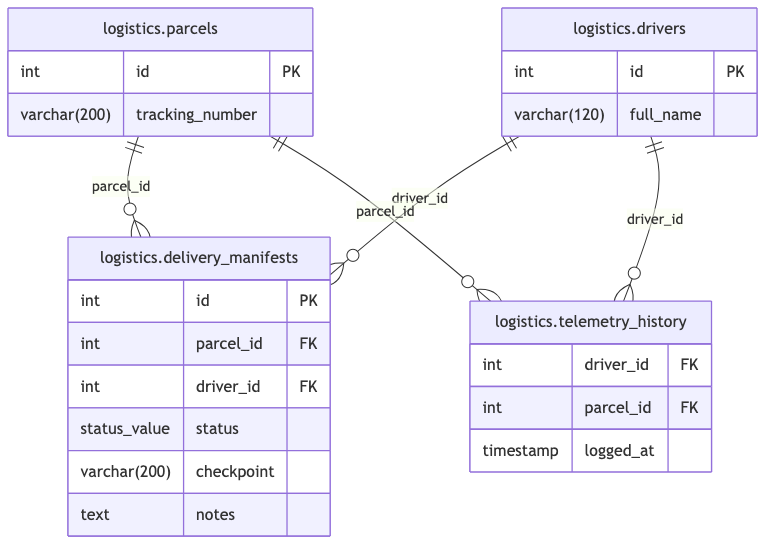
The manifest and telemetry modules monitor active package handling. They use a tracking state enum (
status_value), single composite unique indexes (like
(parcel_id, driver_id) [unique]) to enforce record integrity, and multi-column indexes for fast chronological scans.
Enum status_value {
  pending
  sorting
  transit
  delivered
  exception
}

Table logistics.parcels {
  id int [pk, increment]
  tracking_number varchar(200) [not null]
}

Table logistics.drivers {
  id int [pk, increment]
  full_name varchar(120) [not null]
}

Table logistics.delivery_manifests {
  id int [pk, increment]
  parcel_id int [not null]
  driver_id int [not null]
  status status_value [not null]
  checkpoint varchar(200)
  notes text

  indexes {
    (parcel_id, driver_id) [unique]
  }
}

Table logistics.telemetry_history {
  driver_id int [not null]
  parcel_id int [not null]
  logged_at timestamp [not null, default: 'now()']

  indexes {
    (driver_id, logged_at)
  }
}

Ref: logistics.delivery_manifests.parcel_id > logistics.parcels.id
Ref: logistics.delivery_manifests.driver_id > logistics.drivers.id
Ref: logistics.telemetry_history.driver_id > logistics.drivers.id
Ref: logistics.telemetry_history.parcel_id > logistics.parcels.id
Strategic Best Practices for DBML
- Organize Core Collections with TableGroup: Group closely connected tables (such as
logistics.parcels, logistics.vehicles, and logistics.hubs) in a TableGroup to keep your visual layout organized.
- Ensure Correct Relationship Direction: Standardize on
> (many-to-one) or < (one-to-many) so visual foreign key arrows point cleanly from child fields to primary keys.
- Enforce Business Rules with Indexes & Enums: Use composite unique indexes (like
(parcel_id, driver_id) [unique]) and custom Enums (like status_value) to enforce business constraints right at the schema level.


