What is a Work Breakdown Structure (WBS) Diagram?
A Work Breakdown Structure (WBS) Diagram is a fundamental project management tool that decomposes a complex project into smaller, manageable deliverable-based components. It organizes project scope into distinct hierarchical levels, from overall project goals down to individual phases, tasks, and work packages. With VPasCode, you can quickly convert structured text into clean, publication-ready WBS tree diagrams using standard PlantUML syntax. This eliminates the need for manual alignment on visual canvases and makes updating project structures fast and maintainable.Core Syntax Guide: Elements and Constructs
Building a WBS Diagram in VPasCode uses arithmetic notation (*, **, ***) or block brackets to represent hierarchy levels inside standard @startwbs and @endwbs block boundaries.
1. Declaring Hierarchical Levels
Define the root project title with a single asterisk (*), and represent nested deliverables by adding asterisks for each subordinate level:
PlantUML
Edit PlantUML in VPasCode
@startwbs
* Corporate Office Relocation
** 1. Planning & Design
*** 1.1 Requirements Gathering
*** 1.2 Space Planning
** 2. Infrastructure Setup
*** 2.1 IT Systems
*** 2.2 Furniture & Equipment
@endwbs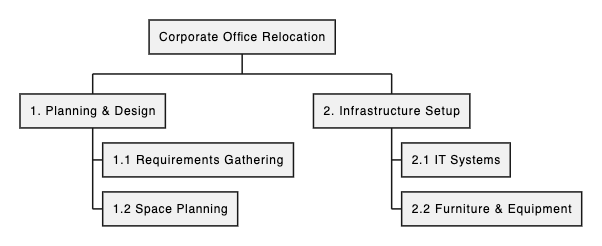
2. Controlling Layout Orientation (Left / Right Branching)
By default, PlantUML arranges WBS branches symmetrically. You can force specific branches to extend explicitly to the left or right side of a parent node using directional arithmetic operators (+_ or -_):
PlantUML
Edit PlantUML in VPasCode
@startwbs
* Project Main Target
** Left Branch (Deliverables)
***_ Task A
***_ Task B
**_ Right Branch (Operations)
***_ Task C
@endwbs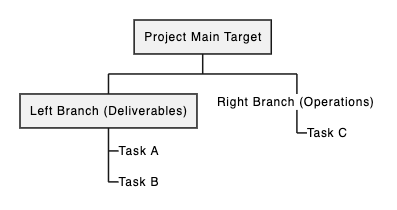
Pro Tip: Appending an underscore (*_) turns child nodes into vertical box lists rather than expanding horizontally across the canvas, keeping large project trees compact.
3. Customizing Colors and Box Styling
Apply background colors or custom styling directly to specific work packages or milestone boxes to highlight high-priority deliverables or status stages:
PlantUML
Edit PlantUML in VPasCode
@startwbs
*[#LightBlue] Website Redesign Project
**[#LightGreen] Phase 1: UX/UI Design
***[#Pink] Wireframing
***[#Pink] Prototyping
**[#Yellow] Phase 2: Frontend Development
@endwbs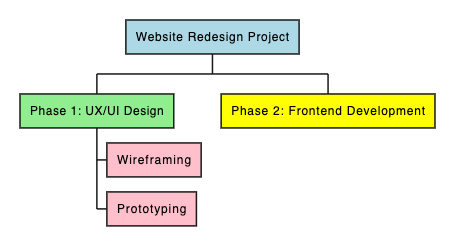
Best Practices for Clean Layouts
- Keep Deliverable Labels Actionable: Use clear phase titles and numbered WBS codes (e.g.,
1.1 Requirements) for easy cross-referencing in project documentation. - Use Vertical Box Lists (
*_): Convert deep sub-tasks into vertical lists using the underscore suffix to prevent horizontal scrolling on wide project trees. - Color-Code Project Phases: Assign consistent background colors across distinct phases (e.g., Green for Planning, Yellow for Execution, Blue for Testing) to improve stakeholder readability.
Real-World PlantUML WBS Diagram Examples
Copy and paste these blueprints directly into your VPasCode editor panel to see them render in real time.Example 1: Corporate Office Relocation WBS
This blueprint models a multi-phase corporate relocation project covering planning, IT infrastructure, physical move, and change management.
PlantUML
Edit PlantUML in VPasCode
@startwbs
title Corporate Office Relocation Project WBS

*[#87CEEB] Corporate Office Relocation
**[#LightGreen] 1. Planning & Design
***_ 1.1 Space Planning & Floor Layouts
***_ 1.2 Vendor Selection & Contracting
***_ 1.3 Budget & Schedule Finalization

**[#Khaki] 2. Infrastructure & IT Setup
***_ 2.1 Server Room & Network Installation
***_ 2.2 Workstation Hardware Provisioning
***_ 2.3 Telecom & Security Systems

**[#LightPink] 3. Move Execution
***_ 3.1 Packing & Equipment Tagging
***_ 3.2 Physical Transport & Logistics
***_ 3.3 Unpacking & Setup

**[#Plum] 4. Handover & Orientation
***_ 4.1 Final Premises Inspection
***_ 4.2 Staff Orientation & Move Briefings
***_ 4.3 Project Closeout Report
@endwbs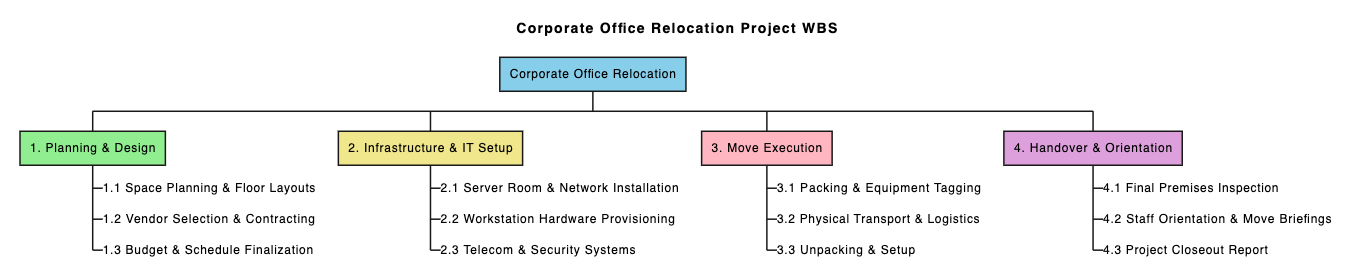
***_) under each phase to create compact vertical columns. Custom background colors categorize the four main operational tracks.
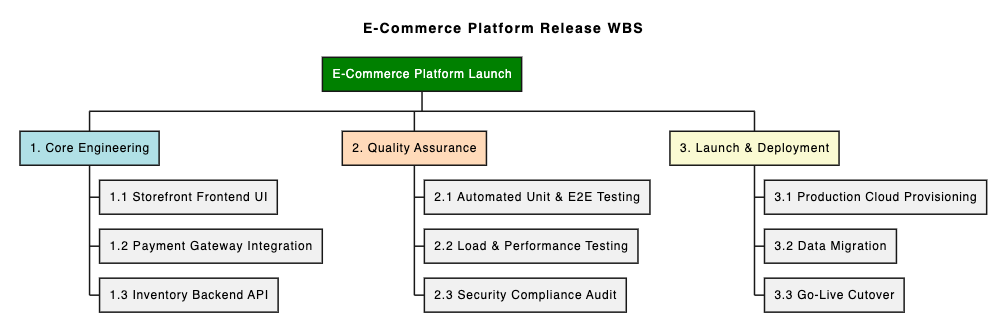
Example 2: Enterprise E-Commerce Platform Launch
This blueprint structures an enterprise software release into core engineering, quality assurance, deployment, and marketing deliverables.
PlantUML
Edit PlantUML in VPasCode
@startwbs
title E-Commerce Platform Release WBS

*[#Green] E-Commerce Platform Launch
**[#PowderBlue] 1. Core Engineering
*** 1.1 Storefront Frontend UI
*** 1.2 Payment Gateway Integration
*** 1.3 Inventory Backend API
**[#PeachPuff] 2. Quality Assurance
*** 2.1 Automated Unit & E2E Testing
*** 2.2 Load & Performance Testing
*** 2.3 Security Compliance Audit
**[#LightGoldenrodYellow] 3. Launch & Deployment
*** 3.1 Production Cloud Provisioning
*** 3.2 Data Migration
*** 3.3 Go-Live Cutover
@endwbs