


What is a BPMN Diagram?
A Business Process Model and Notation (BPMN) Diagram is a behavioral blueprint used to visualize business processes, workflows, and operational steps across different roles or services. Rather than building raw BPMN 2.0 XML or manually aligning visual elements on a drag-and-drop canvas, VPasCode lets you write BPMN process flows using a simple, human-friendly PlantUML activity diagram syntax. With VPasCode, you can instantly turn text definitions into standardized BPMN business process diagrams. This guide covers the essential syntax elements you need to build clear, publication-ready process flows.Core Syntax Guide: Elements and Constructs
Building a BPMN diagram in VPasCode relies on PlantUML activity diagram constructs wrapped inside@startuml and @enduml tags, enhanced with explicit BPMN stereotypes and parent-child partition names.
1. Modeling Pools and Swimlanes
To define organizational responsibility, use partition bars (|...|). VPasCode uses a colon separator (Parent:Child) to represent nested pools and swimlanes:
PlantUML
Edit PlantUML in VPasCode
|E-Commerce Platform|
:<<UserTask>> Receive Order;

|Warehouse:Fulfillment|
:<<ManualTask>> Pick & Pack Items;

|Logistics:Delivery|
:<<ServiceTask>> Assign Courier;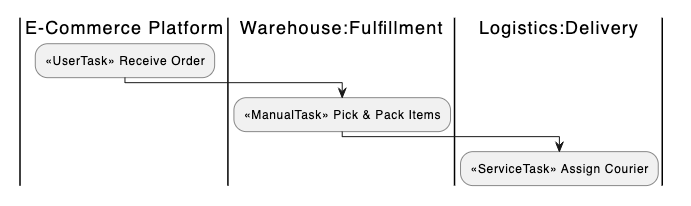
Pro Tip: Using |Pool:Lane| keeps your diagram readable by grouping internal departments (like Intake, Assessment, or Payout) cleanly inside an overall organizational pool (like Claims).
2. Defining Explicit BPMN Task Types
Rather than generic action boxes, you can declare the exact nature of an activity by adding a BPMN task stereotype before the task label:
PlantUML
Edit PlantUML in VPasCode
:<<UserTask>> Submit Claim;
:<<ServiceTask>> Validate Policy Coverage;
:<<ScriptTask>> Calculate Payout Amount;
:<<BusinessRuleTask>> Auto-Approve Claim;
:<<ManualTask>> Perform Field Investigation;
:<<SendTask>> Send Acknowledgement;
:<<ReceiveTask>> Receive Payment Confirmation;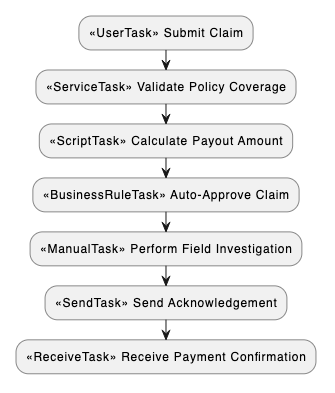
Supported Task Types:
<<UserTask>>: Work completed by a human user through an application interface.<<ServiceTask>>: Automated work performed by an internal or third-party service.<<ManualTask>>: Physical work executed without system involvement.<<ScriptTask>>: Automated work executed by an internal software engine script.<<BusinessRuleTask>>: Automated decision processing based on defined business logic.<<SendTask>>: An outbound message or notification sent to an external participant.<<ReceiveTask>>: An inbound message or payload received from an external participant.
3. Representing Gateways and Decision Logic
Model decision points, conditional branches, and workflow splits using familiar PlantUMLif, then, else, and endif statements:
PlantUML
Edit PlantUML in VPasCode
if (Requires Adjuster Review?) then (yes)
  :<<UserTask>> Assign Adjuster;
  :<<ManualTask>> Perform Field Investigation;
else (no)
  :<<BusinessRuleTask>> Auto-Approve Claim;
endif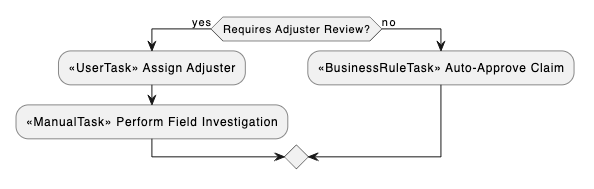
VPasCode automatically maps decision logic into standard BPMN gateway symbols (such as Exclusive, Parallel, or Inclusive gateways) depending on the branching structure.
4. Process Boundaries: Start and Stop Events
Mark the entry and exit points of your process using standardstart and stop keywords. These render cleanly as BPMN Start and End events:
PlantUML
Edit PlantUML in VPasCode
start
:<<UserTask>> Submit Form;
:<<ServiceTask>> Process Request;
stop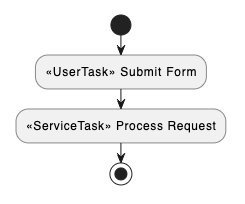
Best Practices for Clean Layouts
- Use Action-Oriented Labels: Always start task descriptions with a strong verb (e.g.,
<<ServiceTask>> Validate Policy Coverage). - Set Max Element Widths: Add custom style directives at the top of your script (e.g.,
MaximumWidth 160) to prevent long text labels from causing excessive horizontal stretch. - Group Lanes under Parent Pools: Keep swimlanes organized logically using the
|Pool:Lane|syntax to avoid cluttering the visual canvas.
Real-World PlantUML BPMN Diagram Examples
Copy and paste these blueprints directly into your VPasCode editor panel to see them render in real time.Example 1: Core Insurance Claim Processing
This blueprint models an insurance claim workflow spanning a Policyholder and multiple internal departments within a Claims pool.
PlantUML
Edit PlantUML in VPasCode
@startuml
title Insurance Claim Process BPD

<style>
element {
  MaximumWidth 160
}
</style>

|Policyholder|
start
:<<UserTask>> Submit Claim;
:<<UserTask>> Upload Supporting Documents;

|Claims:Intake|
:<<ServiceTask>> Validate Policy Coverage;
:<<SendTask>> Send Acknowledgement to Policyholder;

|Claims:Assessment|
:<<UserTask>> Assess Claim Details;
:<<ScriptTask>> Calculate Payout Amount;
if (Requires Adjuster Review?) then (yes)
  :<<UserTask>> Assign Adjuster;
  :<<ManualTask>> Perform Field Investigation;
else (no)
  :<<BusinessRuleTask>> Auto-Approve Claim;
endif
:<<UserTask>> Approve Final Decision;

|Claims:Payout|
if (Claim Approved?) then (yes)
  :<<ServiceTask>> Schedule Payment;
  :<<ReceiveTask>> Receive Payment Confirmation;
else (no)
  :<<SendTask>> Notify Policyholder of Rejection;
endif
:<<SendTask>> Send Settlement Notification;

|Policyholder|
:<<ReceiveTask>> Receive Settlement;
stop
@enduml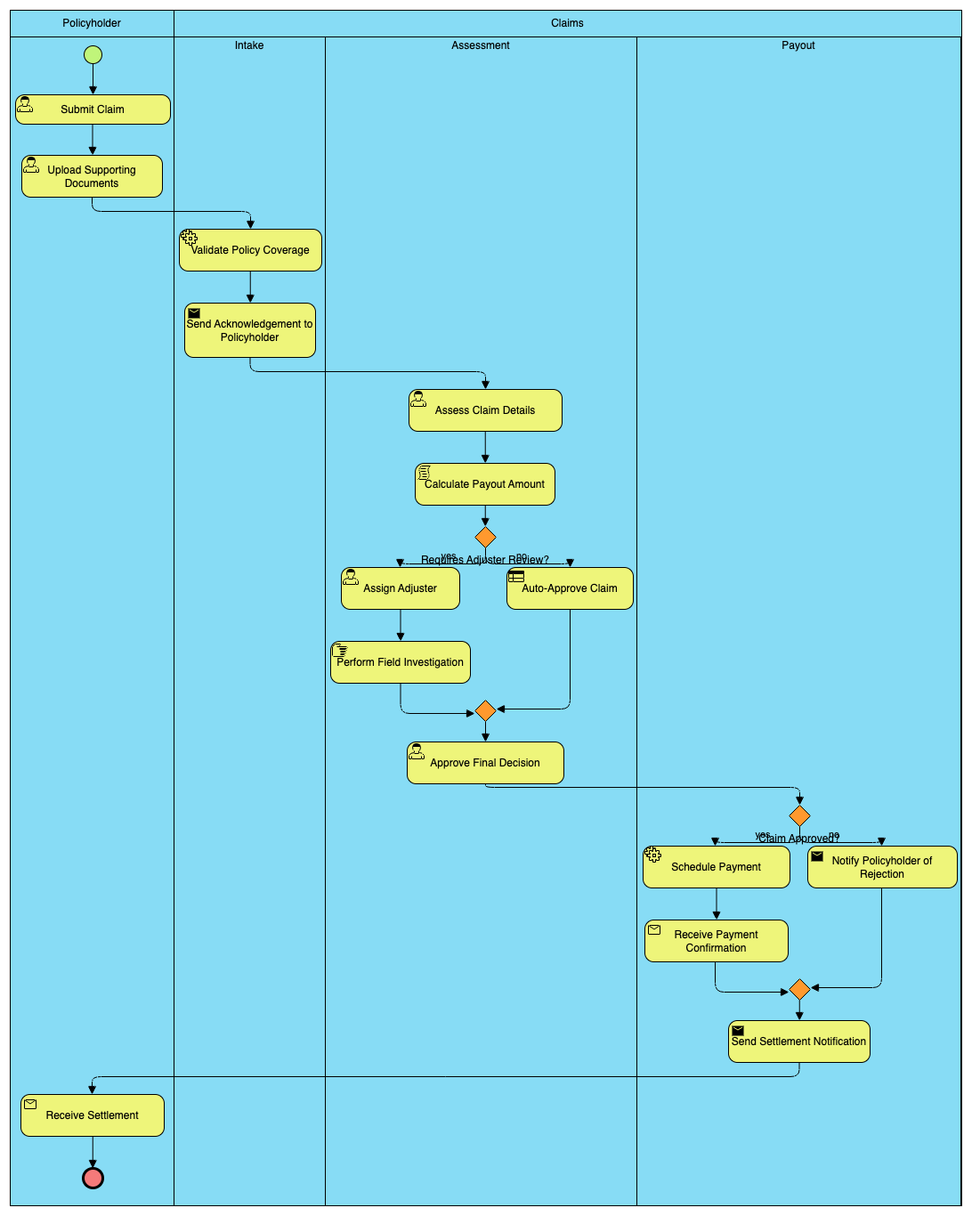
|Claims:Intake|, |Claims:Assessment|, and |Claims:Payout| construct three distinct lanes inside a single Claims pool. Notice how task stereotypes like <<ServiceTask>> and <<UserTask>> explicitly define the exact functional execution for each operational step.
Example 2: E-Commerce Order Fulfillment & Payment Approval
This blueprint maps an online order process across a Buyer, an Online Store backend, and a Warehouse logistics team.
PlantUML
Edit PlantUML in VPasCode
@startuml
title E-Commerce Fulfillment Process BPD

<style>
element {
  MaximumWidth 160
}
</style>

|Customer|
start
:<<UserTask>> Place Order;
:<<UserTask>> Submit Payment Details;

|Store:Backend|
:<<ServiceTask>> Authorize Funds;
if (Payment Successful?) then (yes)
  :<<SendTask>> Send Order Confirmation;
else (no)
  :<<SendTask>> Send Payment Failure Alert;
  stop
endif

|Store:Warehouse|
:<<ManualTask>> Pick & Pack Items;
:<<ManualTask>> Handover to Courier;

|Logistics:Delivery|
:<<ServiceTask>> Update Tracking Status;
:<<SendTask>> Send Delivery Notification;

|Customer|
:<<ReceiveTask>> Receive Package;
stop
@enduml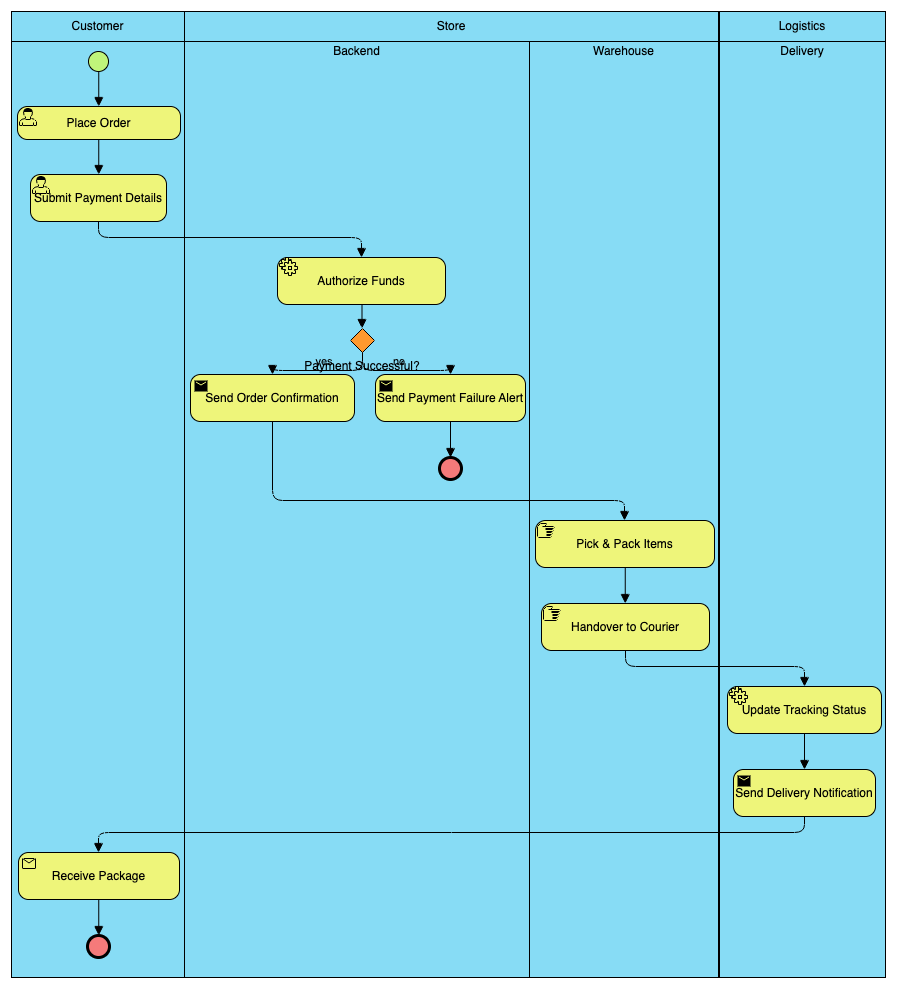
stop) inside the payment failure branch while keeping the main “happy path” moving seamlessly through backend processing, warehouse execution, and courier delivery.