


What is a Regex Diagram?
A Regular Expression (Regex) Diagram (also known as a Syntax Diagram or Railroad Diagram) is a visual representation of a regular expression pattern. It translates complex, cryptic regex strings into an intuitive flow diagram that shows start-to-finish execution paths, character matching rules, optional groups, loops, and branching choices. With VPasCode, you can write concise PlantUML regex scripts to automatically render clean, interactive railroad diagrams for documentation, code reviews, and technical specifications without drawing connectors by hand.Core Syntax Guide: Elements and Constructs
Building a Regex Diagram in VPasCode uses regex block definitions wrapped inside standard@startregex and @endregex block boundaries.
1. Literal Characters and Sequences
Represent exact string matches by placing text directly or inside quotes within the regex block: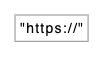
2. Character Classes and Sets
Define allowed character ranges or specific sets using standard bracket notation[...] or predefined classes:

Pro Tip: Use character ranges like[0-9]for numeric digits or[a-z]for lowercase alphabetic inputs to render clean single-box matching constraints.
3. Quantifiers and Repetition Loops
Represent optional elements, zero-or-more repeats, or one-or-more loops using standard quantifiers (?, *, +, or {n,m}):
PlantUML
Edit PlantUML in VPasCode
@startregex
"http" "s"? "://"
@endregex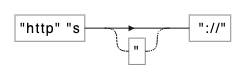
4. Alternation and Grouping
Represent branching choices using the pipe operator (|) or parenthesized groups (...) to visualize decision splits in the execution path:
PlantUML
Edit PlantUML in VPasCode
@startregex
("com" | "org" | "net")
@endregex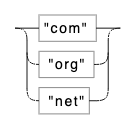
Best Practices for Clean Layouts
- Group Sub-Patterns: Use parentheses
(...)to logically cluster related tokens so alternative execution paths branch cleanly. - Quote Special Characters: Always wrap literal punctuation symbols (like
".","@", or":") in double quotes to prevent syntax conflicts. - Break Complex Regex into Modules: Test and build individual sub-patterns (such as domain names or protocol prefixes) step by step.
Real-World PlantUML Regex Diagram Examples
Copy and paste these blueprints directly into your VPasCode editor panel to see them render in real time.Example 1: Email Address Validator Pattern
This blueprint visualizes a standard email validation regex consisting of a username string, an@ symbol, a domain name, and a top-level domain suffix.
PlantUML
Edit PlantUML in VPasCode
@startregex
title Email Address Validation Pattern

[a-zA-Z0-9._%+-]+ "@" [a-zA-Z0-9.-]+ "." ("com" | "org" | "net" | "io")
@endregex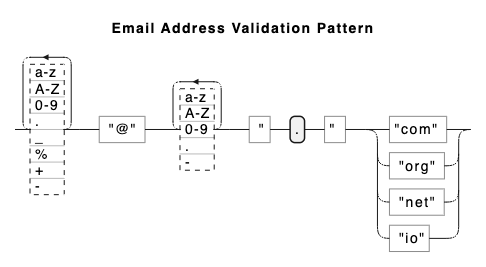
[a-zA-Z0-9._%+-]+), followed by a literal "@", domain characters, a literal dot, and an alternating selection for top-level domains.
Example 2: URL Endpoint Matcher Pattern
This blueprint models an HTTP/HTTPS web address regex featuring optional protocol prefixes and optional port numbers.
PlantUML
Edit PlantUML in VPasCode
@startregex
title Web URL Endpoint Matcher Pattern

"http" "s"? "://" [a-zA-Z0-9.-]+ (":" [0-9]+)? "/" [a-zA-Z0-9_/-]*
@endregex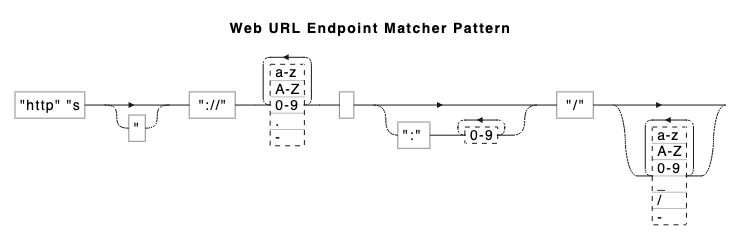
"s"? (supporting both HTTP and HTTPS), domain string matching, an optional port group (":" [0-9]+)?, and path routing matches.