


What is a Salt Wireframe?
PlantUML Salt is a lightweight text-based sub-engine used to design quick Graphical User Interface (GUI) wireframes, form layouts, dialog boxes, and application mockups. Rather than spending hours in visual design tools during early requirements phase, Salt lets product teams, analysts, and developers describe user interfaces using simple text syntax. With VPasCode, you can write concise Salt scripts to instantly generate clean, low-fidelity wireframes that render alongside your software documentation and technical specifications.Core Syntax Guide: Elements and Constructs
Building a GUI wireframe in VPasCode uses Salt markup enclosed inside@startsalt and @endsalt block boundaries (or inside standard @startuml blocks using the salt keyword).
1. Basic Form Controls and Input Widgets
Salt provides intuitive syntax markers for common interface components like text fields, buttons, checkboxes, and radio buttons:
PlantUML
Edit PlantUML in VPasCode
@startsalt
{
  Username: | "john_doe"
  Password: | "*******"
  [X] Remember Me
  ( ) Admin | (X) Standard User
  [  Cancel  ] | [  Login  ]
}
@endsalt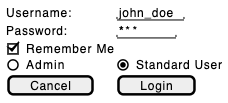
Widget Syntax Cheat Sheet:
"Text": Text input box or field.[ Button Label ]: Clickable action button.[X]/[ ]: Checked / Unchecked checkbox.(X)/( ): Selected / Unselected radio button.^Dropdown Option^: Dropdown select menu.
2. Grid Layout Containers
Salt arranges widgets using grid layouts specified by opening brace declarations ({). Use vertical pipes (|) to separate columns and horizontal lines (.. or ==) to separate rows:
PlantUML
Edit PlantUML in VPasCode
@startsalt
{
  "Search Query..." | ^Category^ | [ Search ]
  ..
  "Filter by Date" | "YYYY-MM-DD" | [ Apply ]
}
@endsalt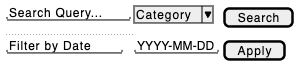
3. Data Tables and Grid Views
Display tabular data using the{# grid table marker with automatic column alignment:
PlantUML
Edit PlantUML in VPasCode
@startsalt
{#
  ID | User Name | Role | Status
  #101 | Alice Smith | Administrator | Active
  #102 | Bob Jones | Editor | Pending
  #103 | Charlie Brown | Viewer | Suspended
}
@endsalt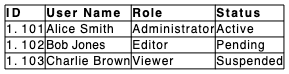
4. Navigation Tabs and Windows
Organize complex user interfaces into tabbed views using the{T marker or window boundaries using {+:
PlantUML
Edit PlantUML in VPasCode
@startsalt
{+
  User Settings Window
  {T
    + Profile | Security | Notifications
    Name: | "Mary"
    Email: | "[email protected]"
    [ Save Changes ]
  }
}
@endsalt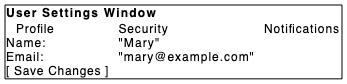
Best Practices for Clean Layouts
- Use Grid Pipes (
|) for Alignment: Keep form field labels and input boxes aligned by placing vertical pipes between grid columns. - Keep Wireframes Low-Fidelity: Focus on layout structure, required fields, and functional actions rather than pixel-perfect styling.
- Use Section Separators: Use horizontal grid lines (
..for thin lines,==for double lines) to logically group form controls into distinct fieldsets.
Real-World PlantUML Salt Wireframe Examples
Copy and paste these blueprints directly into your VPasCode editor panel to see them render in real time.Example 1: User Account Registration Dialog
This blueprint models a standard account sign-up form modal complete with text inputs, dropdown selectors, terms acceptance checkboxes, and action buttons.
PlantUML
Edit PlantUML in VPasCode
@startsalt
{+
  Create New Account
  ==
  Full Name:       | "Jane Doe"
  Email Address:   | "[email protected]"
  Account Type:    | ^Developer Account^
  Password:        | "************"
  Confirm Pass:    | "************"
  ..
  [X] I agree to the Terms of Service
  [ ] Subscribe to Product Updates
  --
  [   Cancel   ] | [   Register Now   ]
}
@endsalt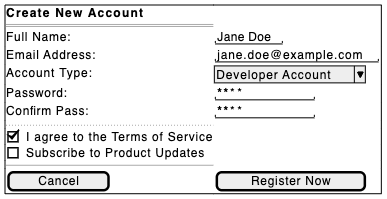
{+), this layout organizes labels and inputs into a balanced two-column grid using | separators, with horizontal divider rules (== and --) isolating form sections.
Example 2: SaaS Admin Dashboard & User Table View
This blueprint structures a web-based administration panel featuring a search header bar, tabbed navigation, and an interactive data grid.
PlantUML
Edit PlantUML in VPasCode
@startsalt
{+
  Admin Portal - Team Management
  --
  "Search users..." | ^All Roles^ | ^Active Status^ | [ Filter Results ]
  ==
  {T
    + Users | Roles & Permissions | Audit Logs
    {#
      User | Email | Role | Actions
      Alex M. | [email protected] | Admin | [ Edit ] | [ Delete ]
      Sarah T. | [email protected] | Developer | [ Edit ] | [ Delete ]
      David K. | [email protected] | Viewer | [ Edit ] | [ Delete ]
    }
  }
  ..
  Page 1 of 5 | [ < Prev ] | [ Next > ]
}
@endsalt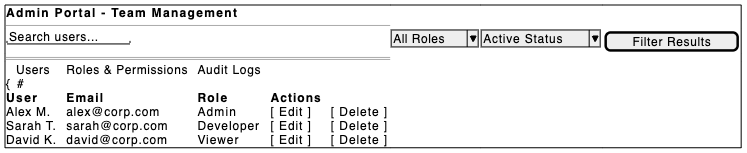
{T), a structured data table ({#), and pagination action buttons at the footer.