


treeView-beta) designed specifically for mapping file directories, folder hierarchies, and project file trees. With plain-text indentation, inline annotations, and custom highlight classes, you can document code repositories and system structures clearly.
1. Basic Directory Indentation
IntreeView-beta syntax, directory nesting is controlled using simple four-space or tab indentations. Append a trailing slash (/) to denote folders, and write file names directly beneath them.
Mermaid
Edit Mermaid in VPasCode
treeView-beta
    src/
        components/
            Header.tsx
            Footer.tsx
        App.tsx
        main.tsx
    package.json
    README.mdz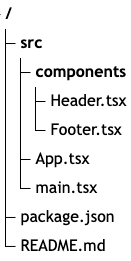
2. Adding File Annotations & Descriptions
You can add inline explanations next to any file or folder by placing double hashes (##) followed by your descriptive comment.
Mermaid
Edit Mermaid in VPasCode
treeView-beta
    src/
        App.tsx ## Main React entry point
        index.js ## Utility helpers and bootstrapping
        config.ts ## Runtime environmental settings
        styles.css ## Global CSS rules
    package.json ## Node project manifest and dependencies
    README.md ## Project setup documentation
    .gitignore ## Ignored repository paths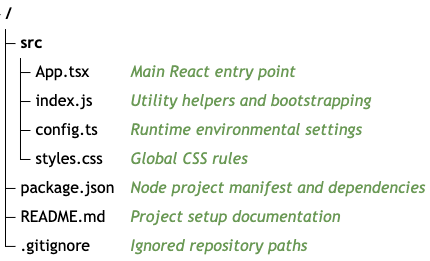
3. Highlighting Key Files (:::highlight)
To call attention to critical entry points, primary files, or modified scripts within a complex repository tree, append the :::highlight modifier before your comment definition.
| Feature | Syntax Format | Description |
|---|---|---|
| Folder Path | folder_name/ |
Marks a node as a collapsible directory container |
| Inline Comment | filename ## comment |
Adds a visual description next to the file name |
| Highlighted Node | filename :::highlight ## comment |
Applies prominent accent styling to key items |
Mermaid
Edit Mermaid in VPasCode
treeView-beta
    src/
        App.tsx :::highlight ## Main app entry
        index.js ## Utility helpers
        config.ts ## Runtime configuration
        styles.css
    package.json :::highlight ## Project manifest
    README.md
    .gitignore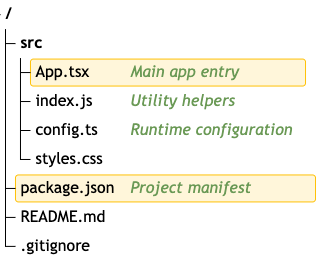
4. Complete Practical Example
The following example demonstrates a full production web application directory structure, featuring nested subfolders, detailed file annotations, and highlighted core entry files.
Mermaid
Edit Mermaid in VPasCode
treeView-beta
    public/
        favicon.ico
        robots.txt
    src/
        assets/
            logo.svg
        components/
            Navbar.tsx
            Sidebar.tsx
        services/
            api.ts :::highlight ## Core API service client
        App.tsx :::highlight ## Application root component
        main.tsx ## React DOM bootstrap file
        vite-env.d.ts
    .env.example ## Environment variables template
    package.json :::highlight ## Dependencies and build scripts
    tsconfig.json ## TypeScript compiler configuration
    README.md ## Project setup and guidelines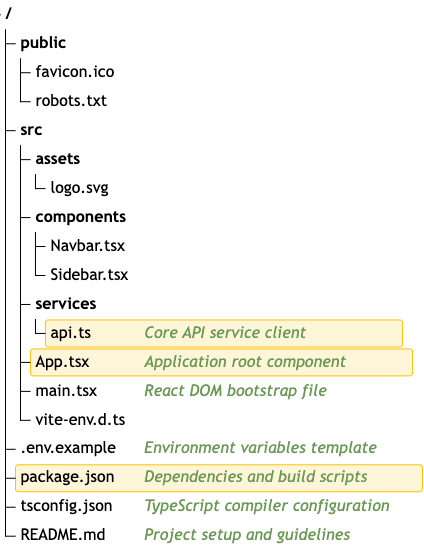
Conclusion
Using Mermaid’streeView-beta syntax gives you an intuitive, maintainable way to represent file system trees and repository layouts. By combining plain-text indentation with ## comments and :::highlight flags, you can generate clear, self-documenting code trees across your technical guides and README files.