


usecase-beta syntax in VPasCode, you can write clean, text-based use case models complete with custom actor types, modular boundaries, stereotypes, notes, and visual styling.
Core Syntax Guide: Elements and Constructs
To design standards-compliant use case diagrams using theusecase-beta engine, master these key syntax constructs:
- Declaring Actors: Use the
actorkeyword to declare participants. You can append properties such as@{ type: hollow }or@{ business: true }and assign stereotypes like<<External>>. - Defining System Boundaries: Enclose system functions inside container blocks using
systemBoundary BoundaryName["Boundary Title"]. - Mapping Use Cases: Declare individual functions using parentheses or brackets, and attach stereotypes (e.g.,
<<Core>>) or CSS class bindings (e.g.,:::critical). - Relationship Lines & Dependencies: Link actors to use cases with directional arrows (
-->). Express procedural dependencies using dotted include or extend notation (..> : include TargetCase). - Notes & Custom Styling: Add explanatory annotations using
note for CaseName "Text"and define custom visual styles withclassDefrules.
Real-World Mermaid.js Use Case Examples
Example 1: Patient Healthcare Portal (Actors & System Boundaries)
This functional blueprint models a digital medical portal. It shows how to group clinical functions within distinct system boundaries and apply special attributes to external actors.
Mermaid
Edit Mermaid in VPasCode
usecase-beta
direction LR
actor Patient("Hospital Patient")
actor Doctor("Attending Physician")@{ type: hollow }
actor Insurer("Insurance Provider")@{ business: true } <<External>>

systemBoundary PatientPortal["Patient Portal"]
  BookAppt("Book Appointment") <<Core>>
  ViewRecords("View Medical History")
  RefillRx("Request Prescription Refill")
end

systemBoundary ClaimsEngine["Insurance Services"]
  SubmitClaim("Submit Billing Claim")
end

Patient --> BookAppt
Patient --> ViewRecords
Patient --> RefillRx
Doctor --> ViewRecords
Insurer --> SubmitClaim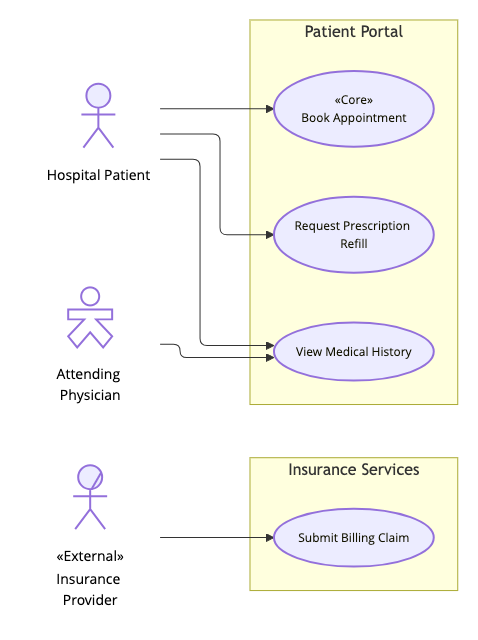
direction LR directive lays out the workflow horizontally. The systemBoundary containers isolate patient-facing features from external billing services, while actor attributes define physician and external partner roles clearly.
Example 2: Smart Banking Platform (Dependencies, Notes & Class Styling)
This advanced blueprint illustrates how to model mandatory functional inclusions, optional feature extensions, developer notes, and customized stroke styling for high-security banking operations.
Mermaid
Edit Mermaid in VPasCode
usecase-beta
direction LR
actor Member("Bank Member")
actor Security("Fraud System")@{ type: hollow }

systemBoundary CoreBanking["Core Banking Subsystem"]@{ type: package }:::banking
  Transfer("Transfer Funds") <<Core>>:::critical
  Auth("Authenticate Session")
  Notify("Send SMS Alert")
  LogAudit[Record Transaction Log]
end

Member --> Transfer
Security --> LogAudit

Transfer ..> : include Auth
Transfer ..> : extend Notify
note for Transfer "Requires two-factor authentication for transfers over $1,000"

classDef banking stroke:#0284c7,stroke-width:2px
classDef critical stroke:#dc2626,stroke-width:3px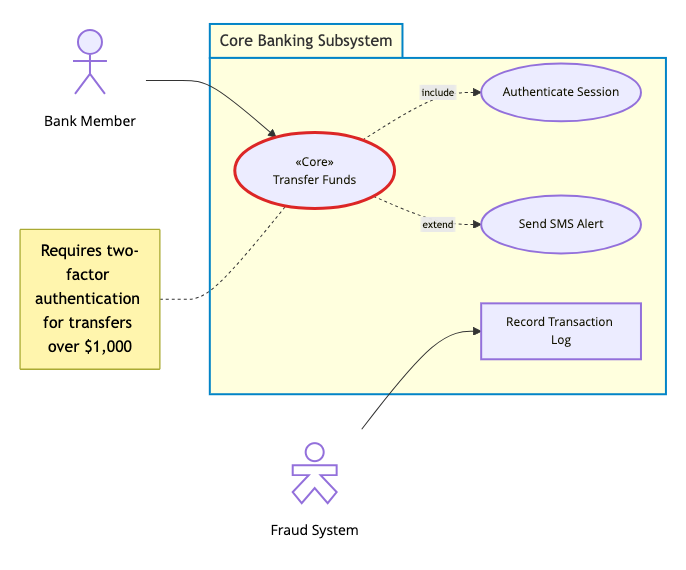
..> : include Auth enforces mandatory session verification before completing a transfer, while ..> : extend Notify shows optional SMS alerts. The note for directive adds operational logic documentation, and classDef rules dynamically apply distinct colored borders to critical banking operations.
Best Practices for Clean Use Case Architecture
- Establish Clear Boundaries: Always group internal use cases inside a labeled
systemBoundaryto maintain a sharp distinction between internal application features and external actors. - Document Critical Constraints: Attach inline annotations using
note forto document security requirements, business rules, or threshold logic right alongside your visual model. - Highlight Key Services with Styling: Use
classDefstyling to visually distinguish core capabilities, external APIs, or high-security subsystems across your architectural documentation.